
Target CPA is a Google Ads bid strategy that sets your bids automatically to get as many conversions as possible at the average cost per conversion you choose. CPA stands for cost per action, so you are telling Google what you are willing to pay, on average, for a lead, sale or sign-up. It matters because it lets you scale results while keeping your cost per customer under control.
Key Takeaways
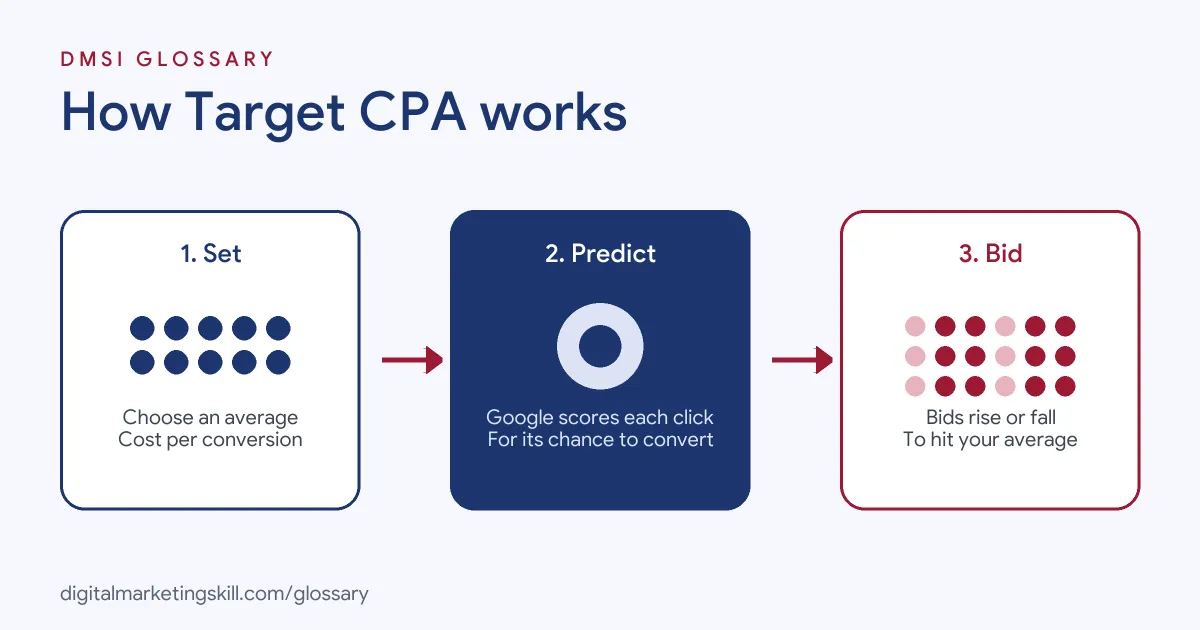
- You set an average cost per conversion. Google then sets a bid in each auction based on how likely that click is to convert.
- It is a Smart Bidding strategy, so it relies on conversion tracking. You must set that up first.
- Some conversions will cost more than your target and some less. Google aims to keep the average close to it.
- A target that is too low can cut the number of conversions you get.
- Google recommends a starting target based on your average cost per conversion over the last 30 days, where history exists.
What Is Target CPA?
With manual bidding, you decide how much to bid on each keyword. With this strategy, you give Google a goal instead. You say, “I want leads at about £40 each,” and the system adjusts bids in every auction to hit that average.
Google describes it as “an automated bid strategy that sets bids for you to get as many conversions or customer actions as possible.” You set “your desired average cost per conversion”, and Google Ads uses it “to set a bid based on the likelihood of the ad to convert.”
For example, an accountancy firm knows that one new client is worth far more than £100 in fees. So it sets a target CPA of £50 per enquiry. Google then bids higher on searches likely to become enquiries and lower on searches that rarely do.
How Target CPA Works
Target CPA is one of Google’s Smart Bidding strategies. These use Google AI to optimise for conversions “in every auction”, a feature Google calls auction-time bidding. In short, each bid is set at the moment someone searches.
The Signals Behind Each Bid
Google looks at signals about the person and their context at the time of the auction. These include device and location, plus other signals and combinations that only Smart Bidding can use. It then predicts how likely each click is to convert and bids to match.
Why Target CPA Is an Average, Not a Cap
The target is not a hard limit. Google says “Some conversions may cost more than your target and some may cost less”, but overall it will try to keep your cost per conversion equal to the target. Your actual CPA can also move because of things Google can’t control, such as changes to your website or ads, or more competition in the auction.
Target CPA and Your Budget
Before you start, Google recommends checking that you are comfortable spending up to twice your average daily budget on a given day, while staying within your monthly charging limit. That’s because automated bidding can spend more on days with more chances to convert.
Target CPA Examples
Here are three made-up examples of how advertisers use it:
- Lead generation: A home insulation firm sets a £35 target per quote request. After a month, it reviews which quotes became jobs and adjusts the target.
- Online course: A training provider sets a £20 target per free trial sign-up, based on how many trials turn into paying students.
- Several campaigns, one goal: A software firm runs three Search campaigns with the same value per lead. It groups them under one portfolio strategy with a shared target.
In each case, the target comes from what a conversion is worth to the business, not from a guess.
Target CPA vs Other Bid Strategies
Google offers several Smart Bidding options. Here is how they compare:
| Strategy | What you tell Google | Best for |
|---|---|---|
| Maximise conversions | Get as many conversions as possible within the budget | New campaigns building data, with no fixed cost goal |
| Target CPA | Get conversions at this average cost | Leads or sales that are worth about the same |
| Maximise conversion value | Get as much value as possible within the budget | Sales with different values, no fixed return goal |
| Target ROAS | Get this return on ad spend | Online shops where order values vary |
Google has also changed how it labels these. “Maximize conversions with a Target CPA” is now shown as “Target CPA”. The underlying bidding behaviour stays the same.
How to Set Up Target CPA
- Set up conversion tracking and check that it records the right actions.
- Work out what a conversion is worth. For instance, if one in four leads becomes a £400 sale, a lead is worth about £100 in revenue.
- Open your campaign settings in Google Ads and go to Bidding.
- Choose to focus on conversions, then set a target cost per action.
- If your campaign has history, review Google’s recommended target before you enter your own.
- Decide whether to use it on one campaign (standard) or across several (portfolio).
- Check your daily budget, since spend can reach twice the daily average on some days.
- Give it time to learn, then review results and adjust the target in small steps.
A Worked Example
Here is a made-up example. A campaign spent £3,000 last month and got 75 enquiries. That’s an actual cost per conversion of £40. Sales records show one in five enquiries becomes a client worth £500 in profit, so each enquiry is worth about £100. A target of £40 leaves plenty of room. Next, the team could test a slightly higher target to win more enquiries, as long as each one stays profitable.
Best Practices for Target CPA
- Start from real data. Google’s recommended target is “the average CPA from the last 30 days, adjusted for any conversion delays.”
- Don’t set it too low. Google warns that a target that’s too low “may cause you to forgo clicks that could result in conversions.”
- Keep one target per campaign. You can set targets for each ad group, but Google says this “isn’t recommended as it can restrict Smart Bidding.”
- Track the right action. Optimise for leads that matter, not button clicks.
- Change targets gradually. Big swings make results harder to read.
Common Mistakes With Target CPA
A common error is switching it on before conversion tracking works, so the system learns from bad data. Another is choosing a target far below the current average, which can choke delivery. Some advertisers panic when one day’s cost runs high, even though Google aims for an average over time. Others count every page view as a conversion, so the strategy chases cheap actions that don’t lead to sales. Finally, many forget to check which leads became customers, so they never know if their target is right.
Where You’ll Use Target CPA at Work
Bid strategy skills come up again and again in paid search roles. For example, recent remote job listings ask for:
- “Deep knowledge of bidding strategies (tCPA/tROAS, value-based bidding), campaign structures, Performance Max, keyword research and negative management” (PPC Specialist).
- Someone who will “know automated bidding well: tROAS, tCPA, value-based bidding, PMax” (Paid Ads Specialist, Google and Meta).
So if you want to work as a Google Ads Specialist or PPC Specialist, expect to choose targets, explain them to clients and report on cost per conversion.
Learn It in the Google Specialist Track
You can learn to set and manage bid strategies in the AI-Powered Google Specialist track. It covers Google Ads across Search, Display, Discovery, Gmail and YouTube, plus Google Analytics. Your portfolio project is a Google Ads campaign you launch and measure with conversion tracking. You also get unlimited 1-on-1 mentoring and a U.S. Project Internship from day one.
Next, read how Google Ads costs work and our guide to Google Ads optimisation. You may also like our glossary entries on Smart Bidding and customer acquisition cost.
Frequently Asked Questions
What does target CPA mean in Google Ads?
It is the average amount you want to pay for each conversion. Google sets bids automatically to get as many conversions as possible at that average.
Do you need conversion history to use it?
No. Google says advertisers can start with no conversion history. However, you do need conversion tracking set up first.
Will every conversion cost my target amount?
No. Some will cost more and some less. Google tries to keep the overall average equal to your target.
What happens if my target is too low?
You may miss clicks that could have converted. As a result, you could end up with fewer conversions in total.
Can I set a different target for each ad group?
You can, but Google doesn’t recommend it for most campaigns because it can restrict Smart Bidding.
Sources: Google Ads Help: About Target CPA bidding; Google Ads Help: About Smart Bidding; Google Ads Help: About conversion measurement; remote job listings on Himalayas.