
The Conversions API (CAPI) is a Meta tool that sends customer actions, such as purchases and sign-ups, straight from your server to Meta, rather than from the visitor’s browser. It works alongside the Meta Pixel to give Meta a more complete view of what your ads achieve. It matters because better data helps Meta measure results, lower your cost per result and show ads to the right people.
Key Takeaways
- CAPI sends events from your server, website platform, app or CRM directly to Meta.
- It can carry website, app, business messaging and offline events through one connection.
- Meta recommends running it alongside the Meta Pixel, which it calls a redundant setup.
- When both send the same event, matching event names and IDs let Meta deduplicate them.
- Event Match Quality, scored out of 10, shows how well your customer details match Meta accounts.
What Is the Conversions API?
Meta’s developer documentation says the API is “designed to create a connection between an advertiser’s marketing data” and the Meta systems that optimise ad targeting, lower cost per action and measure results. In plain terms, it is a direct line from your business systems to Meta.
The Meta Pixel runs in the visitor’s browser. However, browsers can block scripts, and people can leave before the page loads fully. The server-side route doesn’t depend on the browser. So if a shopper pays and your store’s server records the order, the server can report that purchase to Meta itself.
That’s why Meta pairs the two. In other words, the pixel and CAPI each send the same key events, and Meta keeps one copy of each.
How the Conversions API Works
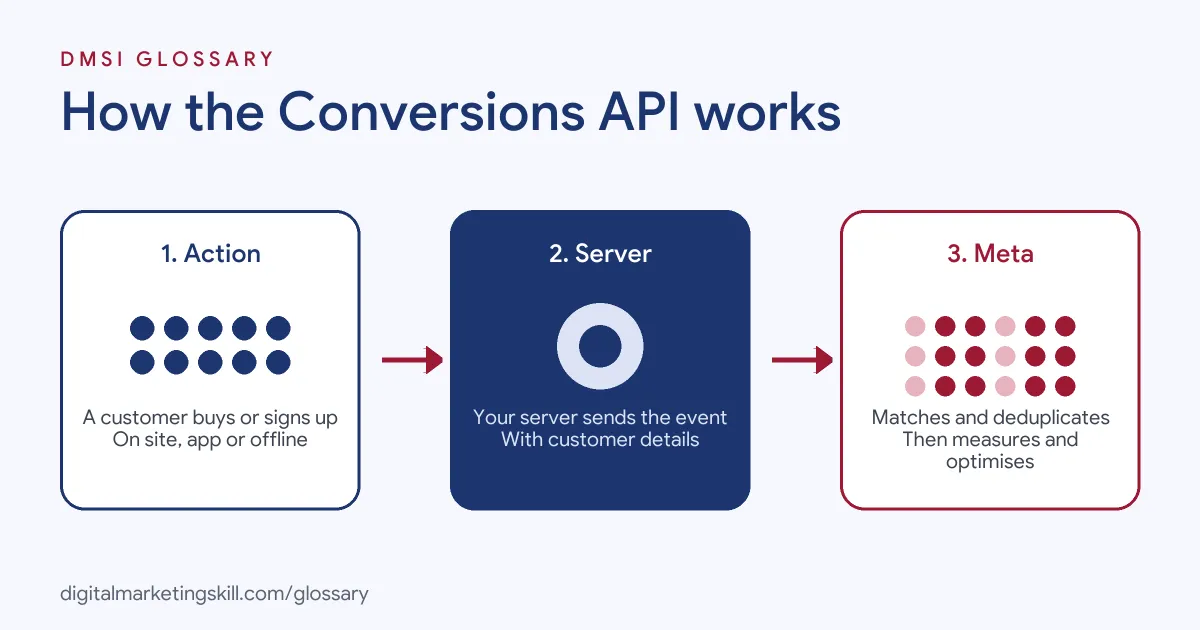
Every server event follows the same path. First, a customer takes an action, such as buying. Next, your server sends that event to Meta with details about the customer. Finally, Meta matches the event to a person, removes duplicates and uses it for reporting and optimisation.
Server Events
Your server sends events to Meta as POST requests. Meta treats these events like those from the pixel, so they feed measurement, reporting and optimisation. Meta also advises using the same Pixel ID for browser and server events, so everything lands in one place.
Customer Information
To link an event to a person, you send customer details with it. Meta’s best practices name examples such as email, phone, first and last name, and client IP address. It also mentions the browser ID and click ID cookies, known as fbp and fbc. These details must be hashed before sending. Meta’s Business SDK does that for you, but if you don’t use the SDK, you must add hashing yourself.
Deduplication
If the pixel and the server both report one purchase, Meta needs to know it is the same purchase. Meta’s guide says the pixel’s eventID must match the server’s event_id, and the event names must match too. When they do and arrive within 48 hours, Meta generally keeps the first one and discards the later copy.
There is a second method, too. You can send the same event name plus the fbp cookie or an external ID from both the browser and the server. However, Meta lists two limits. It generally works only when the browser event arrives first. Also, it doesn’t remove repeats that come from a single source. For that reason, matching event IDs is the more reliable choice. On the browser side, Meta’s pixel reference suggests passing the eventID as the fourth argument of the fbq('track') call.
Conversions API Examples
Here are three common ways businesses use it:
- Online store: A skincare shop sends Purchase events from both the pixel and its store platform. Each order has one event ID, so Meta counts it once even when the browser blocks the pixel.
- Lead generation: A training provider sends a Lead event from its server when a form is submitted. Later, it sends a second event from its CRM when that lead enrols, so Meta learns which leads become customers.
- Offline sales: A furniture retailer sends in-store sales to Meta. Meta’s documentation says offline events support offline measurement and offline custom audiences.
In each case, the server fills gaps that browser tracking can’t cover. Meta also notes that a single integration can carry several types of events at once. As a result, a business with a website, an app and a shop floor doesn’t need a separate connection for each one.
Meta Pixel vs Conversions API
The two tools do a similar job in different places:
| Feature | Meta Pixel | Conversions API |
|---|---|---|
| Where it runs | In the visitor’s browser | On your server, platform or CRM |
| What it sends | Website events | Website, app, messaging and offline events |
| Setup | Paste base code on every page | Partner integration or developer work |
| Main risk | Blocked or missed in the browser | Duplicates if event IDs don’t match |
Meta’s advice is to use both, not to pick one. So treat the server as the backup line that keeps your data complete.
How to Set Up the Conversions API
Meta offers several setup methods, which differ in effort, cost and features. Many ecommerce platforms offer a partner integration, while developers can build a direct one. The broad steps are the same:
- Choose your method. Check whether your website platform or CRM has a ready-made integration before you build one.
- Use your existing Pixel ID. Send browser and server events to the same ID.
- Get an access token. In Events Manager, open your pixel’s settings, find the Conversions API section and select Generate access token.
- Send your key events. Start with the ones that matter most, such as Purchase or Lead.
- Add customer details. Include hashed email or phone where you have consent, plus fbp and fbc.
- Match event IDs. Give each event the same ID in the pixel and the server call.
- Verify. Meta’s guide says to confirm that it received your events and that they are deduplicated and matched correctly.
Best Practices for the Conversions API
- Send events as they happen. Meta says sharing events in real time, or in batches close to it, can help campaigns get the best results.
- Raise your Event Match Quality. Send more customer details, such as email and phone, to improve the score out of 10.
- Keep cookie values fresh. Meta notes that fbp and fbc should be refreshed regularly if you send them.
- Mirror your pixel events. Use the same event names in both, so deduplication works.
- Respect consent. Only send personal data your privacy notice and consent settings allow.
Common Mistakes to Avoid
The same few errors cause most problems. First, teams send server events without event IDs, so Meta counts purchases twice. Second, they use different event names in the browser and on the server. Third, they send unhashed personal data when they build their own integration. Finally, they switch off the pixel once CAPI is live, which goes against Meta’s advice to run both.
Where You’ll Use the Conversions API at Work
Server-side tracking now appears in many paid social job listings. For example, remote roles ask for:
- “Conversions API, server-side tracking and first-party data” (Director of Performance Marketing).
- “Conversions API (CAPI) setup and configuration” (Paid Media Strategist).
- The ability to “Implement and troubleshoot Meta Pixel, Conversion API (CAPI), and conversion tracking” (Remote Meta Ads Specialist).
So as a Paid Social Specialist or Social Media Manager, you will often check event setup, read Event Match Quality and work with developers to fix gaps.
Learn It in the Social Media Track
You can learn how the Conversions API fits into campaign tracking in the AI-Powered Social Media Management and Advertising track. There, you plan, create and run a paid social campaign for a real brand, so clean tracking comes first. You also join a U.S. Project Internship from day one, with unlimited 1-on-1 mentoring.
Setting up the browser side first? Follow our Meta Pixel setup guide.
Frequently Asked Questions
What does the Conversions API do?
It sends customer actions, such as purchases and leads, from your server or CRM to Meta. Meta then uses them for reporting, optimisation and audiences.
Do I still need the Meta Pixel with CAPI?
Yes. Meta recommends running both together. The pixel tracks the browser side, while the server sends a backup copy of the same events.
What is deduplication?
It is how Meta avoids counting one action twice. When the pixel and server send the same event name and ID within 48 hours, Meta keeps one.
What is Event Match Quality?
It is a score out of 10 that shows how well your server events’ customer details can match a Meta account. More matching details usually raise it.
Do I need a developer to set up CAPI?
Not always. Many website platforms offer a partner integration. However, a direct setup usually needs a developer to send the server requests.
Sources: Meta for Developers: Conversions API; Meta for Developers: Best practices; Meta for Developers: Deduplication; Meta for Developers: Get started; remote job listings on Himalayas.