
Meta Ads Manager is Meta’s tool for creating, running and measuring ads on Facebook, Instagram and the rest of Meta’s apps. It is where you set your goal, choose your audience and budget, upload your ads and then track the results. It matters because almost every paid social job that involves Meta expects you to use it confidently.
Key Takeaways
- Ads Manager organises everything into three levels: campaign, ad set and ad.
- Each campaign has one objective. The six current goals are awareness, traffic, engagement, leads, app promotion and sales.
- Budget, schedule, audience and optimisation are set at the ad set level.
- Ads about jobs, housing, credit, financial products, gambling or politics must declare a special ad category.
- Reports show metrics such as impressions, reach, spend, cost per thousand impressions, clicks and results.
What Is Meta Ads Manager?
Think of Ads Manager as the control room for your Meta advertising. Instead of boosting single posts, you build full campaigns with a clear goal, a defined audience and several ads to test. You can also pause, edit, copy and compare campaigns from one place.
For example, a small candle brand wants more online sales before a busy season. In Ads Manager, it creates a sales campaign, targets people in the UK who like home decor and runs three short videos. After a week, it checks which video brings the cheapest purchases. Then it moves more budget to that one.
Behind the scenes, Ads Manager sits on the same system that Meta’s developer tools use. That is why Meta’s developer documentation is a reliable guide to how campaigns are structured, even if you never write a line of code.
How Meta Ads Manager Works
Every campaign has three layers. First, the campaign holds your objective. Next, the ad set holds your audience, budget and schedule. Finally, the ad holds the creative that people actually see. Each layer sits inside the one above it, so one campaign can contain several ad sets, and each ad set can contain several ads.
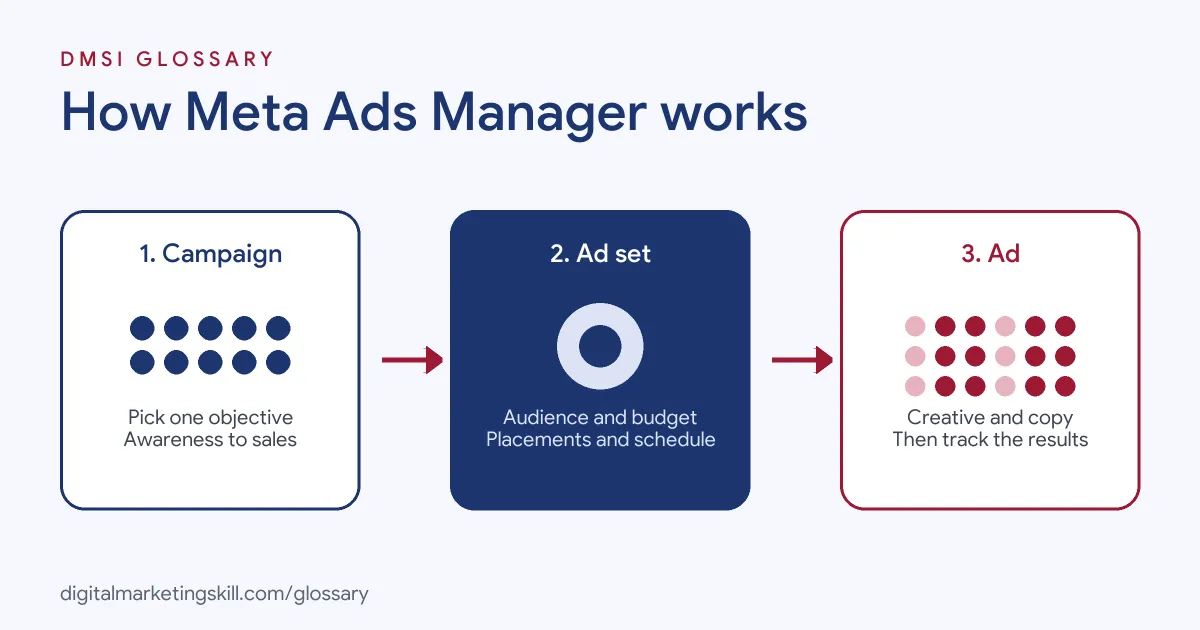
Campaign Level: Your Objective
Meta says a campaign “should represent a single objective.” So you start by choosing what you want. Meta’s current objectives are awareness, traffic, engagement, leads, app promotion and sales. Meta has retired its older list of objectives in favour of these six. Your choice tells the system what kind of result to look for.
Ad Set Level: Audience and Budget
According to Meta, “the budget, billing, and duration are set at the ad set level and apply to all ads in the set.” In addition, Meta says all ads in one ad set should share “the same targeting and optimization goal.” This is where you pick locations, ages and interests, or use your own audiences, such as website visitors or a lookalike audience.
Ad Level: Your Creative
The ad holds the image or video, the main text, the headline and the call-to-action button. Meta suggests creating several ads in each ad set to test different images, links, videos or text. As a result, the system can show the stronger versions more often.
Special Ad Categories
Some ads need extra care. Meta requires every campaign to state whether it falls into a special ad category. The categories cover employment, housing, credit, financial products and services, online gambling and gaming, and social issues, elections or politics. If none apply, you simply choose none.
Meta Ads Manager Examples
Here are three common ways teams use it:
- Online shop: A clothing brand runs a sales campaign with two ad sets. One targets past visitors, and one targets new people. It then compares the cost per purchase for each.
- Training provider: A course provider runs a leads campaign aimed at people interested in career change. As a result, it collects sign-ups for a free webinar.
- Restaurant: A new restaurant runs an awareness campaign for people within a few miles. Later, it switches to a traffic campaign that sends people to its booking page.
In each case, the objective came first. Everything else, from the audience to the creative, followed from that choice. That order matters, because the objective shapes who Meta shows your ads to. If you pick the wrong goal, even great creative can reach the wrong people. So spend a minute on this choice before you touch any other setting.
Campaign vs Ad Set vs Ad
Here is what you control at each level:
| Level | What you set | Example choice |
|---|---|---|
| Campaign | Objective and special ad category | Sales, with no special category |
| Ad set | Audience, budget, schedule, placements and optimisation goal | Women aged 25 to 45 in London, a set daily budget, running for two weeks |
| Ad | Image or video, text, headline, link and button | A 15-second product video with a “Shop now” button |
In short, the campaign says why, the ad set says who and how much, and the ad says what people see.
How to Set Up a Campaign in Meta Ads Manager
The steps below follow the standard flow. Menu names can change slightly, but the logic stays the same:
- Open Ads Manager and select Create.
- Choose one objective, such as leads or sales.
- Declare a special ad category if your ad relates to jobs, housing, credit, finance, gambling or politics.
- At the ad set level, set your budget, schedule, audience and placements.
- At the ad level, add your image or video, text, headline, link and button.
- Check your tracking is in place, so purchases or leads show up in your reports.
- Publish the campaign, then wait for enough data before you make big changes.
Once it runs, use the reporting columns to compare ads. Then pause the weakest and give more budget to the best.
Best Practices
A few habits help you get better results:
- Pick the objective that matches your real goal. If you want sales, choose sales, not traffic.
- Name things clearly. A simple naming pattern for campaigns, ad sets and ads makes reports far easier to read.
- Test creative, not just audiences. For instance, try different first seconds of a video.
- Read the right metrics. Meta’s reports include impressions, reach, spend, cost per thousand impressions, clicks and cost per result.
- Know your attribution window. Meta’s reporting tools can count results in the days after a click or a view, so check which window you are using.
Common Mistakes to Avoid
Beginners often repeat the same errors. First, they boost posts instead of building proper campaigns. Second, they choose traffic when they really want sales. Third, they launch without tracking, so results never appear. Finally, they edit campaigns every day, which makes it hard to tell what worked. Each of these is easy to fix with a clear plan before you start.
Where You’ll Use Meta Ads Manager at Work
Ads Manager skills are named directly in many job listings. For example, current remote roles include lines such as:
- “3+ years of hands-on Meta Ads Manager work for ecommerce or DTC brands” (Growth Marketing Manager, Paid Media).
- “Upload a Meta Ads Manager screenshot of campaigns you ran (spend, purchases, ROAS visible)” (Growth Marketing Manager, Paid Media).
- “Expert-level command of Meta Ads Manager and deep familiarity with TikTok Ads” (Senior Director, Paid Social).
Notice the second line. Employers want proof, not just a claim. A screenshot of real results says more than any line on a CV. So if you aim to become a Paid Social Specialist or Social Media Manager, you will need campaigns of your own to show.
Learn It in the Social Media Track
You can learn to plan and run Meta campaigns in the AI-Powered Social Media Management and Advertising track. There, you plan, create and run a paid social campaign for a real brand, so you finish with results you can show an employer. You also work on a U.S. Project Internship from day one, with unlimited 1-on-1 mentoring.
Want a hands-on walkthrough? Read our guide to Facebook Ads Manager, or see the bigger picture in our glossary entry on paid social.
Frequently Asked Questions
What is Meta Ads Manager used for?
It is used to create, run and measure ads on Facebook, Instagram and Meta’s other apps, all from one dashboard.
Is Meta Ads Manager the same as Facebook Ads Manager?
Yes. Many people still call it Facebook Ads Manager, but it is the same tool, and it runs ads across Facebook, Instagram and Meta’s other apps.
What are the three levels in Ads Manager?
Campaign, ad set and ad. The campaign holds the objective, the ad set holds audience and budget, and the ad holds the creative.
How many objectives does Meta offer?
Six: awareness, traffic, engagement, leads, app promotion and sales.
Do I need a big budget to use Ads Manager?
No. You set your own budget at the ad set level, so you can start small and grow once you see results.
Sources: Meta for Developers: Ad campaign structure; Meta for Developers: Ad campaign reference; Meta for Developers: Insights API; remote job listings on Himalayas.