
Keyword match types are settings in Google Ads that control how closely a person’s search must relate to your keyword before your ad can show. Google Ads offers three of them: broad match, phrase match and exact match. They matter because the match type you pick decides whether your budget reaches the right searches or leaks into ones that will never buy.
Key Takeaways
- There are three keyword match types in Google Ads: broad, phrase and exact.
- You set them with symbols. No symbol means broad, quotation marks mean phrase, and square brackets mean exact.
- Broad match is the default for every keyword you add.
- Broader types reach more searches. Narrower types give you more control.
- Negative keywords use their own match types and work differently from positive keywords.
What Are Keyword Match Types?
When you run search ads, you don’t bid on exact searches. Instead, you bid on keywords, and Google decides which real searches each keyword should cover. The match type is how you tell Google how loose or strict to be.
It helps to know the difference between two words that sound alike. Google Ads Help describes a search term as “a word or set of words that a person enters when searching on Google.” A keyword, by contrast, is what you add to an ad group to target those searches. Match types connect the two.
So imagine you sell tennis shoes. With a loose setting, your ad might show for many related searches. With a strict setting, it shows only for searches that mean the same thing as your keyword. Neither is right for every campaign. Instead, the best choice depends on your budget, your data and how well your bidding can judge each search.
How Keyword Match Types Work
Each match type sets a different boundary around your keyword. Google Ads Help explains that broader match types cover all the searches of narrower types, plus more. So exact sits inside phrase, and phrase sits inside broad.
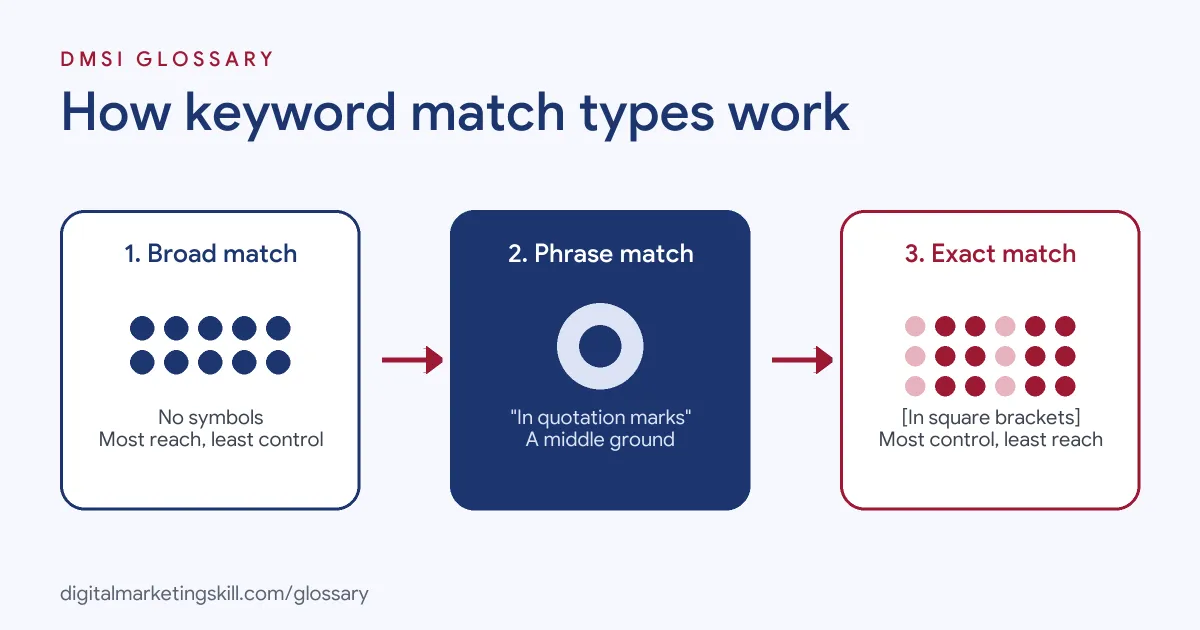
Broad Match
You enter a broad match keyword with no symbols, for example: tennis shoes. Google says ads “can show for related searches”, including some that don’t contain the keyword’s literal meaning. It may also look at recent search activity, your landing page and other keywords in the ad group. Google calls broad match “the default match type that all your keywords are assigned because it is the most comprehensive.”
Phrase Match
You put a phrase match keyword in quotation marks, such as “tennis shoes”. Ads can then show for searches that include the meaning of your keyword, and those searches can be more specific. As a result, phrase match reaches more searches than exact match but fewer than broad match.
Exact Match
You put an exact match keyword in square brackets, for example [red shoe]. Ads can show for searches that have the same meaning or intent as the keyword. Google says this gives you the most control over who sees your ad, although it reaches the fewest searches of the three.
Keyword Match Types Examples
Here are three made-up examples that show how the choice plays out:
- Example: local plumber with a small budget. They use exact match for [emergency plumber] and [boiler repair]. This keeps spend on the searches most likely to turn into calls.
- Example: online shoe store. They run phrase match on “trail running shoes” to catch longer searches, such as people adding a size or a colour, while still staying on topic.
- Example: software company with lots of conversion data. They test broad match with Smart Bidding to find relevant searches they never thought to add as keywords.
In each case, the match type follows the goal. Tight budgets lean narrow, while well-tracked accounts can afford to go broader.
Broad vs Phrase vs Exact Match
This table sums up the three keyword match types side by side:
| Match type | How you write it | Ads can show for | Trade-off |
|---|---|---|---|
| Broad match | tennis shoes | Related searches, including ones without your words | Most reach, least control |
| Phrase match | “tennis shoes” | Searches that include your keyword’s meaning | A middle ground |
| Exact match | [tennis shoes] | Searches with the same meaning or intent | Most control, least reach |
Also note that Google does not recommend adding near-duplicates such as ‘red car’ and ‘car red’. According to Google Ads Help, only one of them will match both searches, so adding both changes nothing.
Negative Keyword Match Types
Negative keywords stop your ad from showing for certain searches. They have their own match types, and they behave differently. Using the negative keyword running shoes, Google gives these rules:
- Negative broad match: Your ad won’t show if the search contains all the terms in any order, such as “blue running shoes”. However, it can still show for “running shoe”.
- Negative phrase match: Your ad won’t show if the search contains the terms in the same order. So “shoes running” can still trigger it.
- Negative exact match: Your ad won’t show only for the exact terms with no extra words. Therefore “blue running shoes” is still allowed.
One detail catches many beginners. Google states that “negative keywords won’t match to close variants or other expansions.” In other words, you may need to add plural or singular forms yourself.
How to Choose Keyword Match Types
Use these steps when you build or review a Search campaign:
- Start from your keyword research. Group keywords by theme, so each ad group has one clear topic. Our guide to keyword research explains how.
- Check your conversion tracking. Broad match relies on good data. Google says “it’s critical to use Smart Bidding with broad match.”
- Pick a match type per keyword. Use exact or phrase for your most valuable, proven terms. Consider broad when you have tracking and Smart Bidding in place.
- Add negative keywords. List terms you never want, for example “free” or “jobs” if you sell a paid product.
- Launch, then read the search terms report. It shows the real searches that triggered your ads, and its match type column shows how closely each one related to your keyword.
- Refine every week. Add good search terms as keywords and bad ones as negatives.
Best Practices
- Keep ad groups tightly themed. Google may use other keywords in the ad group as a signal for broad match, so mixed themes blur the picture.
- Judge by conversions, not clicks. A match type that brings cheap clicks but no leads is not working.
- Review the search terms report often. For instance, Google’s own example is adding “wine” as a negative when “wine glasses” triggers ads for a seller of spectacles.
- Change one thing at a time. If you switch match types and bids together, you won’t know which change made the difference.
Common Mistakes
Many beginners leave every keyword on broad match by accident, because it is the default, and then run it with manual bids and no conversion tracking. Others use only exact match and wonder why their ads barely show. Some add negatives but forget that negatives ignore close variants. Finally, many never open the search terms report, so wasted spend goes unnoticed for weeks.
Where You’ll Use Keyword Match Types at Work
Match types are a basic skill in paid search roles. For example, real remote job listings ask for:
- A “solid grasp of campaign structure, keyword analysis, match types, negatives and bid strategies” (Google Ads Specialist, PPC and Search).
- The ability to “own SEM account architecture, bid strategy, keywords, and match types, connecting each lever back to client business goals” (Senior Media Strategist).
So if you want to work as a Google Ads Specialist or PPC Specialist, expect interviewers to ask how you choose a match type, and how you check that it works.
Learn It in the Google Specialist Track
You can practise keyword match types in the AI-Powered Google Specialist track. There, you launch and measure a Google Ads campaign with conversion tracking, so you see how each match type affects real results. You also join a U.S. Project Internship from day one, with unlimited 1-on-1 mentoring.
For a deeper look at the settings, read our guide to Google Ads match types.
Frequently Asked Questions
What are the three keyword match types?
Google Ads has broad match, phrase match and exact match. Broad reaches the most searches, while exact gives you the most control.
Which match type is the default in Google Ads?
Broad match. Any keyword you add without quotation marks or square brackets uses broad match.
Which match type is best for beginners?
Many beginners start with phrase or exact match on a small set of proven keywords. They then test broad match once conversion tracking and Smart Bidding are in place.
What is a close variant?
It is a search that differs slightly from your keyword but means the same thing, such as a singular or plural form. Positive keywords can match close variants, but negative keywords cannot.
Do match types still matter with automated bidding?
Yes. They still set how wide your net is. Google recommends Smart Bidding with all match types and says it is critical with broad match.
Sources: Google Ads Help: About keyword matching options; Google Ads Help: About negative keywords; Google Ads Help: About the search terms report; remote job listings on Himalayas.