
Shopping ads are Google ads that show a product’s photo, title, price and shop name directly in the results, built from product data you upload to Google Merchant Center. Instead of choosing keywords, you give Google details about what you sell, and it matches your products to relevant searches. They matter for online shops because shoppers see the product and price before they click, so the visits you pay for tend to be more ready to buy.
Key Takeaways
- These ads run on product data from Merchant Center, not on keywords.
- Each ad shows an image, title, price and shop name, so shoppers can compare before clicking.
- You manage them in Google Ads through Shopping or Performance Max campaigns.
- Your product feed must include required details, such as ID, title, link, image, price and availability.
- The price in your feed should match the price on your landing page and at checkout.
What Are Shopping Ads?
Google Ads Help explains that, “Unlike text-only ads, Shopping ads display a product photo, title, price, shop name and more.” As a result, people get a clear view of the product before they click.
Picture someone searching for “running shoes size 8.” In the results, they see a row of shoe images, each with a price and a shop name. They pick the pair they like and land on that product page, ready to buy. That row is made up of these product-based ads.
So they suit any business that sells physical products online. In other words, if you run an online shop, they are often one of the first Google campaigns to consider.
How Shopping Ads Work
The system has three parts. First, you upload product data to Google Merchant Center. Next, you link Merchant Center to Google Ads and create a campaign. Then Google matches people’s searches to your products and shows the most relevant ones.
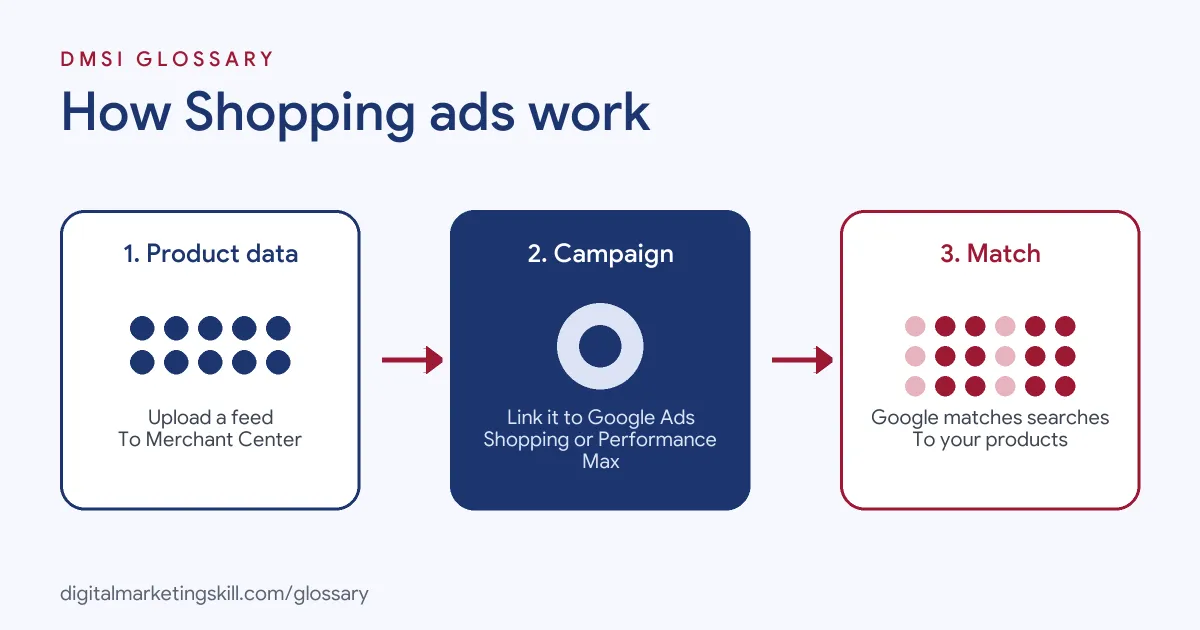
Product Data, Not Keywords
This is the biggest difference from search ads. Google says these ads use “your existing Merchant Center product data (not keywords) to decide how and where to show your ads.” So the quality of your feed does the job that keyword lists do in a Search campaign. Google may also use content from your landing page, images and feed, as well as other signals, to enrich your ads.
The Product Feed
Your feed is a structured list of everything you sell. Google’s product data specification marks some attributes as required. If you leave one out, Google says your product “won’t be able to serve in ads and free listings.” Required details include:
- ID: a unique identifier for each product. Google suggests using the SKU where possible.
- Title and description: what the product is.
- Link: the product’s landing page on your verified domain.
- Image link: the URL of the main product image.
- Price: it should match your landing page, structured data and checkout.
- Availability: for example, in stock, out of stock, pre-order or backorder.
Shopping or Performance Max
You run these ads through either a Shopping campaign or a Performance Max campaign. A standard Shopping campaign gives you more direct control. For instance, you can browse your product inventory in Google Ads and create product groups for the items you want to bid on. The big difference is where the ads can appear. According to Google, a Shopping campaign covers selected channels, such as the Shopping tab, Google Search and Google Images. By contrast, Performance Max can reach most Google Ads channels, including YouTube, Gmail, the Display Network and Maps.
Shopping Ads Examples
Here are three common ways shops use them:
- Fashion store: A clothing brand uploads every size and colour as separate variants. As a result, a search for “red midi dress” can show the exact red dress.
- Home goods shop: A homeware seller splits best-sellers into their own product group. Then it bids more on them, since they convert best.
- Electronics retailer: A shop fixes wrong product identifiers, such as GTINs, in its feed. As a result, products that had errors start showing again.
In each case, better product data led to better matches. That is why feed work is such a big part of the job.
Shopping Ads vs Search Ads
Both appear on Google, but they work in different ways:
| Feature | Shopping ads | Search ads |
|---|---|---|
| What triggers them | Product data in Merchant Center | Keywords you choose |
| What they show | Product image, title, price and shop name | Text headlines and descriptions |
| Best for | Selling physical products online | Services, leads and products alike |
| Main skill | Feed quality and product grouping | Keyword research and ad copy |
Google also notes that more than one of your Shopping ads can appear for a search. In addition, a Shopping ad and a text ad can show at the same time, which widens your presence on the page.
How to Set Up Shopping Ads
The steps below follow Google’s standard flow. Menu names can change, but the logic stays the same.
- Set up Merchant Center. Add your products with all required attributes.
- Link Merchant Center to Google Ads. You can’t change the linked account after you create the campaign.
- Create a new campaign. Choose an objective, such as Sales, then select Shopping as the campaign type.
- Choose Shopping or Performance Max. Pick the campaign that fits your need for control or automation.
- Set locations, bidding and budget. For example, choose automated bidding and a daily budget.
- Create product groups. Group items so you can bid more on the ones that sell best.
Before you launch, check the diagnostics in Merchant Center. Otherwise, products with errors may never show.
Best Practices for Shopping Ads
- Write clear product titles. Google allows up to 150 characters and asks you to match the title on your landing page. Avoid promotional text such as “free delivery” or all capital letters.
- Keep prices and stock accurate. Above all, make sure the feed matches your website.
- Use strong images. Google lists low-quality images as a common problem that can stop products showing.
- Add correct product identifiers. Google lists wrong GTINs and product categories among the issues that can stop ads showing.
- Review search terms and results. Then move budget towards the products that earn sales.
Common Mistakes to Avoid
The most common mistake is a messy feed. Google lists frequent problems such as incorrect product categories or GTINs, missing variant details like colour or size, low-quality images and conflicting data between the feed and the website. Another mistake is treating every product the same. If you bid equally on best-sellers and slow sellers, budget gets wasted. Finally, some shops forget that prices change. So update your feed whenever your prices or stock levels move.
Where You’ll Use Shopping Ads at Work
Ecommerce and paid search roles rely heavily on this skill. For example, recent remote job listings ask candidates to:
- “Lead the strategy, setup, and optimisation of Google Shopping and paid media campaigns for international retail brands” (Google Shopping Manager).
- “Manage and maintain product data feeds in Google Merchant Center” (Google Shopping Manager).
- Bring “Strong experience with Performance Max, Shopping campaigns, Merchant Center feeds and Smart Bidding strategies” (Google Ads Specialist).
So if you want to work as a Google Ads Specialist or PPC Specialist, you need to understand feeds as well as bids. Employers will also want to see a campaign you have set up and measured.
Learn It in the Google Specialist Track
You can learn to plan and run campaigns like these in the AI-Powered Google Specialist track. It covers AI fundamentals, Google Ads across Search, Display, Discovery, Gmail and YouTube, and Google Analytics. For your portfolio, you launch and measure a Google Ads campaign with conversion tracking. You also join a U.S. Project Internship from day one, with unlimited 1-on-1 mentoring.
To go further, read our guide to Google Ads for small business, which covers Search, Shopping and Display. You can also read our glossary entries on Google Ads and search ads.
Frequently Asked Questions
What are Shopping ads in simple terms?
They are Google ads that show a product’s picture, price and shop name in the results. Google creates them from the product data you upload to Merchant Center.
Do Shopping ads use keywords?
No. They use your Merchant Center product data to decide when and where to show. So clear titles and descriptions matter a lot.
Do I need Merchant Center?
Yes. Your products must be in a Merchant Center account that is linked to Google Ads before you can run a Shopping campaign.
What is the difference between Shopping and Performance Max?
Both can show product ads. A Shopping campaign shows ads on selected channels, such as the Shopping tab and Google Search. Performance Max can reach most Google Ads channels, including YouTube and Gmail.
Why are my products not showing?
Often the feed has errors, such as missing required details, wrong identifiers or a price that doesn’t match your website. Check the diagnostics in Merchant Center first.
Sources: Google Ads Help: About Shopping ads; Merchant Center Help: Product data specification; Google Ads Help: Create a Shopping campaign; remote job listings on Himalayas.