
A context window is the amount of text, measured in tokens, that an AI language model can look at in one go when it writes a reply, including the reply itself. Anything outside that window, such as an early part of a very long chat, the model simply can’t see. It matters because the size and contents of the window shape how much material you can give the model and how well it uses it.
Key Takeaways
- Anthropic describes the context window as a model’s “working memory”, which is separate from the data it learned from in training.
- Everything counts towards it: your instructions, the whole chat so far, pasted files and images, and the model’s own answer.
- Providers measure sizes in tokens. Anthropic and Google both document models with windows of up to about one million tokens.
- Bigger isn’t automatically better. Anthropic notes that accuracy and recall can drop as the token count grows.
- Research shows models often handle information at the start or end of a long input better than information in the middle.
What Is a Context Window?
Imagine a desk. A model can only work with the papers on that desk right now. Its general knowledge from training is like a library down the hall. The desk, however, is small and holds only what you’ve handed over in this conversation.
Anthropic’s documentation defines the context window as “all the text a language model can reference when generating a response, including the response itself.” Google uses a similar picture. It says, “An analogy for the context window is short term memory.”
So when you paste a brief, a report or a long email thread into a chat, you are filling that desk. When the desk is full, something has to go, or the model can’t take any more.
How a Context Window Works
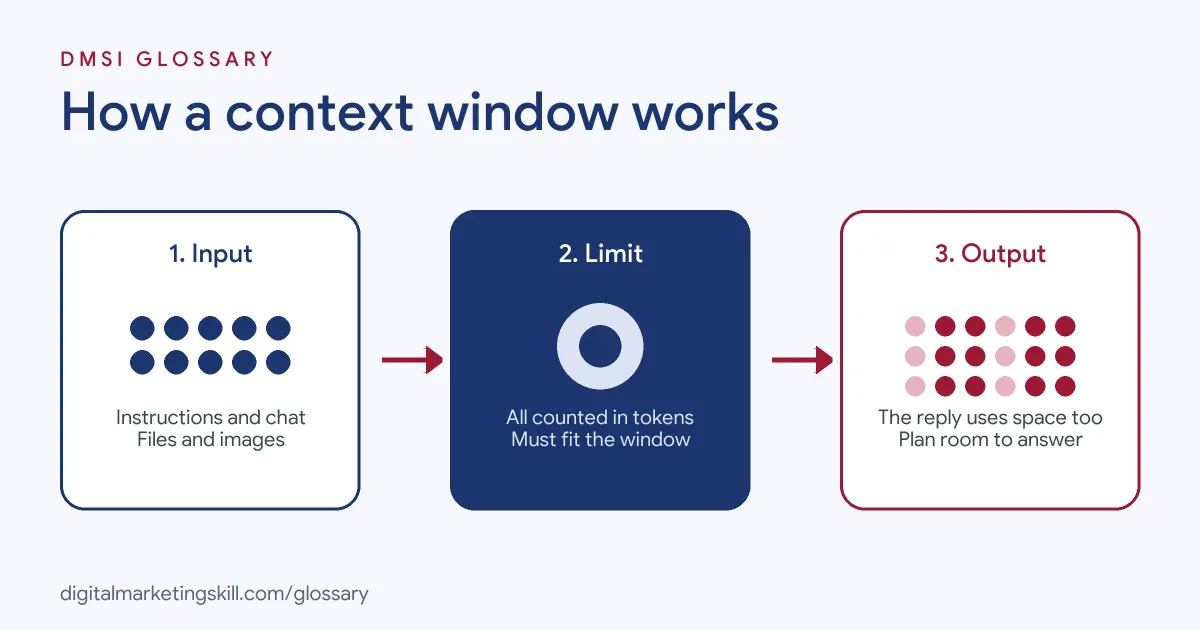
Each request follows the same pattern. First, the tool gathers everything the model needs to see, from instructions to earlier messages. Next, it converts all of it into tokens and checks the total against the limit. Finally, the model writes its reply, and those new tokens also use up space.
What Fills the Context Window
According to Anthropic, everything in a request counts. That includes the system prompt, every message, tool results, images, documents and tool definitions. The model’s output counts too, including any extended thinking. In a chat, each new message and reply adds to the pile, and earlier turns stay in place.
How Big Is It?
Sizes vary by model. Anthropic lists windows of up to one million tokens for some models and 200,000 for others. Google’s Gemini documentation also lists windows of more than a million tokens. To give a sense of scale, Google says one million tokens could hold about 50,000 lines of code or around eight average-length English novels.
A Worked Example
Here is a rough way to plan the space, using OpenAI’s rule that 100 tokens is about 75 English words. Say you share a 3,000-word brand guide and a 15,000-word customer survey. The guide comes to about 4,000 tokens, and the survey to about 20,000. Add a 300-word prompt, which is about 400 tokens, and leave room for a 1,500-word reply of roughly 2,000 tokens. The total is about 26,400 tokens. That fits easily in a large window, but it would overflow a small one.
When the Window Is Full
If the input alone is too big, Anthropic’s API rejects the request with a “prompt is too long” error. Some tools manage this for you. For example, Anthropic describes “compaction”, which summarises earlier parts of a long conversation so it can carry on. Other chat tools handle a full window in their own ways, which is one reason a model can seem to forget the start of a long chat.
Context Window Examples
- Summarising a report: You paste a long research report and ask for five key points. The report, your request and the summary all need to fit in one window.
- A long brainstorming chat: After hours of back-and-forth about campaign ideas, the model starts repeating itself or missing early decisions. The early part of the chat may have dropped out, or the model may be struggling to use it.
- Brand guidelines in every request: A team includes a full style guide with every prompt. It works, but it uses up space and tokens each time, so the team trims the guide to the rules the model actually needs.
Context Window vs Training Data vs Output Limit
| Term | What it means | Can you change it? |
|---|---|---|
| Context window | The model’s working space for this request, including your input and its reply | You control what goes in, but not the maximum size |
| Training data | The large body of text the model learned from before you used it | No, it is fixed for that model |
| Output limit | The most tokens the model will write in one reply | Often yes, through a setting such as maximum tokens |
In short, training gives the model general knowledge, while the window holds the specific material for your task.
How to Use the Context Window Well
- Decide what the model truly needs. Google advises passing tokens only when the model needs them.
- Put the question last. For long inputs, Google recommends placing your question after all the other context.
- Keep key facts near the start or end. The “Lost in the Middle” study found performance “significantly degrades” when models must use information from the middle of long contexts.
- Start fresh for new tasks. A new chat clears old material that could confuse the model.
- Summarise long threads. Ask the model for a short recap, then carry that recap into a new chat.
- Check sizes before you send. Anthropic suggests using its token counting tool to estimate usage first.
Best Practices
- Curate, don’t dump. Anthropic says curating what’s in context is “just as important as how much space is available”.
- Ask for one thing at a time. Google notes that pulling out many separate pieces of information from a long input is less reliable.
- Expect slower replies with huge inputs. Google says longer inputs generally add delay before the first word appears.
- Reuse stable material wisely. Google says context caching can cut costs when you ask repeated questions about the same information.
Common Mistakes to Avoid
A common mistake is to treat a large window as permission to paste everything. Another is to bury the key instruction in the middle of a long prompt. Many users also keep one chat going for days and wonder why quality drops. Finally, some forget that the reply needs space too, so a full window can leave the model too little room to answer.
Where You’ll Use Context Windows at Work
The term appears in AI and automation job listings. For example, remote listings ask for people who can:
- Design, test and optimise “prompt architectures, context windows, and retrieval-augmented generation (RAG) pipelines to maximize LLM performance and accuracy” (Context Engineer).
- Understand “tools, prompts, context windows, and why an agent succeeds or fails on a real task” (MCP and Memory Intern).
- Show “Familiarity with modern LLM application concepts, including prompt engineering, context windows, token usage” (Senior Forward Deployed AI Engineer).
Marketers use the same idea every day. When you feed AI a brand guide, a product sheet and past campaign results, knowing what fits and where to place it leads to better drafts.
Learn It in Any DMSI Track
AI fundamentals, including strategy and planning, are part of every track. The Full Stack (all four tracks) option covers all ten courses, so you practise using AI for social media, Google Ads, email and SEO. You also work on a U.S. Project Internship from day one, with unlimited 1-on-1 mentoring.
To go further, read how to write your own ChatGPT prompts. You can also learn what a token is and why AI hallucination happens.
Frequently Asked Questions
What is a context window in simple terms?
It is how much text an AI model can see at once, including your instructions, the chat so far and its own reply.
Is a bigger context window always better?
Not always. A bigger window lets you share more material, but Anthropic notes that accuracy and recall can drop as the token count grows.
Why does an AI chat seem to forget earlier messages?
Long chats can fill the window. Some tools then summarise earlier parts, as Anthropic’s compaction does. In addition, models may use material buried in a very long input less well.
How many words fit in a context window?
It depends on the model. As a rough guide, OpenAI says 100 tokens is about 75 English words, so you can convert a token limit into an approximate word count.
Does the context window include the model’s answer?
Yes. Anthropic’s definition includes the response itself, so the reply has to fit in the space that’s left.
Sources: Claude Docs: Context windows; Google AI for Developers: Long context; Liu et al.: Lost in the Middle: How Language Models Use Long Contexts; OpenAI Help Center: What are tokens; remote job listings on Himalayas.