
An Advantage+ campaign is a Meta ads campaign for sales, app installs or leads in which Meta’s AI automatically manages the budget, the audience and the ad placements for you. Instead of setting each targeting option by hand, you give Meta your goal, your creative and a few limits, and its system decides who sees which ad and where. It matters because this is now the default way to set up these campaigns in Meta Ads Manager, so anyone who runs Facebook or Instagram ads needs to understand how it works.
Key Takeaways
- Advantage+ applies to three campaign objectives: Sales, App promotion and Leads.
- A campaign counts as Advantage+ when three settings stay on: Advantage+ campaign budget, Advantage+ audience and Advantage+ placements.
- If you switch off any of the three, the campaign is no longer Advantage+.
- Advantage+ sales campaigns are the updated version of the older Advantage+ shopping campaigns.
- You still control the creative, the location, the minimum age and the people you exclude.
What Is an Advantage+ Campaign?
Meta uses the name “Advantage+” for its AI-driven ad tools. An Advantage+ campaign brings several of them together in one setup. According to Jon Loomer’s summary of Meta’s documentation, when you create a new campaign with the Sales, App or Leads objective, “Advantage+ will be on by default.”
Think of it as handing the steering wheel to Meta while you choose the destination. You decide what you want, such as purchases, and what the ads look like. Meta then decides how to split the budget, which people to reach and whether to show your ad in Feeds, Stories, Reels or elsewhere.
This setup replaced older, separate flows. Meta’s developer documentation says the unified approach replaces “the existing separate workflows” for manual and Advantage+ shopping campaigns. So if you learned on older tutorials, the screens you see in Meta Ads Manager may look different.
How an Advantage+ Campaign Works
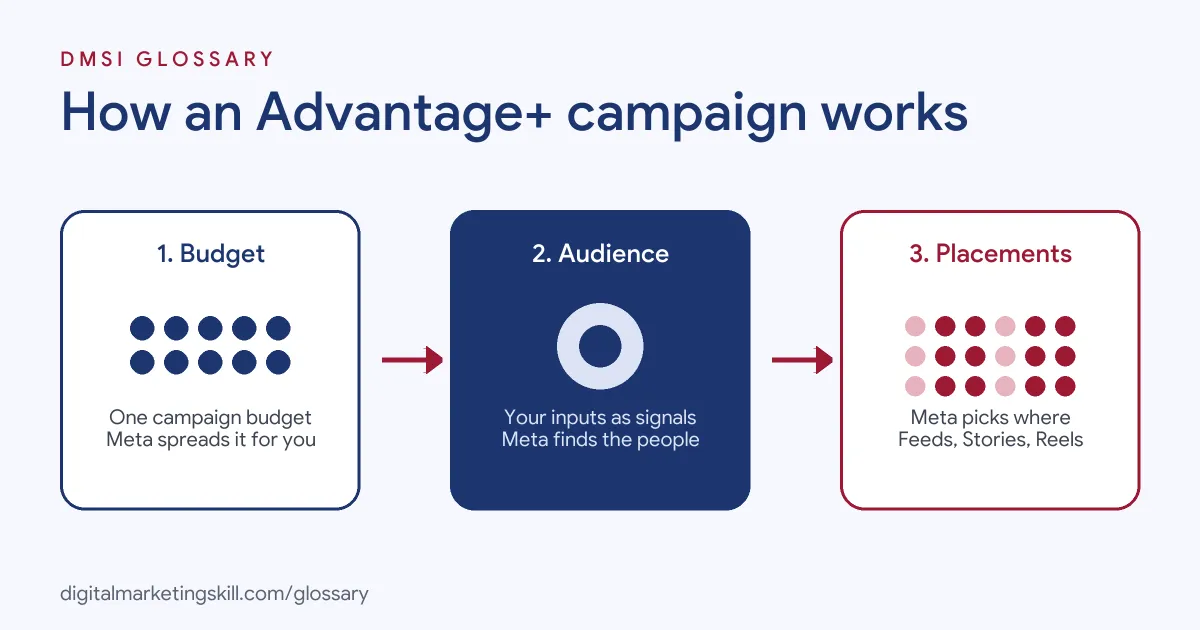
Meta’s developer documentation describes three “automation levers”. When all three stay on, the campaign has an Advantage+ status. When any one is off, the status reads as disabled.
Advantage+ Campaign Budget
You set one budget at the campaign level, rather than a separate budget for each ad set. Meta then moves money between ad sets towards the ones it expects to perform best. In a Sales campaign with more than one ad set, Loomer notes that this budget setting must stay on to keep Advantage+ status.
Advantage+ Audience
Instead of hard targeting, you give Meta suggestions. Loomer lists the firm controls as location, minimum age, excluded custom audiences and languages. Other inputs, such as maximum age, gender, custom audiences and detailed targeting, act only as suggestions. In other words, Meta may show ads to people outside them if it predicts better results. That’s also why a lookalike audience works as a signal here, not a strict limit.
Advantage+ Placements
Placements decide where your ads appear across Facebook, Instagram, Messenger and Meta’s Audience Network. Meta’s documentation says Advantage+ placements is “the default setting.” As a result, you don’t need to do anything to turn it on. However, if you remove placements by hand, you lose the Advantage+ status.
Advantage+ Campaign Examples
Here are three made-up examples of how businesses might use this setup:
- Example: skincare brand. It runs an Advantage+ campaign with the Sales objective, a product catalogue and ten creatives. It sets only the country and minimum age, then lets Meta find buyers.
- Example: language-learning app. It uses the App objective to drive installs. It excludes current users with a custom audience, so it doesn’t pay to reach them again.
- Example: training provider. It runs an Advantage+ campaign with the Leads objective and an instant form. It checks lead quality each week, because cheap leads are not always good leads.
In each case, the advertiser keeps control of the offer, the creative and the exclusions. Meta handles the rest.
Advantage+ Campaign vs Manual Setup
Here is how the two approaches compare on the main settings:
| Setting | Advantage+ campaign | Manual setup (a lever turned off) |
|---|---|---|
| Budget | One campaign budget that Meta spreads across ad sets | You can set budgets per ad set |
| Audience | Meta uses your inputs as suggestions | Age, gender and inclusions can act as hard limits |
| Placements | Meta chooses placements | You pick placements yourself |
| Best for | Accounts with good tracking and plenty of creative | Tests that need tight control, or strict audience rules |
Neither option is always better. Many advertisers run both, then compare cost per result over the same period.
How to Set Up an Advantage+ Campaign
Menus can change over time, but the basic flow in Ads Manager looks like this:
- Check your tracking first. Make sure your Meta Pixel or Conversions API sends purchases or leads correctly. AdNabu notes that Meta recommends connecting first-party data in this way.
- Create a campaign. Choose the Sales, App promotion or Leads objective. Advantage+ switches on automatically.
- Set the budget and goal. Pick a daily or lifetime budget and the result you want, such as purchases.
- Add audience controls. Set the location, minimum age and any audiences to exclude, such as existing customers.
- Add audience suggestions if you have them. For instance, use a custom audience of past buyers as a signal.
- Upload several creatives. Mix images, videos and formats, so the system has options to test.
- Review the Advantage+ status. If you change a setting, check that you have not switched a lever off by mistake.
- Publish and wait for data. Avoid big changes in the first days while the system learns.
How to Measure Results
Because Meta makes so many choices for you, measurement is where your skill shows. First, pick one main result, such as purchases or qualified leads, and track its cost. Next, compare that cost with a manual campaign or with your own past results over the same period. Then check the breakdowns by placement, age and creative, so you can see where Meta spent the money. Finally, look beyond the platform. For leads, ask the sales team which ones turned into customers.
Also be careful with big changes. Meta’s developer documentation notes that moving an older campaign into the new setup resets it to the learning stage. So plan changes, rather than making them in the middle of a busy sales week.
Best Practices
- Feed it strong creative. The system can only choose between the ads you give it, so variety matters.
- Get tracking right. The AI optimises towards the events you send, so wrong events mean wrong results.
- Use exclusions carefully. Exclusions are one of the few hard controls you keep.
- Judge on business results. Look at sales, cost per acquisition and lead quality, not just clicks.
- Know the limits. Loomer reports that Sales campaigns allow up to 50 ads per ad set.
Common Mistakes
Many beginners turn on hard age or gender limits without realising this removes Advantage+ status. Others launch with one or two ads, which gives the system little to work with. Some forget to exclude existing customers, then pay to reach people who already bought. Finally, many judge results after a day or two, before the campaign has enough data to settle.
Where You’ll Use Advantage+ at Work
Meta’s automated campaigns now appear in paid social job descriptions. For example, one real remote listing asks candidates to manage “Meta campaigns, including dynamic product ads (DPAs) and Advantage+ Shopping Campaigns (ASC+)” (Paid Media Strategist). The shopping version it names is the older form of what Meta now calls Advantage+ sales campaigns.
So if you want to work as a Paid Social Specialist or Social Media Manager, employers will expect you to set up, test and explain these campaigns. They will also expect you to know when a manual setup makes more sense.
Learn It in the Social Media Track
You can practise running an Advantage+ campaign in the AI-Powered Social Media Management and Advertising track. There, you plan, create and run a paid social campaign for a real brand, so you finish with results you can show an employer. You also join a U.S. Project Internship from day one, with unlimited 1-on-1 mentoring.
For more on campaign planning, see our guide to Facebook ad campaigns.
Frequently Asked Questions
What is an Advantage+ campaign in simple terms?
It is a Meta ads campaign where Meta’s AI manages the budget, audience and placements together. You supply the goal, the creative and a few limits.
Which objectives can use Advantage+?
Sales, App promotion and Leads. When you create a campaign with one of these objectives, Advantage+ is on by default.
Can I still target a specific audience?
Partly. You can set location, minimum age, languages and exclusions as firm rules. Other inputs, such as gender or interests, act only as suggestions.
What happened to Advantage+ shopping campaigns?
Meta’s developer documentation describes Advantage+ sales campaigns as the updated version of Advantage+ shopping campaigns.
How do I know if my campaign is still Advantage+?
Ads Manager shows whether Advantage+ is on. If you switch off the campaign budget, audience or placements setting, the campaign loses that status.
Sources: Meta for Developers: Advantage+ campaign experience for sales, app and leads; Jon Loomer: Advantage+ Sales, App and Leads campaigns; AdNabu: Meta Advantage+ sales campaigns; remote job listings on Himalayas.