
Dynamic ads are ads that build themselves from a product feed, so each person sees the items most relevant to them. Instead of designing one ad per product, you upload a catalogue and a template, and the platform fills in the image, name and price. They matter because one campaign can promote thousands of products to the right people at once.
Key Takeaways
- Dynamic ads need two things: a product feed and tracking on your website or app.
- On Meta, the feature is now called Advantage+ catalog ads. Many job listings still call them dynamic product ads, or DPAs.
- Meta requires the ViewContent, AddToCart and Purchase events, and the product IDs must match your catalogue.
- Google Ads offers dynamic remarketing, which shows past visitors the products they viewed.
- Results depend on feed quality. Missing images, wrong prices or broken IDs lead to weak ads.
What Are Dynamic Ads?
A normal ad is fixed. Everyone who sees it gets the same picture and words. Dynamic ads work differently. The platform swaps in products from your catalogue for each viewer, based on what they browsed or are likely to want.
Meta’s developer documentation describes the format simply: with Advantage+ catalog ads, “you can promote relevant items from an entire catalog across any device.” Its pixel guide adds that the ads are “dynamically created by populating an ad template with product information found in a data feed.”
Google has its own version. Its help centre says dynamic remarketing “allows you to show previous visitors ads that contain products and services they viewed on your site and your app.” So the idea is the same on both platforms, even though the names differ.
Most brands use them for retargeting ads, where they remind shoppers of items they left behind. However, they can also reach new people who are likely to want your products.
How Dynamic Ads Work
Every campaign has three moving parts. First, a product feed lists what you sell. Next, tracking on your site records what each visitor views, adds to basket or buys. Finally, the platform matches people to products and fills your template with the right items.
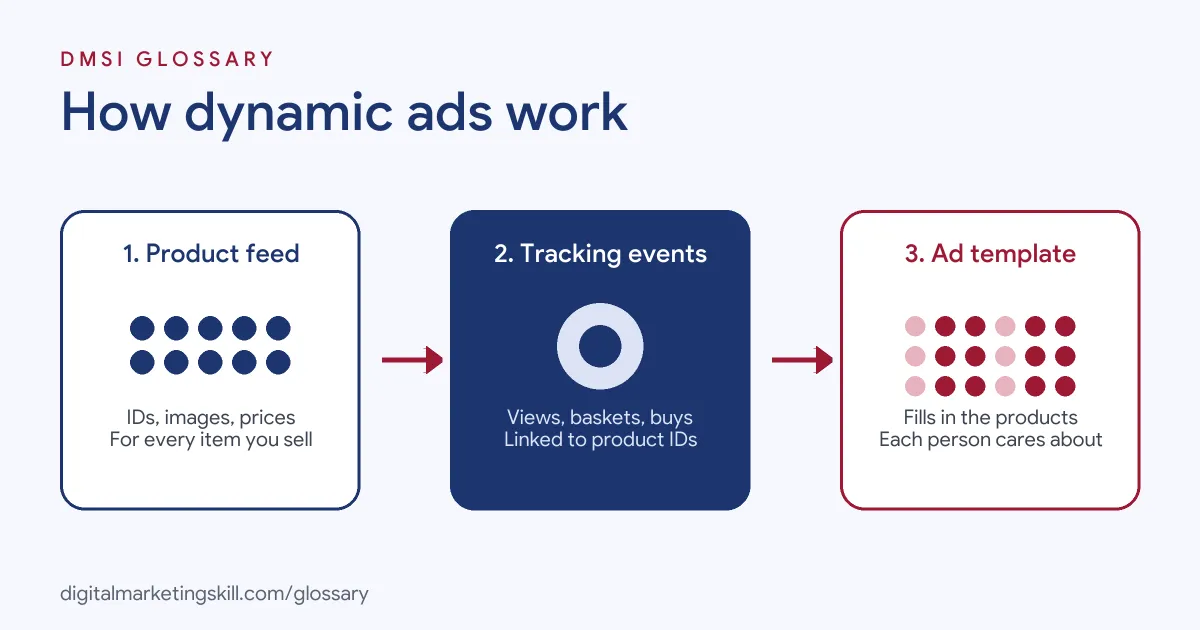
The Product Feed
The feed is a file or data source with one row per product. Google says your feed should include details “such as a unique ID, price, and image.” Retailers upload it to Google Merchant Center, while other businesses add it to the Business data section of Google Ads.
Meta stores the feed in a catalogue. Its FAQ recommends “under 5 million products per feed through the file upload method,” with a limit of 100 MB per feed file. It also advises updating the catalogue often, so stock and prices stay accurate.
Tracking Events
Next, the platform needs to know what each person did. On Meta, you track actions with the Meta Pixel or App Events. Meta’s documentation says that before you can set up catalogue ads, “you must first be tracking” three standard events: ViewContent, AddToCart and Purchase.
Each event must say which product it refers to. Meta is clear here: “IDs must match the IDs found in your product catalog.” If the IDs don’t match, the system can’t link a visit to a product. On Google, you add the dynamic remarketing tag with custom parameters to all pages of your site.
The Ad Template
Lastly, you build a template rather than a finished ad. You choose the layout, headline and call to action. Then the platform drops in the product image, name and price for each viewer. On Google, these ads use responsive display ads, which resize to fit each placement.
Dynamic Ads Examples
Here are three made-up examples of how businesses use the format:
- Example 1, fashion retailer: A shopper views a pair of trainers but doesn’t buy. The next day, she sees an Instagram ad with those trainers and two similar pairs.
- Example 2, travel site: A visitor searches for hotels in Lisbon. Later, a carousel ad shows the hotels he looked at, with their current prices.
- Example 3, homeware store: A customer buys a sofa. The store then shows her cushions and throws from the same range, instead of more sofas.
In each case, one template does the work of hundreds of separate ads.
Dynamic Ads on Meta vs Google
Both platforms follow the same logic, but the set-up differs:
| Feature | Meta Advantage+ catalog ads | Google dynamic remarketing |
|---|---|---|
| Product source | A catalogue in Commerce Manager | Merchant Center for retailers; Business data feed for others |
| Tracking | Meta Pixel or App Events with ViewContent, AddToCart and Purchase | Dynamic remarketing tag with custom parameters on all pages |
| Ad format | Ad template filled from the catalogue | Responsive display ads |
| Key rule | Event product IDs must match catalogue IDs | Feed items need a unique ID, price and image |
Other networks, including TikTok and Reddit, also sell catalogue-based ads, so the skill carries across platforms.
How to Set Up Dynamic Ads on Meta
- Create a catalogue. In Commerce Manager, add your products by file upload, a scheduled feed or a partner platform such as Shopify.
- Check the feed. Make sure every product has a unique ID, a clear image, a price and a working link.
- Install tracking. Add the Meta Pixel, or App Events for apps. Then send ViewContent, AddToCart and Purchase with matching product IDs.
- Connect the pixel to the catalogue. This lets Meta link each event to a product.
- Create a sales campaign. Choose the catalogue option, then pick the product set you want to promote.
- Choose your audience. For example, retarget people who viewed or added to basket in the past few weeks, and exclude recent buyers.
- Design the template. Pick a format, such as carousel, and write a headline that works for any product.
- Launch and monitor. Finally, watch for feed errors and judge results on sales, not just clicks.
How to Measure Results
Because these campaigns aim at sales, judge them on purchases, cost per purchase and return on investment. Also, check results by product set, since a few items often drive most sales. Then look at the feed itself. A product that never shows may have a missing image or a rejected listing.
Best Practices for Dynamic Ads
- Treat the feed as your creative. Good product photos and clear titles make better ads.
- Use product sets. Group items by category, margin or season, so you can spend more on what matters.
- Exclude recent buyers. Otherwise, people keep seeing the item they already bought.
- Add a frame or offer carefully. A simple overlay with free delivery can help, but don’t hide the product.
- Refresh the catalogue often. Out-of-stock items and old prices frustrate shoppers.
Common Mistakes to Avoid
The biggest mistake is a mismatch between pixel IDs and catalogue IDs. When that happens, the ads can’t show the right products. Another is a messy feed with missing images or wrong prices. Some advertisers also forget to exclude buyers, so they pay to reach people who’ve already converted. Lastly, many judge the campaign too quickly, before the system has enough event data.
Where You’ll Use Dynamic Ads at Work
Catalogue ads are a core skill for ecommerce advertisers. For example, remote job listings mention:
- Managing “Meta campaigns, including dynamic product ads (DPAs) and Advantage+ Shopping Campaigns (ASC+)” (Paid Media Strategist).
- The ability to “Build and maintain catalog and dynamic product advertising across collections” (Senior Paid Social Manager).
- The view that “Dynamic Product Ads (DPA) is one of our fastest-growing verticals” (Senior Product Manager, Ads, Shopping Catalogs).
So if you aim to be a Paid Social Specialist or Social Media Manager for an online brand, expect to manage feeds, pixels and catalogue campaigns.
Learn It in the Social Media Track
You can learn to run catalogue campaigns in the AI-Powered Social Media Management and Advertising track. It covers social media advertising and analytics, and you plan, create and run a paid social campaign for a real brand. You also get unlimited 1-on-1 mentoring and a U.S. Project Internship from day one.
To go further, read our guide to Facebook retargeting.
Frequently Asked Questions
What are dynamic ads in simple terms?
They are ads that pull products from your catalogue and show each person the items most relevant to them, using one template.
What are dynamic ads called on Facebook now?
Meta calls them Advantage+ catalog ads. Many advertisers and job listings still use the older name, dynamic product ads.
Which events do Meta’s catalogue ads need?
Meta requires ViewContent, AddToCart and Purchase. Each event must include product IDs that match your catalogue.
Are dynamic ads only for retargeting?
No. Retargeting is the most common use, but you can also show catalogue products to new audiences.
Does Google Ads have dynamic ads?
Yes. Google’s version is dynamic remarketing, which uses a product feed, a site tag and responsive display ads.
Sources: Meta for Developers: Advantage+ catalog ads; Meta for Developers: Meta Pixel for Advantage+ catalog ads; Meta for Developers: Advantage+ catalog ads FAQ; Google Ads Help: About dynamic remarketing; remote job listings on Himalayas.