
A marketing dashboard is a single screen that shows your most important marketing numbers in one place, such as leads, sales, cost per result and traffic. It pulls data from tools like Google Analytics, ad platforms and your CRM, then displays it as charts and tables that update for you. It matters because it lets a team spot problems and wins quickly, without digging through five different reports.
Key Takeaways
- A good dashboard answers a few clear questions. It does not try to show every metric.
- Most dashboards connect to data sources, so the numbers refresh without manual copying.
- Google’s Data Studio, previously called Looker Studio, is a no-cost tool for building shareable dashboards.
- CRM tools such as HubSpot include dashboards with filters and sharing controls, and their limits depend on your plan.
- The best dashboards pair numbers with a short note on why they moved and what to do next.
What Is a Marketing Dashboard?
Think of a car dashboard. It doesn’t show every detail of the engine. Instead, it shows speed, fuel and warning lights, so the driver can act fast. A marketing dashboard does the same for a campaign or a whole team.
Each dashboard is built from small blocks, often called widgets, charts or reports. One block might show leads this month. Another might compare cost per lead by channel. Together, they give a quick picture of performance.
Dashboards usually track key performance indicators, or KPIs. These are the few numbers that show whether you are hitting your goals. For example, an online shop may focus on revenue and customer acquisition cost, while a B2B firm may watch qualified leads.
Different people also need different views. A company owner usually wants a short summary of leads, sales and spend. In contrast, a channel specialist needs detail by campaign, ad and keyword. So many teams build one top-level marketing dashboard for leaders and separate, deeper ones for each channel.
How a Marketing Dashboard Works
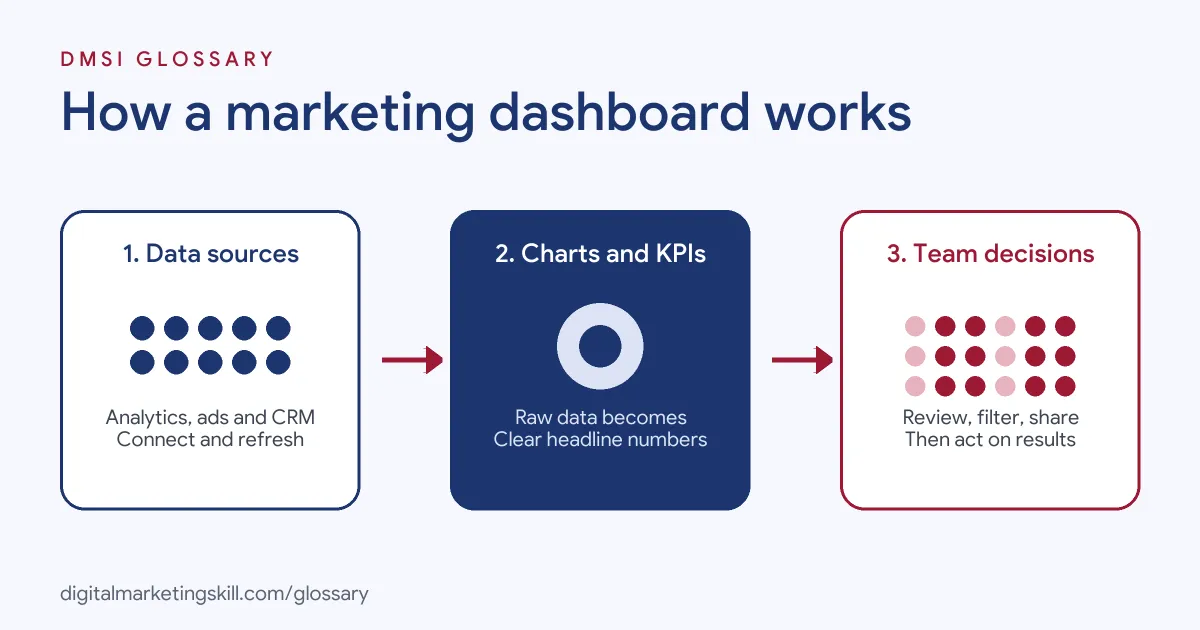
Every dashboard follows the same basic flow. First, it connects to your data sources. Next, it turns the raw data into charts and summary numbers. Finally, people view, filter and share it to make decisions.
Data Sources
The data comes from the tools you already use. Common sources include Google Analytics, Google Ads, Meta Ads Manager, your email platform, your CRM and simple spreadsheets. Most dashboard tools connect to these through built-in connectors, so data refreshes on a schedule.
Charts and Metrics
Next, you choose how to show each number. A line chart works well for trends over time. A bar chart compares channels or campaigns. Meanwhile, a single large number suits one headline KPI, such as total leads this month.
Built-in reports often work in a similar way. Google Analytics, for instance, offers a Reports snapshot and overview reports, which Google says “summarize data about a topic.” You can also customise its report collections to include any report.
Sharing and Access
Finally, the dashboard has to reach the right people. In HubSpot, you can keep a dashboard private, share it with everyone in the account, or, on Enterprise plans, share it with specific users and teams. You can also email a dashboard to a team member. Google’s Data Studio lets you share insights “with your team or with the world.”
Marketing Dashboard Examples
Here are three made-up examples for different teams:
- Example 1, paid ads dashboard: A media buyer tracks spend, cost per purchase and return on ad spend for Google and Meta side by side. As a result, she can move budget to the stronger channel each week.
- Example 2, lead generation dashboard: A training school shows form fills, cost per lead and the share of leads that become enquiries. It also breaks each number down by source.
- Example 3, content dashboard: A blog team tracks organic sessions, top landing pages and newsletter sign-ups. Then it reviews the dashboard every Monday to plan new posts.
Marketing Dashboard Tools Compared
Here is how three common options differ:
| Tool | Best for | Key detail |
|---|---|---|
| Google Data Studio (previously Looker Studio) | Custom dashboards that combine many sources | A no-cost tool for dashboards and reports you can share |
| HubSpot dashboards | Teams that run marketing and sales in a CRM | Filters, sharing controls and a report limit set by your subscription |
| Google Analytics reports | Quick website and app overviews | Reports snapshot and overview reports, with customisable report collections |
Many teams use more than one. For example, they keep website detail in Google Analytics and build a cross-channel view in Data Studio.
How to Build a Marketing Dashboard
- Start with questions. Write down the three to five questions the dashboard must answer, such as “Are we on track for leads this month?”
- Pick the KPIs. Choose one or two numbers for each question. Then agree on how each is defined.
- Connect your data. Link the tools that hold each number, such as Google Analytics, your ad accounts and your CRM.
- Lay it out by priority. Put headline KPIs at the top, trends in the middle and detail at the bottom.
- Add filters. Let viewers change the date range, channel or campaign. HubSpot, for instance, lets you filter all reports on a dashboard or filter single reports.
- Share and schedule a review. Give the right people access, then set a regular meeting to discuss it.
- Write a short summary. Finally, add a note each week on what changed and what you recommend.
A Simple Layout to Copy
Here is a made-up layout for a small business. The top row shows four headline numbers: sessions, leads, sales and cost per lead. Below that, a line chart shows leads by week. Next comes a table of channels with spend, leads and cost per lead. At the bottom, a short text box explains the main change and the next action.
Best Practices for a Marketing Dashboard
- Keep it short. If everything is on the dashboard, nothing stands out.
- Compare against something. Show a target, last month or last year, so each number has context.
- Use the same definitions everywhere. Agree what counts as a lead before you start.
- Check the data regularly. Broken tracking can make a dashboard look fine when it isn’t.
- Explain, don’t just report. One job listing for a Marketing Director asks for someone who “Explains why results moved and brings a recommendation, not just the numbers.”
Common Mistakes to Avoid
The most common mistake is cramming in too many charts. Another is tracking vanity metrics, such as likes, instead of results tied to goals. Some teams also mix data with different date ranges or time zones, which makes numbers disagree. Others build a dashboard once and never look at it again. Lastly, many forget to note tracking changes, so later drops look like real problems.
Where You’ll Use a Marketing Dashboard at Work
Dashboards come up in almost every senior or data-focused marketing role. For example, remote job listings mention:
- The need to “Build reporting dashboards to track customer acquisition cost (CAC), conversion rates, and other key SaaS growth metrics” (SaaS Growth Marketing Specialist).
- A role that “Owns the performance dashboard and the monthly channel read” (Marketing Director).
- The task to “Establish marketing performance measurement frameworks, attribution models, dashboards, and executive reporting” (Director, Marketing Operations).
So whether you aim to be a Digital Marketing Manager, Growth Marketer or Freelance Digital Marketer, you’ll need to build dashboards and explain what they show.
Learn It in the Full Stack Programme
You can learn to track results across channels in the Full Stack (all four tracks) programme. It covers all ten courses, with one portfolio project from each track. You also get unlimited 1-on-1 mentoring and a U.S. Project Internship from day one.
To choose what goes on your dashboard, read our guide to digital marketing KPIs and our round-up of marketing analytics tools.
Frequently Asked Questions
What is a marketing dashboard in simple terms?
It is one screen that shows your key marketing numbers together, so you can see at a glance how campaigns are doing.
What should a marketing dashboard include?
Include the few KPIs tied to your goals, such as leads, sales and cost per result. Then add trends and a comparison, like last month.
What is the difference between a dashboard and a report?
A dashboard is a live, at-a-glance view that updates as data comes in. A report usually goes deeper on one topic or period and often includes written analysis.
Is there a free marketing dashboard tool?
Yes. Google describes Data Studio, previously Looker Studio, as a no-cost tool for building dashboards and reports.
How often should I check my dashboard?
It depends on how fast your numbers change. Paid campaigns often need daily checks, while most teams review the wider picture weekly or monthly.
Sources: Google Cloud: Data Studio documentation; HubSpot Knowledge Base: Customise your dashboards; Analytics Help: Reports in Google Analytics; remote job listings on Himalayas.