
Instagram Shopping is a set of Instagram features that lets businesses tag products in posts and Reels, so people can see product names and prices and shop without searching. It runs on a product catalogue linked to your Instagram professional account. It matters because it shortens the path from “I like that” to “I bought that” inside an app where people already browse.
Key Takeaways
- You need an Instagram business account, a product catalogue and approval from Meta before you can tag products.
- Your business must meet Meta’s commerce eligibility rules, be in a supported market and sell items that follow Meta’s Commerce Policies.
- Meta’s developer documentation allows up to 20 product tags on a photo or video feed post and up to 30 on a Reel.
- Depending on the set-up, shoppers either check out inside Instagram or on your own website.
- Approval is at Instagram’s discretion, and only approved products can be tagged.
What Is Instagram Shopping?
Most people discover products on Instagram before they ever visit a shop. Instagram Shopping turns that discovery into a short path to purchase. Instead of writing “link in bio”, a brand tags the product right on the image or video.
When a shopper taps a shoppable post, they see tags with product names and prices. Tapping a tag opens a product page with more details. From there, the shopper can buy, either in the app or on the brand’s website.
Behind the scenes, everything depends on a catalogue. This is a list of your products with images, prices and links. Shopify, for example, says its Facebook and Instagram channel syncs your products to a catalogue so you can “sell on your business’s Instagram profile.”
Instagram Shopping is part of wider social media marketing. It works best alongside strong organic content and, often, paid ads.
How Instagram Shopping Works
The set-up follows three stages. First, you connect a product catalogue to your Instagram business account. Next, Instagram reviews your account and products. Finally, you tag approved products in posts and Reels, and shoppers tap through to buy.
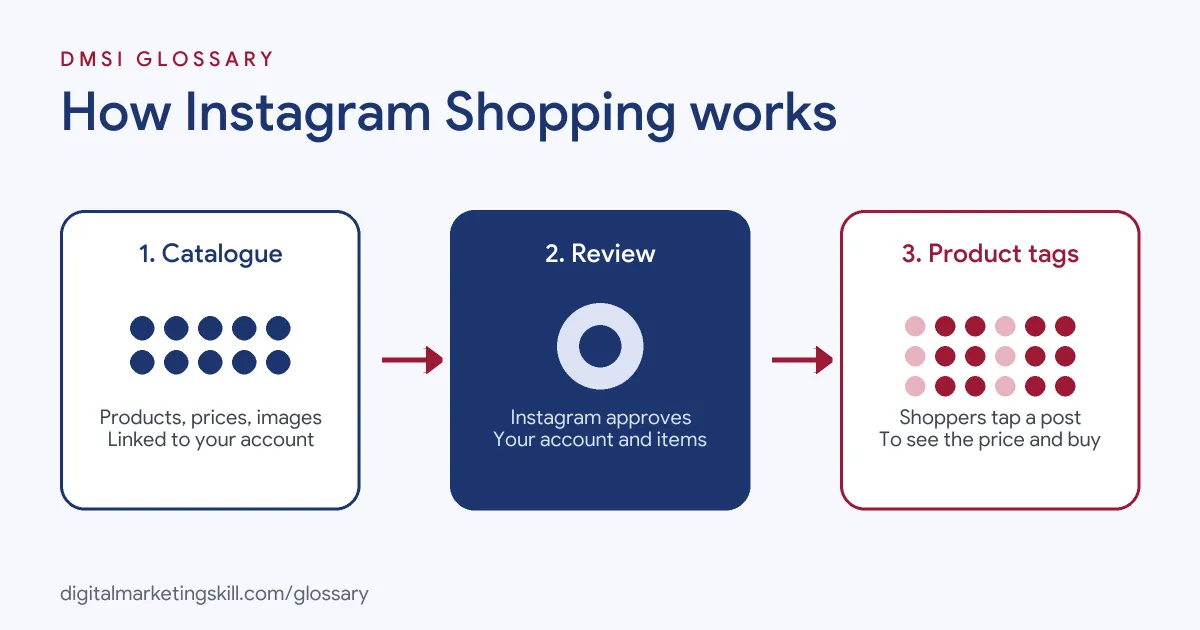
Eligibility and Review
BigCommerce’s help centre sums up the main requirements. You “must have an Instagram Business account” and a Facebook Business Page. Your business must also “meet Meta’s Commerce Eligibility Requirements and be located in a supported country.” In addition, your products must follow Meta’s Commerce Policies.
After you connect, Instagram reviews your accounts. There is no fixed timescale, and the same guide says “Catalog and account approval is at Instagram’s full discretion.” Products are also reviewed before you can tag them.
Product Tags
Once approved, you can tag products on feed photos, videos, carousels and Reels. According to Meta’s developer documentation, you can add “up to 20 tags for photo and video feed posts and up to 20 tags total per carousel post (up to 5 per carousel slide).” Reels allow up to 30 product tags.
Meta’s documentation also states that only products with an “approved” review status can appear on published posts. So if a product fails review, you can’t tag it until you fix the listing.
Checkout Options
Checkout can happen in two places. Meta’s documentation supports both in-app and external checkout. With external checkout, a product “can only be bought on the merchant’s website.” In that case, the shopper taps through from Instagram to your online shop to pay.
Instagram Shopping Examples
Here are three made-up examples of how brands use the feature:
- Example 1, jewellery brand: A small brand posts a carousel of five rings and tags one ring on each slide. As a result, followers can check each price without sending a message.
- Example 2, skincare shop: A shop films a Reel showing a three-step routine. It tags all three products, so viewers can tap through to each one.
- Example 3, homeware store: A store posts a styled living room photo and tags the lamp, cushions and rug. Shoppers then buy the pieces on the store’s website.
Product Tag Limits by Format
This table sums up the limits in Meta’s developer documentation:
| Format | Product tags allowed | Notes |
|---|---|---|
| Photo or video feed post | Up to 20 | Tags appear on the image or video |
| Carousel post | Up to 20 in total | Up to 5 per slide, across up to 10 tagged slides |
| Reels | Up to 30 | Tags and product IDs must be unique |
| Stories and Live | Not supported through the API | Check the app for current options |
In practice, fewer, well-chosen tags usually look cleaner than the maximum.
How to Set Up Instagram Shopping
- Switch to a business account. Convert your Instagram profile to a business account and link a Facebook Business Page.
- Check eligibility. Make sure your business is in a supported market and your products follow Meta’s Commerce Policies.
- Create a catalogue. Build one in Commerce Manager, or connect a platform such as Shopify or BigCommerce to sync products.
- Submit for review. Connect the catalogue to Instagram and wait for the review notice in the app.
- Tag your first posts. Add product tags to feed posts, carousels or Reels. Then start with your best sellers.
- Keep the catalogue fresh. Update stock, prices and images, so tags never point to old details.
- Measure results. Finally, track product views, website clicks and sales from each post in your insights and store reports.
How to Measure Results
Shoppable posts are only useful if they lead to sales. So track each step of the journey. Start with how many people viewed a tagged product. Then look at how many tapped through to the product page or your website. Finally, check how many of those visits ended in an order. If you use website checkout, add UTM tags to your product links, so your analytics tool can show which posts drove sales. Over time, you’ll see which products, formats and captions earn the most money, not just the most likes.
Best Practices for Instagram Shopping
- Show the product in use. Lifestyle photos and short demos often explain a product better than a plain packshot.
- Write clear product titles. Shoppers see names and prices on the tag, so keep them short and accurate.
- Tag in Reels and carousels. These formats let you show several products or angles in one post.
- Link shopping to ads. You can promote shoppable content with paid campaigns, such as a carousel ad, to reach new people.
- Answer questions fast. Comments and messages often decide whether a shopper buys.
Common Mistakes to Avoid
Many brands upload a catalogue with blurry images or vague titles, which makes tags look untrustworthy. Others forget to update prices, so the tag and the website disagree. Some tag too many items in one post, which clutters the image. Also, sellers often list products that break Meta’s Commerce Policies, which leads to rejected items. Finally, many never check which posts drive sales, so they can’t repeat what works.
Where You’ll Use Instagram Shopping at Work
Social commerce skills show up in social media and ecommerce roles. For example, remote job listings mention:
- Leading strategy “with a strong emphasis on TikTok Shop, Instagram Shopping, YouTube Shopping, and live commerce” (Director, Social Commerce Strategy).
- The need to “Support TikTok Shop and Instagram Shop execution” (Social Media Manager).
- Posting “content that drives sales through TikTok Shop and Instagram” (Social Media Manager).
So if you want to work as a Social Media Manager, Paid Social Specialist or Content Creator for a product brand, expect to plan and measure shoppable content.
Learn It in the Social Media Track
You can learn to create and promote shoppable content in the AI-Powered Social Media Management and Advertising track. It covers content creation, social media marketing and analytics, and social media advertising. You also plan, create and run a paid social campaign for a real brand, with unlimited 1-on-1 mentoring and a U.S. Project Internship from day one.
For more ideas, read our guide to Instagram for small business and our Instagram marketing strategy guide.
Frequently Asked Questions
What is Instagram Shopping in simple terms?
It lets a business tag products in its Instagram posts and Reels. Shoppers tap the tag to see the price and buy.
Who can use Instagram Shopping?
Businesses with an Instagram business account that meet Meta’s commerce eligibility rules, sell in a supported market and follow its Commerce Policies.
How many products can I tag in one post?
Meta’s developer documentation allows up to 20 on a photo or video feed post, 20 across a carousel and 30 on a Reel.
Does Instagram Shopping cost money?
Tagging products in organic posts doesn’t require ad spend. However, promoting those posts with ads does. Shopify, for example, says its Facebook and Instagram channel is free to use with all its plans, subject to store eligibility.
Do shoppers pay inside Instagram?
It depends on the set-up. Meta supports in-app checkout and external checkout, where shoppers finish on your website.
Sources: Meta for Developers: Product tagging; BigCommerce Help Centre: Sell on Instagram; Shopify Help Centre: Selling on Instagram; remote job listings on Himalayas.