
A content calendar is a schedule that shows what content you will publish, where and when, along with who is responsible for each piece. It turns a content plan into a clear list of posts, dates, platforms and tasks that the whole team can see. It matters because it helps you post consistently, avoid last-minute rushes and catch mistakes before they go live.
Key Takeaways
- A content calendar organises upcoming content by publish date and platform.
- At a minimum, each entry should include the date, time, platform, copy, asset and link.
- Planning ahead leaves time to review posts, so errors are caught before publishing.
- Good calendars leave space for reactive posts about trends or news.
- You should review the calendar often and adjust it based on performance.
What Is a Content Calendar?
Hootsuite describes a social media calendar as “a strategic plan of all upcoming content, organized by publish date and platform.” Sprout Social puts it in similar terms: “a forward-looking plan of all scheduled posts across your social media platforms.”
The idea is not new. Wikipedia notes that print publishers “have used editorial calendars in some form for centuries.” Today, bloggers, brands and agencies use the same approach for websites, email and social media.
Teams use a calendar for three main reasons. First, it supports consistency, which Sprout Social links to trust. Second, it helps people work together: “a shared calendar gives every stakeholder, from social to product to legal, visibility into upcoming content.” Third, it saves time, because planning core content ahead “reduces the daily scramble while leaving room for timely, reactive posts.”
A calendar can live in a spreadsheet, a project tool or a social media scheduler. What matters is that it is shared, up to date and easy to read. If you want to see where it fits in the bigger picture, read our glossary entry on social media marketing.
How a Content Calendar Works
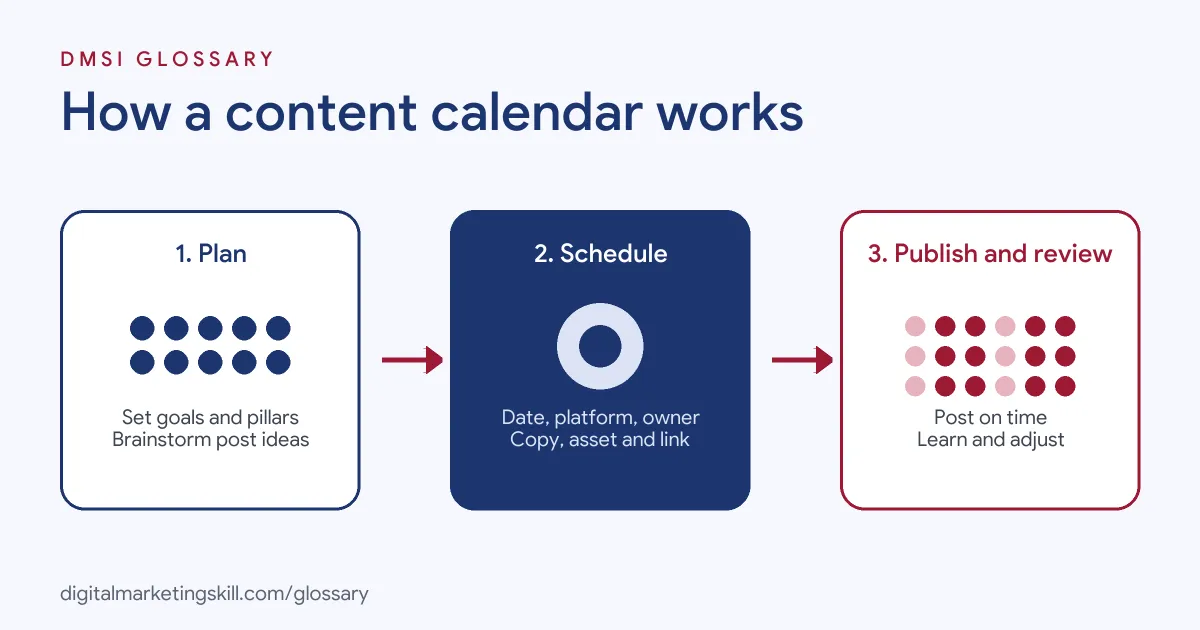
A calendar connects your strategy to daily work. First, you decide what to say and why. Next, you plan each post and assign it a slot. Finally, you publish, measure and feed what you learn back into the plan.
What to Include
Hootsuite says that, “at minimum, every social media calendar should include the date, time, platform, copy, asset, and link for each post.” Many teams also track the status, the owner, the format, alt text, the call to action, approvals, the content pillar and tags. As a result, anyone can open the calendar and see what is happening and what still needs work.
Content Pillars and the Content Mix
Most calendars group posts into themes, often called content pillars. For example, a fitness brand might use workouts, nutrition, member stories and offers. Hootsuite suggests having enough content for each stage of the journey: “awareness, consideration, and retention/conversion.” It also mentions the 80-20 approach, where about 80% of content educates and 20% promotes.
Planned and Reactive Posts
A calendar should not be rigid. Sprout Social advises you to “reserve space for reactive posts because social moves fast and your calendar needs to move with it.” In practice, that means leaving a few open slots each week for trends, news or customer questions.
Content Calendar Examples
Here are three ways different teams use a calendar:
- Coffee shop: The owner plans three Instagram posts a week. Monday covers a new drink, Wednesday shows the team, and Friday shares a customer photo.
- Software company: The marketing team lines up blog posts, LinkedIn updates and a monthly newsletter around a product launch. Then legal and product staff review each item before it is scheduled.
- Online course: A creator plans a four-week series on TikTok that leads to a free webinar. Each video builds on the last, and the final week focuses on sign-ups.
In each case, the calendar shows the whole sequence at a glance. That makes gaps, clashes and repeated ideas easy to spot. It also makes it easier to brief designers and video editors early, since everyone can see what is coming.
Content Calendar Tools Compared
You can build a calendar in several kinds of tools. Here is how the main options compare:
| Tool type | Good for | Trade-off |
|---|---|---|
| Spreadsheet (Google Sheets, Excel) | Simple, free planning for small teams | No automatic publishing |
| Project tool (Trello, Asana, Notion) | Tracking tasks, owners and approvals | Posts still need to be published elsewhere |
| Social scheduler (Meta Business Suite, Hootsuite, Sprout Social) | Planning and publishing in one place | Fewer options for non-social content |
Many teams start with a spreadsheet, then move to a scheduler once they post across several platforms.
How to Create a Content Calendar
Hootsuite lists a seven-step process. Here it is in plain terms:
- Start with your social media strategy, including goals and audience.
- Plan your schedule: which platforms, how often and at what times.
- Research and brainstorm ideas for each content pillar.
- Create the content, including copy, images and video.
- Schedule each post in your calendar or publishing tool.
- Analyse performance once posts go live.
- Update your strategy and calendar based on what you learn.
Hootsuite’s guidance suggests a weekly look at the calendar, with a deeper review each month or quarter. That rhythm keeps the plan fresh without constant rework.
Best Practices for a Content Calendar
A few habits make a calendar far more useful:
- Plan around key moments. Sprout Social notes that calendars “make it easy to sync posts with larger campaigns, product launches and events.”
- Give every post an owner. Clear names prevent work from slipping through the cracks.
- Use statuses. Labels such as idea, draft, approved and scheduled show progress at a glance.
- Batch your work. Writing several posts in one session is usually faster than writing one a day.
- Choose quality over volume. As Sprout Social puts it, “consistency builds audience trust,” but that only works if each post is worth seeing.
Common Mistakes to Avoid
Many beginners fill every slot months ahead, then struggle when plans change. Others plan posts but forget the assets, so designers get last-minute requests. Some teams never look back at results, which means the calendar repeats the same weak ideas. Finally, a calendar kept in one person’s head or laptop is not really a calendar. Instead, keep it shared, flexible and linked to your goals.
Another mistake is treating every platform the same. A post that works on LinkedIn may feel stiff on TikTok. So adapt the format and caption for each channel, even when the core idea stays the same.
Where You’ll Use a Content Calendar at Work
Running a calendar is a core task in social media and content roles. For example, recent remote job listings ask candidates to:
- “Develop and implement a content calendar for Instagram posts and stories” (Social Media Manager).
- Show experience “building out content calendars, conceptualizing social creatives, and engaging with audiences” (Jr Social Media Manager).
- Take charge of “owning and running content calendars” (Sr. Content Marketing Manager, B2B SaaS).
So if you want to work as a Social Media Manager or Content Creator, employers will expect you to plan, schedule and report on content in a structured way. A sample calendar is also a useful piece for your portfolio. In interviews, you may be asked how you would plan a month of content for a brand, so it helps to have a real example ready.
Learn It in the Social Media Track
You can practise building a content calendar in the AI-Powered Social Media Management and Advertising track. It covers content creation for graphics and video, social media marketing and analytics, and paid social. For your portfolio, you plan, create and run a paid social campaign for a real brand. You also join a U.S. Project Internship from day one and get unlimited 1-on-1 mentoring.
For a hands-on walkthrough, see our guide on how to create a content calendar.
Frequently Asked Questions
What is a content calendar in simple terms?
It is a shared schedule of the content you plan to publish. It shows what goes out, on which platform, when, and who is responsible.
What is the difference between a content calendar and an editorial calendar?
The terms are often used interchangeably. “Editorial calendar” comes from print publishing, while “content calendar” is more common for blogs and social media.
How far ahead should I plan my content?
Many teams plan a few weeks ahead and review weekly. Longer plans work for big campaigns, but you should always leave room for reactive posts.
What should a content calendar include?
Include the date, time, platform, copy, asset and link for each post. Many teams also add the owner, status, format, call to action and content pillar.
Can I use a spreadsheet as a content calendar?
Yes. A spreadsheet works well for small teams. As you grow, a scheduling tool can save time by publishing posts automatically.
Sources: Hootsuite: How to create a social media content calendar; Sprout Social: Social media calendar guide; Wikipedia: Editorial calendar; remote job listings on Himalayas.