
A system prompt is a set of standing instructions given to an AI model before the conversation starts, telling it what role to play, what tone to use and what rules to follow. The user usually never sees it, but it shapes every reply. It matters because clear setup instructions are how businesses turn a general AI model into a consistent brand assistant, support bot or writing tool.
Key Takeaways
- It sits above the user’s messages and sets the model’s role, tone, goals and limits.
- Anthropic says setting a role at this level focuses Claude’s behaviour and tone, and that “even a single sentence makes a difference.”
- OpenAI’s API calls these high-level instructions, and says they “take priority over a prompt in the input parameter.”
- Consumer apps use them too. Claude’s apps, for example, use one to give the model the current date.
- It guides behaviour, but it does not guarantee it. You still need to test and check the output.
What Is a System Prompt?
When you chat with an AI tool, there are usually two kinds of input. There is what you type, which is the user message. Then there is a hidden layer of setup text written by the company or developer. That hidden layer is the system prompt.
For example, a skincare brand might build a chatbot on top of a large AI model. Its setup text could say: “You are the friendly assistant for an example skincare brand. Answer only questions about our products. Use British English. Never give medical advice.” Every customer then talks to the same, consistent assistant.
The idea is closely linked to prompt engineering. However, a normal prompt asks for one task, while a system prompt sets the rules for the whole conversation.
How a System Prompt Works
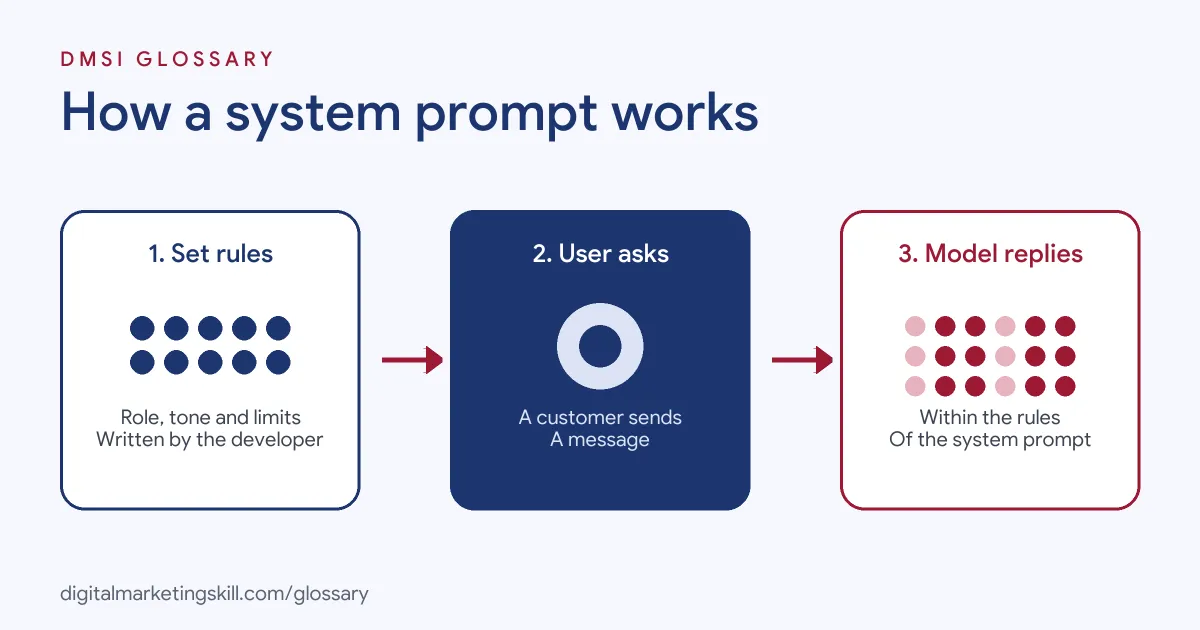
Each time the user sends a message, the model reads three things together. First, it reads the hidden instructions. Next, it reads the conversation so far. Finally, it reads the new message and writes a reply that tries to follow all of them.
Levels of Authority
Not all instructions carry the same weight. OpenAI’s developer guide says you can give instructions “with differing levels of authority” using message roles. It explains that developer messages are “prioritized ahead of user messages,” while user messages are “prioritized behind developer messages.” In practice, this lets a business set rules that a user’s request should not override.
What Goes Inside
OpenAI describes its instructions setting as guidance on “how it should behave while generating a response, including tone, goals, and examples of correct responses.” Anthropic’s documentation focuses on role. It says that giving Claude a role in the system prompt “focuses Claude’s behavior and tone for your use case.” Its own code example is just one line: “You are a helpful coding assistant specializing in Python.”
System Prompts in Consumer Apps
You meet them even when you never write one. Anthropic explains that Claude’s web interface and mobile apps “use a system prompt to provide up-to-date information, such as the current date.” It adds that the prompt “also encourages certain behaviors, such as always providing code snippets in Markdown.” By contrast, these updates “do not apply to the Claude API,” where developers write their own.
Limits to Keep in Mind
Setup text guides a model, but it does not control it completely. A model can still misread a rule, mix up two instructions or give a wrong fact. That’s why the best teams treat their instructions like any other piece of work: they draft, test, measure and improve. For example, a support team might collect twenty real questions, run them through the bot each time the instructions change, and compare the answers. This simple habit helps you catch problems before customers do.
System Prompt Examples
Here are three made-up examples that a marketing team might use:
- Brand copy helper: “You write social captions for an example coffee roaster. Keep a warm, plain tone. Use British English. Keep each caption under 40 words.”
- Lead qualification bot: “You help visitors book a demo. Ask for their company size and main goal. If they ask about pricing, offer to connect them with the sales team.”
- Report summariser: “You summarise weekly ad reports for a manager. Start with three bullet points. Flag any metric that changed sharply from the week before.”
In each case, the setup text defines the job once. As a result, nobody has to repeat those rules in every message.
System Prompt vs User Prompt vs Custom Instructions
These three are related but not the same. This table shows how they differ:
| Type | Who writes it | What it does |
|---|---|---|
| System prompt | The developer or business | Sets role, tone and rules for every conversation |
| User prompt | The person chatting | Asks for one specific task or answer |
| Custom instructions | The user, in app settings | Adds personal standing preferences, such as ChatGPT’s up to 1,500 characters on Free and Go plans |
OpenAI says custom instructions “allow you to share anything you’d like ChatGPT to consider in its response.” So they act like a personal, lighter version of the developer’s setup text.
How to Write a System Prompt
Follow these steps to draft one for a business use:
- State the role. Start with one sentence, such as “You are the support assistant for an online bookshop.”
- Name the audience. Say who the model is talking to and what they usually need.
- Set the tone and style. For instance, ask for plain British English and short answers.
- List the rules. Say what it must always do and what it must never do.
- Add an example. Show one good question and answer, so the model copies the pattern.
- Explain what to do when unsure. Tell it to ask a question or hand over to a person.
- Test with real questions. After that, try tricky and off-topic requests, then refine the wording.
Best Practices for a System Prompt
- Be clear and specific. Short, direct rules work better than vague hopes.
- Explain the reason. A rule with a reason, such as “keep answers short because users are on mobile,” is easier to follow well.
- Keep facts out of it where you can. Prices and policies change, so store them in a source the bot can check.
- Version your prompts. Save each change, so you can roll back if results get worse.
- Review conversations. Read real chats regularly to spot where the rules fail.
Common System Prompt Mistakes
Some errors appear again and again. First, teams write a wall of rules that contradict each other. Second, they never say what to do when the model does not know, so it guesses. Third, they assume the prompt is secret or unbreakable, when users may try to get around it. Finally, they launch without testing, so the first customers find the problems. Each of these is easy to avoid with a short, tested draft.
Where You’ll Use a System Prompt at Work
Few marketing job listings use the exact phrase yet. Still, technical AI roles already name it. For example, one remote listing for building AI agents asks: “What goes into the system prompt, what into skills?” (Senior Backend Developer, Agents). Another asks for “Demonstrated experience with Large Language Models (LLMs), prompt engineering patterns (e.g., Chain-of-Thought, few-shot), and working with major foundation model APIs or open-weights models” (Context Engineer).
In marketing roles, you will use the same skill when you set up an AI chatbot for lead capture, configure a brand writing assistant or build an internal reporting helper.
Learn It in the Full Stack Programme
AI fundamentals, covering strategy and planning, is part of every DMSI track. To apply these skills across social, email, search and websites, choose the Full Stack programme, which covers all four tracks and all ten courses. You finish with one portfolio project from each track. You also join a U.S. Project Internship from day one, with unlimited 1-on-1 mentoring.
For practical prompt ideas, read our guide on how to write ChatGPT prompts.
Frequently Asked Questions
What is a system prompt in simple terms?
It is the hidden setup text that tells an AI model who to be and how to behave. It applies to the whole conversation, not just one message.
Can users see these hidden instructions?
Usually not. They are written by the developer or business and run in the background. However, you should never put secrets in them.
Does a system prompt override what the user says?
It carries more weight. OpenAI, for example, says developer messages are prioritised ahead of user messages. Even so, no prompt guarantees perfect behaviour.
How long should a system prompt be?
Long enough to cover the role, tone and key rules. Anthropic notes that even a single sentence setting a role makes a difference.
Is a system prompt the same as custom instructions?
They are similar. Custom instructions are personal preferences a user adds in app settings, while the hidden setup text comes from the developer.
Sources: Anthropic: Prompting best practices; OpenAI: Text generation guide; Anthropic: System prompts release notes; OpenAI Help Centre: Custom instructions for ChatGPT; remote job listings on Himalayas.