
AI content detection is the use of tools and signals to judge whether artificial intelligence made a piece of text, an image, audio or video. Methods range from software that estimates how “AI-like” text looks, to hidden watermarks and labels that tools add when they make content. It matters because marketers, publishers and platforms increasingly need to know where content came from, but the tools are far from perfect.
Key Takeaways
- There are three main approaches: text classifiers, invisible watermarks and provenance labels.
- Text classifiers can be wrong. OpenAI withdrew its own AI text classifier because of its “low rate of accuracy.”
- In OpenAI’s tests, that tool caught only 26% of AI-written text and wrongly flagged human text 9% of the time.
- Watermarks such as Google’s SynthID and labels such as Content Credentials track origin at the point of creation.
- Google Search does not ban AI content. Instead, it targets content made at scale without adding value.
What Is AI Content Detection?
As generative AI tools produce more text and images, people want ways to tell what a person made and what a machine made. AI content detection is the umbrella term for those methods.
The most familiar type is the “AI detector,” a tool where you paste text and get a score. However, these tools only estimate. They look for patterns that are common in machine-written text, so people can fool them. They can also be wrong about human writing.
Other ways work differently. Rather than guessing after the fact, they add a signal when a tool creates the content. Anyone with the right checker can then look for that signal later.
How AI Content Detection Works
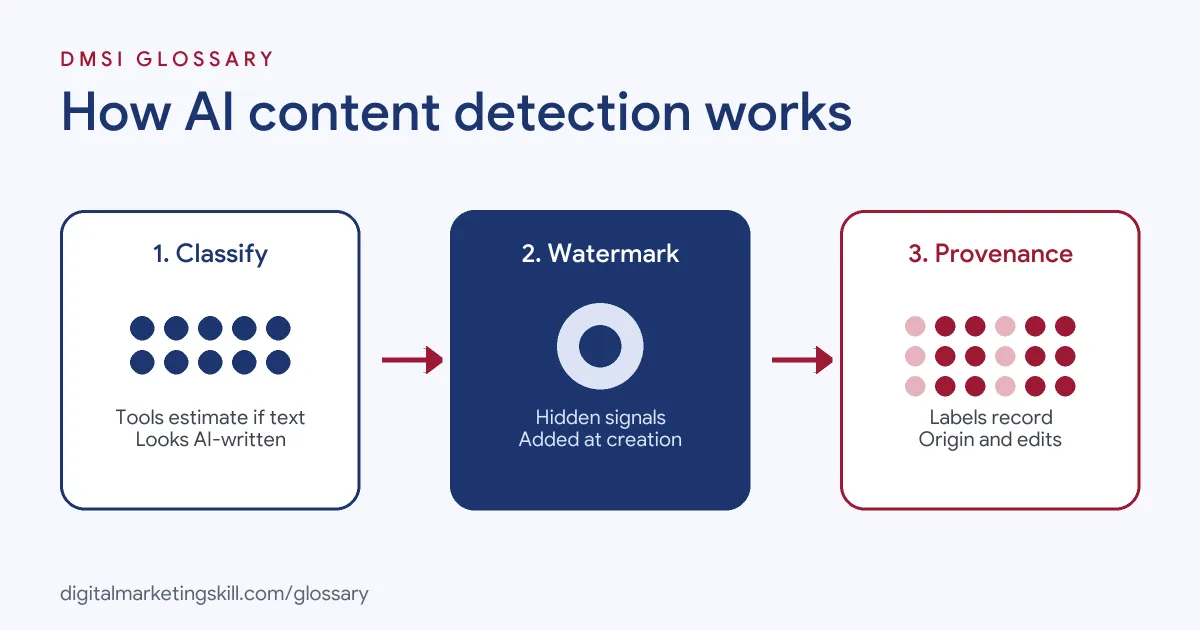
There are three broad approaches. First, classifiers analyse finished content and estimate the chance it is AI-made. Second, watermarks hide a signal inside AI output as the tool makes it. Third, provenance labels attach a record of who made the content and how they changed it.
Text Classifiers
OpenAI once released a classifier to flag AI-written text. It later said the tool “is no longer available due to its low rate of accuracy.” In its evaluations on a set of English texts, the classifier correctly identified 26% of AI-written text, while it labelled human-written text as AI-written 9% of the time. OpenAI also warned it was very unreliable on texts under 1,000 characters and worse in languages other than English. It added that people could edit AI text to slip past it. Above all, it said the tool “should not be used as a primary decision-making tool.”
Watermarks
Watermarking adds a hidden marker as the tool makes the content. Google DeepMind describes SynthID as “our watermarking tool, designed specifically for AI-generated content.” It embeds digital watermarks “directly into AI-generated images, audio, text or video.” These watermarks “are imperceptible to humans – but can be detected by SynthID’s technology.” Google also offers a SynthID Detector portal to check whether content carries its watermark.
Provenance Labels
The third approach records where content came from. The Coalition for Content Provenance and Authenticity (C2PA) provides “an open technical standard for publishers, creators and consumers to establish the origin and edits of digital content.” It calls this Content Credentials, which it says “function like a nutrition label for digital content.”
Why Detection Is Hard
It helps to see why this job is so tricky. AI tools learn from huge amounts of human writing. So their text often reads just like ours. In the same way, people who write in a plain, clear style can look “too neat” to a checker.
Edits make it harder still. A writer might ask a tool for a rough draft, then rewrite half of it. Is that AI work or human work? Most of the time, it is both. A score cannot tell you how much of each went in.
That’s why the best test is not “who wrote it?” but “is it true, clear and useful?” If the answer is yes, the page can serve readers well. If not, it needs work, no matter who or what wrote it.
AI Content Detection Examples
Here are three made-up situations where detection comes up:
- Agency review: A content agency runs a freelancer’s article through a detector and gets a high AI score. The editor does not reject it. Instead, she checks the facts, the sources and the drafts, because detectors can be wrong.
- Online shop: A retailer uses AI to create product images. It adds the metadata that Google Merchant Center requires for AI-generated images.
- Brand safety: A social team sees a suspicious image of its product. It checks for Content Credentials or a watermark before responding.
AI Content Detection Methods Compared
This table compares the three main approaches:
| Method | How it works | Main limitation |
|---|---|---|
| Text classifier | Estimates whether finished text looks AI-written | Can miss AI text and wrongly flag human writing |
| Watermark, such as SynthID | Hides an invisible signal in AI output as the tool makes it | Only works on content from tools that add the watermark |
| Provenance label, such as Content Credentials | Attaches a record of origin and edits | Depends on creators and tools adopting the standard |
What Google Search Says About AI Content
For SEO, the key question is not “was this made by AI?” but “is it useful?” Google’s guidance says that using generative AI tools “to generate many pages without adding value for users may violate Google’s spam policy on scaled content abuse.” It also asks publishers to “focus on accuracy, quality, and relevance.”
Google warns that generative models “don’t retrieve facts, but predict a likely sequence of words,” so their output “may contain inaccuracies.” That’s why it calls it “critical to manually factcheck and review all AI-generated content for accuracy and trustworthiness before publishing.” For shops, Google Merchant Center requires AI-generated images to carry IPTC “TrainedAlgorithmicMedia” metadata.
How to Use AI Content Detection Responsibly
Follow these steps if your team uses detection tools:
- Treat scores as a hint. A detector result is a reason to look closer, not proof.
- Check the content itself. Review facts, sources, originality and usefulness.
- Ask for process evidence. Drafts, notes and research links say more than a score.
- Use provenance where you can. Prefer tools that add watermarks or Content Credentials to AI images.
- Label AI use where rules require it. For example, follow Merchant Center rules for AI product images.
- Write a clear policy. Explain when staff may use AI and how editors should check the work.
- Review regularly. After that, update the policy as tools and platform rules change.
Best Practices for AI Content Detection
- Never rely on one tool. Combine detection with human review.
- Be careful with short texts. OpenAI found its classifier very unreliable under 1,000 characters.
- Remember language limits. Tools may perform worse on languages other than English.
- Focus on quality. Watch for AI hallucination, where content states false facts with confidence.
- Be fair to people. Do not accuse a writer of using AI on the basis of a score alone.
Common AI Content Detection Mistakes
Some mistakes cause real harm. First, teams treat a detector score as proof and reject honest work. Second, they assume a “human” score means the content is accurate. Third, they publish lots of lightly edited AI pages, which Google’s guidance links to scaled content abuse. Finally, they ignore platform labelling rules for AI images in ads and shopping feeds.
Where You’ll Use AI Content Detection at Work
We did not find recent remote job listings that name this skill directly. Even so, it matters in several roles. SEO Specialists need to make sure AI-assisted content meets Google’s quality guidance. Website Managers and WordPress Developers often set editorial rules and check content before it goes live. In addition, content and social teams may need to verify where an image came from before sharing it.
In each case, the real skill is good judgement. You need to know what the tools can and cannot tell you. Then you check the content itself.
Learn It in the WordPress and SEO Track
You can learn to create useful, accurate content with AI support in the AI-Powered WordPress and SEO Specialist track. There, you build a WordPress site or store and rank it with an SEO content plan. You also work on a U.S. Project Internship from day one, with unlimited 1-on-1 mentoring.
For a look at the tools themselves, read our round-up of AI writing tools.
Frequently Asked Questions
What is AI content detection in simple terms?
It is any method that helps you tell whether AI made a piece of content. It includes detector tools, hidden watermarks and labels that record where content came from.
Are AI detectors accurate?
Not fully. OpenAI withdrew its own text classifier because of low accuracy, after it caught only 26% of AI text and wrongly flagged 9% of human text in tests.
Does Google penalise AI-generated content?
Google’s concern is low-value content at scale. Its guidance says generating many pages “without adding value for users” may violate its scaled content abuse policy.
What is SynthID?
It is Google DeepMind’s watermarking tool for AI-generated content. It adds invisible watermarks to images, audio, text or video that its technology can detect.
What are Content Credentials?
They are a C2PA standard that records the origin and edits of digital content, working like a nutrition label for media.
Sources: OpenAI: New AI classifier for indicating AI-written text; Google Search Central: Guidance on generative AI content; Google DeepMind: SynthID; C2PA: Content Credentials.