
AI lead scoring is a way of ranking leads by how likely they are to become customers, using a machine learning model trained on your past wins and losses. Instead of you deciding how many points each action is worth, the software finds the patterns and gives every new lead a score. It matters because sales teams have limited time, and a good score helps them call the right people first.
Key Takeaways
- Traditional scoring uses rules you write by hand. The AI version learns from leads that converted and leads that did not.
- The model needs enough history. Microsoft Dynamics 365 asks for at least 40 qualified and 40 disqualified leads in the training period.
- HubSpot can build contact scores with AI on Marketing Hub Enterprise, from a sample of at least 50 contacts.
- Scores usually mix fit (who the lead is) and engagement (what the lead does).
- A score is a guide, not a verdict. You still need sales feedback to check that high scores really close.
What Is AI Lead Scoring?
Every business gets some leads who are ready to buy and many who are just looking. Lead scoring sorts them. In a classic set-up, a marketer writes rules, such as “add 10 points for a pricing page visit” and “subtract 5 points for a student email address.” That works, but the points are guesses.
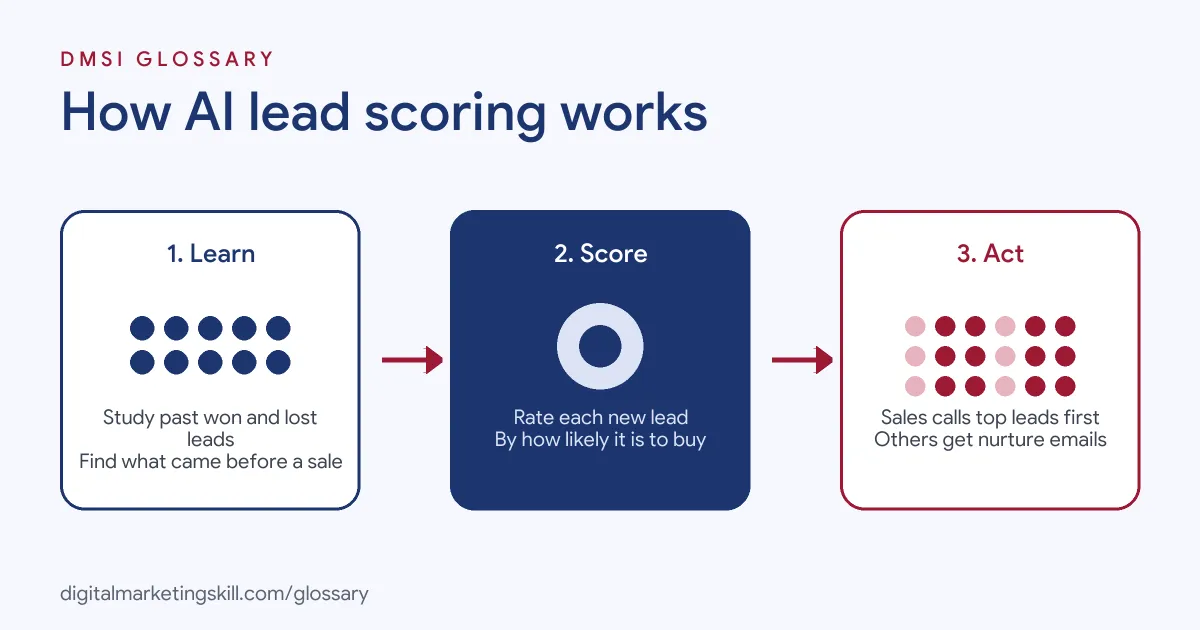
AI lead scoring replaces the guesswork with a model. The software studies leads you have already closed, both won and lost. Then it works out which traits and actions tend to come before a sale. Finally, it applies those patterns to new leads and gives each one a score.
If you are new to the idea, start with our glossary entry on lead scoring, which explains the manual version.
How AI Lead Scoring Works
Most tools follow the same three steps. First, they collect historical data on leads and outcomes. Next, they train a model that links traits and behaviour to conversion. After that, they score each new lead and keep updating the model as more results come in.
Training Data
The model can only learn from the history you give it. Microsoft’s documentation for predictive lead scoring in Dynamics 365 says your organisation “must have created and closed at least 40 qualified and 40 disqualified leads” during the time frame you choose. For example, if you train on the past three months, you need those 80 closed leads from that period.
Similarly, HubSpot’s knowledge base says “a minimum sample size of 50 contacts, containing 25 converted and 25 non-converted, is required to generate a score.” In other words, the model needs examples of both success and failure.
Fit and Engagement
HubSpot describes three kinds of score. Engagement scores “qualify records based on their actions and interactions, such as visiting your website.” Fit scores “qualify records based on their demographic information through property values.” Combined scores use both.
So a lead from a large company in your target industry has strong fit. Meanwhile, a lead who opened five emails and booked a demo has strong engagement. The best leads usually score well on both.
Keeping the Model Fresh
Buyers change, so models need updating. In Dynamics 365, you can choose to retrain the model automatically every 15 days. HubSpot, by contrast, offers score decay, which you can set to every 1, 3, 6 or 12 months. As a result, old actions slowly count for less.
AI Lead Scoring Examples
Here are three made-up examples of how teams might use it:
- Software company: The model notices that leads who visit the integrations page and invite a colleague often convert. Those leads now get high scores, and sales calls them within an hour.
- Training school: Leads who download a course guide and then return to the fees page score highly. As a result, advisers phone them first, while others get an email sequence.
- Agency: The model learns that leads with a tiny budget field rarely sign. So the team routes them to a self-serve offer instead of a sales call.
In each case, the score changes who gets attention and when. That is where the value comes from.
AI Lead Scoring vs Rule-Based Scoring
Both approaches have a place. Here is how they compare:
| Feature | Rule-based scoring | AI-based scoring |
|---|---|---|
| Who sets the weights | You assign points to each action or trait | A model learns the weights from past outcomes |
| Data needed | Very little to start | Enough closed leads, both won and lost |
| Transparency | Easy to explain each point | Harder to explain why a lead got its score |
| Upkeep | Manual reviews of the rules | Retraining as new results arrive |
| Best for | New teams with little history | Teams with steady lead volume and clean CRM data |
Many teams start with rules, then switch once they have enough data for a model.
How to Set Up AI Lead Scoring
The exact menus differ by CRM. Even so, the process usually looks like this:
- Agree with sales on what counts as a converted lead, such as a qualified opportunity or a closed sale.
- Clean your CRM. Merge duplicates, fill key fields and close out old leads with the right status.
- Check that you meet your tool’s minimum data needs.
- Create the model, choose the time frame and pick the lead types or segments it should cover.
- Check which fields the model can use, and remove any that seem unfair or irrelevant.
- Publish the score, then show it in lead views and use it in routing and workflows.
- Each month, compare scores with real outcomes and retrain if accuracy drops.
Best Practices
- Start with clean data. A model trained on messy records will learn the wrong lessons.
- Define the goal clearly. Score for the outcome that matters, such as a paid customer, not just a form fill.
- Use thresholds. HubSpot sorts engagement and fit scores into High, Medium and Low labels, which makes routing simple.
- Combine score and context. A high score with a clear buying signal deserves the fastest follow-up.
- Close the loop. Ask sales to mark why a lead was lost, so the next model learns more.
Common Mistakes to Avoid
Teams often trust the score too soon. First, they train on too little data, so the model picks up noise. Second, they never mark lost leads properly, which leaves the model with only half the picture. Third, they ignore how the model treats sensitive traits, which can lead to unfair results. Finally, they set it up once and forget it. Markets shift, so the model must shift too. That’s why it helps to review scores every quarter and compare them with the deals sales actually closed.
Where You’ll Use AI Lead Scoring at Work
Lead scoring is a standard task in marketing operations and lead generation roles. For example, recent remote job listings ask candidates to:
- “Own and optimize HubSpot end-to-end: workflows, automation, lead scoring, segmentation, list management, and reporting” (Marketing Operations Manager).
- “Optimize the lead scoring model and manage the process to increase success of lead quality and volume” (Pardot Specialist).
- Bring ideas on AI approaches “such as predictive or intent-based lead scoring” (Solution Campaign Marketing Director).
So as a Marketing Automation Specialist or Lead Generation Specialist, you may build scores, connect them to workflows and report on lead quality.
Learn It in the Lead Generation Track
AI fundamentals are part of every DMSI track, and lead scoring sits naturally in the AI-Powered Lead Generation and Email Automation track. It covers lead generation, email marketing and automation. Your portfolio project is to build a lead magnet and an automated email sequence that converts. You also get unlimited 1-on-1 mentoring and a U.S. Project Internship from day one.
For ideas on what to do once a lead scores highly, read our guide to lead conversion strategies.
Frequently Asked Questions
What is AI lead scoring in simple terms?
It is software that learns from your past leads and predicts which new ones are most likely to buy. It then gives each lead a score, so sales knows who to contact first.
How much data does it need?
That depends on the tool. Dynamics 365 needs at least 40 qualified and 40 disqualified leads, while HubSpot needs a sample of at least 50 contacts, half converted and half not.
Is AI scoring better than manual scoring?
Not always. It usually performs better when you have plenty of clean history. However, manual rules are easier to explain and work well for new teams.
Which tools offer AI lead scoring?
Many CRMs and marketing platforms do. For example, HubSpot and Microsoft Dynamics 365 both document AI or predictive lead scoring features.
How often should the model be retrained?
Often enough to keep pace with change. Dynamics 365, for instance, lets you retrain automatically every 15 days.
Sources: Microsoft Learn: Configure predictive lead scoring; HubSpot Knowledge Base: Understand the lead scoring tool; remote job listings on Himalayas and Himalayas.