
AI automation is the use of artificial intelligence inside automated workflows, so software can handle tasks that need judgement, such as reading a message, scoring a lead or drafting a reply. Traditional automation follows fixed rules. AI adds the ability to understand text, spot patterns and decide what to do next. It matters because marketers can hand off repetitive work and spend more time on strategy and creative ideas.
Key Takeaways
- Rule-based automation follows “if this, then that” steps. AI automation adds a step that reads, sorts or writes.
- Common uses include lead scoring, sorting enquiries, summarising calls, drafting emails and setting ad bids.
- Some AI steps produce one output. Others, called agentic steps, choose which tools to use themselves.
- Pick the simplest model that does the job. Simple tasks rarely need the most advanced model.
- Keep a person in the loop. UK data rules apply extra safeguards when a machine alone makes significant decisions about people.
What Is AI Automation?
Standard automation is great at clear, repeatable rules. For example, “When someone fills in the form, add them to the email list.” It breaks down when the input is messy, such as a free-text message where every person writes something different.
That is where AI helps. An AI step can read the message, work out what the person wants and pass a clear answer to the next step. In other words, it turns unstructured input into structured data that the rest of your workflow can use.
For example, a web design agency gets 200 enquiries a month through its contact form. An AI step reads each message, tags it as “new website”, “redesign” or “support”, and estimates how urgent it is. The workflow then routes each one to the right person, without anyone sorting the inbox by hand.
How AI Automation Works
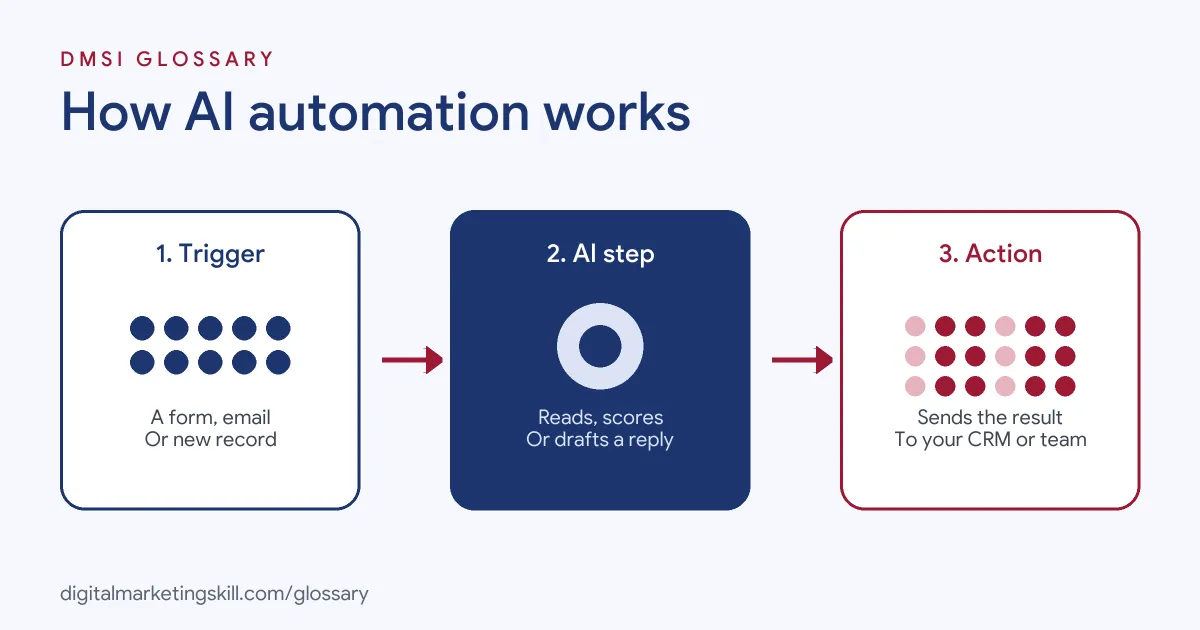
Most workflows have three parts. A trigger starts them. Then one or more steps do the work, and some of those steps use AI. Finally, an action sends the result somewhere, such as your CRM, email tool or a team chat.
Standard AI Steps
Zapier describes a standard AI step as one that “reasons, produces one output, and doesn’t touch your other apps.” For instance, its guide shows a lead form where AI reads the open-ended “What are you looking to do?” field. Based on your prompt, it scores the lead. A score of 1 to 5 routes to a small-business rep, while anything higher goes to an enterprise rep.
Agentic Steps in AI Automation
You can go a step further. Zapier explains that you can make an AI step agentic “by giving it tools.” Then the AI itself decides what to do, including which tools to call and in what order. This is more powerful, but it also needs more care, since the AI is now taking actions rather than just giving an answer.
Choosing a Model
Every AI step runs on a model. Zapier offers three tiers: standard models that “work great for simple tasks”, advanced models for more complex prompts, and premium models for deep analysis and multi-step reasoning. So match the model to the job. Sorting enquiries is simple. Analysing a long sales call is not. Simpler models also keep costs down when a workflow runs hundreds of times a day.
AI Automation Examples in Marketing
Here are some common uses. The business names are left out, and the details are examples:
- Lead scoring: AI reads form answers and scores each lead, so sales calls the best ones first.
- Call summaries: Zapier’s guide describes AI analysing a sales call transcript to pull out contacts, commitments, objections and next steps.
- Content drafts: A new blog post triggers an AI step that drafts three social captions for a person to review.
- Ad bidding: Google’s Smart Bidding uses AI to set bids “in every auction”, which is AI automation built into the ad platform.
- Data tidying: AI fields in a table can generate content from the data in each row, such as a short product description.
A Worked Example
Here is a made-up example. A small agency spends about five hours a week reading and sorting form enquiries. It builds a workflow that tags each message and drafts a short reply. A team member still checks every draft, which takes about one hour a week. So the team saves around four hours each week. More importantly, hot leads now get a reply within minutes rather than the next morning.
Rule-Based Automation vs AI Automation
Both have a place. Here is how they compare:
| Feature | Rule-based automation | AI automation |
|---|---|---|
| Best input | Clean, predictable data | Messy text, images or mixed inputs |
| How it decides | Fixed rules you write | A model’s judgement, guided by your prompt |
| Predictability | Same result every time | Results can vary, so you need checks |
| Typical task | Add a tag when a form is sent | Read the message and decide which tag fits |
In practice, most good workflows mix the two. Rules handle the routine steps, while AI handles the moments that need judgement.
How to Set Up AI Automation
- List repetitive tasks that take time each week, such as sorting enquiries or writing first drafts.
- Pick one task where a mistake would be easy to spot and fix.
- Map the workflow: the trigger, each step and the final action.
- Write a clear prompt for the AI step. Include examples of good outputs.
- Choose the simplest model that handles the task well.
- Test it on real past examples before you switch it on.
- Add a human review step for anything sent to customers.
- Check results weekly at first, then adjust the prompt or rules.
Best Practices for AI Automation
- Start small. One reliable workflow beats ten fragile ones.
- Give structured instructions. Ask for a fixed format, such as a score from 1 to 10, so later steps can use it.
- Keep people involved. Review AI outputs before they reach customers.
- Know the rules. The UK ICO explains that extra safeguards apply to decisions that are “solely automated” and have “legal or similarly significant effects” on a person.
- Log what happens. Keep a record of inputs and outputs, so you can spot errors quickly.
Common AI Automation Mistakes
Many teams automate a messy process without fixing it first, so they just make mistakes faster. Others give the AI vague prompts and get vague results. Some skip testing and only notice problems when a customer complains. Another mistake is letting an agentic step act in important apps without limits. Finally, many forget to check costs, since running the most advanced model for every simple task adds up.
Where You’ll Use AI Automation at Work
Employers now expect marketers to save time with AI. For example, recent remote job listings ask candidates to:
- “connect business systems, automate workflows and improve operational efficiency” (AI Automation and Admin Specialist).
- Show “Practical experience using AI assistants or agents, such as Claude, ChatGPT or Gemini, to analyse campaigns and improve workflows” (Google Ads Specialist, Advanced Tracking and AI Automation).
- “identify, test, and deploy AI tools and automated knowledge systems to eliminate manual work and boost team productivity” (Head of Revenue Operations).
So if you want to work as a Marketing Automation Specialist or Email Marketing Specialist, expect to design workflows, write prompts and check that the AI does its job.
Learn It in the Lead Generation and Email Track
Automation is at the heart of the AI-Powered Lead Generation and Email Automation track. It covers AI fundamentals, lead generation, and email marketing and automation. Your portfolio project is a lead magnet and an automated email sequence that converts. You also get unlimited 1-on-1 mentoring and a U.S. Project Internship from day one.
Next, read our marketing automation guide and our list of marketing automation tools. You may also like our glossary entries on AI agents and email automation.
Frequently Asked Questions
What is AI automation in simple terms?
It is an automated workflow with an AI step that can read, sort, score or write, so software can handle tasks that need some judgement.
How is it different from normal automation?
Normal automation follows fixed rules. AI automation can handle messy inputs, such as free-text messages, and decide what to do with them.
Do I need to code to use it?
No. Tools such as Zapier let you add AI steps to workflows without code. You mainly need clear prompts and good testing.
What is an agentic AI step?
It is an AI step that has access to tools and decides for itself which ones to use and in what order.
Is AI automation safe to use with customer data?
It can be, if you follow data protection rules, limit what the AI can access and keep a person reviewing important outputs.
Sources: Zapier: AI by Zapier guide; Zapier Help: Use of AI within Zapier; Google Ads Help: About Smart Bidding; ICO: Automated decision-making and profiling; remote job listings on Himalayas.