
Email automation is the use of software to send emails automatically when a person does something, or when a set time or date arrives. You build the sequence once, and the platform sends the right message to each person at the right moment. It matters because it lets a small team welcome, nurture and follow up with every subscriber without writing each email by hand.
Key Takeaways
- Every automated sequence starts with a trigger, such as a sign-up, a purchase or an abandoned cart.
- Platforms call these sequences different names: Klaviyo says “flows”, while Mailchimp says “automation flows”.
- Delays, rules and branches let each person follow their own path through the sequence.
- Klaviyo suggests three flows to set up first: a welcome series, an abandoned cart flow and a post-purchase flow.
- Automated marketing emails still need consent and an easy way to unsubscribe.
What Is Email Automation?
Klaviyo describes a flow as “a sequence of automated actions (e.g., sending messages) triggered by a behavior or event.” In other words, the email goes out because of what the person did, not because you pressed send.
That’s the main difference from a regular campaign. A campaign goes to a whole list at a time you choose. An automated email, by contrast, goes to one person at a time, at the moment that suits them.
For example, someone downloads a free recipe guide from a meal-kit brand. Straight away, they get the guide by email. Two days later, they get a tip on planning meals. Then, after five days, they receive an offer for their first box. Nobody on the team had to send those emails manually.
How Email Automation Works
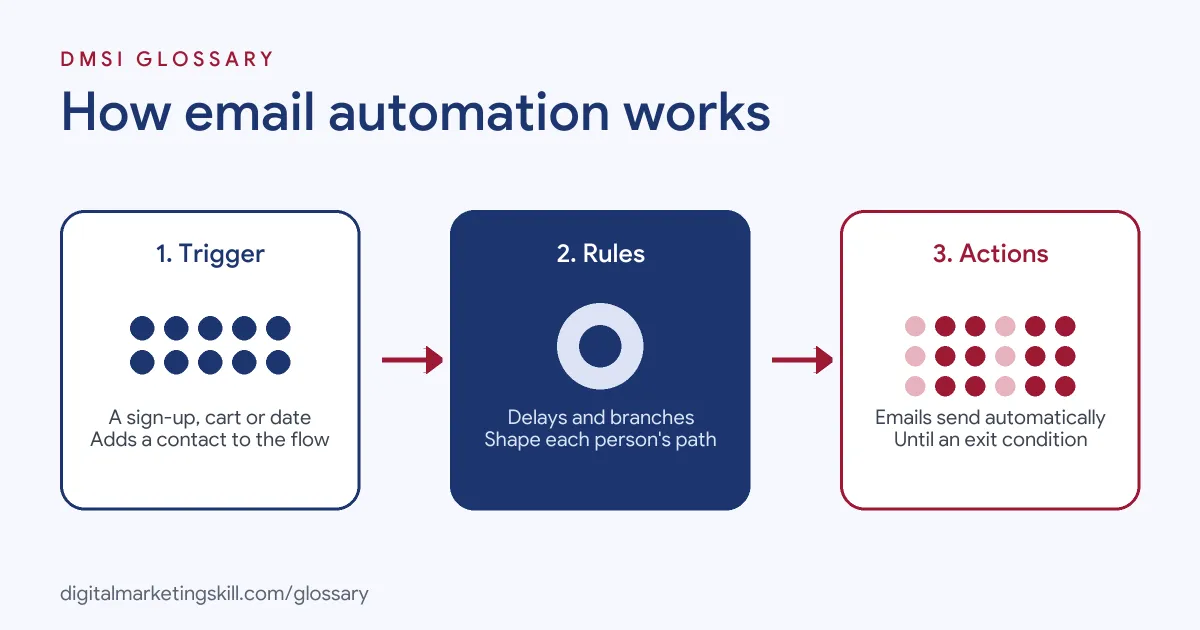
Most platforms use the same building blocks. Mailchimp’s help centre defines them clearly: a trigger starts the journey, steps decide what happens next, and an exit condition ends it.
Triggers
Mailchimp defines a trigger as “An event or action that adds a contact to a flow.” Klaviyo gives common examples: a flow might start when someone joins a list, starts checkout, has an order fulfilled or reaches a date such as their birthday. Mailchimp also notes that triggers only apply to actions that happen after you activate the flow.
Rules, Delays and Branches
After the trigger come the steps. In Mailchimp, a rule “defines how and when a contact moves along a set path.” A delay is one type of rule. Klaviyo adds that flows can include “time delays between actions and multiple paths that split based on different criteria.” For instance, people who clicked your last email can get one message, while people who didn’t get another.
Actions and Exits
An action tells the system to do something, such as send an email or SMS, or add a tag. Mailchimp gives a simple example: a trigger of “signs up”, a rule of “delay for 1 week”, then an action of “send email”. Finally, an exit condition removes a contact from the flow. For example, you might remove someone from an abandoned cart flow as soon as they buy.
Email Automation Examples
Here are three made-up examples of email automation in action:
- Welcome series: A skincare brand sends three emails after sign-up. The first gives a discount, the second shares its story and the third shows best-selling products.
- Abandoned cart: An online bookshop emails people an hour after they leave items in their basket. If they still haven’t bought after a day, it sends one reminder.
- Lead nurturing: A software company sends new trial users a short tip each day for a week. Users who log in often then get an invitation to book a demo.
In each case, a clear trigger starts the sequence, and the content matches what the person just did.
Common Automated Flows Compared
Here are common flows to consider building early:
| Flow | Typical trigger | Main job |
|---|---|---|
| Welcome series | Someone joins your list | Introduce the brand and turn subscribers into first-time customers |
| Abandoned cart | Someone leaves items in their cart | Remind them and recover the sale |
| Post-purchase | An order is placed or fulfilled | Thank, support and encourage a repeat purchase |
| Date-based | A birthday or anniversary approaches | Send a timely message or offer |
| Re-engagement | No opens or clicks for a long time | Win the person back, or clean them from the list |
Klaviyo describes the welcome series as one that “introduces subscribers to your brand and converts them into first-time customers.” So it is usually the best place to start.
How to Set Up Email Automation
The menus differ between platforms, but the process is much the same. Follow these steps:
- Pick one goal. For example, turn new subscribers into first-time buyers.
- Choose the trigger. Decide what starts the flow, such as joining a list.
- Map the steps. Sketch each email, delay and branch on paper first.
- Write the emails. Give each one a single purpose and a clear call to action.
- Add exit conditions. Stop the flow when the person has done what you wanted, such as buying.
- Test and preview. Klaviyo recommends reviewing, customising and previewing every default message before turning a flow live.
- Turn it on and monitor. Check clicks, conversions and unsubscribes for each email in the flow.
For a step-by-step build, see our guide to creating an email automation workflow.
How to Measure Email Automation
Look at each flow as a whole, and then at each email inside it. First, check how many people entered the flow and how many reached the goal, such as a first purchase. Next, compare clicks and unsubscribes email by email. If one message loses lots of people, rewrite it or move it later. Finally, test one change at a time, such as a shorter delay or a new subject line, so you know what made the difference.
Best Practices
- Start with one flow. A strong welcome series beats five half-finished flows.
- Use real behaviour. Base triggers and branches on what people actually do.
- Respect consent. In the UK, the ICO’s rules on marketing emails apply whether you send them by hand or automatically.
- Make leaving easy. Gmail requires bulk senders to support one-click unsubscribe in marketing messages.
- Review flows regularly. Update offers, links and product details, so old emails don’t send wrong information.
Common Mistakes to Avoid
Teams often make the same few errors. First, they forget exit conditions, so buyers keep getting “Complete your order” emails. Second, they set a flow live and never check it again. Third, they send too many emails too close together. Finally, they treat automation as a way to email people who never agreed to it. Each of these damages trust and can hurt your sender reputation.
Email Automation vs Email Campaigns
Both have a place in a strong email programme. Here is how they differ:
| Feature | Automated flow | Campaign |
|---|---|---|
| What sends it | A trigger, such as a sign-up | You, at a chosen time |
| Who gets it | One person at a time, when they qualify | A whole list or segment at once |
| Best for | Welcomes, reminders and follow-ups | News, launches and sales |
In short, automation handles the moments that repeat, while campaigns handle the moments that don’t. Together, they also support lead nurturing.
Where You’ll Use Email Automation at Work
Email automation is a common requirement in marketing and sales support roles. For example, recent remote job listings ask candidates to:
- “build and execute the company’s growth marketing strategy across website conversion, lead generation, email automation, and paid advertising” (Marketing Lead).
- Show “Proficiency in email automation tools such as Mailchimp, Apollo, or LinkedIn Sales Navigator” (Virtual Assistant, Lead Generation & Email Marketing).
- Have “Experience in email automation, cold outreach, and CRM-based campaign tracking” (CRM & Internal Growth Specialist).
So if you want to work as a Marketing Automation Specialist or Email Marketing Specialist, employers will expect you to plan, build, test and improve automated flows.
Learn It in the Lead Generation and Email Track
You can learn email automation in the AI-Powered Lead Generation and Email Automation track. There, you build a lead magnet and an automated email sequence that converts, so you have a working flow to show employers. You also get unlimited 1-on-1 mentoring and a U.S. Project Internship from day one.
Frequently Asked Questions
What is email automation in simple terms?
It is software that sends emails for you when someone takes an action, such as signing up or leaving items in a cart.
What is a trigger in email automation?
A trigger is the event that starts the flow and adds a contact to it, such as joining a list or making a purchase.
Which automated email should I set up first?
A welcome series is a good first choice. Klaviyo lists it first, followed by abandoned cart and post-purchase flows.
Is email automation the same as a drip campaign?
They are closely related. Klaviyo says flows are “also known as automations or drip campaigns”.
Do automated emails need consent?
Yes. Marketing rules apply to every marketing email, whether a person or software sends it.
Sources: Mailchimp: About Marketing Automation Flows; Klaviyo Help Center: Getting started with flows; ICO: Electronic mail marketing; Google: Email sender guidelines; remote job listings on Himalayas.