
Marketing automation is software that sends messages and tasks based on what a contact does, not on a fixed schedule. It replaces one-size-fits-all blasts with timed, personal sequences. Done well, marketing automation lifts open rates, click rates and sales without extra manual work.
Key Takeaways
- Triggered, behaviour-based emails beat one-off blasts on opens and clicks. They arrive right after a contact shows interest, not on a random day.
- 86.4% of marketing teams now use AI in some part of their work. 47.38% of marketers call “leveraging automation” a top trend, according to HubSpot’s State of Marketing report (1,500+ global marketers surveyed).
- 93.2% of marketers say personalised content drove more leads or sales. Yet only 12.6% use deep personalisation. Most still run basic, broad segments (HubSpot).
- The average online cart abandonment rate is 70.22%. Baymard Institute built that figure from 50 separate studies. Automated cart-recovery emails exist to claw back exactly that drop-off.
- Most automation programmes fail for one reason: teams skip goal-setting and lead scoring, then build a workflow anyway.
In this guide
- The Marketing Automation Gap: What Most Guides Skip
- How Marketing Automation Actually Works
- What Differs By Marketing Automation Channel
- How To Lead With Each Channel
- How To Measure Marketing Automation
- The One Decision Rule For What To Automate First
- A Real Case: What Automation Changed
- Frequently Asked Questions About Marketing Automation
- Where To Learn Marketing Automation Properly
The Marketing Automation Gap: What Most Guides Skip
Most articles describe automation features. Triggers. Workflows. Scoring. Few tell you which one to build first. Even fewer tell you how to check if it worked. That gap matters. A business with ten contacts and a business with ten million behave very differently inside the same platform. This guide, put together by the team at digitalmarketingskill.com, is built to work for both.
Two ground rules come first. This is a starting framework, not a guaranteed formula. Your results depend on your list size, your sales cycle and how clean your contact data already is. The benchmark numbers in this guide are a snapshot too, not a permanent ranking of any tool or channel. Automation performance shifts as inboxes, algorithms and buyer habits change. Treat every number here as a starting point to test, not a target to chase blindly.
For scale, more than 6 billion people are online, per the DataReportal report. That is 73.2% of the world’s population, and the pool every automation trigger ultimately draws from.
Below is a plain definition, a map of where automation changes outcomes, and one rule for deciding what to automate first.
One more note before the mechanics. Marketing automation is a category, not a single tool. Dozens of platforms sell some version of it, from simple email-sequence builders to full suites that also handle ads, chat and CRM. This guide focuses on the logic behind marketing automation, not on ranking any specific platform, because the logic transfers across tools while feature lists change every year.
One more practical point belongs here too: clean contact data. A workflow built on duplicate entries, dead email addresses or outdated job titles will misfire no matter how well the trigger is designed. Before building your first sequence, it is worth spending an afternoon removing bounced addresses and merging duplicate records, since every automation decision downstream depends on that list being accurate.
How Marketing Automation Actually Works
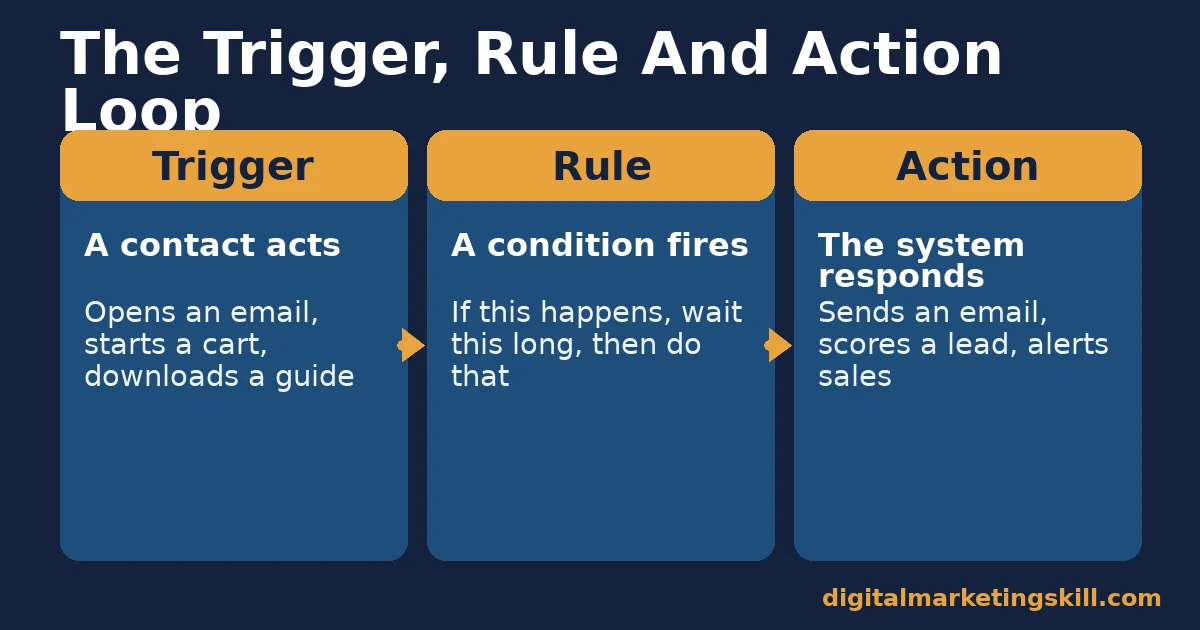
Automation connects three simple parts. A trigger is something a contact does, like opening an email or abandoning a cart. A rule says what happens next, and how long to wait. An action carries out the rule, such as sending an email or notifying a salesperson. Set up those three parts once, and the sequence runs on its own.
Automation Is Not A Scheduled Newsletter
This is not the same as “automating” a weekly newsletter. A newsletter has no trigger tied to behaviour. Everyone on the list gets the same message on the same day. Automation workflows branch instead. A contact who clicks goes down one path. A contact who ignores the email goes down another. Each path can carry its own timing and its own content.
Most platforms explain this trigger-rule-action structure in their own help centres. Mailchimp’s automation documentation shows the same three-part logic most tools use.
The Four Workflow Types Behind Most Marketing Automation
Four workflow types cover most businesses. Welcome sequences start the moment someone subscribes. Abandonment sequences start when a cart, form or booking stalls. Lifecycle sequences start when a status changes, such as becoming a customer. Lead-scoring rules add points for behaviour, so the system can flag who is ready for a human follow-up.
Because each workflow runs on its own trigger, you can usually launch them in any order. However, most teams get the best early return from whichever workflow sits closest to a purchase decision, since that is where a timely message changes the outcome the most. Therefore, a cart-abandonment sequence or a pricing-page follow-up often beats a general welcome series on pure revenue impact, even though a welcome series is easier to build first.
The “notify a salesperson” action usually means handing a contact to whatever system sales already uses. Often that is a CRM built around marketing data, not a spreadsheet. The CRM carries the contact’s full history with it.
Where Lead Scoring Fits In The Picture
Lead scoring is the piece beginners skip. A scoring rule adds or removes points for actions. Visiting a pricing page might add 10 points. Opening three emails in a row might add 5. Going quiet for 60 days might subtract 5. The system then flags who is worth a human call, automatically. As a result, your sales team opens their day with a short, ranked list instead of a flat list of thousands of names in no particular order. Over time, that single change tends to shorten response time to hot leads, since nobody has to scroll through a spreadsheet to find them first.
What Differs By Marketing Automation Channel
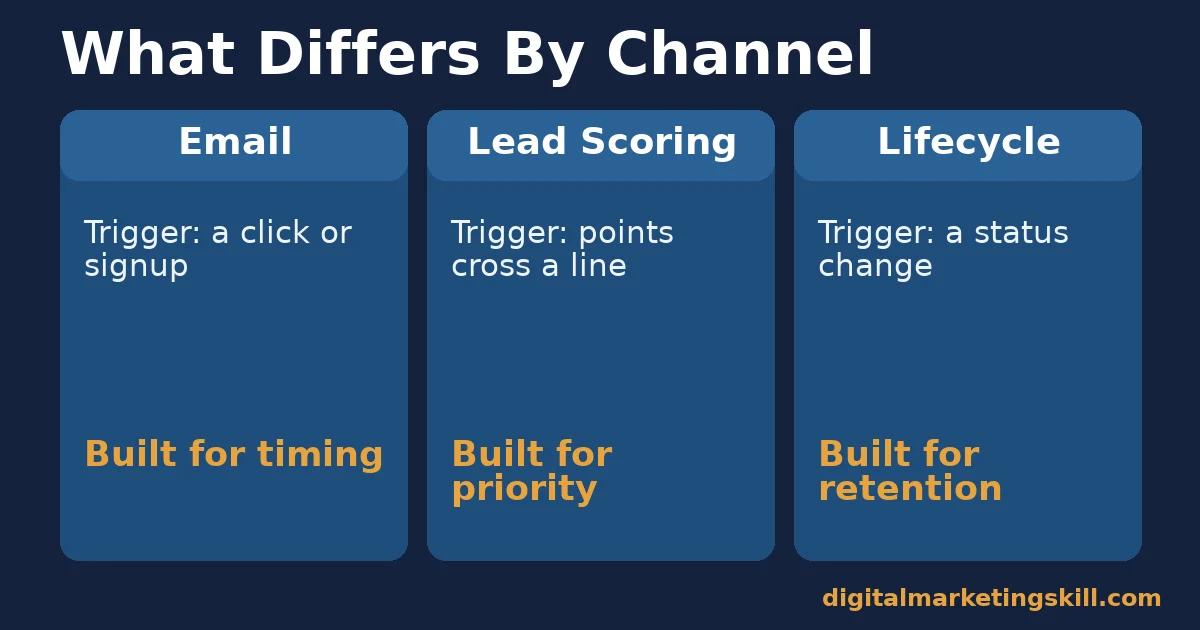
Automation behaves differently depending on where it sits in your funnel. Most businesses start with three channels, and each one needs a different trigger. Mixing them up is the most common early error: teams often apply a lead-scoring mindset to a welcome email, or try to segment a one-off announcement that should have gone to everyone at once. The three breakdowns below exist to stop that confusion before it costs you a workflow’s worth of build time.
Email Automation: Built For Timing
A specific action triggers an email, not a calendar date. A signup, a click, or an anniversary date all work. The message arrives when a contact is most receptive. That is why email is the most measurable channel most teams run. Every open and click ties back to a known trigger, not a guess about inbox habits. The same if/then logic appears in Zapier’s own trigger documentation, built for automation generally.
Lead Scoring: Built For Priority
Lead scoring answers one question: who should a human talk to next? It turns behaviour into a number. Scoring is not a messaging channel on its own. Instead, it is the layer that decides who leaves automation for a person, and who stays in the nurture sequence a while longer. The same scoring logic sits behind most B2B lead generation handoffs between marketing and sales.
Lifecycle Sequences: Built For Retention
A status change triggers lifecycle automation, not a single click. Becoming a customer counts. Going quiet for 60 days counts too. Lifecycle automation runs after the first sale, when the goal shifts from winning a stranger to keeping a customer engaged. That usually means a different message, a different trigger, and often a different team than the one running top-of-funnel email.
How To Lead With Each Channel
Knowing what each channel is built for is half the job. Here is how to lead with each one, matched to the three channels above.
Email Automation: Lead With Triggers, Not Blasts
Start with one trigger, not ten. Pick your site’s single highest-traffic action: a signup, a download, or a cart start. Build one three-to-five-email sequence around it. Add a second workflow only once the first one runs cleanly. A handful of well-timed, triggered emails beats a broad blast almost every time, because the message always matches a behaviour the contact just showed. Check your sequence against a general email marketing checklist before launch, so deliverability basics don’t undercut a well-timed trigger.
Lead Scoring: Lead With Behaviour, Not Guesswork
Score the actions that actually came before a sale in your own data. Don’t score actions that merely sound important. Check your own numbers first. If every buyer opened two or more emails before converting, weight opens higher than you might assume. Review your scoring thresholds every quarter. A model set once and never revisited drifts out of line with how buyers actually behave. HubSpot’s own lead-scoring guide walks through a worked points example if you want a second reference point.
Lifecycle Campaigns: Lead With Segmentation
Segment customers by status, not only by demographics. A new customer, a repeat customer and a lapsing customer each need a different message. Segmented campaigns speak to where someone actually stands in the relationship. That single change, segment first and write second, usually separates a lifecycle programme people open from one they ignore. It is the same logic behind a healthy digital marketing sales funnel: different stage, different message, same contact.
How To Measure Marketing Automation
Four KPIs tell you whether a workflow works. Define each one before you open a dashboard.
The Four KPIs To Track
- Triggered open rate. The share of a triggered email’s recipients who open it, measured against your regular bulk-send open rate. If the triggered rate doesn’t clearly beat the bulk-send average, fix the trigger or subject line before you scale it.
- Workflow conversion rate. The share of contacts who enter a workflow and complete the action it was built for, such as a purchase or a reply. This number tells you if the sequence earns its upkeep. Google’s conversion-tracking documentation covers how to tie a completed action back to the exact send that caused it.
- Cart or form recovery rate. The share of abandoned carts or forms that convert after an automated follow-up, measured against your baseline abandonment rate. A general average of 70.22%, per Baymard Institute, is a fair benchmark to try to beat.
- Lead-to-customer rate by score band. The share of contacts in each score band, high, medium or low, who become customers. If your high-score band converts at roughly the same rate as your low-score band, your scoring rules aren’t predicting anything yet. Revisit which actions earn points.
Check these four numbers monthly, not daily. Workflows need weeks to show a stable trend. Judging a sequence after two days of data almost always leads to the wrong call.
Write these four KPIs down somewhere visible, next to the workflow they measure. Marketing automation that nobody measures tends to keep running long after it stops working, simply because no one notices. A short monthly review, even ten minutes per workflow, is usually enough to catch a sequence that quietly went stale. Keep the review short on purpose. A ten-minute check that actually happens every month beats an elaborate quarterly audit that keeps getting pushed back, because consistency catches a stalling workflow faster than depth does.
The One Decision Rule For What To Automate First
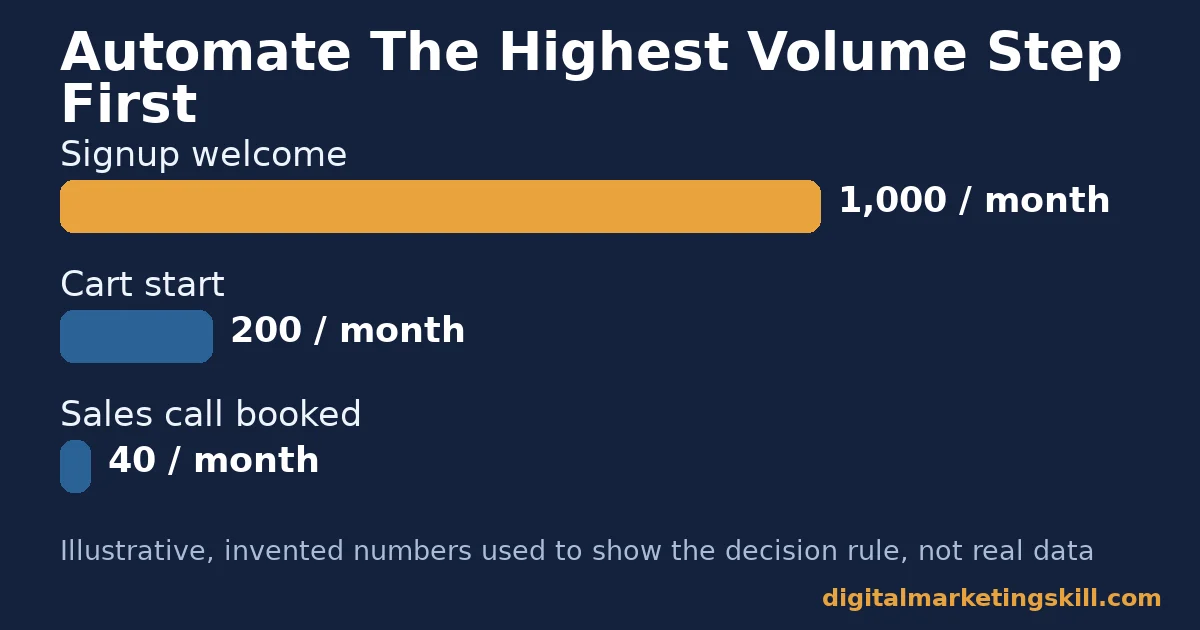
Automate the step with the highest volume and the clearest single trigger. Not the step that feels most urgent. Not the step a vendor’s demo made look impressive. Pick the step where the most contacts take the same identifiable action.
Illustrative, invented numbers show the logic. Picture a business with 1,000 monthly signups, 200 cart starts, and 40 sales calls booked. A signup welcome sequence touches 1,000 people a month. A sales-call reminder touches 40. Both are useful. But the signup sequence reaches 25 times more contacts for similar build effort, so build it first. Once that sequence runs and gets measured, move down the list by volume. Don’t chase whichever workflow looks most sophisticated on a feature page.
For example, suppose your demo call volume is small but each call is worth a large contract. In that case, a well-timed call-reminder sequence can still matter more than its raw volume suggests, because one missed call might cost more than every unopened welcome email combined. So, treat the volume rule as a strong default, then adjust it when one step clearly carries outsized value per contact.
One practical way to apply this: list every repeatable step in your funnel on one page, next to its monthly volume and its average value per contact. Multiply the two, roughly, and build whichever step produces the largest number first. This turns a subjective “what feels important” decision into a short, visible calculation anyone on the team can check and argue with, which tends to produce better buy-in than a single person’s gut call.
A Real Case: What Automation Changed
Olajire Jacob, a Digital Marketing Skill Institute graduate, describes charging an average of $500 to set up email automation flows for clients when he began offering the service. He later scaled that side of his business to $5,000 a month as his client base grew, as published in the Institute’s student reviews. The jump came from one repeatable deliverable: a client’s welcome and nurture automation, built once and resold, rather than a fresh custom project every time.
This case has limits. It reflects one freelancer’s pricing and client mix, not a guaranteed outcome. It is also a service-provider result, selling automation setups to clients, rather than a brand running its own automation in-house. Income results like this vary by market, experience and effort, and are not typical for everyone. See the Institute’s earnings disclaimer for the full context.
Still, the mechanism behind the result generalises reasonably well. Turning a one-off service into a repeatable, partly automated package tends to raise what a freelancer or an in-house marketer can charge for it, because the client is paying for a proven outcome rather than hours of custom setup work each time.
Frequently Asked Questions About Marketing Automation
Is marketing automation only for big companies with big budgets?
No. A trigger, a rule and an action exist in free and low-cost tools. You can build one welcome or cart-recovery sequence with a handful of contacts. The ROI case grows stronger as your list grows, but there is no minimum list size to start.
Does marketing automation replace a marketer’s job?
No. It removes repetitive sending and manual follow-up. It does not remove strategy, copywriting, or the decision about which message to send. Teams that automate well still write, test and refine constantly. They just spend far less time sending the same message one contact at a time.
How is marketing automation different from basic email marketing?
Basic email marketing sends the same message to an entire list on a schedule. Automation triggers a specific sequence based on one contact’s behaviour. Two people on the same list can get completely different messages, depending on what each one actually did.
How long should a workflow run before I judge it?
Give a new workflow at least one full sales cycle. For most businesses, that means four to six weeks at minimum. Judging a workflow after a handful of sends almost always produces a misleading result.
What’s the single biggest mistake to avoid when starting out?
Building ten workflows before measuring the first one. Launch one well-targeted sequence. Measure it against the four KPIs above for a full cycle. Only then build the next one. Launching everything at once leaves you with no way to tell which workflow caused which result.
Can marketing automation work without a large contact list?
Yes. The data needed to judge it statistically just takes longer to build up. A small list can still benefit from a well-timed welcome sequence or a cart reminder. The trigger-and-action logic works the same at any list size. You will simply need more time to collect enough sends to trust the numbers.
Should I automate email first, or lead scoring first?
Email first, almost always. Email automation needs only a trigger and a sequence to start producing data. Lead scoring needs enough closed deals in your own history to know which actions actually predict a sale. Run email automation for a full sales cycle, then build your scoring model from what that data shows you.
Do I need a dedicated automation specialist to run this?
Not at the start. One person can set up and run a single welcome or cart-recovery sequence inside most platforms without specialist training. As the number of workflows grows, however, it helps to have one person own the scoring rules and the KPI review, so changes don’t get made in isolation by different team members each month.
Where To Learn Marketing Automation Properly
Want to build and run automation for real clients or your own business, not just read about it? That is exactly what the Master Diploma in Digital & AI Marketing at Digital Marketing Skill Institute is built around. The programme runs four AI-powered tracks, built from ten courses in total: AI-Powered Social Media Management and Advertising, AI-Powered Lead Generation and Email Automation, AI-Powered Google Specialist, and AI-Powered WordPress and SEO Specialist. A Full Stack option lets you complete all four. The Lead Generation and Email Automation track lines up directly with everything in this guide: building triggers, sequences and scoring that run on their own.
Every track includes unlimited one-on-one coaching and mentoring, a U.S. Project Internship with a verified U.S. Work Reference Letter, and dual US and UK accreditation recognised in more than 100 countries. All of it runs 100% online, so you can build real automation workflows from anywhere in your country, wherever you live. Apply here to start. Browse more breakdowns like this one on the Digital Marketing Skill Institute blog, or read more outcomes like the one above on the student reviews page. Learn more about Digital Marketing Skill Institute at digitalmarketingskill.com, available anywhere in your country.
Every figure in this guide was checked against its original source before publication. Figures marked as illustrative are invented examples, not real results.
![9 Amazing Digital Marketing Skills to Make Money Online [With Proof]](https://digitalmarketingskill.com/wp-content/uploads/2019/07/9-Amazing-Digital-Marketing-Skills-to-Make-Money-Online-With-Proof-17.png)





