
A vector database is a database built to store embeddings, which are lists of numbers that capture meaning, and to find the items most similar to a query in a fraction of a second. Instead of matching exact words, it looks for the nearest meaning. For marketers, it is the engine behind AI chatbots that answer from your own content, smart site search and “you might also like” recommendations.
Key Takeaways
- Pinecone says a vector database “indexes and stores vector embeddings for fast retrieval and similarity search.”
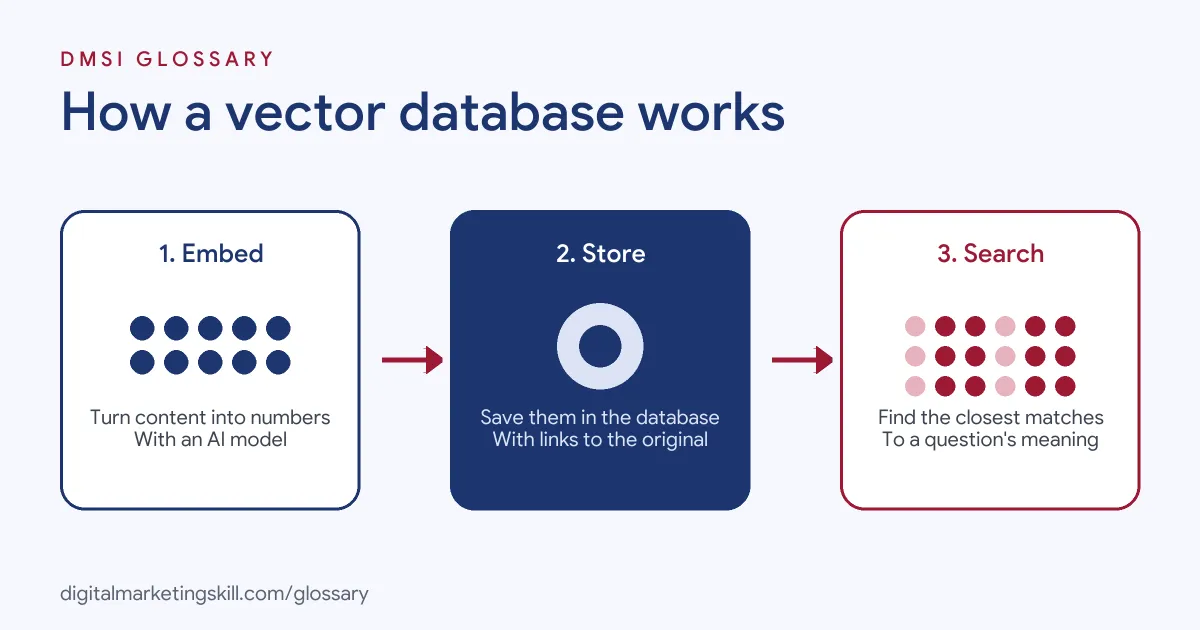
- You fill it by turning your content into embeddings with an AI model, then storing them with a link back to the original.
- To search, you turn the query into an embedding with the same model and ask for the closest matches.
- Some tools, such as pgvector for Postgres, add vector search to a database you already use.
- It is a key part of retrieval-augmented generation (RAG), where an AI looks up facts before it answers.
What Is a Vector Database?
A normal database is great at exact questions, such as “show me all orders over a set value.” But it struggles with fuzzy ones, such as “find reviews that moan about delivery,” when people say the same thing in many ways.
That’s where this kind of store comes in. Pinecone, which makes one, explains that AI applications rely on vector embeddings, a type of data “that carries within it semantic information.” Because embeddings have many dimensions, Pinecone says you need “a specialized database designed specifically for handling this data type.”
So, in plain terms, it is a store for meaning. You put your content in as numbers. Then you get back the bits that are closest in meaning to what you ask.
How a Vector Database Works
Pinecone breaks the process into three steps. First, an embedding model creates embeddings for the content you want to search. Next, those embeddings go into the database, each with a reference to the original content. Finally, when a query arrives, the same model turns it into an embedding, and the database returns the most similar stored items.
Storing Embeddings
OpenAI’s embeddings guide describes the same idea from the other side. After you create an embedding, you “can extract the embedding vector, save it in a vector database, and use for many different use cases.” Each stored item usually includes the numbers, the original text or a link to it, and extra details such as a category or date.
Finding the Nearest Neighbours
Searching means finding the stored vectors closest to the query. The open-source pgvector extension for Postgres supports both “exact and approximate nearest neighbor search.” Exact search checks everything, while approximate search trades a little accuracy for much more speed on large collections.
Measuring Distance
To judge what is “closest,” the tool uses a distance measure. pgvector lists several, including L2 distance, inner product and cosine distance. OpenAI recommends cosine similarity for its own embeddings and notes that the choice “typically doesn’t matter much.”
Vector Database Examples
Here are three made-up examples of how a marketing team might use one:
- Help centre chatbot: A software company stores its help articles as embeddings. When a customer asks a question, the chatbot finds the most relevant articles and answers from them.
- Product search: An online shop lets people search “comfy shoes for long walks” and returns trainers and walking boots, even though those exact words aren’t in the titles.
- Content recommendations: A blog shows three related posts at the end of each article, chosen by meaning rather than by tags.
A Worked Example
Here is a made-up example in plain terms. A bike shop has 300 help pages. It turns each one into a list of numbers and saves them. A customer then types, “My chain keeps slipping off.” The tool turns that question into numbers too. It finds the three pages closest in meaning. The first is about gear tuning. Another covers worn chains, and a third explains how to clean a chain. Next, the chatbot reads those pages and writes a short answer, with links. So the shop never had to guess every way a customer might ask. Instead, the numbers did the matching.
Vector Database vs Vector Index vs Regular Database
| Option | What it does | Good for |
|---|---|---|
| Regular database | Stores rows and finds exact matches | Orders, contacts and stock levels |
| Vector index (such as FAISS) | Speeds up similarity search | Fast lookups, but Pinecone notes it lacks full database features |
| Vector database (such as Pinecone) | Stores and searches embeddings, with database features like filtering | AI search, chatbots and recommendations |
| Database with vector extension (such as pgvector) | Adds vector search to Postgres | Keeping vectors “with the rest of your data” |
Pinecone also mentions metadata filtering as a key feature. For example, you might search only help articles in one language or one product range.
How to Use a Vector Database in a Project
You don’t need to build one yourself to understand the workflow. A typical project looks like this:
- Choose your content. For example, gather help articles, product descriptions or blog posts.
- Split it into chunks. Break long pages into short, focused sections.
- Create embeddings. Send each chunk to an embedding model.
- Store them. Next, save each embedding with its text and useful labels, such as category or language.
- Embed the query. Use the same model to turn each user question into an embedding.
- Retrieve the closest matches. Ask the database for the top few results, with filters if needed.
- Use the results. Show them as search results, or pass them to an AI model to write an answer.
- Keep it fresh. Finally, update the stored embeddings whenever your content changes.
Best Practices
- Use one embedding model. Embeddings from different models don’t compare well, so stick to one.
- Add labels. Labels let you filter results, which keeps answers relevant.
- Test with real questions. For instance, use queries from your support inbox.
- Protect private data. Think carefully before storing personal or sensitive information.
- Start small. A few hundred good pages often beat thousands of messy ones.
Common Mistakes
A common mistake is loading in old or duplicate pages, so the system gives out-of-date answers. Another is using chunks that are too long, which blurs several topics together. Some teams also forget to redo the numbers after they edit a page. Finally, many assume the closest match is always correct. It is only the most similar. So you still need good pages and regular checks. Ask a colleague to test it each month. If an answer looks wrong, fix the page, then redo its numbers. Small, steady fixes keep the tool useful and keep your customers happy.
Where You’ll Use Vector Databases at Work
This skill appears mainly in AI engineering roles. For example, real remote job listings include lines like these:
- “Hands-on experience with RAG pipelines and vector databases” (Mid Data Science / AI Engineer).
- “Build scalable data pipelines across structured and unstructured data using ETL/ELT, vector databases (Pinecone, Weaviate, AstraDB), and knowledge base frameworks” (Senior Forward Deployed Engineer).
- “Experience prototyping with LLM providers (Anthropic, OpenAI, etc.), vector databases, or agent orchestration frameworks outside the Salesforce ecosystem” (Sr. Developer, AI and Agentforce).
As a marketer, you are more likely to use tools built on them, such as AI chatbots or smart search, than to build one. However, knowing how they work helps you plan content those tools can find and use well.
Learn It in the Full Stack Programme
AI fundamentals, including strategy and planning, are part of every DMSI track. The Full Stack (all four tracks) programme covers all ten courses, with one portfolio project from each track, so you see how AI tools support social, email, Google Ads and SEO work. You also get unlimited 1-on-1 mentoring and a U.S. Project Internship from day one.
To understand what goes into a vector database, read our glossary entry on embeddings. To see one in action, read about retrieval-augmented generation.
Frequently Asked Questions
What is a vector database in simple terms?
It is a database that stores meaning as numbers, so it can quickly find content that is similar to a question, even when the words differ.
Why do AI tools need a vector database?
AI tools often need to look up the most relevant facts before answering. A vector database finds those facts fast, based on meaning.
Is a vector database the same as a regular database?
No. A regular database finds exact matches. A vector database finds the closest matches in meaning, although some regular databases can add vector search.
What are examples of vector databases?
Pinecone and Weaviate are examples, and pgvector adds vector search to Postgres.
Do marketers need to build one?
Usually not. However, understanding how they work helps you write content that AI search and chatbots can find and use.
Sources: Pinecone: What is a vector database?; pgvector on GitHub; OpenAI: Vector embeddings guide; remote job listings on Himalayas.