
AI ad creative is advertising content, such as headlines, images, video and copy, that is made or changed with the help of generative AI tools. Ad platforms like Google and Meta now build these tools into their ad managers, and marketers also use standalone AI tools. It matters because it lets small teams produce and test many more ad versions, as long as a person checks every one for accuracy and brand fit.
Key Takeaways
- Generative AI can write headlines and descriptions, create or edit images and resize them for different placements.
- In Google’s Performance Max, AI can generate headlines, descriptions and images from your website and a short summary.
- Meta’s tools include background generation, image expansion and text variations.
- AI-made assets still have to pass ad policies. Google says they “aren’t guaranteed to be approved.”
- Human review is essential. You need to check facts, product details and tone before anything goes live.
What Is AI Ad Creative?
Every ad has creative: the words, pictures and video people see. Traditionally, a copywriter and a designer made each version by hand. With generative AI, you can describe what you want and get drafts in seconds. You can also take one photo and turn it into several versions with different backgrounds or sizes.
AI ad creative covers two kinds of work. First, there is generation, where the tool creates something new, such as ten headline ideas. Second, there is adaptation, where it changes an existing asset, for instance by expanding a square image to fit a vertical placement.
For the basics of what makes an ad work, see our glossary entry on ad creative.
How AI Ad Creative Works
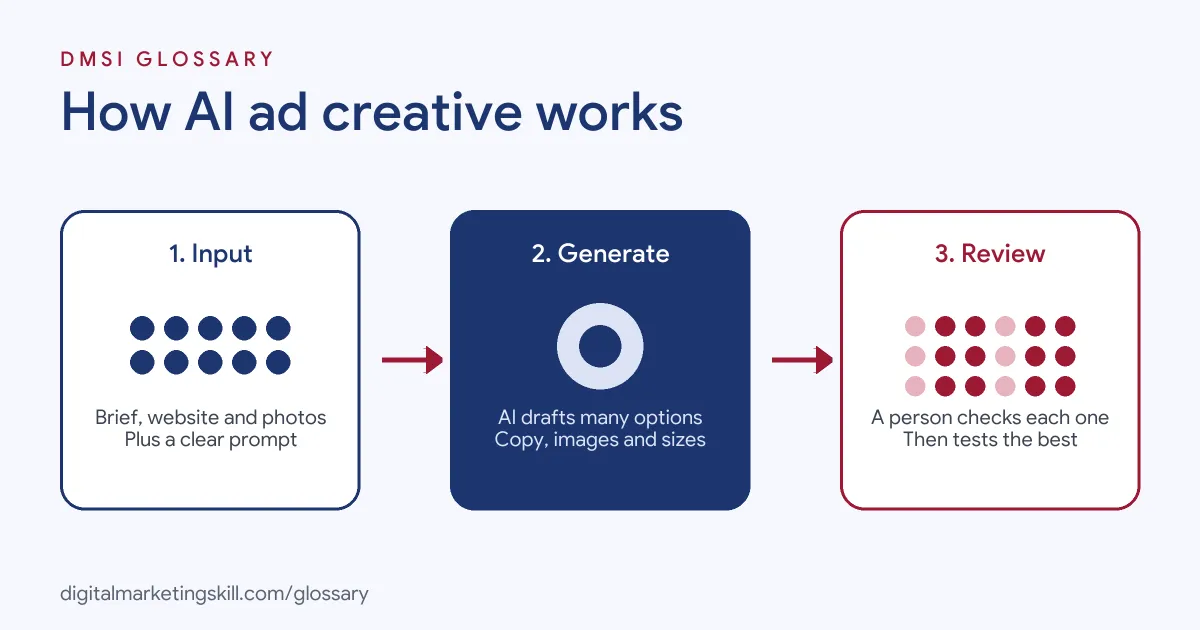
The process usually has three stages. First, you give the tool inputs, such as your website, product details or a prompt. Next, the AI generates options. Finally, you review them, keep the good ones, edit them and launch.
AI Ad Creative in Google Ads
Google builds generative AI into Performance Max. Its help centre says Google “will automatically generate headlines and descriptions based on your website and product or service summary.” It also suggests “a curated set of images,” including new AI-generated ones. In addition, you can “create more headlines or descriptions using your own prompts” and ask Google AI to create new images.
You stay in control. According to Google, “you can review all of them and discard any that don’t match your business.” Even so, the help page warns that assets “aren’t guaranteed to be approved by ads policy.”
AI Tools in Meta Ads
Meta offers similar features in Ads Manager. Jon Loomer, who writes about Meta ads, describes three of them. Background generation “will automatically generate multiple background variations for some of your images.” Image expansion lets Meta “automatically expand images to fit different aspect ratios by auto-generating new pixels.” Meanwhile, text variations “uses AI to generate up to 6 variations of text based on your primary text inputs.”
Limits and Guardrails
Platforms put limits on what their tools will make. Google says its generative AI “contains guardrails to prevent our systems from engaging with inappropriate or sensitive prompts.” It also says generating images in sensitive categories, “such as prominent likeness and minors or children isn’t allowed.”
AI Ad Creative Examples
Here are three made-up examples of how teams might use these tools:
- Online shop: A homeware brand uses image expansion to turn square product photos into vertical versions for Stories. As a result, it doesn’t need a new photo shoot for each placement.
- Local service: A cleaning company enters its website into Performance Max. Then it keeps six of the suggested headlines, rewrites two and discards the rest.
- Training provider: A course provider asks an AI writing tool for ten hooks for a video ad. The team picks three, records short videos for each and tests them against each other.
In each case, AI speeds up the first draft. A person still decides what goes live.
AI Ad Creative Tools Compared
There are two broad routes. Here is how they compare:
| Option | What it does | Good to know |
|---|---|---|
| Google Performance Max generative AI | Drafts headlines, descriptions and images from your site, summary and prompts | You review and discard assets; policy approval isn’t guaranteed |
| Meta generative AI features | Background generation, image expansion and text variations | Works inside Ads Manager on your existing assets |
| Standalone AI tools | Write copy, create images or edit video outside the ad platform | More creative control, but you must upload and check everything yourself |
Most teams use a mix. They draft ideas in standalone tools, then let the platform adapt sizes and variations.
How to Use AI Ad Creative
- Start with a clear brief: the audience, the offer, the key message and the action you want.
- Gather your inputs, such as product photos, brand colours and approved claims.
- Generate several options with your chosen tool, using specific prompts.
- Review every asset. Check facts, prices, product details and spelling.
- Edit the best options to match your brand voice.
- Launch a small test with a few versions, so you can see which one performs.
- Keep the winners, retire the losers and feed what you learned into the next brief.
Best Practices
- Give detailed prompts. Vague inputs give generic results, so describe the audience, tone and offer.
- Protect accuracy. One job listing asks hires to “keep product details accurate” when editing AI-made creative.
- Stay on brand. Keep a short style guide and edit AI drafts to match it.
- Test, don’t assume. AI gives you more versions, so use that volume to run fair tests.
- Respect people and rights. Avoid creating realistic images of real people, and check you have rights to any input images.
How to Measure Results
More ads are only useful if you know which ones work. So judge each version on the same few numbers:
- Click-through rate: how many people who see the ad click it. This shows if the hook grabs them.
- Cost per result: what you pay for each lead or sale. This is the number that matters most.
- Thumb-stop rate for video: how many people watch the first few seconds.
- Frequency and fatigue: how often the same people see the ad. When results drop, it is time for fresh creative.
For example, say an AI headline gets more clicks but a human one brings cheaper sales. In that case, keep the human one, and use the AI hook as an idea for the next test.
Common Mistakes to Avoid
The biggest mistake is to post AI output without checking it. AI can make up features, get prices wrong or add odd details to images. Another error is letting every ad sound the same, because generic prompts lead to generic copy. Some teams also skip testing, so they never learn which AI versions actually work. Finally, many forget that policy rules still apply, so ads get rejected and campaigns stall.
Where You’ll Use AI Ad Creative at Work
AI creative skills now appear in many paid media and creative job listings. For example, recent remote listings ask candidates to:
- “Produce ad creative with AI tools (image, video, copy), then edit it to match our brand and keep product details accurate.” (Growth Marketing Manager, Paid Media).
- “Leverage AI tools to support copywriting, ideation, and creative production.” (Campaign Marketing Executive).
- Follow trends in areas such as “AI-generated creative, synthetic respondents, creative volume, digital and social testing” (Senior Director, Industry Strategy).
So as a Paid Social Specialist, Social Media Manager or Content Creator, you will likely use AI to draft, adapt and test ads.
Learn It in the Social Media Track
AI fundamentals are part of every DMSI track. For ad creative, the best fit is the AI-Powered Social Media Management and Advertising track. It covers content creation (graphics and video), social media marketing and analytics, and social media advertising. Your portfolio project is to plan, create and run a paid social campaign for a real brand. You also get unlimited 1-on-1 mentoring and a U.S. Project Internship from day one.
For more ideas to feed your prompts, see our list of creative content ideas.
Frequently Asked Questions
What is AI ad creative?
It is ad content, such as copy, images or video, that is made or edited with generative AI. A person should still review it before it runs.
Can Google Ads create ads with AI?
Yes. In Performance Max, Google can generate headlines, descriptions and images from your website, a product summary and your own prompts.
Does Meta have AI tools for ads?
Yes. Its features include background generation, image expansion and text variations, which can create up to six versions of your primary text.
Will AI-generated ads always be approved?
No. Google says assets created by generative AI aren’t guaranteed to pass ad policy review, so check them as you would any ad.
Will AI replace ad designers and copywriters?
It changes the job more than it removes it. Teams still need people to write briefs, judge quality, protect the brand and run tests.
Sources: Google Ads Help: Build a Performance Max asset group using generative AI; Jon Loomer: Generative AI features for ads; remote job listings on Himalayas and Himalayas.