
An SSL certificate is a small data file on a web server that proves the website’s identity and lets browsers set up an encrypted HTTPS connection. It holds the site’s public key and the name of the trusted body that issued it. Without one, browsers warn visitors that the site is “not secure”, which hurts trust, sign-ups and sales.
Key Takeaways
- The name “SSL” has stuck, but Cloudflare notes that the protocol is “more commonly called TLS” today.
- It does two jobs: it encrypts data in transit and confirms the server really belongs to the domain.
- Let’s Encrypt is a nonprofit that gives out free, basic DV certificates.
- Let’s Encrypt certificates last 90 days by default, so automatic renewal is essential.
- HTTPS also unlocks key browser features, and it is part of Google’s page experience advice.
What Is an SSL Certificate?
Cloudflare defines it simply: “An SSL certificate is a data file hosted in a website’s origin server.” The file holds the website’s public key, its identity and related information, such as the issuer and the subdomains it covers.
Think of it like a passport for a website. A passport shows who you are, and a trusted government issued it. Similarly, the certificate shows which domain the server belongs to, and a trusted certificate authority (CA) signed it. Browsers check that signature before they show the padlock.
In practice, people use “SSL” and “TLS” to mean the same thing. SSL was the original protocol. TLS replaced it, yet the old name is still the everyday term in hosting panels and job listings.
How an SSL Certificate Works
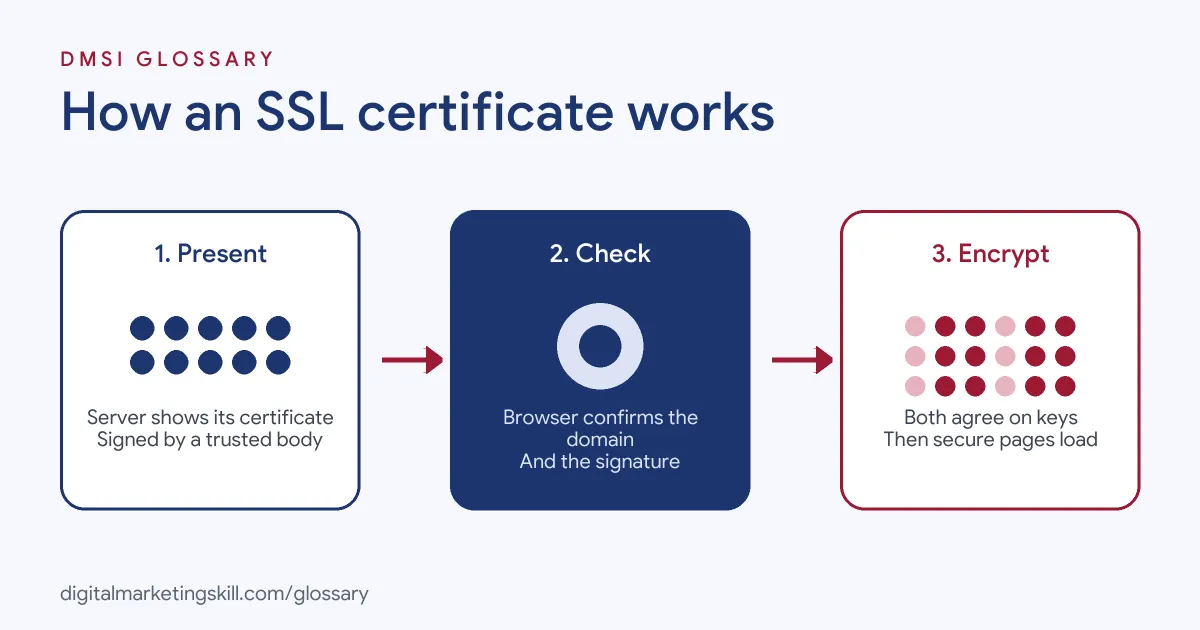
When someone visits an HTTPS site, the browser and server run a quick check before any page loads. First, the server presents its certificate. Next, the browser confirms a trusted CA signed it and that it matches the domain. Finally, the two agree on encryption keys, and the page loads securely.
Encryption
Encryption scrambles data as it travels, so others on the network cannot read or change it. Google’s web.dev guide explains that HTTPS “helps prevent intruders from tampering with communication” between your site and visitors. These include hackers, and also firms such as internet providers “that inject ads into pages.”
That matters even on a simple blog. Web.dev warns that intruders exploit “every unprotected resource”, including images, cookies and scripts.
Identity and Validation
Before a CA issues a certificate, it checks that the applicant controls the domain. There are three common levels:
- Domain Validation (DV): confirms control of the domain only. It is quick and can be fully automated.
- Organization Validation (OV): also checks the firm behind the site.
- Extended Validation (EV): runs the deepest checks on the firm.
Let’s Encrypt offers only DV certificates. It says it does not offer OV or EV “primarily because we cannot automate issuance” for those types.
Expiry and Renewal
No SSL certificate lasts for ever. Let’s Encrypt states its default certificates “are valid for 90 days” and recommends renewing them every 60 days. It also offers an opt-in six-day certificate. Since they are short, most hosts renew them for you. If renewal fails, however, visitors see a full-page browser warning.
SSL Certificate Examples
Here are three made-up examples of common set-ups:
- Small business site: A plumber’s WordPress site uses the free certificate built into its hosting plan. The host renews it automatically.
- Online shop: A clothing store installs a certificate before launch, so checkout pages load over HTTPS and shoppers see the padlock.
- Marketing landing pages: An agency points campaign subdomains at a page builder. It then checks each subdomain is covered, so ads never send traffic to a warning page.
In each case, the certificate is invisible when it works and very visible when it breaks.
Types of SSL Certificate Compared
| Type | What is checked | Typical use |
|---|---|---|
| Domain Validation (DV) | Control of the domain | Blogs, small business sites, most marketing sites |
| Organization Validation (OV) | Domain plus the organisation | Companies that want their name in the certificate details |
| Extended Validation (EV) | Domain plus detailed organisation checks | Organisations with strict compliance needs |
| Self-signed | Nothing; no trusted CA | Internal testing only; Cloudflare notes browsers “don’t consider self-signed certificates trustworthy” |
For most marketing websites, a DV certificate is enough. The main difference between the types is how much identity checking happened.
How to Set Up an SSL Certificate
- Check your host. Many hosts include a free certificate. Look for an SSL or HTTPS option in the control panel.
- Turn it on for every domain. Include the main domain, the www version and any subdomains you use.
- Check that it renews. Make sure the host or tool renews it before it runs out.
- Redirect HTTP to HTTPS. Send all old http:// links to the secure version with a permanent redirect.
- Update your site address. In WordPress, set the site URL to https:// and fix any images or scripts still loading over HTTP.
- Check Search Console. Google’s page experience guidance points to Search Console’s HTTPS report to see what needs fixing.
After the switch, test key pages, forms and checkout. Then update links in your ads, emails and social profiles.
How to Check a Site’s Certificate
You can check any site in a few clicks. Cloudflare explains that in Chrome, you click the padlock icon next to the web address. From there, you can open the details. Look at three things. First, check who it was issued to. It should match the site you are on. Next, check who issued it. Then check the end date. If that date is close, ask the host when it will renew. Do this for your main site and for each landing page you use in ads. It takes a minute, and it can save a whole campaign from a warning page.
Best Practices for an SSL Certificate
- Use HTTPS everywhere. Web.dev advises protecting all websites with HTTPS, “even if they don’t handle sensitive communications.”
- Let a tool renew it. Short lifetimes make renewing by hand risky.
- Watch for mixed content. One image loaded over HTTP can break the padlock.
- Cover each part of the site. Campaign pages and shop subdomains need cover too.
- Keep private keys private. Let’s Encrypt notes the private key is generated and kept on your own server, never on theirs.
Common Mistakes to Avoid
First, owners install a certificate but forget to redirect HTTP, so two versions of the site exist. Second, they miss a subdomain used for landing pages. Third, the renewal fails, and nobody sees it until visitors complain. Finally, some use a self-signed one on a live site, and browsers flag it as not safe. A monthly check of key URLs prevents most of these problems.
Why HTTPS Matters for Marketing
Security is not only an IT issue. Cloudflare notes that browsers tag HTTP sites as “not secure” in noticeable ways. That label can stop a visitor from filling in a form or entering card details. In addition, web.dev explains that powerful browser features, such as service workers and camera access, require HTTPS. So a secure site is the base for forms, tracking, shops and apps.
Where You’ll Use an SSL Certificate at Work
This work shows up in many website jobs. For example, remote job listings ask candidates to:
- “Configure and maintain web servers, domains, DNS records, SSL certificates, and email-related DNS records.” (PHP and WordPress Websites Webmaster).
- “Handle hosting environments, domains, DNS, SSL, and WordPress management” (IT and Business Administrator).
- Show “Experience with SSL certificate management, including CSR generation, certificate renewal, installation, and troubleshooting.” (Senior Network Engineer, Security).
So if you plan to work as a WordPress Developer or Website Manager, you will install, renew and troubleshoot certificates. You will also connect them to DNS and hosting.
Learn It in the WordPress and SEO Track
You can practise securing a site with HTTPS in the AI-Powered WordPress and SEO Specialist track. There, you build a WordPress site or store and rank it with an SEO content plan. The track is about 90% hands-on, with unlimited 1-on-1 mentoring and a U.S. Project Internship from day one.
To compare hosts that include free certificates, read our guide to website hosting services.
Frequently Asked Questions
What is an SSL certificate in simple terms?
It is a digital file that proves a website is who it claims to be and lets the browser encrypt the connection. It is what makes the padlock and HTTPS appear.
Is an SSL certificate free?
Yes, often. Let’s Encrypt does not charge for its certificates, and many hosts include one in their plans.
How long does an SSL certificate last?
It depends on the issuer. Let’s Encrypt certificates last 90 days by default, so most hosts renew them automatically.
What is the difference between SSL and TLS?
TLS is the modern version of SSL. People still say SSL out of habit, but today’s secure connections use TLS.
What happens if my certificate expires?
Browsers show a warning page instead of your site. Most people will leave, so set it to renew and keep an eye on it.
Sources: Cloudflare: What is an SSL certificate?; Let’s Encrypt: FAQ; web.dev: Why HTTPS matters; Google Search Central: Page experience; remote job listings on Himalayas.