
KWFinder is a keyword research tool built around one number: a keyword difficulty (KD) score from 0 to 100. That score estimates how hard a term is to rank for. It is based on the backlink strength of the pages already ranking. Reading it correctly, not just trusting it, is the real skill.
Key Takeaways
- KWFinder’s database covers more than 2.5 billion related keywords, growing by roughly 20 million a month, plus around 65,000 supported locations for local volume (Mangools).
- Its KD score is built from Link Profile Strength: Domain Authority and Page Authority from Moz, plus Citation Flow and Trust Flow from Majestic, each on a 0-100 scale (Mangools, Majestic).
- Moz states plainly that “Domain Authority is not a Google ranking factor and has no effect on the SERPs,” so a KD score built partly on DA is a proxy, not a Google signal (Moz).
- Citation Flow measures link quantity and ignores quality. Trust Flow measures link quality. Majestic designed the two to be read together, not alone (Majestic).
- Google’s own Keyword Planner shows most accounts a search-volume range, not an exact number. That is why a tool reporting an exact figure, like KWFinder, still deserves a second check (Google Ads documentation).
In this guide
- The Gap: What A Difficulty Score Does And Doesn’t Tell You
- How KWFinder’s Difficulty Score Actually Works
- What Differs Between New Sites And Established Sites
- How To Lead With A Difficulty Score At Each Stage
- Measuring Whether A KD Score Called It Right
- The One Decision Rule For Using A KD Score
- A Real Case: Competitor And Keyword Research Driving Results
- Frequently Asked Questions About KWFinder
- Turning Keyword Difficulty Into A Career Skill
The Gap: What A Difficulty Score Does And Doesn’t Tell You
Most reviews of a tool like KWFinder describe the interface and stop there. They skip the one question that matters. What is the number actually measuring? A KD score is not a prediction from Google. It is an estimate, built from public backlink data, of how strong the current top-ranking pages are.
Three ground rules keep this guide honest. First, every figure here comes from the tool vendors’ own documentation, checked directly, not from a secondhand review.
Second, a KD score is a snapshot of today’s top results, not a permanent ranking. Competitors change, so re-check it before committing real budget. Third, a low score means the current competition is weak. It does not mean your content will be good enough. It does not mean you will keep the ranking once you get it.
These ground rules matter because a difficulty score is often read as a verdict, rather than a starting point. In practice, the gap between a term that ranks fast and one that stalls usually comes down to what the score cannot see: content quality, search intent and how the page is built. A score can narrow your list. It cannot write the page or guarantee the result.
This is not a flaw specific to KWFinder. Every keyword research tool that reports a difficulty number faces the same limit, because every one of them scores backlinks and authority signals, not the quality of the writing a competitor published. Treat the number as a filter for where to look first, not as the final word on whether a term is worth targeting.
Worth saying directly: none of this makes KWFinder, or any tool like it, less useful. A large, regularly updated database still saves hours of manual digging. The point is narrower. Know what the number is estimating, and keep the manual check as a permanent second step, not an occasional extra.
How KWFinder’s Difficulty Score Actually Works
KWFinder is one keyword research tool inside the Mangools suite. Mangools states its own database covers more than 2.5 billion related keywords. That number grows by about 20 million a month. It also checks roughly 100 million competitor keywords monthly, and supports around 65,000 locations for localized volume.
The free tier is capped. You get five lookups a day, fifteen related keywords per lookup, and five competitor keywords per lookup. For comparison, that is a narrow slice of what a paid account unlocks, which is one reason free and paid tools suit different stages of research, as covered in this companion guide to keyword research tools.
Inside The Link Profile Strength Score
The KD score is where the tool does its real work. Mangools explains that it pulls the pages ranking on the first page for a term. It then scores each one’s Link Profile Strength. That score blends Domain Authority and Page Authority, both from Moz, with Citation Flow and Trust Flow, both from Majestic. Lower-authority pages are weighted more heavily in the final number, so one unusually strong outlier does not distort the whole score.
Each input metric has its own meaning, and none of them come from Google. Moz’s own definition states plainly that “Domain Authority is not a Google ranking factor and has no effect on the SERPs.” It is a predictive score Moz built from its own crawl data.
Majestic’s own documentation describes Citation Flow as a score that “reflects the quantity of links that point to any given website,” and notes it “does not care whether a link is of good-quality, or poor quality.” Trust Flow, by contrast, is “a score based on quality, on a scale between 0-100.” Majestic designed the two to be read side by side, since popularity and authority are not the same thing.
Put together, a KD score is a backlink-based proxy for competition, not a Google metric. It can still be useful. However, it is only useful if you remember what it is actually built from, and what it leaves out.
What Differs Between New Sites And Established Sites
The same KD score means something different depending on the strength of the site using it. The number does not change. What you should do with it does.
New Sites: A Low KD Score Is Built For You
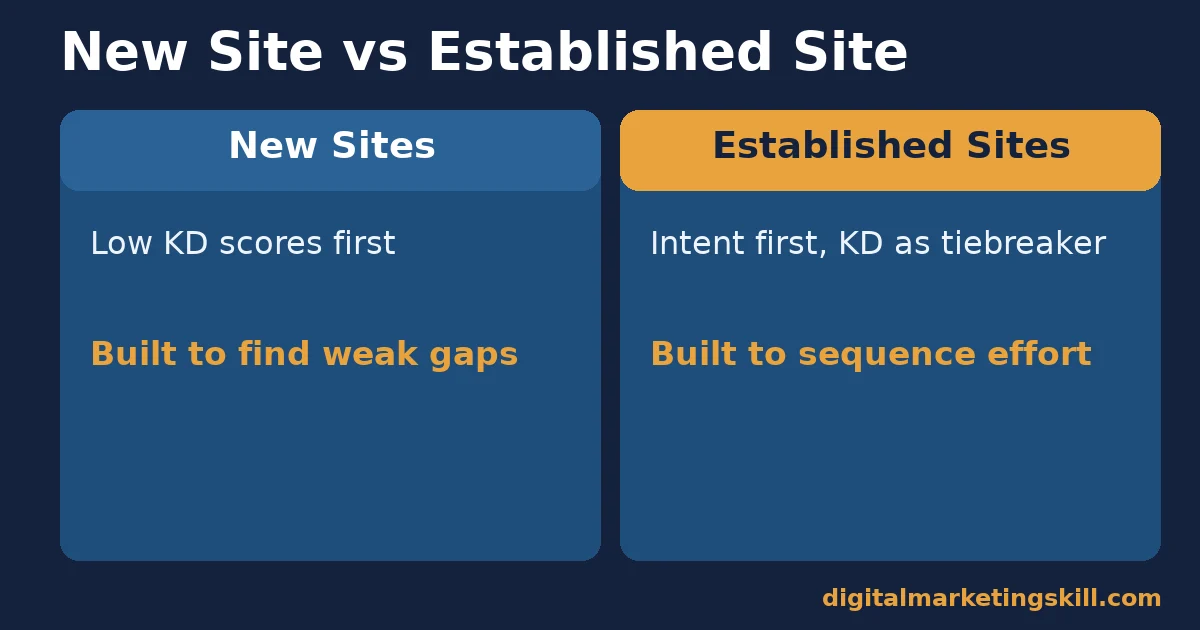
When you open KWFinder on a brand-new domain, the honest move is to sort by KD score and work from the bottom.
A new or low-authority site has little backlink strength of its own yet. A low KD score tells you the current top pages are weak too. So the gap between you and them is small. This is the honest starting zone for a new site: terms where the competition has not built much of a backlink profile.
Established Sites: A Higher KD Score Is Built For You
This split is not about which site is “better,” only about where each one should start. A site with an existing backlink profile and a track record can often outrank pages with a moderate KD score. Its own authority inputs are already stronger than a brand-new domain’s. For this type of site, a low-KD-only strategy leaves real traffic on the table. A higher score is not automatically off-limits.
Think of the two zones as a ladder, not two permanent categories. A site that starts in the low-KD zone and keeps publishing well-targeted, well-linked content moves up that ladder over time. Its own Domain Authority and Trust Flow rise as it earns more legitimate links, which is exactly why the same keyword can look “too hard” for a site early on, and realistic for that same site later, once its own authority inputs have caught up.
How To Lead With A Difficulty Score At Each Stage
Knowing which zone you are in only helps if it changes what you check first.
New Sites: Lead With The Score, Then Verify By Hand
Work through this stage quickly, since the point is a short, realistic shortlist, not an exhaustive one. Sort your candidate list by KD score, lowest first, and stop scanning once the score climbs past what your site can realistically compete for today.
Filter candidate keywords to the lowest KD scores first. Then open the actual top 10 results for each one. Check whether those pages are thin, outdated or badly matched to the query, not just low-authority. A low score with weak content above it is a real opportunity. A low score with strong, well-matched content above it is a trap the number alone will not warn you about.
Established Sites: Lead With Intent, Then Use The Score As A Tiebreaker
Start from search intent and topical relevance instead of the lowest number on the list. Shortlist terms your site can credibly answer. Then use the KD score to sequence them: lower-difficulty terms first for faster wins, higher-difficulty terms once you have supporting content and internal links in place. The guidance in these website SEO tips covers the on-page side of the same sequencing.
Measuring Whether A KD Score Called It Right
A tool’s KD score is an estimate made before you publish. What actually happens afterward is the only honest test of whether that estimate was right for your site, so build measurement into the same workflow as the research itself.
A difficulty score is a forecast made before you publish. Track what actually happens after. That is how you learn whether the forecast was useful for your site specifically, not just in theory.
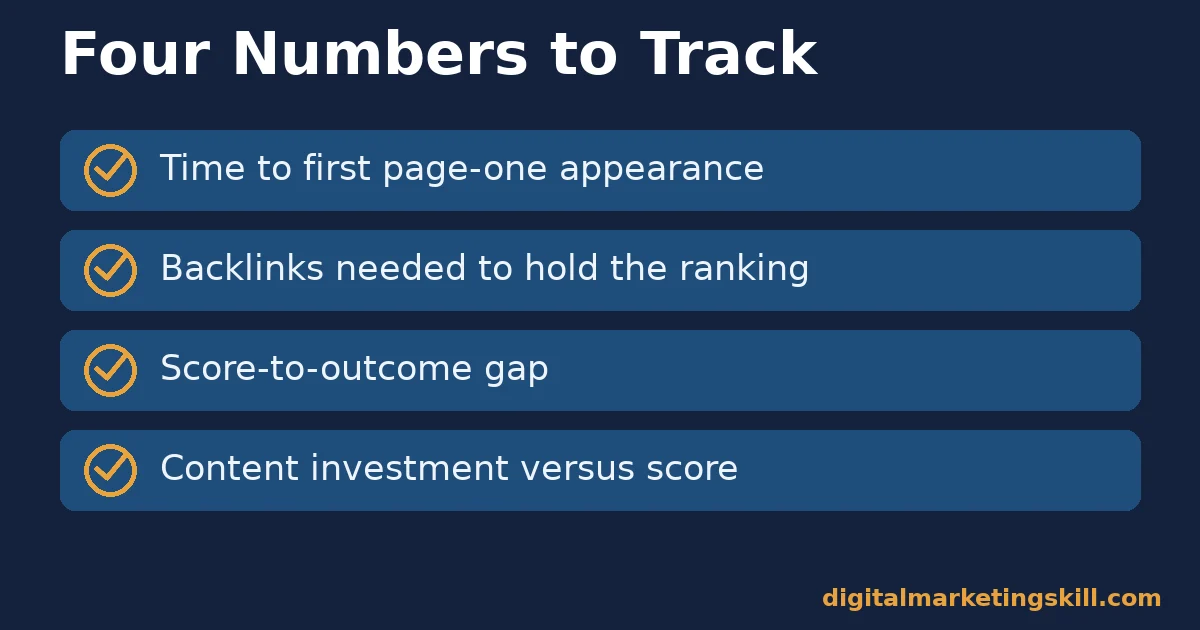
- Time to first page-one appearance: how many weeks after publishing the page first reaches the first page, checked directly in search console or a rank tracker.
- Backlinks needed to hold the ranking: how many referring domains your page actually needed, compared with what the KD score implied about the competition’s link strength.
- Score-to-outcome gap: keep a simple log of predicted KD versus weeks-to-rank for your last ten pages. A consistent gap in one direction means you should recalibrate how you read the score for your site.
- Content investment versus score: whether low-KD pages needed templated, lighter content to rank, and higher-KD pages needed deeper, more original content, matching what the score implied about competition.
Review these four together once a month, not in isolation. A page that ranked fast but needed far more backlinks than its KD score implied is telling you something useful about your niche, not just about that one page. Keep the log simple: a spreadsheet with the keyword, the KD score KWFinder reported, and the outcome weeks later is enough to spot a pattern after ten or twenty pages.
The One Decision Rule For Using A KD Score
Teams often ask which KD threshold to standardise on, as if one cutoff number could replace judgment for every site and niche. It cannot, because the score means something different depending on your own site’s authority, as the sections above cover. The decision rule below settles a narrower, more useful question: given one keyword in front of you right now, what should move you to act on it.
Use the KD score to shortlist candidates. Never use it to make the final call alone. The final call belongs to a short manual check of the actual top 10 results.
Illustrative, invented numbers: picture two keywords. One shows a KD of 14, and its top 10 is full of forum threads and thin listicles. One shows a KD of 38, and its top 10 is full of pages that do not fully answer the query.
Under the rule above, both are real candidates. The score alone would have pushed you toward the first and away from the second. The manual check shows the second may be just as winnable, for a reason the number alone cannot see: a weak content match, not a weak backlink profile. Keep that logic even when the scores in front of you look nothing like this illustration; the rule is about checking the top 10 by hand, not about these exact numbers.
A Real Case: Competitor And Keyword Research Driving Results
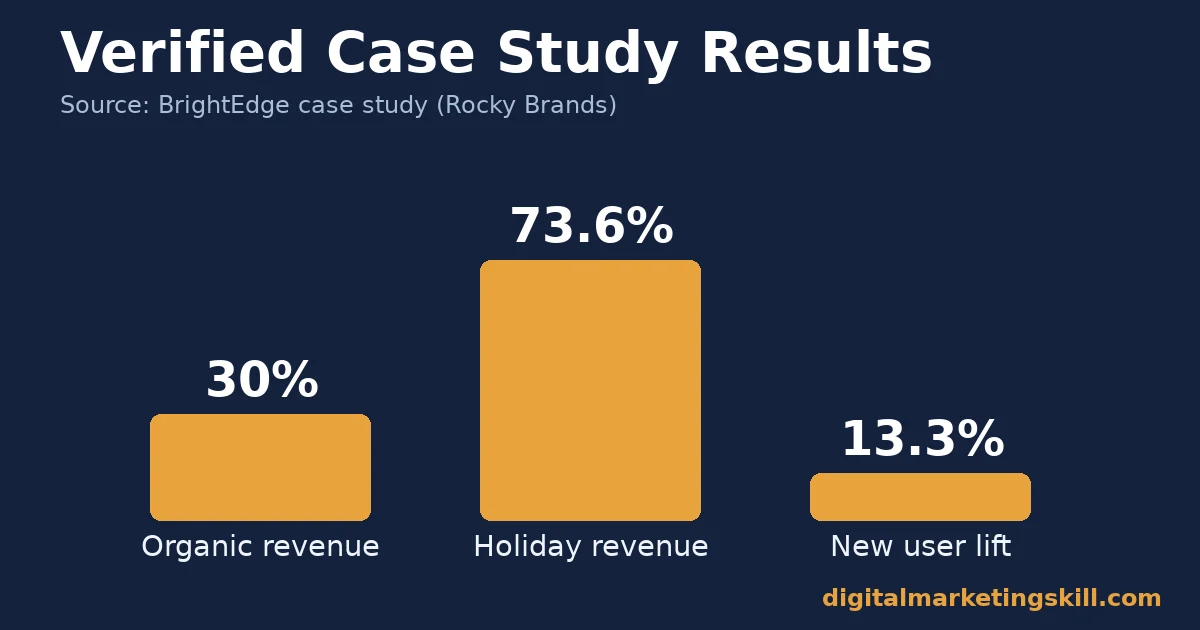
BrightEdge’s published case study on footwear and apparel company Rocky Brands describes using its Data Cube tool for keyword and competitor research. The company chose target terms for product and content pages based on where it could realistically compete, rather than the broadest possible terms.
As a result, the company reported organic revenue growth of 30% following the research-led overhaul. In the following holiday season, it also reported a 73.6% revenue jump and a 13.3% lift in new users, compared with the prior period, plus close to 1,500 organic keywords ranking on page one of Google in the US.
Limits worth stating plainly: this is a vendor-published case study, self-reported by BrightEdge and its customer, not independently audited. It covers one footwear and apparel retailer, using a different vendor’s tool from KWFinder. Even so, the same core idea, scoring competition before committing content budget, applies across tools. The holiday-season figures compare against one prior period, not a multi-year average.
Frequently Asked Questions About KWFinder
Is KWFinder accurate enough to trust on its own?
It is accurate as a backlink-based estimate of today’s competition, built from real Moz and Majestic data. That said, it is not a prediction from Google, and it cannot see content quality, search intent or how well a page answers the query. Use it to shortlist, then check the actual results by hand before you commit.
Why do KWFinder and other keyword tools show different difficulty scores for the same term?
Each tool builds its difficulty score from its own inputs and its own weighting. KWFinder leans on Moz and Majestic backlink metrics. Other tools build similar scores from their own crawl data. None of them read a shared number from Google, so expect scores to diverge, sometimes widely, for the same keyword.
Does a low KD score guarantee a fast ranking?
No. A low score means the current top-ranking pages have a weak backlink profile. It says nothing about whether your content will be better, how well search intent is being served, or whether a stronger competitor will publish on the same term next month. Treat it as a starting signal, not a guarantee.
How often should I re-check a keyword’s difficulty score?
Re-check it before you actually commit content budget, even if you researched the term earlier. The pages ranking on the first page can change. There is no fixed interval that fits every niche; a fast-moving topic needs more frequent checks than a stable, reference-style one.
Should a brand-new site avoid every keyword with a high KD score?
Not entirely, but weight your early list toward lower scores while you build your own backlink and content base. As your site’s own authority grows, a moderate-to-higher score becomes more winnable. That is why established sites can reasonably target different terms than brand-new ones.
Is Domain Authority the same thing as a Google ranking signal?
No, and Moz says so directly. Domain Authority is Moz’s own predictive score, built from its own crawl data, used to compare the relative strength of sites. It is not published or used by Google. Treat it as one useful proxy among several, not as proof of how Google itself will rank a page.
What should I check beyond the KD score before targeting a keyword?
Open the actual top 10 results and read them. Check whether they match search intent, how recently they were updated, and whether they fully answer the query. A thin or mismatched top 10, even at a moderate KD score, often beats a well-served low-KD term.
Does KWFinder work the same way for every language or market?
Coverage varies. Mangools reports support for roughly 65,000 locations for localized search volume, but data depth is uneven across regions and languages, much like other keyword research tools. For a thin-looking market, cross-check the result against a second tool or a live, free source such as autocomplete before concluding the demand is not there.
Turning Keyword Difficulty Into A Career Skill
Reading a difficulty score correctly, knowing what it measures and what it cannot see, is one applied skill inside a much larger SEO toolkit. It sits alongside the broader keyword research landscape covered in this companion guide. The Master Diploma in Digital & AI Marketing from Digital Marketing Skill Institute includes an AI-Powered WordPress and SEO Specialist track built around exactly this kind of research-to-ranking workflow.
Completing all four tracks unlocks the Full Stack option, covering all ten courses. Every track also includes unlimited 1-on-1 coaching and mentoring, plus a U.S. Project Internship with a verified U.S. Work Reference Letter. The certificate is dual US and UK accredited, and recognised in more than 100 countries. You study 100% online, from anywhere in your country.
See how past students describe the program on the reviews page. Browse more practical guides, including these free Google marketing tools, on the digitalmarketingskill.com blog. Or go straight to the application page to start, wherever you live. Learn more about the Institute at digitalmarketingskill.com, and explore the full program at digitalmarketingskill.com.
Every figure in this guide was checked against its original source before publication. Figures marked as illustrative are invented examples, not real results.