
A keyword research tool finds the exact terms people type into search engines. It also shows how often people search each term and how hard that term is to rank for. Picking the right keyword research tool, and reading its numbers correctly, decides whether your content gets found. This guide covers both.
Key Takeaways
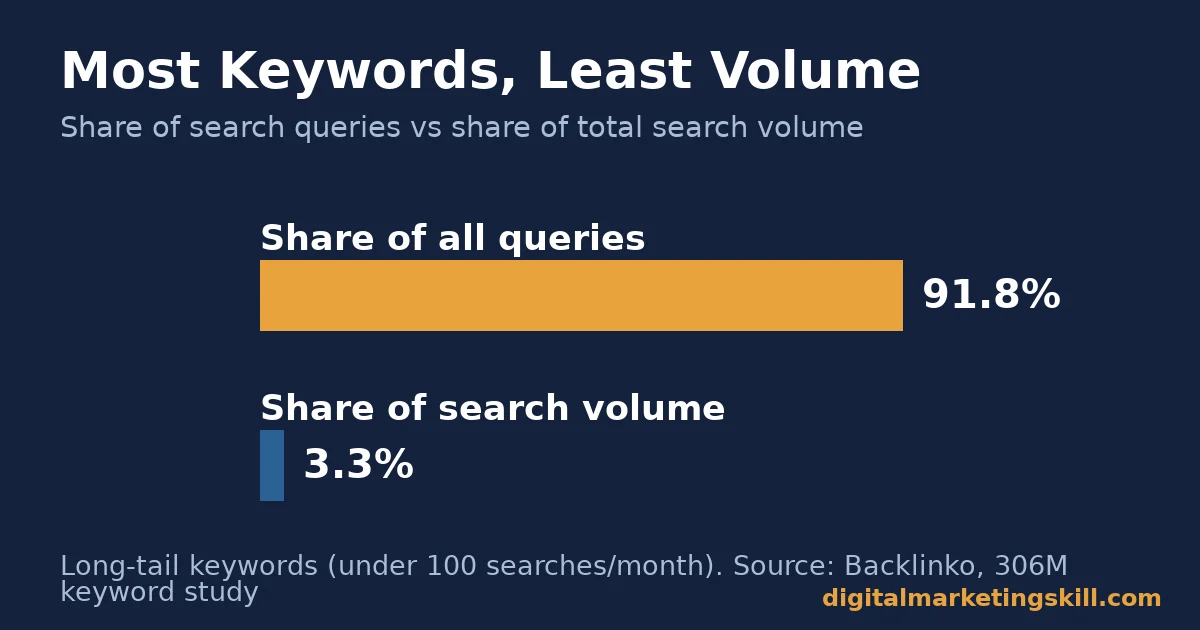
- 91.8% of all search queries are long-tail terms. However, they add up to just 3.3% of total search volume, per Backlinko’s analysis of 306 million keywords.
- 68.01% of Google searches in the US now end without a click, up from 60.45% two years earlier, according to SparkToro’s clickstream research (a US-only figure).
- Google’s own Keyword Planner requires completed billing setup, not an active running ad campaign, to show keyword ideas, per Google’s own support documentation.
- Mobile searches made up roughly two-thirds of the volume behind that zero-click figure, with mobile zero-click rates running well above desktop, per SparkToro.
In this guide
- Why Keyword Lists Alone Don’t Work Anymore
- What a Keyword Research Tool Actually Measures
- Which Tool Fits Which Job
- How To Use Each Type Well
- Grouping Keywords Instead of Targeting Them One by One
- Reading a Keyword Difficulty Score Correctly
- Finding Keyword Gaps Against Competitors
- Common Mistakes That Waste Keyword Research Time
- Matching Search Intent, Not Just Volume
- How To Measure What’s Working
- The One Decision Rule That Saves the Most Wasted Effort
- What This Looks Like in Practice
- Frequently Asked Questions About Keyword Research Tools
- Where to Learn This Properly
Why Keyword Lists Alone Don’t Work Anymore
Most guides to a keyword research tool stop at one step. Type in a word, get a list. That list used to be enough. It is not anymore.
This is a practical reading of public tool documentation and research, not a fixed formula. Search engines change ranking factors often. A tool’s numbers are estimates, not guarantees, so treat every figure here as a planning input.
The real gap is this: most searches now end without a click at all. Most individual keywords also get almost no volume on their own. A keyword research tool that only sorts by volume misses both facts. You need a method that accounts for clicks and long-tail demand together.
What a Keyword Research Tool Actually Measures
A keyword research tool pulls data from search engines or crawled web data. It then reports that data back in a few core fields: search volume, competition, cost-per-click, and related terms.
Search volume is the average number of monthly searches for a term. Competition, sometimes called keyword difficulty, estimates how hard it is to rank for that term organically. Cost-per-click estimates what advertisers pay per click if they bid on that term. Related terms, often called keyword ideas, surface other phrases people search alongside your seed term.
Most tools also show a trend line, a rough chart of how search interest in a term has moved over recent months. A flat trend line means steady, predictable demand. A sharply rising or falling trend line is worth investigating before you commit real budget, since it suggests the volume figure you are looking at may not hold going forward.
None of these numbers are exact counts. They are modeled estimates built from sampled data. That is why the same keyword can show different volume in two different tools. Use them to compare terms against each other, not as a precise forecast.
Here is why that modeling matters in practice. Backlinko’s analysis of 306 million US keywords found that 91.8% of all search queries are long-tail, each pulling under 100 searches a month. Yet those long-tail terms together account for only 3.3% of total search volume. A handful of high-volume head terms carry most of the demand, while the long tail is countless small, specific searches.
Which Tool Fits Which Job
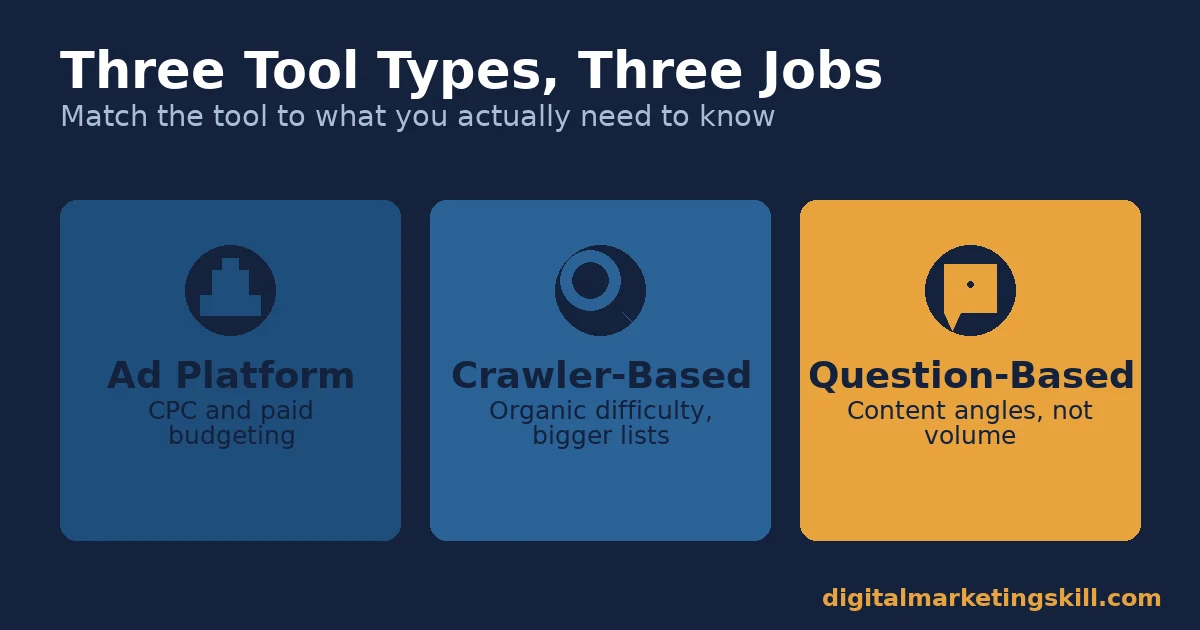
No single keyword research tool does everything best. Each one is built around a different data source and a different job.
Ad Platform Tools: Built For Paid Search Budgeting
Google’s own Keyword Planner pulls data straight from Google’s ad auction. That makes it the most accurate source for cost-per-click and paid competition. Despite older advice, it no longer requires a running campaign; it requires completed billing setup, per Google’s support documentation. It is free, but its organic-difficulty data stays thin, since that is not what it was built to measure.
Crawler-Based Tools: Built For Organic Keyword Discovery
Some tools build their own web crawl, rather than relying on ad-auction data. They tend to give fuller organic-difficulty scores and larger keyword databases, since they sample actual ranking pages instead of ad bids. The tradeoff is cost. Deeper data usually sits behind a paid plan, with a limited number of free lookups per day.
Question-Based Tools: Built For Content Ideas, Not Volume
A smaller category of tool skips volume and competition. Instead, it surfaces the actual questions people type around a seed term. These tools are weaker for prioritizing which keyword to target. However, they are stronger for finding content angles a volume-only tool would never surface.
How To Use Each Type Well
Picking the right category of tool only helps once you know what to do with its output.
Ad Platform Tools: Lead With Budget Questions
Use an ad platform’s keyword tool to answer one question: what would this term cost to bid on? Its cost-per-click and competition figures are built for that question. They are also the most current numbers available for paid search decisions.
Crawler-Based Tools: Lead With a Seed List, Not One Term
Enter five to ten seed terms at once, not one. A single seed term returns a narrow slice of related keywords. A handful of seeds, covering different angles on your topic, surfaces the long-tail variety that actually makes up most real search queries.
Question-Based Tools: Lead With Your Outline
Run a question-based tool before you write, not after. The questions it surfaces often become your subheadings directly. That also means your content answers the exact phrasing a reader searched for.
Grouping Keywords Instead of Targeting Them One by One
A keyword research tool often returns dozens of closely related terms for a single topic. Treating each one as a separate page target is a common mistake. Many of those terms share the same search intent and belong on one page, not several.
This grouping is usually called keyword clustering. The practical test is simple: if the top-ranking pages for two different keyword phrases are mostly the same pages, those two phrases likely belong on one page together. If the top results are different page types entirely, they probably need separate pages.
Clustering avoids two problems at once. It stops you from publishing five thin pages that compete with each other for the same intent, a problem sometimes called keyword cannibalization. It also produces fewer, stronger pages that each have a better chance of ranking for the full group of related terms, not just the one phrase you originally searched for.
Reading a Keyword Difficulty Score Correctly
Most keyword research tools show a difficulty score on a scale, often 0 to 100, estimating how hard a term is to rank for organically. That score is useful, but it is also the most misunderstood number in the whole tool.
The score is built mainly from the backlink profile of pages already ranking for that term. It is not built from your own site’s current authority, your content quality, or how well you can match search intent. Two sites targeting the same keyword with the same difficulty score can get very different results, because the score says nothing about either site’s starting point.
Use the difficulty score as a rough filter, not a final verdict. A high score on a term you can answer better than every page already ranking is still worth attempting. A low score on a term with a poor intent match, as covered above, is still a weak choice. Combine the score with the intent check, never use it alone.
Finding Keyword Gaps Against Competitors
Beyond a single seed term, most crawler-based keyword research tools offer a gap or comparison feature. You enter your domain and one or more competitor domains, and the tool returns terms those competitors rank for that you do not.
This method surfaces terms you would likely never think to search for yourself, since they come from the competitor’s existing content rather than your own brainstorming. It works best once you already have a reasonably full site; on a brand-new site, the gap list tends to be so large it is not useful for prioritization.
A practical way to use a gap list: sort it by search volume first, then cross-check the top twenty or so against search intent, the same way you would for any other keyword. The gap tool finds candidates; it does not replace the intent check.
Common Mistakes That Waste Keyword Research Time
Four mistakes using a keyword research tool show up again and again.
- Chasing volume alone. A term with 10,000 monthly searches and brutal competition can be a worse target than ten long-tail terms you can actually rank for this quarter.
- Trusting one tool’s number as exact. Since every tool models its estimate differently, a single figure should guide direction, not set a precise forecast.
- Ignoring that most searches end without a click. With 68.01% of US Google searches ending in no click, ranking first no longer guarantees a visit. Amsive’s analysis of 700,000 keywords found non-branded terms that trigger an AI Overview lose 19.98% of their click-through rate on average.
- Picking a keyword with the wrong search intent. A high-volume buyer term showing mostly informational results, for example, wastes effort even if you do rank.
Matching Search Intent, Not Just Volume
Before you commit to a keyword, check what is already ranking for it. If the top results are product pages and you plan a guide, or the reverse, that mismatch is a warning sign.
This step catches something pure keyword-tool numbers miss. A term can have solid volume and low competition and still be a poor target. What ranks today tells search engines what kind of result that query wants to see.
Google’s own SEO starter guide backs this approach from the other direction. It advises thinking about the different words a beginner versus an expert might search for the same topic, since “users who know a lot about the topic might use different keywords in their search queries than someone who is new to the topic.” A keyword research tool helps you find those variations before you commit to one angle.
How To Measure What’s Working
Four numbers tell you whether your keyword choices are paying off once content is live. Each is defined here in one line.
- Organic position: where your page ranks for the target keyword in unpaid results. Track it weekly for new content.
- Click-through rate (CTR): the share of people who saw your result and clicked it. A low CTR at a good position usually means a weak title or description.
- Impressions: how many times your page appeared in search results for any query. Rising impressions with flat clicks often signals a zero-click-prone query.
- Keyword-to-page ratio: how many distinct keywords a single page ranks for. A healthy page usually ranks for far more terms than its one target keyword.
Check these monthly for the first quarter after publishing, since organic rankings move slowly. A page with rising impressions but flat clicks is often ranking for a zero-click-prone query. That is a prompt to improve the title and description, not the content itself.
Keep a simple log alongside these four numbers: which keyword you targeted, what you changed on the page, and the date of that change. Without that log, a ranking jump a few weeks later is hard to credit to any specific edit, and you end up repeating guesswork instead of a tested playbook.
The One Decision Rule That Saves the Most Wasted Effort
Decision rule: check search intent against the current top results first, then check volume and competition second. A high-volume keyword with the wrong intent match will not convert, no matter how well it ranks.
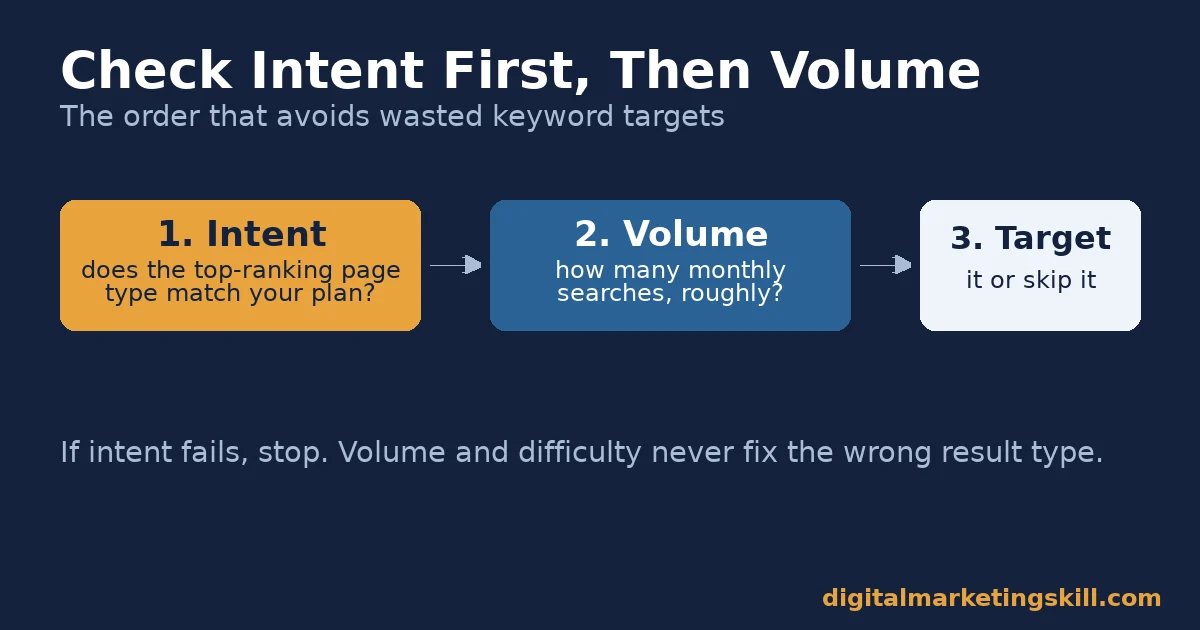
Illustrative, invented numbers: picture two keyword options. Option A shows 2,400 monthly searches and medium competition, but the top results are all vendor comparison pages for a how-to guide you planned to write. Option B shows 320 monthly searches and lower competition, and the top results are genuine how-to guides matching your plan exactly.
Here, Option B is the better target, even at roughly one-eighth the volume, because it can actually rank and convert. Option A would need a different page type entirely to compete.
What This Looks Like in Practice
Backlinko’s keyword study offers a useful real-world check on this pattern. Because 91.8% of search queries are long-tail and individually low-volume, a content plan built only around a handful of high-volume head terms is competing for a small, crowded slice of total demand. Meanwhile, it leaves the much larger number of specific, easier-to-rank long-tail queries untouched.
One limit applies here: this figure describes the shape of search demand in aggregate, not any single site’s traffic potential. It also says nothing about conversion rate once a visitor arrives. So treat it as a reason to build a broader keyword list, not a guarantee that any specific long-tail term will perform.
Frequently Asked Questions About Keyword Research Tools
What is a keyword research tool used for?
A keyword research tool finds the terms people search for related to a topic. It also provides data like monthly search volume, ranking competition, and cost-per-click, so you can decide which terms to target.
Is a free keyword research tool good enough for SEO?
For many small sites, yes. Ad platform tools and the free tier of several crawler-based tools cover search volume, competition, and keyword ideas well. Paid plans mainly add deeper data volume and more daily searches, not fundamentally different numbers.
Why do different keyword research tools show different search volumes for the same term?
Each tool models its estimate from a different data sample and update schedule. So the same keyword rarely shows an identical number across tools. Use one tool consistently to compare keywords against each other.
Do I need an active ad campaign to use Google’s Keyword Planner?
No, not anymore. Current Google support documentation states that using Keyword Planner’s keyword-idea features requires completed account billing setup, not a live, running campaign.
What’s the difference between search volume and keyword difficulty?
Search volume is how many times a term is searched monthly, on average. Keyword difficulty is a separate estimate of how hard that term is to rank for organically, based on how strong the pages already ranking for it are.
Should I always target the highest-volume keyword I can find?
No. A high-volume keyword with a search-intent mismatch, or competition you cannot realistically beat anytime soon, often performs worse than a lower-volume term you can actually rank for.
How many keywords should one piece of content target?
One primary keyword, with several related long-tail terms woven in naturally. A well-optimized page typically ends up ranking for dozens of related terms it never explicitly targeted, simply by covering the topic thoroughly.
Does a keyword research tool tell me search intent directly?
Not usually. Most tools report volume and competition, not intent. You have to check intent yourself by looking at what ranks for that term today.
What does a keyword difficulty score actually measure?
Most tools base it on the backlink strength of pages already ranking for that term. It does not account for your own site’s authority or content quality, so treat it as a rough filter, not a precise prediction of your result.
Is a competitor keyword gap report worth using?
Yes, once your site has enough existing content to compare meaningfully. It surfaces terms competitors rank for that you have missed, though you should still filter the results by search intent before targeting any of them.
Where to Learn This Properly
Reading about a keyword research tool is a start. Still, choosing the right term, matching its intent, and turning it into content that ranks takes structured practice and feedback on real work.
Digital Marketing Skill Institute’s Master Diploma in Digital & AI Marketing is built around four AI-powered tracks, totalling ten execution-first courses, with a Full Stack option for learners who want all four: AI-Powered Social Media Management and Advertising, AI-Powered Lead Generation and Email Automation, AI-Powered Google Specialist, and AI-Powered WordPress and SEO Specialist.
The program runs 100% online, with unlimited 1-on-1 coaching and mentoring, a U.S. Project Internship with a verified U.S. Work Reference Letter, and dual US and UK accreditation recognised in more than 100 countries. Wherever you are, the coursework and coaching work the same way, anywhere in your country.
If you want to go deeper on the keyword side first, see our full guide to what keyword research is and the different types of keywords to target. For the paid-search angle, our walkthrough of Google Keyword Planner goes step by step. Once your keyword list is ready, our SEO writing guide covers turning it into content that ranks.
Explore the full program on the Digital Marketing Skill Institute homepage, browse more guides on our blog, read student outcomes on our reviews page, and when ready, apply here. Results vary by effort and market; see our earnings disclaimer, and visit digitalmarketingskill.com to learn more.
Every figure in this guide was checked against its original source before publication. Figures marked as illustrative are invented examples, not real results.
![9 Amazing Digital Marketing Skills to Make Money Online [With Proof]](https://digitalmarketingskill.com/wp-content/uploads/2019/07/9-Amazing-Digital-Marketing-Skills-to-Make-Money-Online-With-Proof-17.png)





