
Most small teams already have access to the free Google marketing tools that matter. The problem is rarely access. It is knowing which tool answers which question, and in what order to check them. This guide covers six free Google marketing tools worth learning well, instead of twenty worth skimming.
Key Takeaways
- Google Search Console is described by Google itself as a free service that helps you “monitor, maintain, and troubleshoot your site’s presence in Google Search results” (Google Search Central).
- Lighthouse, the engine behind PageSpeed Insights, audits a page across performance, accessibility, SEO and best practices, and explains why each failed check matters (Chrome Developers).
- Keyword Planner shows search volume estimates and cost-to-target figures that refresh daily, adjusted for seasonality (Google Ads Help).
- 412 Food Rescue, a US nonprofit, cut its reporting time by 50% after consolidating web and app data in Google Analytics. That freed staff for community work instead of data compilation (Google Marketing Platform).
- Looker Studio turns connected data into shareable dashboards at no cost, with a drag-and-drop editor and no coding required (Google Cloud documentation).
In this guide
- Why Free Google Marketing Tools Go Unused
- What Free Google Marketing Tools Do Not Do
- The Six Free Google Marketing Tools Worth Learning
- Pairing Tools by the Question They Answer
- A Sensible Order to Set These Up
- Common Mistakes With Free Google Marketing Tools
- How to Measure Whether These Tools Are Actually Helping
- The One Decision Rule: Start With the Tool That Answers Your Current Question
- A Real Case: 412 Food Rescue and Consolidated Data
- Frequently Asked Questions About Free Google Marketing Tools
- Start With One Tool, Then Connect the Rest
Why Free Google Marketing Tools Go Unused
Most of these tools are already installed, verified, or one click away. Few small businesses use more than one or two of them well. The usual reason is not cost. It is unfamiliarity.
A long list of “20 tools” does not fix that. It adds to the overwhelm. This guide picks six free Google marketing tools that cover the real questions a growing business needs answered: who is finding you, what state is your site in, what are people searching for, and how is it all performing together.
Narrowing the list is itself the point. A team that genuinely learns six tools will outperform one that has twenty browser tabs bookmarked and opens none of them more than once.
Treat each tool description below as a starting point, not a full manual. Each one has its own documentation. Features change over time. The goal here is knowing which free Google marketing tool to open first for a given question, not memorising every menu inside it.
What Free Google Marketing Tools Do Not Do
Before the list, a ground rule worth stating plainly. Free Google marketing tools are measurement and research tools. None of them write your content, design your offer, or decide your strategy for you.
A Search Console report can show that a page is not indexed. It cannot tell you whether the page is actually worth indexing. Keyword Planner can show search volume. It cannot tell you whether that audience is a good fit for what you sell. Treat every number these tools produce as an input to a human decision, not a replacement for one.
That distinction matters. It is the single most common way small teams misuse free Google marketing tools: chasing a metric the tool makes visible, instead of the outcome the business actually needs.
The Six Free Google Marketing Tools Worth Learning
Each tool below answers a different question. Together, they cover most of what a small marketing team needs, without a paid subscription.
Google Search Console: Is Google Finding You?
Search Console shows how Google sees your site. It reports which pages are indexed, which search queries bring visitors, and which pages have errors blocking them from appearing in results. Google describes it as a free service to monitor, maintain and troubleshoot your search presence.
It also alerts you when Google detects a security or spam issue on your site. That is often the fastest way to learn your site has been compromised, well before a customer or a traffic drop tells you first.
Lighthouse and PageSpeed Insights: Is Your Site Healthy?
Enter any URL, and PageSpeed Insights runs an automated audit. It checks performance, accessibility, SEO and general best practices. According to Chrome Developers documentation, each failed check comes with an explanation of why it matters and how to fix it.
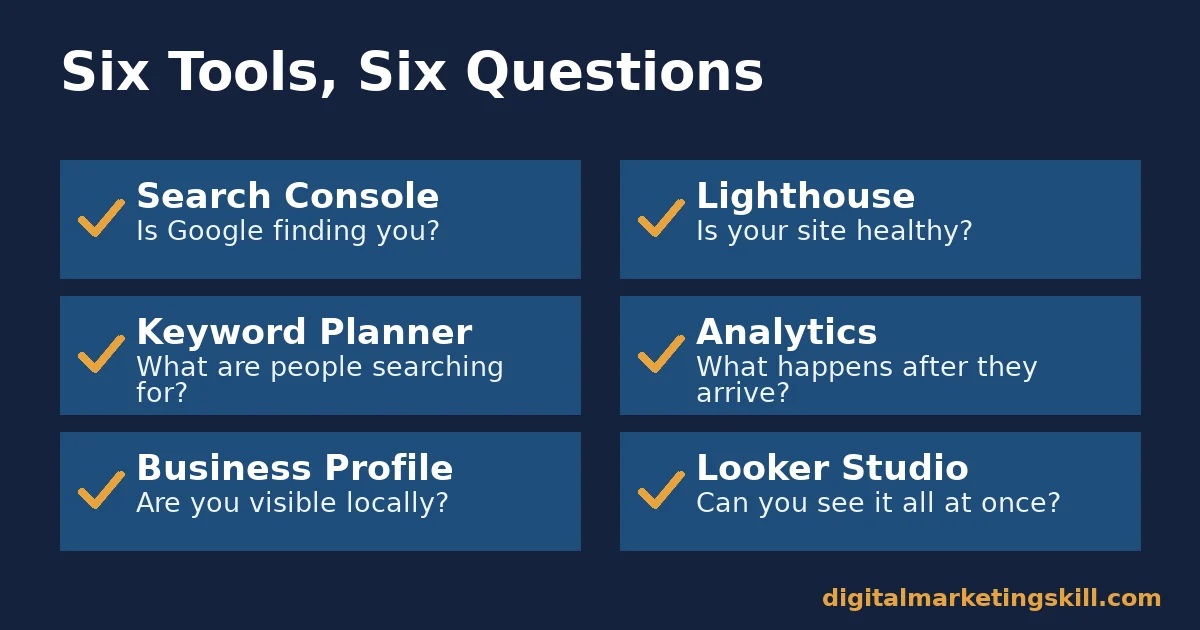
Keyword Planner: What Are People Searching For?
Keyword Planner, inside Google Ads, shows search volume estimates and the average cost to target a keyword. Google’s own documentation notes that forecasts refresh daily and adjust for seasonality. The numbers reflect real, current demand rather than a static guess. Once you have the terms, our guide to where to actually put keywords on a page covers what to do with them.
Google Analytics: What Happens After They Arrive?
Analytics tracks what visitors do once they reach your site or app: which pages they view, how long they stay, and whether they complete a goal. It turns traffic numbers into behaviour you can act on. Getting the data trustworthy in the first place starts with tagging, covered in our guide to Google Analytics campaign tracking.
Google Business Profile: Are You Visible Locally?
A Business Profile controls how your business appears in Google Search and Maps. Google’s help documentation describes managing posts, photos, reviews and performance insights all from one free listing.
For a business with a physical location or a defined service area, this is often the first result a potential customer sees, before they ever reach the actual website. An incomplete or unclaimed profile hands that first impression to a competitor by default.
Looker Studio: Can You See It All in One Place?
Looker Studio, formerly Google Data Studio, connects to tools like Analytics and Search Console and turns the data into a shareable dashboard. Google’s documentation calls it a no-cost way to build fully customisable reports with a drag-and-drop editor, no coding required.
A dashboard built here can be shared with a client, a manager, or a co-founder, without giving them full access to every underlying account. That makes it useful for reporting as much as for your own day-to-day monitoring.
Pairing Tools by the Question They Answer
Used alone, each tool gives a partial picture. Paired with the right second tool, the picture gets much clearer.
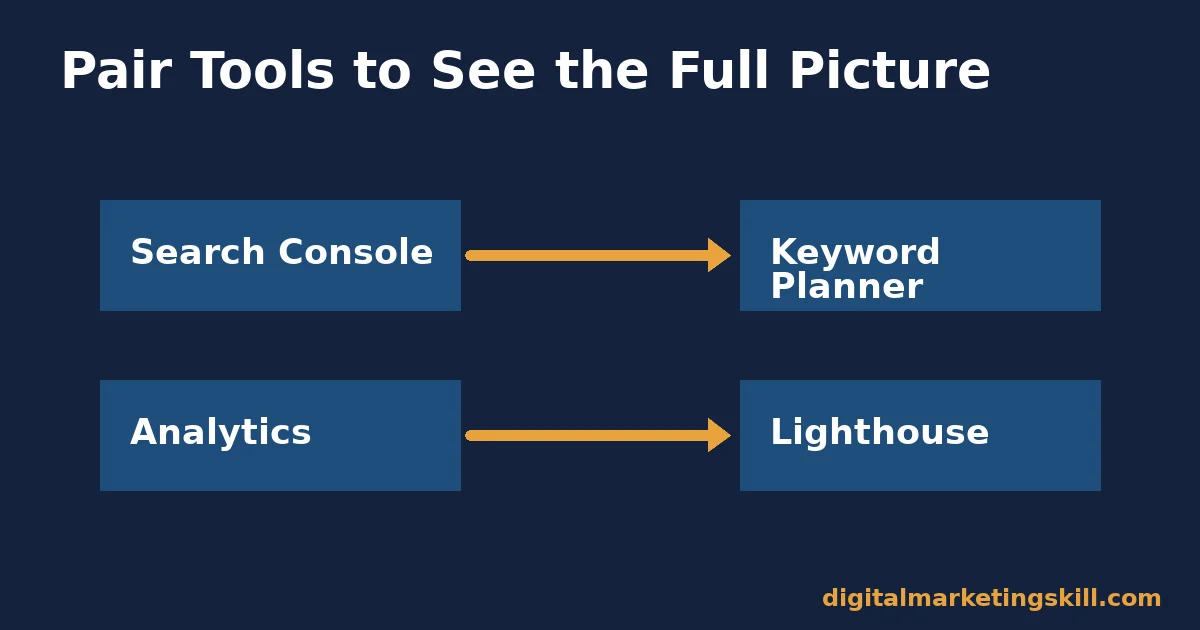
Search Console Paired With Keyword Planner
Search Console shows which queries already bring you traffic. Keyword Planner shows which related queries have real search volume you are not capturing yet. Checked together, they turn a vague content idea into a prioritised list.
Analytics Paired With Lighthouse
Analytics can show a page with high traffic and a poor engagement rate. Lighthouse often explains why: a slow load time, a layout shift, or a missing meta description. One tool shows the symptom. The other shows the likely cause.
Business Profile Paired With Looker Studio
A Business Profile’s own insights are useful but siloed from your website data. Pulling both into one Looker Studio dashboard shows whether local search visibility is actually translating into website visits and enquiries.
Search Console Paired With Lighthouse
Search Console can flag that mobile usability issues exist across a set of pages, without explaining each one in detail. Running the affected pages through Lighthouse fills in the specifics: exactly which element is too small, too slow, or overlapping on a phone screen.
A Sensible Order to Set These Up
Set these tools up in this order. Each step makes the next one more useful, rather than tackling all six at once.
- Verify Search Console first. Without it, you cannot confirm Google is indexing your pages correctly, which undermines everything that follows. Verification itself takes minutes, usually through a DNS record or an HTML file upload.
- Connect Google Analytics next. This starts collecting behaviour data immediately. The earlier it starts, the more historical data you will have later. Waiting six months to install it means losing six months of comparison data permanently.
- Claim your Google Business Profile. If you serve local customers, this is often the single highest-impact free listing available to you. Complete every section Google offers, since incomplete profiles tend to rank lower in local results.
- Run a Lighthouse audit. Fix the highest-impact issues it flags before investing heavily in traffic generation; sending traffic to a slow page wastes the effort. Prioritise performance and accessibility issues first, since those affect every visitor.
- Open Keyword Planner once you have a content plan. Use it to prioritise topics, not to replace a real content strategy. A list of twenty keyword ideas with no publishing plan behind it accomplishes nothing on its own.
- Build one Looker Studio dashboard last. By this point, you have enough connected data sources to make a single dashboard genuinely useful, rather than an empty shell with one metric in it.
Common Mistakes With Free Google Marketing Tools
These mistakes recur regardless of business size. None of them need a bigger budget to fix. They just need a different habit around the free Google marketing tools already installed.
Mistake: Installing Analytics and Never Returning
Many sites have Analytics installed but unchecked for months. A tool nobody reviews provides no value, however well it was set up. Put a recurring 15-minute check on the calendar, weekly or monthly. Treat a missed check the way you would treat a missed invoice: a small gap that compounds if it keeps happening.
Mistake: Ignoring Search Console’s Error Reports
Indexing errors sit quietly in Search Console until someone checks. A page that cannot be indexed gets zero organic traffic, no matter how good the content is. Review the coverage report at least monthly.
Mistake: Treating a Lighthouse Audit as One-Time Work
Site speed degrades as you add plugins, images and scripts. A Lighthouse score from a year ago tells you little about today’s site. Re-run it after any significant change, not only once at launch. Our guide to website optimisation skills covers what to prioritise once you have the report.
Mistake: Using Keyword Planner Numbers Without Context
A keyword’s estimated volume does not guarantee that ranking for it will drive relevant traffic. Check search intent, not just volume, before building content around a term.
Mistake: Rebuilding the Same Report by Hand Every Month
Manually copying numbers from Analytics and Search Console into a spreadsheet, every single month, wastes the exact time these free Google marketing tools exist to save. A Looker Studio dashboard, built once, pulls fresh data automatically on every visit.
How to Measure Whether These Tools Are Actually Helping
Installing free Google marketing tools is not the same as getting value from them. Track these alongside your usual business numbers, to see whether the tools are changing outcomes and not just producing reports nobody reads.
Four Metrics Worth Tracking
- Indexed pages. Search Console’s coverage report shows how many of your pages Google has actually indexed. A gap between pages published and pages indexed is lost potential traffic.
- Core Web Vitals pass rate. Lighthouse and PageSpeed Insights report whether your key pages pass Google’s performance thresholds. A rising pass rate over time shows real technical progress, not a one-off score.
- Organic sessions from Analytics. This is the clearest downstream signal that Search Console and Keyword Planner work is paying off. Track it monthly, not daily, since search traffic naturally fluctuates.
- Time spent on manual reporting. If a Looker Studio dashboard is working, the hours a team spends assembling reports by hand should fall. This is the metric 412 Food Rescue’s case study highlights directly.
Reading These Metrics Together
Indexed pages and Core Web Vitals are leading indicators. They tend to move first. Organic sessions and reporting time are lagging indicators. They show whether the earlier work actually paid off. Check the leading indicators weekly, and the lagging ones monthly, so you catch a problem before a full month of traffic data confirms it.
The One Decision Rule: Start With the Tool That Answers Your Current Question
If you remember one rule from this guide, make it this one. Do not set up every tool at once. Pick the single question you need answered right now. Open the one free Google marketing tool built specifically to answer it, rather than opening several at once and hoping an answer surfaces.
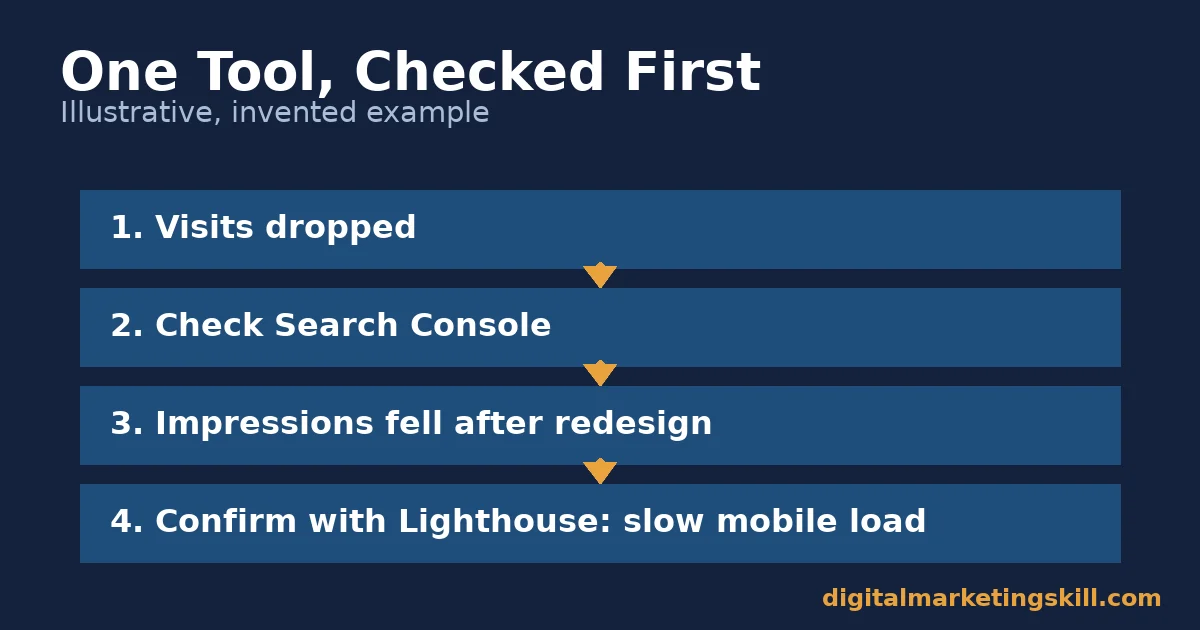
Here is an illustrative example, with invented numbers. A business owner wants to know why website visits have dropped. Instead of opening Analytics, Search Console and Lighthouse all at once, they start with Search Console, since the question is about search visibility.
It shows a sharp drop in impressions for their main keyword, two weeks after a site redesign. A quick Lighthouse check confirms the new design broke mobile loading speed. One tool, checked first, points straight at the cause.
A Real Case: 412 Food Rescue and Consolidated Data
According to Google Marketing Platform’s own case study, 412 Food Rescue, a US nonprofit that connects surplus food with people facing food insecurity, struggled to understand how volunteers found the organisation. Data sat siloed between its website and its app.
After consolidating both into Google Analytics, the organisation reports cutting its reporting time by 50%. It also discovered that weekend engagement from volunteers ran lower than weekday engagement, a pattern the siloed data had been hiding.
Treat this as a vendor-published success story, not an independent audit. Google has an interest in promoting its own tools, and the case study does not disclose the nonprofit’s total marketing budget or staff size. Even so, the underlying lesson holds: consolidating data inside one free tool, rather than checking several disconnected sources, is often what actually saves time.
The organisation’s own framing is worth repeating here. Time saved on reporting was not the end goal. It was reinvested directly into recruiting more volunteers and expanding into new cities. That reinvestment is the real test of whether a free Google marketing tool earned the hours a team spent learning it.
Frequently Asked Questions About Free Google Marketing Tools
Are Google’s marketing tools actually free?
Yes, for the core features covered in this guide. Google Analytics, Search Console, Looker Studio, Business Profile and PageSpeed Insights all have no-cost tiers that cover what most small businesses need. Keyword Planner requires a free Google Ads account, though you do not have to run paid ads to use it.
Which free Google marketing tool should I set up first?
Search Console. It confirms Google can actually find and index your site, which is the foundation everything else depends on.
Do I need to use all six tools to see results?
No. Start with the two or three that answer your most pressing question. A local business might prioritise Business Profile and Search Console, while a content-focused site leans more on Analytics and Keyword Planner.
How often should I check these tools?
A short weekly check of Analytics and Search Console catches most problems early. Pair that with a monthly or quarterly Lighthouse audit, unless you have just made a major site change.
What is the difference between Lighthouse and PageSpeed Insights?
They share the same underlying audit engine. Lighthouse runs inside Chrome DevTools or the command line. PageSpeed Insights is the web-based version, where you simply enter a URL and click analyse.
Is Looker Studio hard to learn?
No prior coding or design experience is required. The editor works by dragging and dropping chart elements. Google provides templates to start from, rather than leaving you to build a dashboard from a blank page.
Do free Google marketing tools work for a brand-new website with no traffic yet?
Yes, and setting them up early is actually the better order. Search Console and Analytics collect more useful history the earlier they are installed. A new site benefits from having them running from day one, even before meaningful traffic arrives.
What should I do once I have outgrown the free tier of these tools?
Most small and mid-sized businesses never genuinely outgrow the free Google marketing tools covered here; they outgrow how consistently they use them. Before paying for a premium alternative, confirm you are actually checking the free tool weekly and acting on what it shows.
Start With One Tool, Then Connect the Rest
Free Google marketing tools solve more problems than most small teams realise, but only once someone actually learns to use a few of them well. Pick the single question you need answered today. Open the tool built for it, and build outward from there one connected tool at a time, rather than trying to master all six in a single afternoon.
For the wider picture of where your traffic actually comes from, see our guide on website traffic and how to grow each source.
If you want guided, hands-on practice with tools like these, Digital Marketing Skill Institute teaches them inside the Master Diploma in Digital & AI Marketing, through its AI-Powered Google Specialist track. It is one of four AI-powered tracks built from ten execution-first courses, with a Full Stack option to complete all four.
It includes unlimited 1-on-1 coaching and mentoring, plus a U.S. Project Internship with a partner company from day one, with a verified U.S. Work Reference Letter. The diploma is dual US and UK accredited, and recognised in more than 100 countries.
The programme is fully online, so you can build these skills from anywhere in your country. Explore more guides on the Digital Marketing Skill Institute blog, read student outcomes on the reviews page, and when you are ready, apply for the Master Diploma or start from the Digital Marketing Skill Institute homepage.
Every figure in this guide was checked against its original source before publication. Figures marked as illustrative are invented examples, not real results.





