
Most sites convert website traffic into leads by fixing friction, not by buying more visitors. Slow pages, buried contact details, long forms and thin content each quietly block leads a site already has. Fix those four levers first, before spending more on traffic.
Key Takeaways
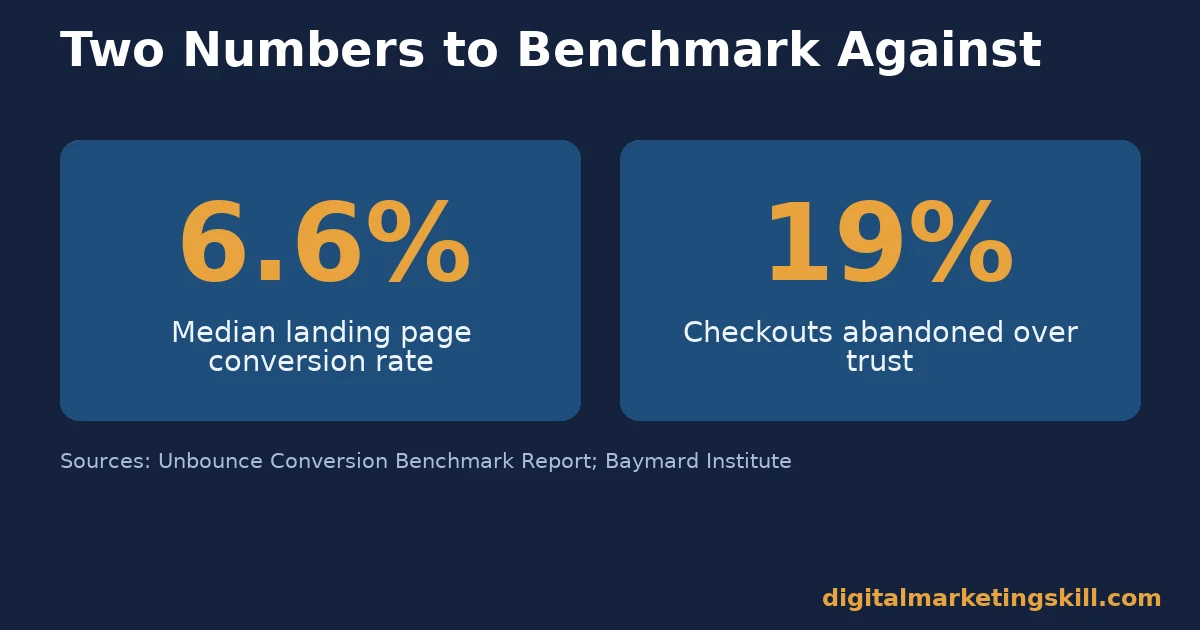
- The median landing page converts at 6.6%, so most sites have real room to improve. Unbounce’s benchmark report analysed over 464 million visits and 41,000 landing pages to reach that figure. A page converting below that is leaking leads it already has traffic for, which is the core reason to convert website traffic before chasing more of it.
- Speed moves conversion more than most teams expect. A joint Google and Deloitte study found a 0.1 second mobile speed improvement raised conversion rates 8.4% for retail sites and 10.1% for travel sites. Small, unglamorous fixes often beat redesigns.
- Trust failures cost real checkouts. Baymard Institute’s research found 19% of shoppers abandon checkout because they do not trust a site with their payment details. That is one in five carts lost to a feeling, not a price.
- Traffic quality beats traffic volume when you try to convert website traffic into leads. A visitor who searched for your exact service converts at a different rate than one who clicked a vague ad. Matching the page to the visitor’s actual intent fixes more leads than adding more visitors of the wrong kind.
- Every lever compounds with the others. A fast page with no trust signals still loses leads. A trustworthy page that loads slowly loses them too. The four levers in this guide work as a set, not as a menu to pick one from when you convert website traffic into leads.
In this guide
- What Most Traffic Advice Misses
- How a Visitor Actually Becomes a Lead You Can Convert
- Four Levers That Actually Convert Website Traffic Into Leads
- How to Convert Website Traffic Into Leads With Each Lever
- How to Measure Whether These Fixes Are Working
- The One Decision Rule: Fix Speed and Trust Before Forms and Copy
- A Real Case: What Core Web Vitals Changes Did for Rakuten 24
- Frequently Asked Questions About How to Convert Website Traffic Into Leads
- Start to Convert Website Traffic Into Leads This Week
What Most Traffic Advice Misses
Most advice about how to convert website traffic into leads starts with getting more visitors. More ads, more content, more social posts. That advice skips a cheaper step. Most sites already send away leads that arrive. A slow page, a hidden phone number or a nine-field form quietly loses visitors who were already interested enough to click through.
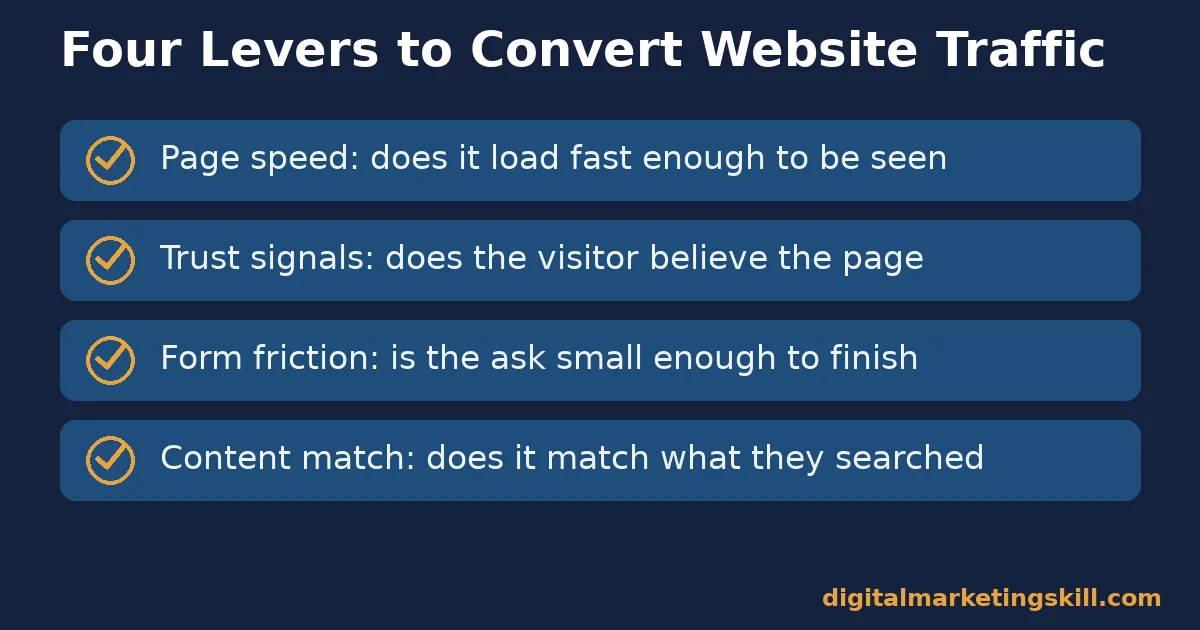
This guide covers four levers that sit inside a site’s own control: page speed, trust signals, form friction and content-to-intent match. Fixing these does not require a bigger ad budget. It requires removing the small frictions that make an interested visitor leave before converting, which is usually the fastest way to convert website traffic you are already paying for or already ranking for.
None of this replaces a real offer or a site nobody wants. These levers cannot fix a product nobody needs. What they fix is more common: a decent offer losing leads to problems nobody measured. A weak offer with a fast, trustworthy page still underperforms, which is why the customer acquisition funnel around a page matters as much as the page itself.
How a Visitor Actually Becomes a Lead You Can Convert
A visitor becomes a lead in three stages. First they decide the page is worth their time. Then they decide they trust what they are looking at. Finally they decide the action asked of them is worth the effort. A failure at any stage loses the lead, and each stage fails for a different reason.
Speed and relevance decide the first stage. A page that loads slowly or does not match what the visitor searched for loses them before they read a word. Trust signals decide the second stage. A page that looks unfinished, has no contact details or shows no proof loses visitors who were otherwise ready to act.
Form friction decides the final stage. A long, confusing form loses visitors who trusted the page and wanted to act, right at the last step. Each stage needs its own fix. A beautiful homepage does not fix a broken checkout form, and a short form does not fix a page nobody trusts.
Where These Three Stages Sit in Your Funnel
Mapped against a full sales funnel, these three stages sit right at the top. They cover the moment between a click and a completed lead form, before nurture or sales ever get involved. Fixing them well means every later stage of the funnel starts with a bigger, better-qualified pool.
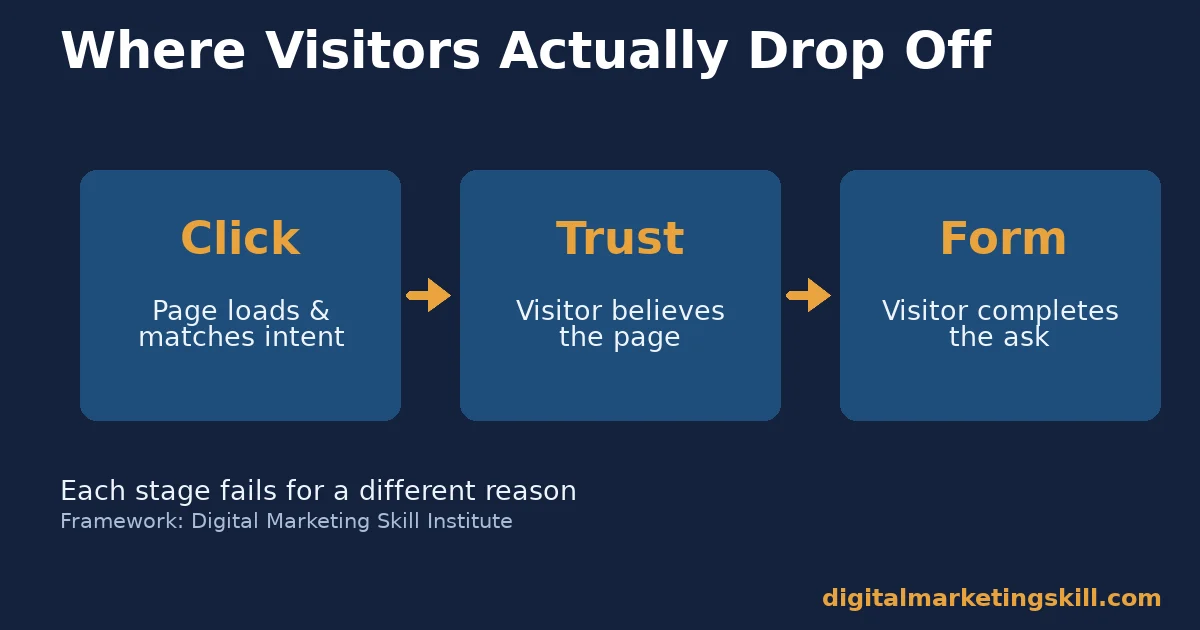
That gap between stages is exactly where the median landing page conversion rate of 6.6% comes from. Unbounce’s own analysis of 464 million visits shows most pages lose the majority of visitors somewhere in this three-stage path, not at the very first click.
Why More Traffic Does Not Fix a Leaky Page
Sending more visitors to a page that loses 95% of them at one of these three stages just means losing more visitors. It happens faster, not better. The leak stays the same size. Only the volume passing through it grows.
Fixing the leak first means every visitor already arriving converts at a higher rate. That compounds. More traffic later then converts at the improved rate instead of the old, leaky one.
Four Levers That Actually Convert Website Traffic Into Leads
Four distinct frictions explain most lost leads between a click and a completed form.
Each needs a different fix, so skipping one leaves a real gap in your conversion path.
Page Speed: Built to Lose Visitors in the First Few Seconds
A slow page loses visitors before they see the offer at all. The Google and Deloitte study found this effect is large even at a fraction of a second. An 0.1 second improvement moved retail conversion 8.4% and travel conversion 10.1%. Speed is not a technical detail. It is the first conversion lever a visitor ever meets.
Trust Signals: Built to Stop Last-Minute Hesitation
A visitor who reaches a form or checkout is already interested. Trust signals decide whether that interest survives contact. Baymard’s research found 19% of abandoned checkouts happen because the shopper does not trust the site with payment details. The product and the price were not the problem.
Nielsen Norman Group’s research on trustworthiness in web design points at the same pattern from a different angle. Specific, checkable detail reads as trustworthy. Vague, unverifiable claims read as evasive, even when both are technically true.
Form Friction: Built to Filter Out the Undecided
Every extra field asks a visitor to spend more effort before they get anything back. Some of that filtering is useful. Too much of it filters out visitors who would have converted with a shorter ask. The right form length depends on how much trust the page has already built by the time the visitor reaches it.
Content-to-Intent Match: Built to Reward the Right Visitor
A visitor who searched for one specific thing and landed on a generic page feels the mismatch immediately. Content-to-intent match means the headline, the offer and the next step all match what the visitor was actually looking for when they clicked. A perfect page for the wrong intent still converts poorly.
Google’s own guidance on helpful content makes a related point for organic traffic specifically. Content built to satisfy a real reader’s need tends to rank and convert better than content built mainly to catch a keyword.
How to Convert Website Traffic Into Leads With Each Lever
Each fix below targets one specific stage of the path from visitor to lead. Running all four in order covers the whole path, not just the part a team happens to notice first.
Page Speed: Lead With the Slowest Page First
Find your slowest high-traffic page before optimising your fastest one. The biggest conversion gain usually sits on the page that is both slow and heavily visited, not the page that is merely slow. Fix images, scripts and unnecessary plugins there first, then move down the traffic list.
This single step is often the fastest way to convert website traffic you already have, since it touches every visitor hitting that page rather than just the ones who make it further down the funnel.
Trust Signals: Lead With Verifiable Proof, Not Claims
Replace vague claims with specific, checkable proof. A phone number a visitor can actually call, a real case study with a name, or a clear refund policy all do more than a generic “trusted by thousands” banner. Specific and checkable beats broad and unverifiable every time.
Form Friction: Lead With Only What You Need Right Now
Ask only for what the very next step actually requires. A first contact form needs a name and an email, not a full company profile. Collect the rest later, once the relationship already has some trust behind it.
Test removing one field at a time rather than rebuilding the whole form at once. That way, if completions change, you know exactly which field mattered, instead of guessing which part of a complete redesign made the difference. This slower pace feels inefficient at first, but it builds a clear, evidence-backed picture of which fields actually earn their place.
Content-to-Intent Match: Lead With the Visitor’s Own Words
Match your headline to the actual phrase a visitor searched or clicked on, not to internal brand language. A visitor who searched “pricing” wants to see pricing, not a mission statement. Send different traffic sources to pages that match what each one was actually looking for.
A single generic landing page asked to convert website traffic from five different sources usually underperforms five smaller pages, each matched to one source’s actual intent.
How to Measure Whether These Fixes Are Working
Four numbers show whether these levers are actually converting more website traffic into leads, beyond a general feeling that the site looks better.
Set a Baseline Before Changing Anything
Record your current page speed, form completion rate, bounce rate and lead count before making any changes. Without that baseline, a later improvement could come from a change you made. It could also come from something else entirely, like a seasonal shift in traffic.
Write these numbers down somewhere you will actually look at again, not just in an analytics dashboard you rarely open. A baseline nobody checks later cannot tell you whether the fixes worked, which defeats the point of measuring it at all. A simple shared spreadsheet, checked monthly, usually works better than a dashboard nobody schedules time to revisit.
The Four Numbers to Track
- Page load time is how long a visitor waits before the page is usable, and it reflects the first conversion stage. A faster page keeps more visitors long enough to see the offer at all.
- Form completion rate is the share of visitors who start a form and actually finish it. A low completion rate relative to page traffic usually points at form friction, not at a weak offer.
- Bounce rate on key pages is the share of visitors who leave without any further action. A high bounce rate on a fast, relevant page usually points at a trust problem instead of a speed or content problem. A deeper look at how to reduce bounce rate walks through the full diagnostic.
- Leads per visitor is the one number that combines all three stages into a single result. Track it over time, not on a single day, since one strong or weak day rarely reflects a real trend.
Read these four together. A fast page with a low form completion rate usually has a forms problem, not a speed problem, since speed already did its job getting the visitor to the form. A high bounce rate on a fast, well-matched page usually means a trust problem instead.
Tracked monthly, these four numbers tell you exactly where to convert website traffic next, instead of guessing which lever to try based on a hunch or the latest trend.
The One Decision Rule: Fix Speed and Trust Before Forms and Copy
The single most useful rule here is simple. Fix page speed and trust signals before spending time on form length or copywriting. A perfectly worded page still loses visitors who left before it finished loading. It also loses visitors who never trusted it enough to read the copy at all.
A Worked Example of the Cost of Skipping Speed
Here is an illustrative, invented example, not a real result. Suppose a page gets 10,000 monthly visitors and converts at the 6.6% median, for 660 leads. A slow load time losing even a tenth of visitors before the page renders could push real traffic down to 9,000.
At the same 6.6% rate, that is 594 leads. The gap is a loss of 66 leads a month before any copy or form change even runs.
Fixing speed first recovers more than a form or copy tweak could on its own, because it protects every visitor who would have reached those later stages. That is the order this decision rule protects. Fix what blocks visitors from arriving intact, then refine what persuades them once they do.
A Real Case: What Core Web Vitals Changes Did for Rakuten 24
Google’s own web.dev case study collection documents Rakuten 24’s investment in Core Web Vitals, the metrics Google uses to measure real-world page speed and stability. After improving these metrics, the retailer recorded a 53.37% increase in revenue per visitor. Conversion rate rose 33.13%, according to Google’s published case study.
The change did not involve a new product line or a pricing change. It involved making existing pages load and respond faster for visitors who were already arriving. The leads and sales were already available in the existing traffic; the site simply stopped losing as many of them along the way.
The lesson generalises past one retailer. Speed is not a cosmetic metric. It is a conversion lever that compounds across every visitor a site already gets, which is why it sits first in the decision rule above. Any team that wants to convert website traffic into leads at scale eventually runs into this same fact: the existing audience is usually worth more than the next campaign.
Frequently Asked Questions About How to Convert Website Traffic Into Leads
Should I fix speed, trust, forms or content first if I can only do one?
Speed first, in almost every case. A visitor who leaves before the page finishes loading never sees your trust signals, your form or your content. Nothing else on this list gets a chance to work until speed is fixed.
How many fields should a lead form actually have?
As few as the very next step genuinely requires. A first-contact form usually needs only a name and an email. Add more fields later, once the relationship already has some trust built up.
Does more traffic ever make sense before fixing conversion?
Rarely, if the current page already loses most visitors. Fixing the leak first means new traffic converts at a better rate from day one. It stops falling through the same gap existing traffic already falls through.
What counts as a real trust signal, versus a weak one?
A real trust signal is specific and checkable: a working phone number, a named case study, a clear policy. A weak one is vague and unverifiable, like an uncredited “trusted by thousands” banner with no way to check the claim. Visitors who cannot verify a claim quickly tend to treat it as noise, not proof.
Is a high bounce rate always a trust problem?
Not always, but it is a strong signal once speed and content match are already ruled out. If the page loads fast and matches what the visitor searched for, a high bounce rate usually points at missing or weak trust signals.
Do these four levers apply equally to B2B and B2C sites?
Yes, though the specific trust signals differ. A B2B visitor often wants a case study and a named contact. A B2C shopper often wants a clear return policy and visible payment security. The underlying mechanism, removing friction at each stage, stays the same.
How long does it usually take to see results after fixing these levers?
Speed and form fixes often show up within days, since they change what every new visitor experiences immediately. Trust and content-match fixes can take longer to show in the data, since they depend partly on returning visitors and on search engines recrawling updated pages.
Is it worth hiring help to convert website traffic into leads, or can a small team do it alone?
A small team can realistically fix speed, trim a form and add a couple of specific trust signals without outside help. A full content-to-intent overhaul across many pages is where outside help tends to save the most time, simply because of the volume of pages involved.
Start to Convert Website Traffic Into Leads This Week
Pick your single highest-traffic page and check its load time this week, even if that is the only fix you make this month. Measure form completion and bounce rate on that same page before and after, then move to trust signals once speed is handled.
Small, consistent fixes to existing traffic compound faster than chasing new visitors ever could. The same four levers apply no matter where your next visitor comes from, whether that is organic search, paid ads, email or social.
Digital Marketing Skill Institute’s Master Diploma in Digital & AI Marketing covers conversion optimisation and landing page conversion as part of its nine practical courses, alongside paid and organic customer acquisition. The program includes unlimited one-on-one coaching and mentoring and real project work inside a US company.
It is dual US and UK accredited and recognised in more than 100 countries, delivered 100% online. You can apply these four levers to real traffic from anywhere in your country.
See the full program on the Master Diploma page, browse more guides on the digital marketing blog, or go straight to apply when you are ready. Learn more at digitalmarketingskill.com, wherever you live, and see real outcomes on the reviews page. Visit digitalmarketingskill.com to get started.
Every figure in this guide was checked against its original source before publication. Figures marked as illustrative are invented examples, not real results.
![9 Amazing Digital Marketing Skills to Make Money Online [With Proof]](https://digitalmarketingskill.com/wp-content/uploads/2019/07/9-Amazing-Digital-Marketing-Skills-to-Make-Money-Online-With-Proof-17.png)






