

Digital marketing tools now number in the thousands. Most teams use well under half of what they already own. This guide explains why tool stacks outgrow teams, which categories of digital marketing tools earn their cost, and one simple rule for deciding when to add, keep or retire a tool.
Key Takeaways
- The market keeps multiplying. Chiefmartec’s own landscape count reached 14,106 marketing technology products. That is a 27.8% jump in a single year.
- Owning a tool is not using it. Gartner’s Marketing Technology Survey, as tracked by Chiefmartec, found utilization of martech stack capabilities fell to 33%, down from 42% and 58% in earlier years.
- Budgets are shrinking even as ambition grows. Gartner’s CMO Spend Survey of 401 CMOs found martech now takes 19.4% of the marketing budget, down from 26.6% five years earlier. Still, 62% of those same CMOs planned to invest more.
- Teams know the stack is bloated. A survey commissioned by SAP Emarsys found 29% of marketers admit they have too many tools. Another 35% report poor integration between them.
- Consolidation has a real, documented payoff. IBM’s own case study with Adobe reports it cut more than 40 marketing systems down to five and saved $120 million.
In this guide
- What Most Digital Marketing Tools Lists Get Wrong
- How a Digital Marketing Tool Stack Actually Works
- What Differs by Team Size
- How to Build the Right Stack for Your Stage
- Five Categories of Digital Marketing Tools Worth Paying For
- How to Measure Whether a Tool Stack Is Working
- The One Rule: Add a Tool Only When a Workaround Breaks Twice
- A Real Case: How IBM Cut Its Martech Stack From 40+ Tools to Five
- Frequently Asked Questions About Digital Marketing Tools
- Start With an Audit, Not a Shopping List
What Most Digital Marketing Tools Lists Get Wrong
Most articles about digital marketing tools are ranked lists. A number sits in the headline, a screenshot follows each entry, and a new version appears every time an entry falls out of date. That format answers “what exists” but not “what should I actually buy, and when.” It also goes stale the moment a vendor changes its pricing.
This guide takes a different approach. It explains how a stack of digital marketing tools grows, why usage lags so far behind ownership, and which categories are worth paying for at each stage of a team’s growth. It closes with one decision rule and a real, published case of a company that cut its stack down.
A few ground rules first. The figures below come from research firms and vendors with their own commercial interests. Read them as informed snapshots, not settled facts. Chiefmartec’s count is a self-submitted directory. Gartner’s and Emarsys’s figures are self-reported survey data. The IBM case is a vendor-published success story. None of that makes the numbers useless, but none of them are a permanent ranking either.
How a Digital Marketing Tool Stack Actually Works
A stack of digital marketing tools is not one list. It is five overlapping jobs that marketing has to do: capture attention, nurture a lead, create content, measure results and coordinate the team. Every tool you buy is really a bet. The bet is that it will do one of those five jobs better than a spreadsheet, a free plan, or the tool it replaces.
The trouble is supply, not demand. Chiefmartec and MartechTribe’s landscape count found 14,106 marketing technology products on the market. That is a net addition of more than 3,000 products and 27.8% growth in a single year. With that many vendors competing for the same five jobs, most teams end up owning several digital marketing tools that do the same job in slightly different ways.
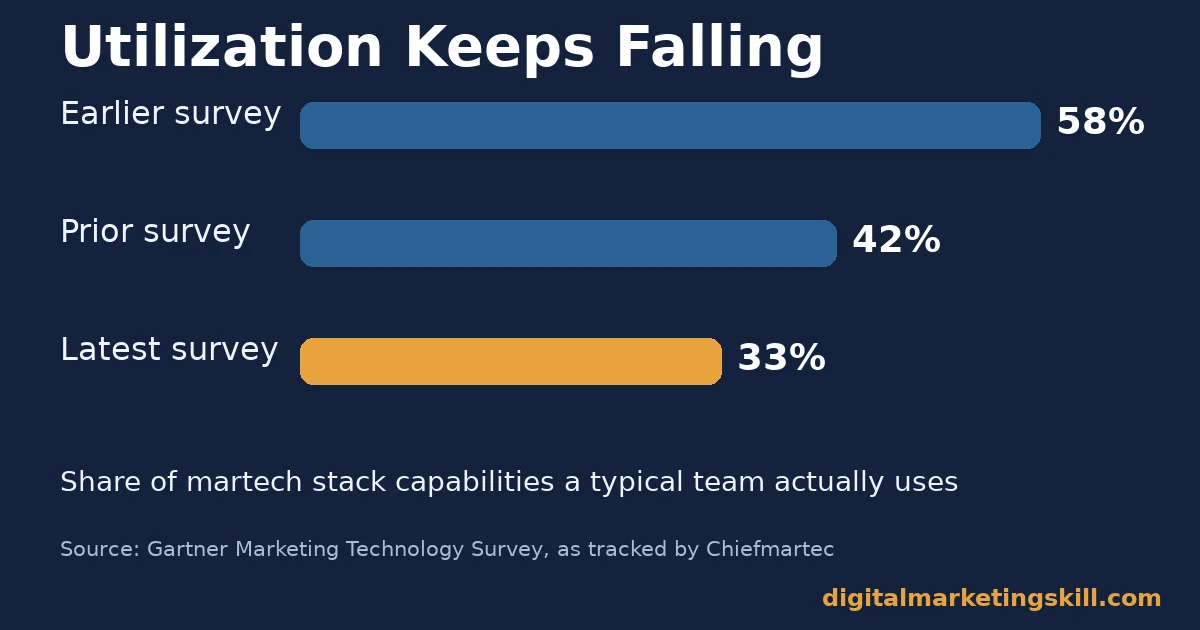
That supply glut shows up directly in usage data. Chiefmartec has tracked Gartner’s Marketing Technology Survey results over several cycles. It found utilization of a typical stack’s capabilities fell from 58% to 42%, then to 33%, based on responses from hundreds of marketing technology leaders. In plain terms: for every three features a team pays for, it actively uses roughly one.
Budgets Are Shrinking at the Same Time
Budgets have not kept pace with the growth in tools either. Gartner’s CMO Spend Survey of 401 chief marketing officers found martech now accounts for 19.4% of the marketing budget, down from 26.6% five years earlier.
Even so, 62% of the same CMOs said they planned to invest more. Teams are asked to do more with a shrinking share of spend. That is exactly when an unmanaged stack turns expensive.
What Differs by Team Size
A stack that works for one marketer is the wrong stack for a team of twelve, and the reverse is also true. The five jobs above stay the same. But which job hurts most, and how much coordination a tool needs to add, both change with team size.
Solo Marketers: Built for Speed, Not Depth
A solo marketer or small-business owner is usually doing all five jobs alone, often around other work. Depth matters less than speed. A tool earns its place by removing a manual step, not by offering a feature the marketer will never open. Free and low-cost, all-in-one digital marketing tools fit this stage best, because switching cost and training time matter more than advanced functionality.
Small Teams: Built Around One Shared Source of Truth
Once a second or third person joins, the biggest risk shifts. It moves from “which tool” to “whose version is correct.” A small team needs one shared source of truth for contacts, content and reporting, even if individual specialist tools sit around it. Without that shared core, a team of three can create the same confusion as a team of thirty.
Scaling Teams: Built Around Integration and Governance
A growing team inherits tools from every person who joined, plus every campaign that needed something quickly. At this stage the real cost is not the subscription fee. It is the data trapped in each tool and the hours spent reconciling reports by hand. Governance, meaning clear ownership of each tool and a routine review, becomes as important as any single feature.
How to Build the Right Stack for Your Stage
The sections below mirror the three stages above. Start with the move that matches where your team is today. A wrong-sized fix wastes time and budget either way.
Solo Marketers: Lead With Free, All-in-One Tools
Pick one platform that covers email, basic analytics and simple content scheduling, rather than a separate specialist tool for each job. Add a single-purpose tool only once a specific task becomes a bottleneck. For example, add an SEO tool once organic search starts sending real traffic.
Resist the urge to collect digital marketing tools “for later.” An unused free plan still costs setup time and a forgotten login, and a login nobody remembers is a small security risk as well as wasted effort.
Small Teams: Lead With One Shared Dashboard
Agree on a single system of record for contacts and a single dashboard for reporting before adding anything else. Every new tool should either feed that dashboard or get replaced by something that does. Our guide to a practical marketing channel mix is a useful companion here. The tools you need depend on which channels you have actually committed to.
Scaling Teams: Lead With an Integration Audit
Before buying anything new, list every tool in use today. Note who owns it, what it costs, and what share of its features anyone opened last quarter. That audit alone usually surfaces two or three tools doing the same job. Our deeper guide to building a martech stack walks through how to sequence that review without disrupting live campaigns.
Five Categories of Digital Marketing Tools Worth Paying For
Rather than ranking individual brands, it is more durable to know the five jobs a stack has to cover, with one or two examples of each. Then you can judge any new tool against the job it claims to do.
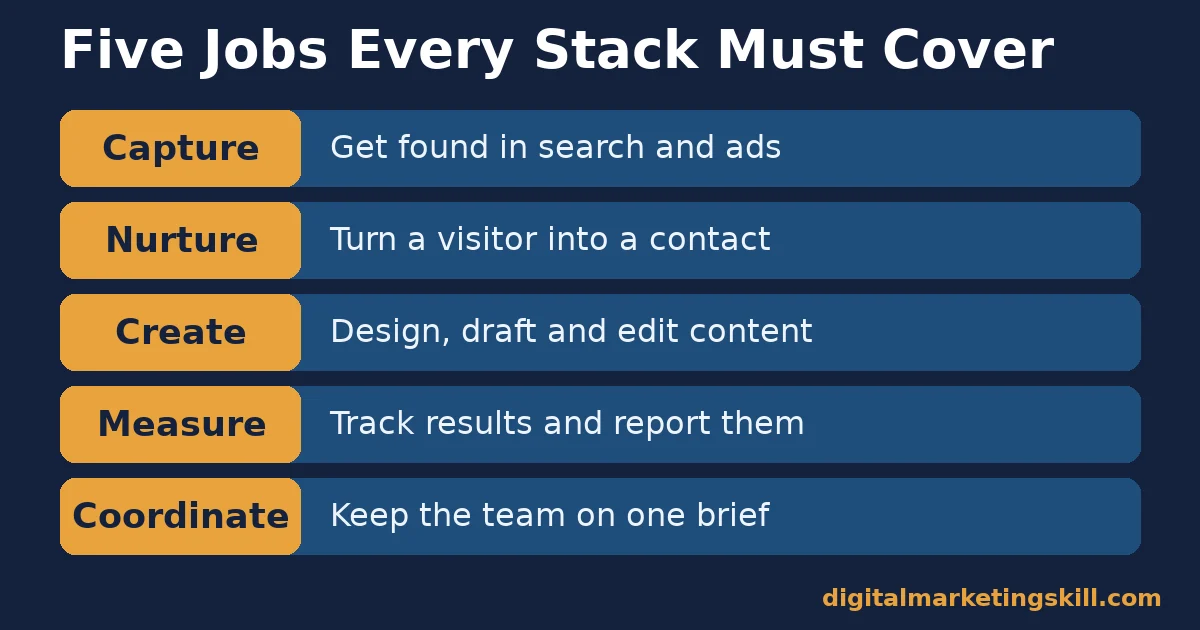
- Capture tools (SEO and paid search). Tools such as Ahrefs or SEMrush track backlinks, keyword rankings and competitor visibility. Google Search Console shows how Google itself is indexing your pages. These digital marketing tools exist to get found before a visitor ever reaches your site.
- Nurture tools (email and CRM). Mailchimp, HubSpot and similar platforms turn a one-time visitor into a repeat contact through segmented email and lead tracking. This is usually the highest-leverage category for a small team, because it compounds: every new subscriber adds to future reach at no extra cost.
- Create tools (design and drafting). Canva covers visual design without a design background. Grammarly checks writing for errors and tone. General-purpose AI assistants can draft an outline, or a first pass of copy, that a human then edits and fact-checks.
- Measure tools (analytics and reporting). Google Analytics and Google Search Console remain the free baseline for most teams. Reporting tools such as Whatagraph turn that raw data into something a stakeholder will actually read.
- Coordinate tools (scheduling and team communication). Social schedulers such as Buffer or Hootsuite plan and queue posts across channels. Slack and shared spreadsheets keep a distributed team working from the same brief.
Which Category to Fix First
Fix the category tied to your bottleneck today, not the one with the flashiest new tool. If nobody can find your content in search, invest in capture tools first. Visitors who arrive but never return need nurture tools more than another analytics dashboard. And if reporting takes hours every month, that is a measurement problem a dashboard tool can solve quickly, often with the clearest return of any category.
Free tiers are worth trying before any paid upgrade, in every one of these five categories. A free plan tells you whether the job itself matters to your workflow, before you commit a budget line to it. Upgrade only when a specific free-tier limit, such as a contact cap or a reporting delay, is the thing actually slowing your team down.
How to Measure Whether a Tool Stack Is Working
Judge a stack by usage and outcomes, not by how many logos appear in a strategy deck. Each metric below is defined in one sentence, with a note on how to read it.
These metrics sit alongside the channel numbers you already track, such as traffic, conversion rate and cost per lead. They answer a narrower question: not whether a campaign worked, but whether the tool behind it earned its subscription. Pull them from your billing dashboard and your admin console once a quarter, and keep the same five metrics each time so the trend, not a single snapshot, does the work.
Five Metrics That Show Real Usage
- Utilization rate. This is the share of a tool’s paid features that anyone on the team has actually used in a set period. It is the same measure Gartner’s survey tracks industry-wide. A low rate is the clearest sign of wasted spend.
- Active seats versus paid seats. This compares how many licences you pay for against how many people logged in during a normal month. A wide gap usually means the tool was bought for a project that has since ended.
- Integration count. This is how many other tools in your stack a given tool connects to automatically, without manual exporting. Tools with zero integrations create hidden data-entry work that rarely shows up in the subscription price.
- Time-to-value. This is how long it takes a new team member to get useful output from a tool without help. A long time-to-value quietly taxes every future hire, not just the first one.
- Engagement rate on the content it supports. Google Analytics counts a session as engaged when it lasts over 10 seconds, includes a key event, or has two or more page views. If a content tool does not improve this number over time, it is decorative rather than useful.
How to Read These Numbers Together
Start with utilization rate and active-versus-paid seats, because together they show whether a tool is used at all. If both look healthy but integration count sits at zero, the tool is probably creating manual work that will not show up until someone totals the hours. If usage and integration both look fine but engagement has not moved, the tool may be solving a problem your audience never had.
The One Rule: Add a Tool Only When a Workaround Breaks Twice
Take one decision rule from this guide and it should be this one. Do not buy a new tool the first time a manual process feels annoying; a single awkward afternoon is not evidence of a real gap.
Add a tool only after the same manual workaround has failed or broken down twice. That is the point where the cost of repeating it by hand clearly exceeds the cost of a subscription.
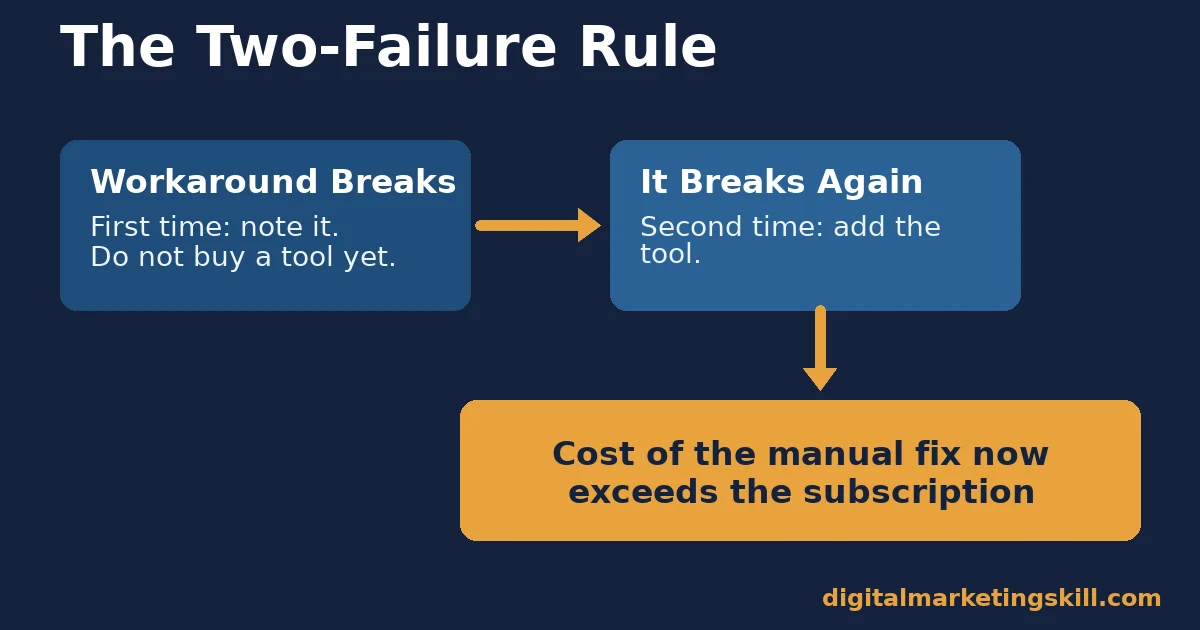
Here is an illustrative example, with invented numbers. A small team tracks email performance in a spreadsheet that someone updates by hand each Monday. The first month it is simply tedious.
The second month, two campaigns get reported with the wrong numbers because a formula broke, and the mistake reaches a client update. That second failure, not the first annoyance, is the signal to adopt a reporting tool that pulls the numbers automatically.
This rule also tells you when to retire a digital marketing tool. If removing it would not recreate a workaround that has broken twice, you probably do not need it. Run that same test against every subscription on today’s invoice before adding a new one. Most invoices turn up at least one forgotten tool that nobody on the current team remembers choosing.
A Real Case: How IBM Cut Its Martech Stack From 40+ Tools to Five
IBM’s own published case study, produced with Adobe, describes how its marketing organisation consolidated more than 40 separate marketing systems down to five core platforms in under a year. The company reports the move saved $120 million. It also reports a 112% increase in email response rates and 75% faster time-to-market for content produced for audiences worldwide.
The case also shows what consolidation does for day-to-day service. IBM reports that customer response times fell from over a day to about 30 minutes, once teams stopped switching between disconnected systems to answer a single request.
Read the limits honestly. This is a vendor-published success story about one of the world’s largest technology companies, built around a single vendor’s platform. The exact dollar figure will not transfer to a small team.
The lesson that does transfer is the mechanism. Every tool removed from a stack also removes the manual reconciliation between it and everything else, and that hidden cost often runs larger than any single subscription fee.
Frequently Asked Questions About Digital Marketing Tools
What are digital marketing tools?
Digital marketing tools are software products that help a business do one of five core jobs: get found, nurture a lead, create content, measure results or coordinate a team. A useful stack covers all five jobs without duplicating any of them.
How many digital marketing tools does a small business actually need?
Fewer than most lists suggest. A solo marketer or very small team can usually cover all five jobs with one all-in-one platform, plus a single specialist tool for whichever job is today’s bottleneck.
Why do marketing teams use so few of the features they pay for?
Mostly because a tool gets bought to solve a specific problem and then never gets revisited once that problem is solved. Gartner’s survey data shows utilization has fallen for several years running, which points to a stack-management problem more than a product-quality one.
Are free digital marketing tools good enough to start with?
Often yes. Google Analytics, Google Search Console and the free tiers of most email and design tools cover the core jobs well enough for a new or small operation. Pay for an upgrade only once a specific free-tier limit is genuinely slowing you down.
How do I know when to replace a digital marketing tool?
Apply the two-failure rule in reverse. If the tool is not preventing a workaround that has broken at least twice, it is not pulling its weight. Check utilization rate and active-versus-paid seats before renewing any subscription.
Should every tool in the stack connect to every other tool?
Not every tool needs to integrate with every other one. Each tool should connect to at least the system you use for reporting. A tool with zero integrations usually creates manual export work that erodes the time it was bought to save.
Is AI replacing traditional digital marketing tools?
AI features are increasingly built into existing categories, such as drafting assistance inside content tools, rather than replacing the five core jobs outright. Treat an AI feature the same way as any other: judge it by whether it removes a workaround that has broken twice.
How often should a team review its digital marketing tools?
Once a quarter is usually enough for a small or mid-size team. Review utilization rate and active-versus-paid seats for every subscription, cancel anything that fails the two-failure rule, and only then consider adding something new.
Start With an Audit, Not a Shopping List
Before adding another digital marketing tool, list what you already pay for, how many people actually log in, and which workaround each tool was meant to remove. That short audit usually finds more value than any new subscription. It also shows exactly which of the five job categories above still needs a real fix.
If you want structured, hands-on practice choosing and running digital marketing tools behind each of these five jobs, Digital Marketing Skill Institute teaches it inside the Master Diploma in Digital & AI Marketing. The AI-Powered Google Specialist and AI-Powered WordPress and SEO Specialist tracks cover capture and measurement tools in depth, and all four AI-powered tracks can combine into a Full Stack diploma.
The programme includes unlimited 1-on-1 coaching and mentoring, plus a U.S. Project Internship with a verified U.S. Work Reference Letter. It is dual US and UK accredited and recognised in more than 100 countries.
The programme is fully online, so you can study and practise with real tools from anywhere in your country. Browse more guides on the Digital Marketing Skill Institute blog, or when you are ready, apply for the Master Diploma or start from the Digital Marketing Skill Institute homepage.
Every figure in this guide was checked against its original source before publication. Figures marked as illustrative are invented examples, not real results.
![9 Amazing Digital Marketing Skills to Make Money Online [With Proof]](https://digitalmarketingskill.com/wp-content/uploads/2019/07/9-Amazing-Digital-Marketing-Skills-to-Make-Money-Online-With-Proof-17.png)






