
Social media marketing tools only earn their cost when they fix a real bottleneck: too many platforms to post on, too many mentions to track, too many reports to build by hand, or too much time spent designing graphics. Pick by the job, not the hype, starting with Zapier’s 9,000+ app integrations, Canva’s 265 million monthly users and Bitly’s 10 billion monthly link connections as a sense of scale.
Key Takeaways
- Tools split into four jobs. Scheduling and publishing, listening and monitoring, analytics and reporting, and design and content creation each solve a different bottleneck.
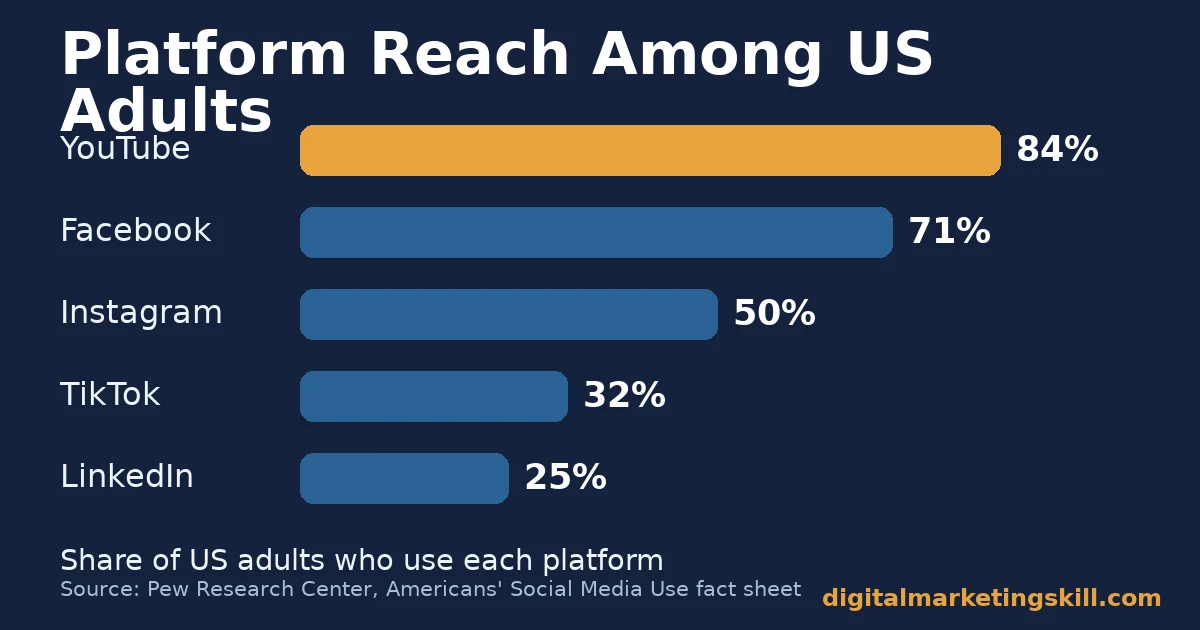
- Reach differs by platform. Pew Research Center found 84% of US adults use YouTube, 71% use Facebook and 50% use Instagram, so tool coverage should follow where your audience actually is.
- Scale varies hugely between vendors. Canva reports 265 million monthly active users; Zapier lists more than 9,000 app integrations; Bitly’s trust center reports over 10 billion monthly connections.
- Both leading schedulers operate at real scale. Buffer reports about 288,000 monthly active users on its own about page; Hootsuite reports over 200,000 users across more than 200 countries.
- Design discipline pays off. Nielsen Norman Group’s eye-tracking study of 232 users found readers scan in an F-shaped pattern, which is why templated, scannable graphics outperform cluttered ones.
In this guide
- What Most “Best Tools” Lists Get Wrong
- Social Media Marketing Tools Solve Four Different Jobs
- How to Choose the Right Tool for Each Job
- 12 Social Media Marketing Tools Worth Testing
- How to Measure Whether a Tool Is Working
- The Most Useful Rule: Match the Tool to the Bottleneck
- A Four-Week Plan to Roll Out a New Tool
- A Real Case: One Scheduling Habit, 200% More Engagement
- Frequently Asked Questions About Social Media Marketing Tools
- Start With Your Biggest Bottleneck
What Most “Best Tools” Lists Get Wrong
Most roundups of social media marketing tools rank everything on one list, as if a scheduling app and an analytics platform solve the same problem. They do not. A marketer drowning in manual posting needs a scheduler; a marketer who cannot prove results needs a reporting tool. Picking from one mixed-up list wastes budget on the wrong job.
This guide groups tools by the job they do, shows what to check before paying for one, and names a real case with its limits. The platform-usage figures below come from Pew Research Center and DataReportal, both of which publish their survey methods. Vendor figures, such as user counts, come from the companies themselves, so read them as self-reported scale, not independent audits.
Scale and reach also differ by audience type. Pew’s survey of US adults found 25% use LinkedIn and 32% use TikTok. DataReportal’s global data puts WhatsApp at 54.4% of internet users worldwide and Facebook Messenger at 36.9%.
A tool built around one platform’s API, such as a Pinterest-only scheduler, is a poor fit if your audience actually lives on WhatsApp or LinkedIn. Check platform coverage before price, every time you shortlist social media marketing tools.
Social Media Marketing Tools Solve Four Different Jobs
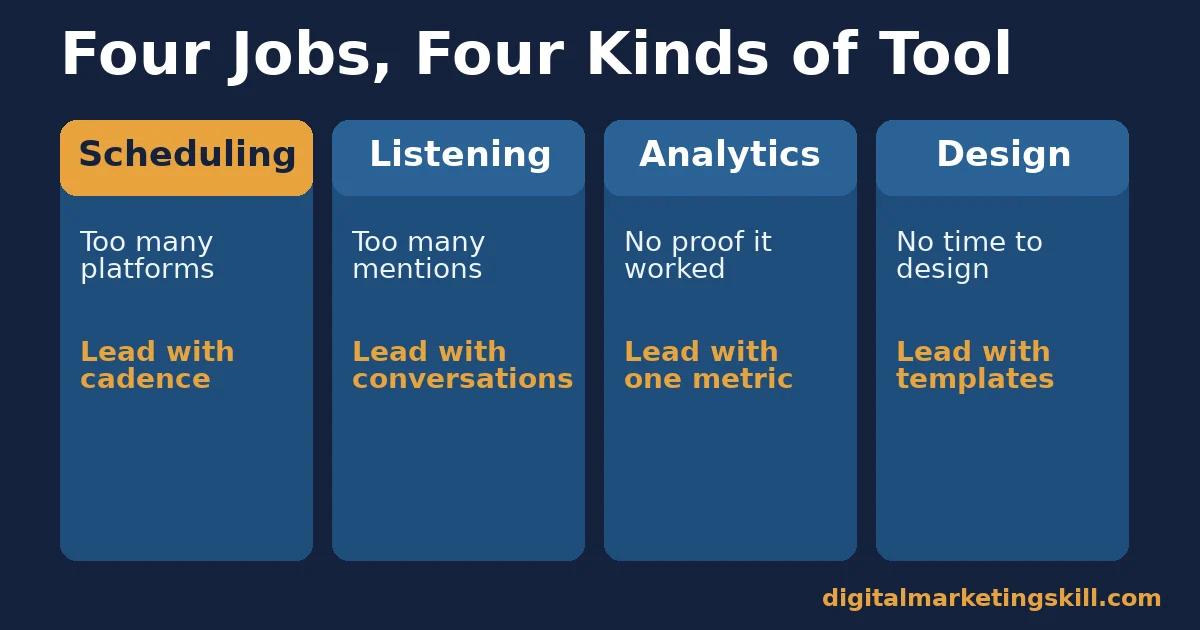
Nearly every social media marketing tool on the market fits one of four jobs: getting content out on a schedule, hearing what people say about your brand, proving what worked, or making the content itself. Knowing which job you need fixed narrows a crowded market fast.
Most teams discover this the hard way, after paying for an all-in-one platform that does three jobs they never needed. Checking the job first, before the brand name, is the single habit that separates useful social media marketing tools from expensive ones.
Scheduling and Publishing Tools
Scheduling tools queue posts across platforms so you are not logging into each network separately. Buffer and Hootsuite are the best-known examples. Buffer’s own about page reports roughly 288,000 monthly active users and 83,000 customers, while Hootsuite’s about page reports 200,000-plus users and customers in more than 200 countries. Both figures are self-reported, but they show both tools operate at real scale, not as niche products.
The job these social media marketing tools do well is consistency. A fixed queue means posts go out at the planned time even on a busy week. Most scheduling tools also include basic analytics on top of the scheduling itself, which covers light reporting needs without a second subscription, similar to the manual habits in our guide on growing a Facebook page for free.
Listening and Monitoring Tools
Listening tools track mentions of your brand, your competitors and your industry across the web and social platforms. Mention and Fanpage Karma both specialise here, surfacing conversations you would otherwise miss.
This job matters most when your brand already has volume. Enough mentions pile up that scrolling manually stops being realistic.
Listening tools also matter for compliance. The FTC’s Disclosures 101 guidance for influencers warns that a sponsorship disclosure is “likely to be missed” if it appears only in a bio or behind a “more” click. A listening tool that flags influencer posts about your brand lets you check those disclosures are visible, not just present somewhere on the page.
Analytics and Reporting Tools
Analytics tools turn raw activity into a report you can act on or show a client. BuzzSumo leans this way for content research, surfacing what already performs well in your niche so you are not guessing at topics. The same research habit helps with platform-specific growth, such as our guide on growing an Instagram following.
Reporting tools answer a different question than scheduling tools: not “did it go out,” but “did it work.” Without one, teams often fall back on vanity numbers like follower counts, which say little about actual engagement.
Platform choice still shapes what “working” looks like. HubSpot’s State of Marketing survey of more than 1,500 global marketers found Instagram and Facebook tied as the strongest reported ROI platforms for B2C marketers at 47.4% each, with short-form video rated the top-performing content format overall at 48.6%. A reporting tool should let you break results down by platform and format, not just show one combined total.
Design and Content Creation Tools
Design tools like Canva exist because most posts are judged on their visuals in under a second. Canva confirmed 265 million monthly active users and about 31 million paying subscribers, making it one of the most widely used design tools of any kind, not only in marketing. That scale is self-reported by the company, but it is consistent across multiple reports of its growth.
The reason design tools pay off ties back to how people actually read a page. Nielsen Norman Group’s eye-tracking study of how users looked at web content found that readers scan in an F-shaped pattern. They cross the top, then a shorter line further down, then drop down the left side.
A templated, uncluttered graphic survives that scan. A crowded one does not, because the eye never reaches the detail buried in a corner.
How to Choose the Right Tool for Each Job
Once you know the job, the next step is picking well inside that category. The sections below mirror the four jobs above, each with the first thing to check before you commit budget.
Scheduling Tools: Lead With a Cadence You Can Keep
Before comparing features, write down the posting pace you can really keep up. A tool that supports twenty posts a day is wasted if your team can only produce content for five. Buffer and Hootsuite both support multi-platform queues, so the deciding factor is usually team size and whether you need approval workflows for multiple editors.
Also check integration reach. Zapier’s own developer platform page lists more than 9,000 app integrations. If your scheduler connects to Zapier, it can likely reach almost any other tool your team already uses, such as a CRM or a form tool, without custom code. That matters more as your stack grows past the scheduler itself.
Listening Tools: Lead With the Conversations That Matter
Set up alerts around your brand name, your main competitors and two or three industry terms, then exclude obvious noise before the alert goes live. A listening tool that floods your inbox with irrelevant mentions gets ignored within a week.
Review what the tool surfaces weekly, not daily, unless you run a support function through social. Most brands do not need real-time alerts; they need a weekly digest that catches the one mention worth a reply.
Analytics Tools: Lead With One Metric at a Time
Pick a single metric that matches your actual goal, such as click-through to your site or saves on a visual platform, before opening any dashboard. Tools that show forty metrics at once make it easy to chase the wrong one.
Use a research tool like BuzzSumo to check what already works in your niche before you build new content, then use your scheduler’s own analytics to confirm whether your version matched that performance.
Design Tools: Lead With Templates, Not a Blank Page
Start every graphic from a template sized for the platform you are posting to, rather than a blank canvas. Canva’s own template library exists because consistent sizing and spacing is what makes a graphic scannable, not originality for its own sake.
Keep a small set of brand colours and one or two fonts across every template. That consistency is what makes your posts recognisable in a crowded feed, more than any single clever design.
12 Social Media Marketing Tools Worth Testing
- Buffer. Scheduling and basic analytics across major platforms, known for a simple interface.
- Hootsuite. Scheduling at scale with sentiment tracking on comments, suited to larger teams.
- Mention. Brand and competitor monitoring across the web, forums and social platforms.
- Fanpage Karma. Facebook and competitor page tracking with built-in benchmarking.
- BuzzSumo. Content research that shows what already performs well for a topic or keyword.
- Canva. Template-based graphic design built for non-designers, used well beyond marketing teams.
- Zapier. Connects your social tools to the rest of your stack without custom code.
- Bitly. Link shortening with click tracking; its own trust center reports more than 500,000 global customers and over 10 billion monthly connections through its platform.
- IFTTT. Simple automation “recipes” for repetitive cross-platform actions, such as syncing a profile photo.
- Sprout Social. An all-in-one platform leaning toward customer relationship management through social replies.
- CoSchedule. A shared marketing calendar that includes social alongside blog and email scheduling.
- Zoho Social. Multi-channel scheduling bundled with the wider Zoho CRM and helpdesk suite.
Treat this list as a starting point, not a ranking. None of these tools fixes a bottleneck it was not built for, so match the name to the job above before reading a single feature comparison. Most offer a free trial, which is the fastest way to confirm a fit before committing budget.
How to Measure Whether a Tool Is Working
A tool earns its subscription when it changes a number you track, not just when it feels convenient. Each metric below is defined in one sentence, with how to read it.
Five Metrics That Show a Tool Is Paying Off
- Time to publish. How long it takes from finished content to live post, across every platform you use. A scheduling tool should cut this sharply.
- Response time to mentions. How quickly your team replies once a listening tool flags a mention. Falling response time shows the tool is actually being checked.
- Engagement rate per post. Interactions divided by reach or followers. Rising engagement after a design-tool switch suggests the templates are working.
- Click-through rate on shortened links. The share of people who click a link you shared. This isolates whether your content, not just your reach, is working.
- Reporting time per month. Hours spent building performance reports. An analytics tool that does not cut this is not paying for itself.
How to Read These Numbers Together
Read these against your own baseline, taken before you adopted the tool. A tool that only shifts one metric is still worth keeping if that metric was your actual bottleneck. If none move after a full month, cancel it and redirect the budget.
Do not compare your numbers directly to another business’s benchmarks. Audience size, platform mix and industry all change what a “good” number looks like, so your own trend line matters more than any outside figure.
The Most Useful Rule: Match the Tool to the Bottleneck
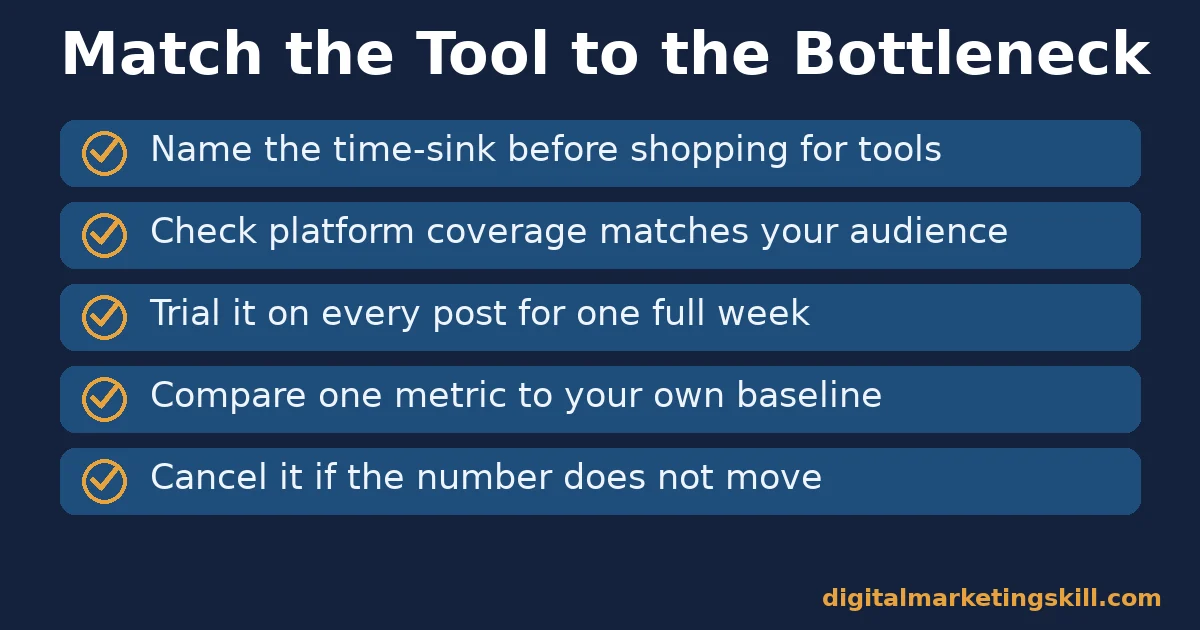
If you remember one decision rule from this guide, make it this one. Name your actual bottleneck first, then shop only inside that one category of tool. Buying an all-in-one platform before you know your bottleneck usually means paying for three jobs you do not need yet.
Here is an illustrative example, with invented numbers. A small outdoor-gear brand spends four hours a week manually posting to three platforms and has no idea which posts drive sales. The bottleneck is not design or listening, it is manual publishing.
A scheduling tool alone cuts that four hours to under one. That frees time to add a simple analytics habit next month, rather than buying a bundled platform for all four jobs at once.
The lesson is sequencing. Fixing the real bottleneck first means every tool you add after that is solving a problem you can already feel, not one you are guessing at.
A Four-Week Plan to Roll Out a New Tool
This plan takes about an hour a week and avoids the common trap of adopting three tools at once and measuring nothing.
- Week one: name the bottleneck. Track where time actually goes for one week: posting, replying, reporting or designing.
- Week two: trial one tool. Pick a free trial in the matching category and use it for every post that week, not a sample.
- Week three: compare against baseline. Check the relevant metric from the list above against the week before you started.
- Week four: decide and document. Keep the tool only if a real number moved, and write down which setting or workflow caused it.
Repeat the cycle for your next bottleneck once the first tool is settled into your routine. Adding tools one at a time, each tied to a measured result, keeps costs from creeping up without proof.
A Real Case: One Scheduling Habit, 200% More Engagement
Buffer published a customer case study in which a Facebook page owner described raising daily interactions from roughly 150 to more than 700, an increase of over 200%, after adopting a consistent posting schedule through the tool.
According to Buffer’s published case study, the change came from posting at consistent times and tracking which posts performed best, then repeating what worked. The write-up does not disclose the page’s total audience size or industry, and it is a single vendor-published case rather than an independent study, so treat it as a plausible result from consistency, not a guaranteed outcome.
The case still illustrates the core point of this guide: the tool did not create the engagement by itself. It made a consistent schedule possible, and consistency is what moved the number.
Frequently Asked Questions About Social Media Marketing Tools
What are social media marketing tools?
Social media marketing tools are software products that help a business schedule posts, monitor mentions, analyse performance or design content for social platforms. Most tools focus on one of those four jobs rather than all of them.
Which social media marketing tool is best?
There is no single best tool, because each one solves a different bottleneck. A team struggling with manual posting needs a scheduler like Buffer or Hootsuite; a team that cannot prove results needs an analytics or reporting tool instead.
Are free social media marketing tools good enough?
Free tiers often cover scheduling for one or two accounts, which is enough for a solo marketer or small brand. Growing teams usually need paid tiers for more accounts, approval workflows or deeper analytics.
How many social media marketing tools does a small business need?
Often just one, picked for the biggest bottleneck. A scheduling tool with basic analytics covers most early needs, and listening or design tools can be added once that first bottleneck is under control.
Do social media marketing tools improve engagement by themselves?
Not on their own. Tools make a consistent habit easier to keep, as in the Buffer case study above, but the habit itself, such as a reliable posting schedule, is what tends to move engagement.
How do I know if a social media marketing tool is worth the cost?
Track one relevant metric, such as time to publish or click-through rate, for a month before and after adopting the tool. If the number does not move, the tool is not solving your actual bottleneck.
Can one tool handle scheduling, listening, analytics and design?
Some all-in-one platforms try to, but they often do each job less well than a specialist tool. Start with the one job costing you the most time, then add others only once that is proven.
Do social media marketing tools work the same way for a solo creator and a large team?
No. A solo creator usually just needs scheduling and light analytics in one place. A larger team often needs approval workflows, multiple logins and a dedicated listening tool, since more people and more mentions raise the chance something important gets missed.
Start With Your Biggest Bottleneck
Social media marketing tools work best when you buy for a named problem rather than a long list of features. Track your time for a week, and name the biggest bottleneck among scheduling, listening, analytics and design.
Then trial one tool in that category before adding any other. For the strategy these tools support, see our guide on building a social media marketing strategy, and for the platforms themselves, our guide to the best social media platforms for business covers where to focus first.
If you want guided practice choosing and using social media marketing tools well, Digital Marketing Skill Institute teaches it hands-on inside the Master Diploma in Digital & AI Marketing. The programme is built around four AI-powered tracks totalling ten courses, including AI-Powered Social Media Management and Advertising, with a Full Stack option for learners who want all four tracks.
It comes with unlimited 1-on-1 coaching and mentoring and a U.S. Project Internship with a verified U.S. Work Reference Letter. The diploma is dual US and UK accredited and recognised in more than 100 countries.
The programme is fully online, so you can study from anywhere in your country. Browse more guides on the Digital Marketing Skill Institute blog, and when you are ready, apply for the Master Diploma or start from the Digital Marketing Skill Institute homepage.
Every figure in this guide was checked against its original source before publication. Figures marked as illustrative are invented examples, not real results.
![9 Amazing Digital Marketing Skills to Make Money Online [With Proof]](https://digitalmarketingskill.com/wp-content/uploads/2019/07/9-Amazing-Digital-Marketing-Skills-to-Make-Money-Online-With-Proof-17.png)






