
Claude is a family of AI models and an AI assistant made by Anthropic that can read, write, analyse and reason with text, images and files. You can chat with it in an app or build it into your own tools through an API. For marketers, it helps with research, drafts, data work and repeat tasks. As a result, it can save hours on work that used to be slow and manual.
Key Takeaways
- Claude is made by Anthropic and is both a set of AI models and an assistant app.
- You can use it on the web, on desktop or on your phone.
- Developers reach Claude through the Claude API, and coders can use Claude Code.
- Claude models accept text and images and reply with text, in many languages.
- It is a helper, not a replacement for your judgement, so you still check its work.
What Is Claude?
Claude is a type of large language model, or LLM. In plain words, it is software trained to understand and write language. Anthropic’s documentation says, “Claude is a family of state-of-the-art large language models developed by Anthropic.”
Usually, people meet Claude as an AI assistant. Anthropic describes it as “the AI assistant for work.” So you type a request, and Claude replies, asks questions or creates a file. Also, you can upload documents, spreadsheets or images and ask Claude to work with them.
Here is an everyday example. Say you have notes from five customer calls. You paste them into Claude and ask for the top three complaints. Then you ask it to draft an email that answers each one. In a few minutes, you have a summary and a first draft to edit.
Claude comes in several model lines, such as Opus, Sonnet and Haiku. In general, each line balances speed and depth in a different way. For instance, Anthropic describes one current Haiku model as suited to “high-volume, latency-sensitive tasks such as classification, extraction, and routing.”
Why It Matters
Marketing involves lots of reading and writing. For example, you write briefs, ads, emails, reports and social posts. Claude can speed up each of these tasks. In addition, it can help with research and analysis, such as sorting survey answers into themes. So small teams can get more done without hiring more people. Still, the output is only as good as your instructions and your review.
Common Marketing Tasks
So what can you actually hand to Claude? For example, it can turn a long report into a short summary for your manager. It can also suggest headlines, ad variations and email subject lines to test. In addition, it can sort open-ended survey answers into themes. Then it can help you plan a content calendar or outline a blog post. Finally, it can explain a new topic in simple terms, which helps when you learn a new skill. In each case, you guide the work and make the final call.
How Claude Works
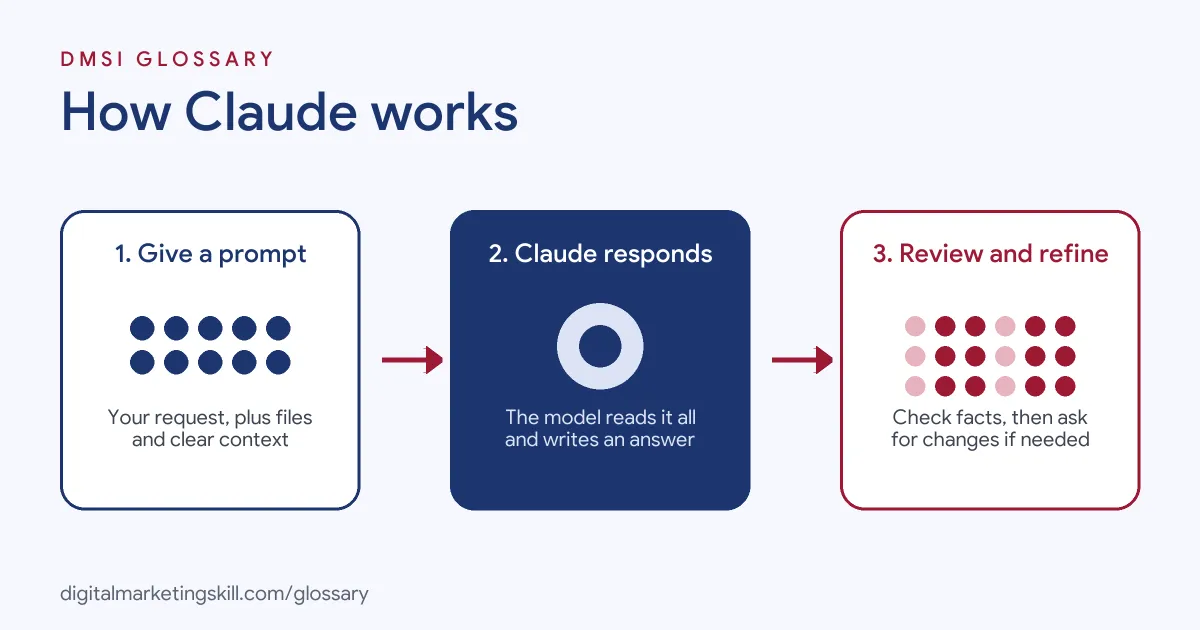
Claude works by predicting useful text based on what you give it. First, you send a message, along with any files. Then the model reads it all and writes a response. Finally, you review the answer and ask for changes if needed.
Prompts and Context
Everything starts with your prompt. This is the instruction you type. As a rule, clear prompts get better results. For instance, “Write three subject lines for a spring sale email to past buyers, under 40 characters” works far better than “Write subject lines.” Also, Claude uses the earlier messages in the chat as context. The amount it can hold at once is called its context window.
Ways to Use Claude
In practice, Anthropic offers Claude in several places. According to Anthropic, you can “use Claude on the web, on desktop, or on your phone.” Also, developers can use the Claude API, which “provides programmatic access to Claude models.” In addition, Claude Code is “an agentic coding tool that reads your codebase, edits files, runs commands, and integrates with your development tools.”
Projects, Artifacts and Connectors
The Claude app has tools for ongoing work. First, Projects let you “keep context, instructions, and files organized by project.” So your brand guide and past campaigns stay in one place. Next, Artifacts are shareable outputs, such as documents and slides. Finally, connectors link Claude to apps you already use, often through the Model Context Protocol.
Checking the Output
However, like all AI models, Claude can make mistakes. Sometimes it states something wrong with confidence, which is called an AI hallucination. So always check facts, numbers, names and links before you publish. Also, follow your company’s rules on what data you can share with AI tools.
Asking It to Act
Claude can do more than answer questions. According to Anthropic, you can “hand Claude a task, not just a question.” For instance, you can ask it to build a slide deck or a spreadsheet from rough notes. Also, the app has permission settings, so Claude can “show its plan and wait for your approval” before it acts. That way, you stay in control of each step.
Examples of Claude in Marketing
- A small e-commerce brand. The marketer uploads last month’s sales export. Then she asks Claude to find the best-selling categories and suggest three email ideas. As a result, she starts planning with clear data in minutes.
- A B2B agency. The team stores each client’s brand guide in a Claude Project. So every draft blog outline follows the right tone of voice. Then an editor reviews and adds expert detail.
- A growth team. A developer connects Claude to the company’s tools through the API. After that, new leads get a short, tailored research note before the sales call.
Claude App vs Claude API vs Claude Code
| Point | Chat app | API | Coding tool |
|---|---|---|---|
| Who it suits | Anyone at work | Developers and technical marketers | Developers and technical users |
| How you use it | Chat on web, desktop or phone | Send requests from your own software | Run in a terminal, IDE, desktop app or browser |
| What you need | An account on the web or app | Console account and API key | Subscription or Console account |
| Typical marketing use | Drafts, research, analysis | Automated workflows at scale | Building scripts, sites and tools |
How to Use Claude for Marketing
- Create an account. Sign up for Claude on the web or download the app.
- Start with one task. Pick a task you do often, such as writing ad variations or summarising reports.
- Give clear context. Tell Claude who the audience is, what the goal is and what format you want.
- Share examples. Paste a past email or post you liked, so Claude can match the style.
- Set up a Project. Add your brand guide and key facts, so you don’t repeat them each time.
- Ask for options. Request several versions, then pick and edit the best one.
- Check everything. Verify facts, claims and numbers before anything goes live.
- Save good prompts. Keep a list of prompts that work, so your team can reuse them.
Best Practices for Using Claude
- Be specific. Include the audience, goal, length and tone in your prompt.
- Work in steps. Ask for an outline first, then the full draft.
- Give it a role. For example, ask it to act as an email editor for a fitness brand.
- Keep a human in the loop. Always review output before you publish or send it.
- Protect data. Follow your company’s policy on customer and private information.
- Add your own expertise. Use Claude for speed, then add real examples and insight only you have.
Common Mistakes to Avoid
- Publishing without checking. AI can get facts wrong, so review every claim.
- Using vague prompts. A one-line request usually gets a generic answer.
- Pasting sensitive data carelessly. Check your company’s rules first.
- Expecting it to know your brand. Claude only knows what you tell it, so share your guidelines.
- Treating the first draft as final. However good it looks, edit it for voice and accuracy.
- Ignoring other tools. Claude works best as part of a wider process, not as the whole process.
Where You’ll Use Claude at Work
Claude shows up in job ads across marketing, operations and growth roles. For example, real remote job listings say:
- “build automations with Claude, n8n or Make” (Growth Marketing Manager, Paid Media and Klaviyo).
- “You will use Claude AI, Claude Code, and the broader Claude ecosystem as core daily tools to execute across communications, research, project management, and operational workflows” (Executive Assistant).
- “We’re looking for a GTM Engineer who lives inside Clay and Claude.” (GTM Engineer).
Learn It in the Full Stack Programme
AI tools such as Claude run through every part of DMSI’s Full Stack programme, which covers all four tracks. Every track includes a U.S. Project Internship from day one, with unlimited 1-on-1 mentoring.
Frequently Asked Questions
Who makes Claude?
Claude is made by Anthropic, an AI company. Anthropic builds both the models and the Claude apps.
Where can I use Claude?
You can use Claude on the web, on desktop or on your phone. Developers can also use the Claude API.
Can Claude read images and files?
Yes. Anthropic says its current models support text and image input. You can also upload files, such as documents and spreadsheets, in the app.
Is Claude good for marketing work?
It can help with drafts, research, analysis and automation. However, you still need to check its work and add your own expertise.
What is Claude Code?
Claude Code is Anthropic’s agentic coding tool. It can read a codebase, edit files and run commands.
Sources: Claude by Anthropic: Product overview; Claude Platform Docs: Models overview; Claude Platform Docs: API overview; Claude Code Docs: Overview; remote job listings on Himalayas, Himalayas and Himalayas.