
Content repurposing is the practice of taking one piece of content, such as a blog post, webinar or video, and turning it into new formats for other channels. A single long video might become short clips, a blog post, an email and a set of social posts. It matters because it helps you reach more people with less effort, and it gets more value from ideas you have already researched and proven.
Key Takeaways
- Repurposing adapts one core idea into several formats. It is not the same as copying and pasting.
- Each new version should suit its channel, such as vertical video for Shorts and Reels.
- YouTube treats square or vertical videos up to three minutes long as Shorts.
- Google’s guidance warns against content that simply copies or rewrites other sources without adding value.
- The best pieces to repurpose are the ones that already performed well.
What Is Content Repurposing?
Think of a chef who roasts a chicken on Sunday. On Monday, the leftovers become sandwiches. On Tuesday, the bones become soup. One effort feeds the family three times, and each meal feels different.
Repurposing works the same way. You put serious effort into one strong “pillar” piece, such as a detailed guide or a recorded talk. Then you reshape it into smaller pieces for each place your audience spends time. As a result, you publish more without starting from a blank page every day.
It is different from simply reposting. A link shared five times is still the same post. By contrast, a repurposed piece changes the format, length and angle to fit the new channel and audience.
How Content Repurposing Works
Most teams follow a simple flow. First, they pick a strong source piece. Next, they break it into smaller ideas. Finally, they rebuild each idea in the format that suits each channel.
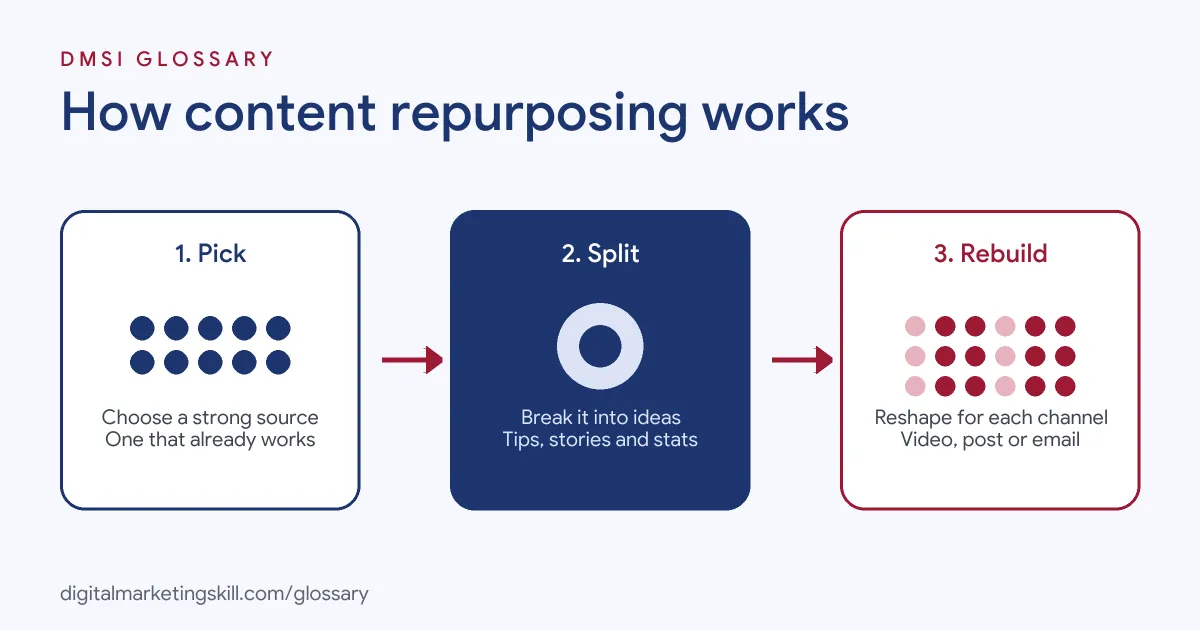
Choose the Source
Start with content that already works. Look for blog posts with steady traffic, videos with high watch time or webinars that drew questions. These pieces have proven that the topic interests your audience. Long, detailed pieces are best, because they contain many smaller ideas.
Break It Down
Next, list the parts inside the piece. A single guide might hold a definition, five tips, a statistic, a short story and a checklist. Each of those can stand alone. For example, the tips could become a carousel, the story a short video and the checklist a downloadable PDF.
Rebuild for Each Channel
Finally, adapt every piece to its new home. Each platform has its own format. YouTube’s help centre says videos “with a square or vertical aspect ratio up to three minutes in length will be categorised as Shorts.” Meanwhile, email works best with one clear idea and link, and LinkedIn suits short, practical posts. So change the length, hook and layout, not just the file size.
Content Repurposing Examples
Here are three made-up examples that show the approach:
- Webinar to many formats: A software firm records a one-hour webinar. It turns it into a blog recap, five short video clips, a quote graphic series and a follow-up email.
- Blog to social: A travel agent’s guide to packing becomes a carousel of tips, a short video showing a packed bag and a printable checklist for her email list.
- Podcast to search: A coach turns each podcast episode into a written article. The article answers the main question from the episode, so it can rank in search.
In each case, one piece of research feeds several channels.
Common Repurposing Paths Compared
| Source | Can become |
|---|---|
| Long blog post | Carousel, email series, infographic, short video script |
| Webinar or talk | Short clips, blog recap, slide deck, quote graphics |
| Podcast episode | Article, audiogram clips, newsletter section |
| Case study | Social post, sales one-pager, short testimonial video |
| Research report | Charts for social, press pitch, webinar topic |
These paths are starting points. The right choice depends on where your audience is and what format they prefer.
How to Repurpose Content Step by Step
- Audit your best content. Use analytics to find posts and videos with the most traffic, watch time or engagement.
- Pick one pillar piece. Choose something detailed and still accurate.
- List the ideas inside it. Write down each tip, story, number and question it covers.
- Match ideas to channels. Decide which idea suits a short video, which suits a carousel and which suits email.
- Rewrite the hook for each one. Open with what that audience cares about most.
- Add something new. Include an extra example, a fresh visual or an updated tip.
- Schedule and link. Plan the pieces in your content calendar and link back to the original where it helps.
- Track results. Compare how each format performs, then repurpose more of what works.
Best Practices for Content Repurposing
- Add value each time. Google’s helpful content guidance asks whether content that “draws on other sources” avoids “simply copying or rewriting those sources.”
- Start with evergreen topics. Evergreen content stays useful for longer, so it is worth reshaping.
- Respect each platform. Use the right size, length and style for every channel.
- Handle duplicates on your own site. If two pages share the same text, Google picks one canonical URL and shows only that version in search. Use a canonical tag to tell Google which one you prefer.
- Keep a source library. Store raw recordings, images and notes, so the team can reuse them easily.
Common Mistakes to Avoid
First, many teams paste the same text onto every channel, so nothing feels native. Second, they repurpose weak content that never performed in the first place. Third, they forget to update old facts before republishing. Finally, they spread one piece too thin, posting so many versions that followers feel spammed. Fortunately, each mistake is easy to fix with a short plan before you start.
How to Measure Content Repurposing
To know whether the effort pays off, track a few simple numbers for each new version. First, look at reach and views, so you know how many new people saw the idea. Next, check engagement, such as saves, shares and comments. Then look at clicks back to the original piece or to your offer. Finally, compare the time each version took to make. If a short clip took one hour and brought more visits than a new blog post that took a day, that tells you where to focus next.
Keep these results in one simple sheet. Over time, you will see which formats suit your audience best.
Why It Matters for Marketing
Creating strong content takes time and money. Repurposing helps you get more return from that work. It also keeps your message consistent across channels, which helps people remember it. In addition, different people prefer different formats. Some read, some watch and some listen. So reshaping one idea lets you reach each group in the way they like best.
Where You’ll Use Content Repurposing at Work
Repurposing appears in many content and social roles. For example, remote job listings ask candidates to:
- “Drive content repurposing strategies to maximize the reach, impact, and lifecycle of high-performing content across channels and formats.” (Content Marketing Manager, Industrial B2B).
- “Repurpose existing blogs, videos, case studies, webinars, and other content into social posts.” (Social Media Intern).
- “Repurpose long-form videos into short-form social content” (Video Editor).
So if you want to work as a Social Media Manager, Content Creator or Freelance Digital Marketer, this skill will save you hours every week. It is also a strong portfolio piece, because you can show one idea working across many channels.
Learn It in the Full Stack Programme
Repurposing touches social, email, search and web content, so the best fit is the Full Stack programme (all four tracks). You take all ten courses and complete one portfolio project from each track. You also get unlimited 1-on-1 mentoring and a U.S. Project Internship from day one.
For more ideas, read our in-depth guide to repurposing content.
Frequently Asked Questions
What is content repurposing in simple terms?
It means turning one piece of content into new formats for different channels. For example, a webinar becomes clips, a blog post and an email.
Is repurposing the same as duplicate content?
No. Repurposing changes the format and angle. Duplicate content is the same text on several pages, which Google groups together and shows only once.
What content should I repurpose first?
Start with pieces that already perform well and are still accurate, such as popular blog posts or videos with high watch time.
How many pieces can one post become?
It depends on the source. A detailed guide or long webinar can often become five or more smaller pieces.
Can AI help with repurposing?
Yes. AI tools can draft summaries, captions and scripts. However, a person should check facts, add new value and match the brand voice.
Sources: YouTube Help: Three-minute Shorts; Google Search Central: Creating helpful, reliable, people-first content; Google Search Central: What is canonicalisation; remote job listings on Himalayas.