
A canonical tag is a line of HTML that tells search engines which URL is the main version of a page when the same or very similar content appears at more than one address. It looks like <link rel="canonical" href="..."> and sits in the page’s head section. It matters because it helps Google show the right page in results and stops duplicate copies from competing with each other.
Key Takeaways
- Duplicate URLs are common. Filters, tracking codes, HTTP and HTTPS versions and print pages can all create them.
- Google treats rel=”canonical” as a strong signal, not a command. It still picks the canonical URL itself.
- Redirects are the strongest signal. Sitemaps are a weak one. Using several together makes your preference clearer.
- Use absolute URLs and add a self-referencing tag on the main page too.
- Don’t use robots.txt or noindex to handle duplicates. Google advises against both.
What Is a Canonical Tag?
“Canonical” simply means the official or preferred version. Google defines a canonical URL as “the URL of a page that Google chose as the most representative from a set of duplicate pages.” The tag is how you tell Google which one you would like it to choose.
Here is a simple case. An online shop sells a green dress. The same product page loads at /dresses/green-dress, at /dresses/green-dress?colour=green and at /sale/green-dress. To a shopper, these are one page. To Google, they are three. The tag points all of them to the address you want in search results.
As Yoast puts it, “even a small difference in the URL makes them separate pages” in Google’s eyes. That’s where this small line of code earns its place.
How a Canonical Tag Works
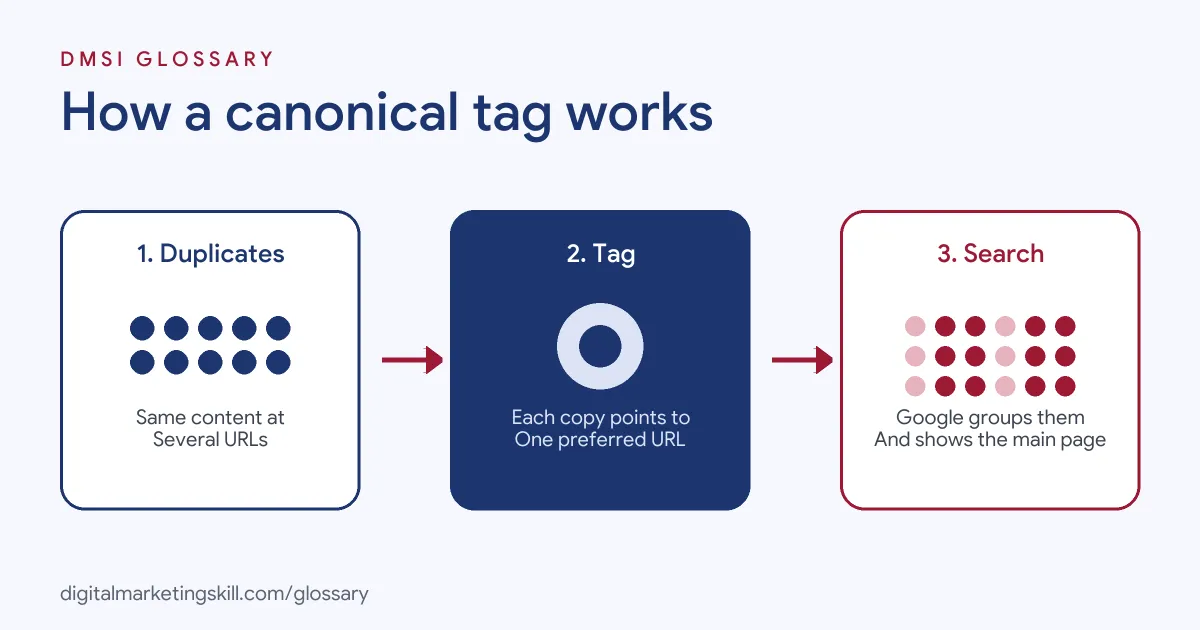
When Google finds several pages with the same content, it groups them and picks one to show. This process is called canonicalisation, or deduplication. The tag is one of the clues it uses to decide.
Why Duplicates Happen
Google lists several common causes. First, there are region variants, such as separate UK and US pages with the same content. Next, device variants, such as mobile and desktop versions. Then there are protocol variants, such as HTTP and HTTPS. In addition, site functions such as sorting and filtering can create new URLs for the same list of products.
Why does this matter? Duplicates split your signals across several URLs. They also waste crawling time. Google notes that it’s better for its crawler to spend time on new or updated pages on your site, rather than on duplicate versions of the same content. So a clear canonical helps search engines focus on the pages you care about.
The Signals Google Uses
Google ranks the main methods by how strongly they influence its choice:
- Redirects: “A strong signal that the target of the redirect should become canonical.”
- Canonical link annotations: “A strong signal that the specified URL should become canonical.”
- Sitemap inclusion: “A weak signal” for the URLs you list.
These methods can stack. So if you use two or more together, your preferred page is more likely to appear in search results.
Where the Canonical Tag Goes
You add a link element with rel=”canonical” to the head section of each duplicate page, pointing to the main page. Google also recommends adding the same tag to the main page itself. This is known as a self-referencing canonical. For files that aren’t HTML, such as PDFs, you can send the same signal in an HTTP header instead.
Canonical Tag Examples
Here are three made-up examples of when to use one:
- Filtered product lists: A shoe shop’s category page can be sorted by price or size, which adds parameters to the URL. Each sorted version points back to the clean category URL.
- Tracking links: A newsletter adds campaign codes to links. The tagged URLs all point to the clean page, so the codes don’t create duplicates in search.
- Syndicated articles: A blog post is republished on a partner site. Where both sides agree, the copy can point back to the original as its canonical.
Canonical Tag vs Redirect vs Noindex
These three tools are often mixed up. Here is when to use each one:
| Tool | What visitors see | Use it when |
|---|---|---|
| Canonical tag | Both pages still load | You need the duplicate to exist, but want one version in search |
| 301 redirect | Visitors move to the new URL | The old page should no longer exist, for example after a move |
| Noindex | The page loads but is kept out of search | You want the page hidden from search entirely, not merged |
On that last row, Google is clear. It doesn’t recommend noindex for choosing a canonical within one site, because noindex “will completely block the page from Search.”
How to Add a Canonical Tag
- Find your duplicates. Look for URL parameters, HTTP and HTTPS versions, and copies of the same page in different folders.
- Pick the main version for each group. Usually, it’s the clean HTTPS URL you want people to land on.
- Add
<link rel="canonical" href="https://example.com/main-page/" />to the head of each duplicate. - Add a self-referencing tag to the main page as well.
- Use full, absolute URLs, not relative paths such as /main-page/.
- List only the main versions in your XML sitemap.
- Update internal links so they point to the main URL, not the duplicates.
- Check the result with the URL Inspection tool in Google Search Console.
On WordPress, you usually don’t need to edit code. Yoast SEO, for example, handles canonical URLs automatically. It also skips the tag on pages set to noindex.
Best Practices
- Use absolute URLs. Google supports relative paths, but warns they “can cause problems in the long run.”
- Be consistent. Don’t name one URL in the sitemap and a different one in the tag for the same page.
- Link to the main version. Google advises linking within your site to the canonical URL, not a duplicate.
- Prefer HTTPS. Redirect HTTP to HTTPS and use the HTTPS version in your sitemap.
- Match languages. If you use hreflang, pick a canonical page in the same language.
Common Mistakes With a Canonical Tag
A few errors cause most problems. First, people block duplicates in robots.txt. Google warns that it “may still index URLs that are disallowed in robots.txt without their content.” Second, they point every page on a site to the home page, which hides useful pages. Third, they send mixed signals, with the sitemap, internal links and tag all naming different URLs. Fourth, they use a URL fragment, the part after a #, which Google generally doesn’t support. Finally, some forget that Google may still pick a different URL if other signals disagree.
Where You’ll Use Canonical Tags at Work
Canonicals are part of almost every technical SEO audit. For example, recent remote job listings ask candidates to:
- Run “recurring audits covering crawlability, indexation, rendering, redirects, canonical tags, internal link structures, structured data, and page quality” (Senior Technical SEO Specialist).
- “Conduct hands-on technical SEO implementation across WordPress sites, including optimizing canonical structures, on-page signals, internal linking, structured data, crawlability, and indexation” (Technical SEO and GEO Specialist).
- “Own the fundamentals with precision: title tags, meta descriptions, heading hierarchy, canonicals, redirects, XML sitemaps and robots.txt” (SEO Strategist).
So if you want to work as an SEO Specialist, WordPress Developer or Website Manager, expect to find duplicates, set canonicals and check that Google agrees.
Learn It in the WordPress and SEO Track
You can learn to fix duplicate content on a real site in the AI-Powered WordPress and SEO Specialist track. It covers WordPress website and eCommerce development, search engine optimisation and content marketing. Your portfolio project is a WordPress site or store that you build and rank with an SEO content plan. You also get unlimited 1-on-1 mentoring and a U.S. Project Internship from day one.
Next, work through our on-page SEO checklist. You may also like our glossary entries on technical SEO and keyword cannibalisation.
Frequently Asked Questions
What does a canonical tag do?
It tells search engines which URL is the main version of a page, so they show that one in results and group the duplicates with it.
Does Google always follow the tag?
Not always. Google treats it as a strong signal but makes its own choice, especially if other signals point to a different URL.
Should every page have a self-referencing canonical?
Google recommends adding the tag to the canonical page itself. On WordPress, Yoast SEO handles canonical URLs automatically.
Is a canonical tag the same as a redirect?
No. A redirect sends visitors to a new URL. A canonical keeps both pages live but tells search engines which one to show.
Can a canonical point to another website?
Yes. Cross-domain canonicals are possible, for example when content is republished elsewhere. Yoast SEO supports them too.
Sources: Google Search Central: How to specify a canonical URL; Google Search Central: What is canonicalisation; Yoast: rel=canonical guide; remote job listings on Himalayas.