
Customer Match is a Google Ads feature that lets you upload contact details your customers shared with you, such as email addresses, then show ads to those people when they’re signed in to Google. Google matches your list to Google Accounts and adds the matches to an audience you can use in campaigns. It matters because your own customers are often your most valuable audience, and Customer Match lets you reach them across Search, YouTube, Gmail and more.
Key Takeaways
- Google says the feature lets you use “your online and offline data to reach and re-engage with your customers.”
- It works across Search, the Shopping tab, Gmail, YouTube and Display.
- You may only upload data you collected first-hand, such as from your website, app or shop.
- Full targeting access requires 90 days of Google Ads history and more than USD 50,000 in lifetime spend.
- Google hashes your data with SHA256, and list memberships expire after 540 days.
What Is Customer Match?
Google describes it as a way to “use your online and offline data to reach and re-engage with your customers across Search, the Shopping tab, Gmail, YouTube and Display.” In other words, it turns your customer list into an audience inside Google Ads.
Here is how it might look. A gym has an email list of past members. It uploads that list, Google finds which emails belong to Google Accounts, and the gym can then show a “come back” offer to those people on YouTube or in search results.
It sits within Google’s “your data” segments, the group that used to be called remarketing. However, instead of tracking website visitors with a tag, it starts from contact details you already hold.
How Customer Match Works
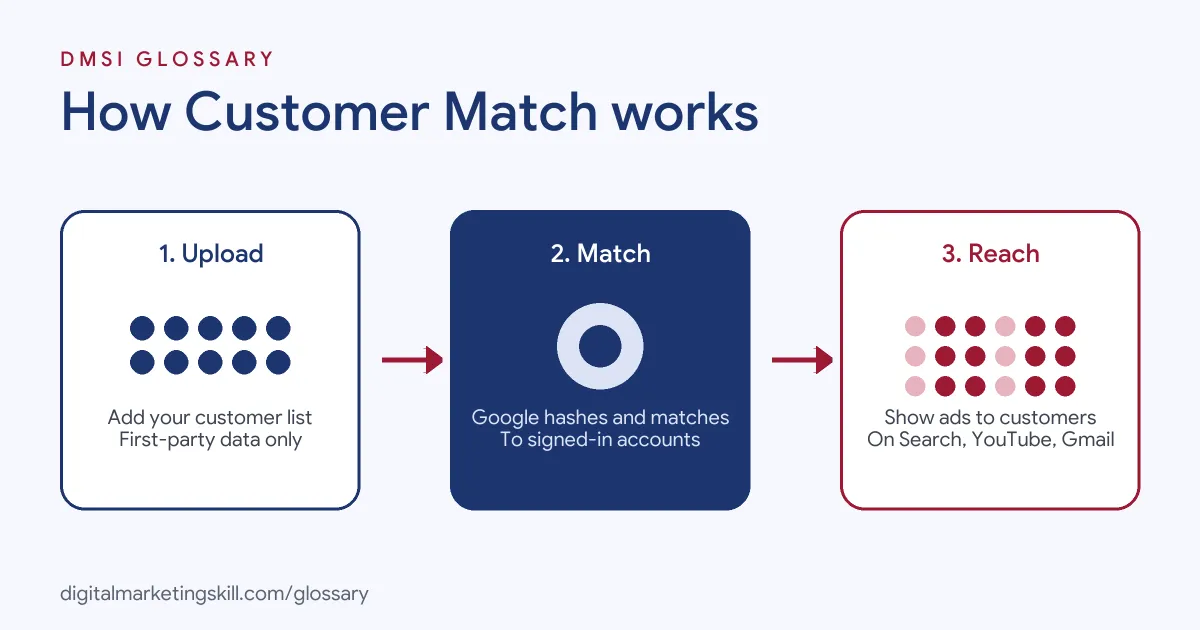
Google explains the process in three steps. First, you create and upload a data file of customer information. Next, you create or update a campaign to target your Customer Match segment. Finally, when those users are signed in to their Google Account, they see your ads on the Search Network, YouTube, Gmail or the Display Network.
Hashing and Matching
Privacy is built into the process. Google says you can hash your customer data yourself “using the SHA256 algorithm,” or Google Ads will hash it for you. It hashes the private fields, which are email, phone, first name and last name, but not country and postcode. Google then compares each hashed value with the hashed details of Google Accounts. It adds that “the matching process can take up to 48 hours,” after which the data file is marked for deletion.
Formatting Your Data
Clean data matches better. If you hash the data yourself, Google asks you to remove leading and trailing spaces, convert text to lowercase and format phone numbers in the E.164 standard. For gmail.com and googlemail.com addresses, it also asks you to remove any full stops before the domain.
List Size and Expiry
Your list must also meet size rules. Google says a segment needs at least 100 active users in the last 30 days to serve on Display, Search or YouTube, and that customer lists have the same eligibility. Memberships also expire. Google’s policy says “Customer Match lists have a maximum membership duration of 540 days,” and a list must have at least 100 members added or updated within that window to stay eligible.
Customer Match Examples
Here are three examples. The first is Google’s own; the others are made up:
- Loyalty launch (Google’s example): A business uploads its customer list to promote a new loyalty programme to existing customers.
- Win-back (example): An online shop targets customers who haven’t bought for a year with a “we miss you” offer on YouTube.
- Exclusion (example): A software company excludes current subscribers from its sign-up ads, so it stops paying to reach people who already pay.
Customer Match Access Levels
Google’s policy sets out what different accounts can do:
| Feature | All policy-compliant accounts | Accounts with 90 days of history and over USD 50,000 lifetime spend |
|---|---|---|
| Observation setting | Yes | Yes |
| Exclusions | Yes | Yes |
| Targeting setting | No | Yes |
| Manual bid adjustments | No | Yes |
To use the feature at all, Google says your account needs “a good history of policy compliance” and “a good payment history.” Google may also remove access if ads could harm users or create a poor experience.
How to Set Up Customer Match
- Check eligibility. Confirm your account meets Google’s policy and access requirements.
- Review consent and privacy. Make sure your privacy policy explains that you share data with third parties for services, and get consent where the law requires it.
- Prepare the file. Use Google’s template, and include first-party contact details only.
- Clean the data. Next, trim spaces, use lowercase and format phone numbers correctly.
- Upload the list. When you set up a connection from scratch, Google recommends its Data Manager tools over the Google Ads API.
- Wait for matching. Allow up to 48 hours, then check the list size.
- Add it to campaigns. Use it for targeting, observation or exclusions, depending on your access.
- Keep it fresh. Finally, refresh the list regularly, for example by syncing your CRM.
A Worked Example
Here is a made-up example. An online bookshop has 8,000 customers who agreed to its privacy terms at checkout. It splits them into three lists: people who bought in the last three months, people who bought more than a year ago and newsletter subscribers who have never bought. After cleaning and uploading the files, it waits two days for matching.
Then it puts each list to work. Recent buyers are excluded from its “first order” ads, so it stops paying to reach them. Lapsed buyers see a YouTube ad for new releases in the genres they liked. Subscribers who never bought see a search ad with a small welcome offer. As a result, each group gets a message that fits where it is.
How It Differs From Website Remarketing
Website remarketing starts from a tag that records visitors to your site. This feature starts from contact details you already hold, which means it can include people who bought in a shop or by phone. Many advertisers use both, because together they cover online visitors and known customers.
Best Practices
- Use only first-party data. Google’s policy allows information collected “in the first-party context,” such as from your website, apps or shops.
- Segment your lists. For instance, upload separate lists for recent buyers, lapsed customers and leads.
- Refresh regularly. Google recommends continuous CRM syncing or regular manual uploads.
- Use exclusions. Stop showing acquisition ads to people who are already customers.
- Know how automation uses it. Google says campaigns with Smart Bidding and optimised targeting automatically include your lists, unless you opt out.
Common Mistakes
A common mistake is uploading bought or rented lists, which Google’s policy does not allow. Another is uploading messy data with spaces and mixed formats, which lowers the match rate. Some advertisers also let lists go stale past the 540-day membership limit. Finally, many forget about consent and privacy notices, which can create legal and policy problems.
Where You’ll Use Customer Match at Work
We didn’t find remote listings that name this exact feature, so here is how it fits the roles instead. A Google Ads Specialist uses Customer Match to win back past customers, upsell existing ones and exclude current buyers from acquisition ads. A PPC Specialist compares these lists with other audience segments to see which performs best. Meanwhile, a Web Analytics Specialist often helps by keeping customer data clean and connected to the CRM.
Learn It in the Google Specialist Track
The AI-Powered Google Specialist track covers Google Ads across Search, Display, Discovery, Gmail and YouTube, plus Google Analytics. You launch and measure a Google Ads campaign with conversion tracking, so you learn how audiences such as Customer Match fit into real campaigns. You also get unlimited 1-on-1 mentoring and a U.S. Project Internship from day one.
To compare it with website-based lists, read our glossary entry on remarketing. For the Meta version of the same idea, see our entry on the custom audience.
Frequently Asked Questions
What is Customer Match in Google Ads?
It is a feature that lets you upload customer contact details and show ads to those people when they are signed in to Google.
Is Customer Match data secure?
Google uses SHA256 hashing for private fields and says the data file is marked for deletion after matching and policy checks.
Who can use Customer Match?
Accounts with a good policy and payment history can use it for observation and exclusions. Targeting requires 90 days of history and more than USD 50,000 lifetime spend.
How long does matching take?
Google says the matching process can take up to 48 hours.
Can I upload a list I bought?
No. Google’s policy only allows customer information you collected in a first-party context, such as from your own website, app or shop.
Sources: Google Ads Help: About Customer Match; Google Advertising Policies: Customer Match policy; Google Ads Help: About the customer matching process; Google Ads Help: How your data segments work.