
Display ads are visual adverts, such as images, banners or short videos, that appear on websites, apps and platforms while people browse. Unlike search ads, they reach people who are not actively searching for your product at that moment. They matter because they help you build awareness, stay in front of past visitors and reach large audiences at scale.
Key Takeaways
- Google’s Display campaigns run on the Google Display Network, which Google says reaches people across 35 million websites and apps.
- Ads can also appear on Google-owned properties, including YouTube and Gmail.
- Responsive display ads combine your images, headlines, logos and descriptions, then adjust to fit the available space.
- Optimised targeting is the default and uses information such as the keywords on your landing page.
- Display works best for awareness and remarketing, while search ads catch people who are ready to act.
What Are Display Ads?
Think of the banner at the top of a news article or the image ad between posts in a mobile app. These are classic examples. They appear alongside content people are already reading, watching or using. Because those people are not searching, the ad has to catch their attention rather than answer a question. That’s why strong images and a short, clear message matter more here than long text.
In Google Ads, you create them through a Display campaign. Google explains that “Display campaigns serve visually engaging ads on the Google Display Network,” reaching people at every stage of the buying journey. Other platforms, such as programmatic networks and social media sites, also sell visual placements. However, this page focuses on Google, because it is where most beginners start.
If you are new to the platform as a whole, read our glossary entry on Google Ads first.
How Display Ads Work
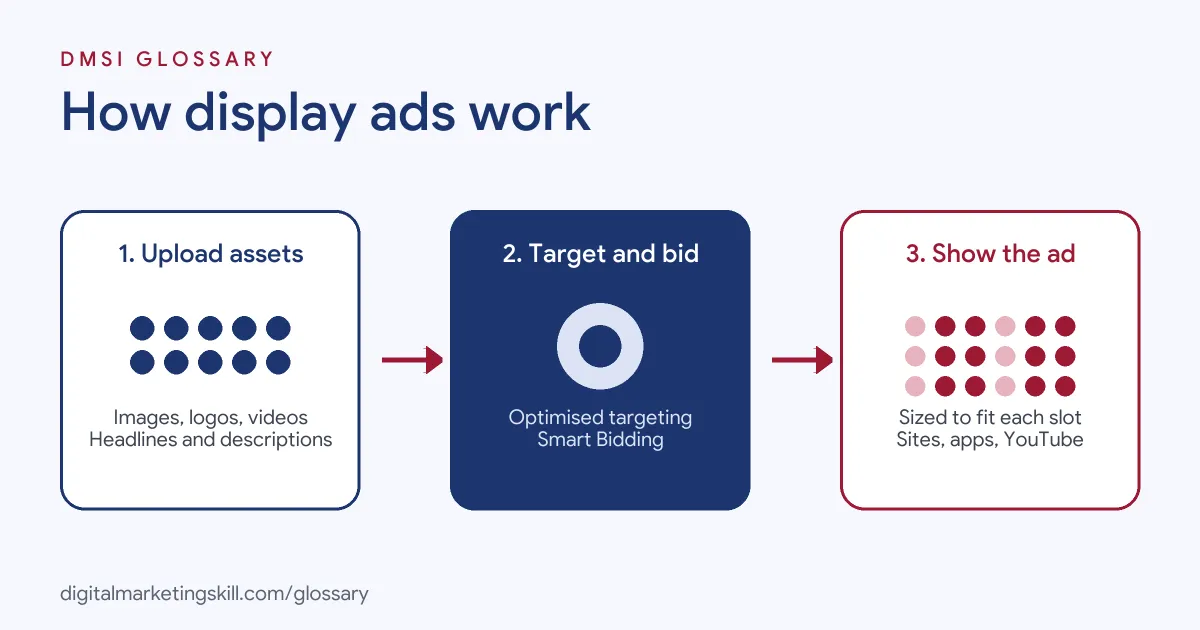
Every Display campaign follows three broad steps. First, you upload your creative assets. Next, Google decides who to show them to, based on your targeting and bidding. Then it builds the ad to fit each available slot and shows it on a site, app or Google property.
Responsive and Uploaded Ads
Google states that “Display campaigns use responsive display ads.” With this format, you upload several images, headlines, logos, videos and descriptions. Then “Google AI determines the optimal combination of assets for each ad slot based on your performance history.” It also adjusts the size, appearance and format to fit “just about any available ad space.”
Alternatively, you can “upload ads as images in different sizes or HTML5” if you want more control over the design. In that case, you need to create each size yourself.
Common Ad Sizes
Size still matters when you design creative. Google’s help centre lists common ad sizes for computers such as 300×250, 336×280, 728×90, 300×600 and 160×600. For high-end mobile, it lists sizes such as 300×50, 300×100 and 250×250. So if you design your own creative, start with these.
Targeting and Bidding
Optimised targeting is the default. According to Google, it “uses information such as keywords on your landing page” to find new, relevant people. You can also use your own data to “reach people who’ve previously visited your website or app,” which is known as remarketing.
For bidding, Google offers Smart Bidding, which it describes as bidding “that uses AI to optimize for conversions or conversion value in each and every auction.” You can still choose manual strategies if you prefer more control.
Display Ads Examples
Here are three common ways businesses use the format:
- Remarketing for an online shop: A furniture store shows image ads of a sofa to people who viewed it but did not buy. As a result, the product stays on their mind while they compare options.
- Awareness for a new app: A budgeting app runs responsive ads with a short video on finance blogs and in mobile games. The goal is to make the brand familiar before people search for it.
- Event promotion: A training school promotes a free webinar with banners on career and education sites. Then it measures sign-ups on its landing page.
In each case, the ad meets people while they are doing something else. That is the main difference from search, where people come to you.
Display Ads vs Search Ads
Both run in Google Ads, but they suit different goals. Here is a quick comparison:
| Feature | Display campaigns | Search campaigns |
|---|---|---|
| Where ads appear | Partner websites and apps, YouTube and Gmail | Google search results |
| Ad format | Images, video, logos and text | Mainly text |
| User intent | Browsing, not actively searching | Searching for an answer or product |
| Best for | Awareness and remarketing | Capturing ready-to-act demand |
In short, search ads answer a need people already have, while visual network ads help create interest and bring people back.
How to Create Display Ads in Google Ads
The steps below follow the standard flow. Menu names can change, but the logic stays the same:
- In Google Ads, create a new campaign and choose a goal, such as sales or leads.
- Select Display as the campaign type.
- Set your locations, languages, budget and bidding strategy.
- Keep optimised targeting on, or add audience segments, such as past website visitors.
- Create a responsive display ad. Upload several images, logos, headlines and descriptions.
- Add the final URL of a page that matches the ad.
- Check that conversion tracking works, then launch the campaign.
After launch, give the campaign time to gather data. Then compare results and replace the weakest images and headlines.
Best Practices for Display Campaigns
A few habits help your budget go further:
- Upload plenty of assets. Google lets you add “multiple assets per asset type,” which gives its AI more combinations to test.
- Add video if you have it. Google may show “videos instead of images” when it predicts better performance.
- Keep the brand clear. Use your logo and colours, because people often see the ad for only a moment.
- Use remarketing lists. Past visitors already know you, so they are more likely to respond.
- Match the landing page. If the ad promises a sale on sofas, the page should show those sofas straight away.
- Measure conversions, not just clicks. Clicks alone can hide poor results.
Common Mistakes to Avoid
Beginners often expect visual network ads to perform like search ads. As a result, they judge them on the same cost per conversion and give up too soon. Another mistake is uploading only one image and one headline, which limits what Google can test. Some advertisers also send traffic to a homepage instead of a focused page. Others target too broadly with no clear goal, which spreads a small budget thinly. Finally, many never refresh their creative, so the same tired image keeps running long after people stop noticing it.
Where You’ll Use Display Ads at Work
Visual ad skills are part of most paid media roles. For example, recent remote job listings ask candidates to:
- Stay “hands-on with paid search, LinkedIn, and display ads, and the testing agenda” (Paid Media, Senior Manager).
- Bring expertise in “B2B lead generation through paid search, display ads, programmatic, and paid social” (Paid Media Associate).
- Oversee the “marketing database, email, and display advertising campaigns” (Digital Marketing Manager).
So if you want to become a Google Ads Specialist or PPC Specialist, employers will expect you to plan, build and report on Display campaigns alongside search. You will also need to explain results to clients or managers, so clear reporting matters as much as the build.
Learn It in the Google Specialist Track
You can learn to run Display campaigns in the AI-Powered Google Specialist track. It covers Google Ads across Search, Display, Discovery, Gmail and YouTube, plus Google Analytics. For your portfolio, you launch and measure a Google Ads campaign with conversion tracking. You also join a U.S. Project Internship from day one and get unlimited 1-on-1 mentoring.
Running ads for a small business? Our guide to Google Ads for small business helps you choose where to start.
Frequently Asked Questions
What are display ads in simple terms?
They are visual ads, such as images, banners and short videos, that appear on websites and apps while people browse. In Google Ads, you run them through Display campaigns.
Where do Google display ads appear?
They appear on the Google Display Network of partner websites and apps, and on Google-owned properties such as YouTube and Gmail.
What is a responsive display ad?
It is an ad built from assets you upload, such as images, headlines and logos. Google combines them and adjusts the size and format to fit each ad space.
What are the most common display ad sizes?
Common sizes include 300×250, 728×90, 300×600 and 160×600 for computers, and 300×50 and 300×100 for mobile. Responsive ads adjust to these sizes for you.
Are display ads better than search ads?
Neither is better in every case. Search ads reach people who are actively looking, while Display reaches people while they browse, which suits awareness and remarketing.
Sources: Google Ads Help: About Display campaigns; Google Ads Help: About responsive display ads; Google Ads Help: About common sizes for responsive display ads; remote job listings on Himalayas.