
Google Ads for small business works by putting your offer in front of people already searching for it. You pay only when they click. Google itself says it now sees more than 5 trillion searches a year. The platform works when you match the right campaign type to the right intent, then measure the result honestly.
Key Takeaways
- The search volume is real. Google’s own statement puts annual search volume at more than 5 trillion queries, its first public volume update in years. That scale is why paid search works at all.
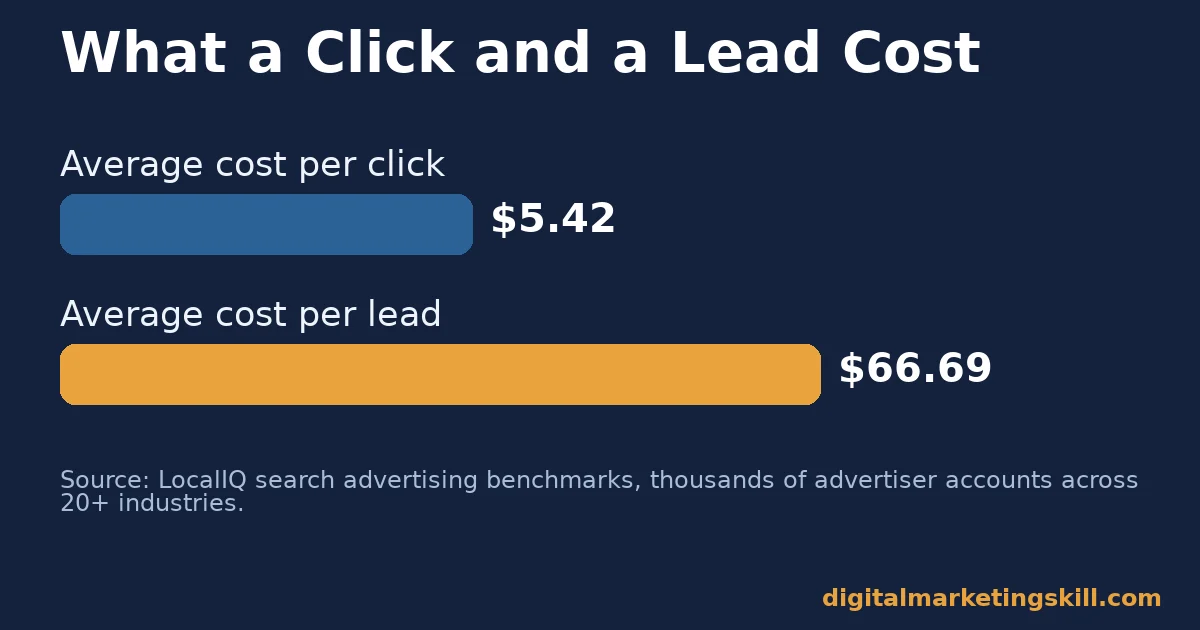
- Clicks cost real money. LocalIQ’s benchmark report is built from thousands of advertiser accounts across more than 20 industries. It puts the average cost per click at $5.42 and the average cost per lead at $66.69.
- Conversion rates vary widely. The same report puts the average conversion rate at 8.18% across industries, with average click-through rate at 6.64%. A single average hides a lot of industry spread.
- Quality Score is a diagnostic, not a KPI. Google’s own Ads Help documentation calls Quality Score a 1-10 diagnostic tool. It is built from expected click-through rate, ad relevance and landing page experience, not a direct auction input.
- Budgets are daily, not fixed. Google Ads documentation confirms a campaign’s average daily budget is spent flexibly. It never exceeds that daily figure times 30.4 over a month.
In this guide
- What Most Google Ads Advice Gets Wrong
- How Google Ads for Small Business Actually Works
- Google Ads for Small Business: Three Campaign Types, Three Jobs
- Google Ads for Small Business: How to Get Results From Each Type
- How to Measure Whether Google Ads for Small Business Is Working
- The One Decision Rule: Fund Intent Before You Fund Reminders
- Common Mistakes in Google Ads for Small Business
- A Real Case: Accountability for a Real Ad Budget
- Frequently Asked Questions About Google Ads for Small Business
- Start With One Tight Campaign, Then Expand
What Most Google Ads Advice Gets Wrong
Most guides to Google Ads for small business treat every campaign the same way. Pick keywords, write an ad, set a budget, launch. That advice ignores a basic fact. Search ads, Shopping ads and Display ads chase different intent. Each one needs a different budget, different creative, and a different success metric to judge it by.
This guide treats them as three separate campaign types. It shows what each one is built for. It also covers what to do first with each, and how to measure whether any of it is working. Benchmark figures below come from Google’s own documentation or a named advertiser-data report. None of them predict your exact result, so read them as a range, not a promise.
The gap matters because a small budget spread across the wrong campaign type burns money fast. It never answers the real question: does this work for your business?
None of this is about finding one perfect campaign type and ignoring the rest. Most businesses running Google Ads for small business eventually use at least two of the three types. The point is sequencing: start where intent is highest, prove the channel works, then add the others deliberately.
How Google Ads for Small Business Actually Works
Every Google Ads campaign runs through an auction. You do not simply pay the highest price to win. Google weighs your bid alongside your Quality Score. That score is a 1-10 diagnostic covering expected click-through rate, ad relevance and landing page experience, according to Google’s own Ads Help documentation.
That score matters in practice. Two advertisers bidding the same amount can pay very different prices per click. The difference comes down to how relevant their ad and landing page are to the search. A relevant ad with a fast, matching landing page often beats a higher bid attached to a weak page.
Budgets work on a daily average, not a hard cap. Google’s documentation on average daily budgets explains that spend flexes day to day. It will not exceed your daily budget times 30.4, the average days in a month, over that period. A $20 daily budget means roughly $608 a month, not a strict $20 ceiling every single day.
None of this works without real demand behind the keywords. Google’s own figure of more than 5 trillion searches a year is the reason this channel exists at all. Your job is finding the slice of that volume that matches your offer.
Once a campaign is live, the Institute’s guide to tracking campaigns on Google Analytics covers how to connect ad clicks to what actually happens after someone lands on your site.
Google Ads for Small Business: Three Campaign Types, Three Jobs
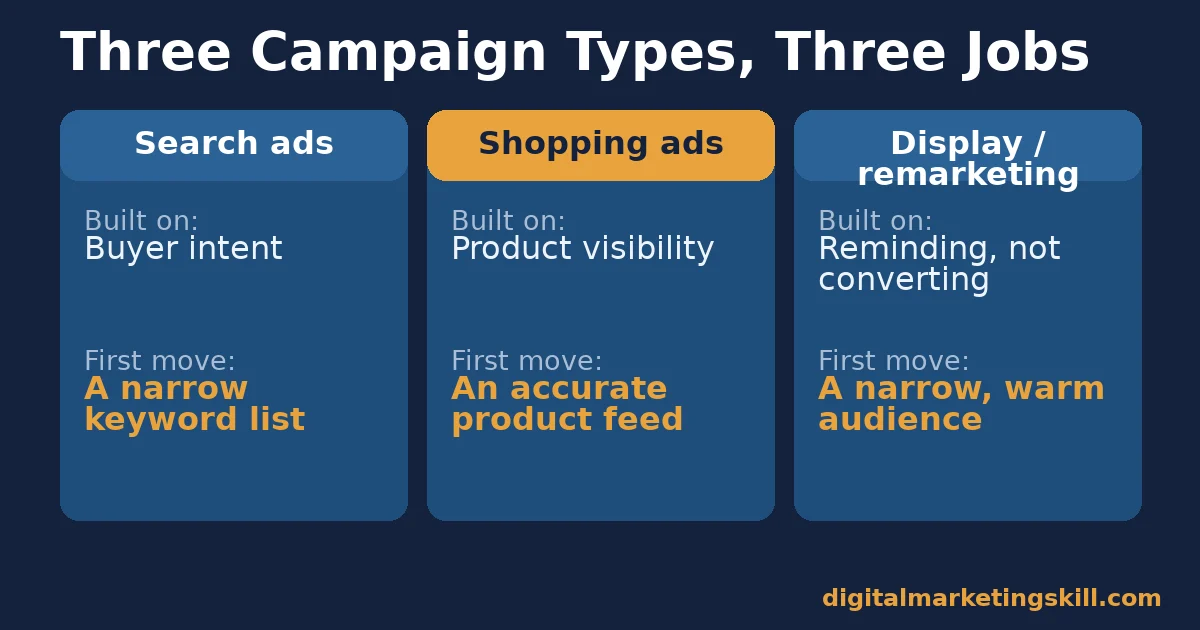
Google Ads for small business usually starts with one of three campaign types. Each one is built for a different kind of intent. Treating them the same wastes budget fast.
A quick way to pick: if people already search for what you sell, start with Search ads. If you sell a visual product, add Shopping ads. If you want to stay in front of people who already visited your site, use Display or remarketing. Do that only after the first two are already working.
Search Ads: Built on Intent
Search ads show up when someone types a query that matches your keywords. The person is already looking, so the ad meets real intent instead of creating it. This is usually the highest-converting campaign type, because it reaches people closest to a decision.
The advantage is relevance. A well-matched search ad competes on message, not just budget. The limit is competition. Popular keywords can carry a high cost per click, especially in competitive industries like legal services or home improvement.
For most small businesses weighing Google Ads for small business against other channels for the first time, Search is the safest starting point precisely because it is the easiest to measure. A click either converts or it does not, with no guesswork about whether the person even saw the message.
Shopping Ads: Built on Product Visibility
Shopping ads show a product image, price and store name directly in search results, before the searcher even clicks. They work on visual comparison rather than ad copy. That suits anyone selling a physical, photographable product.
The advantage is pre-qualification. Someone who clicks a Shopping ad already saw the price and the product. They rarely bounce on sticker shock. The limit is scope. Shopping ads only make sense for businesses with a real product catalog to feed, not for businesses selling a service.
Display and Remarketing: Built on Reminding, Not Converting
Display ads appear across a network of sites and apps, not inside search results. Remarketing, a form of Display, targets people who already visited your site. Neither is built to create new intent from cold strangers. Both are built to stay visible to people already partway through a decision.
The advantage is low cost per impression and strong brand reminder value. The limit is conversion rate. It usually runs far below Search, because Display reaches people mid-scroll, not mid-search.
Many small businesses try Display first because it looks cheap per click. That order usually backfires, because Display spend without a Search foundation has nothing concrete to reinforce.
Google Ads for Small Business: How to Get Results From Each Type
Picking a campaign type is only step one. Each one needs a specific first move to actually produce a return.
Search Ads: Lead With Exact Intent Keywords
Start narrow. Choose a small set of keywords that describe exactly what you sell, in the words a ready buyer would type. Avoid broad category terms at first. A narrow list spends less while you learn what converts, and gives a cleaner read on which keywords actually work.
Write the ad to match the keyword directly. Send the click to a landing page that answers the exact query, not your homepage. That match is what the Quality Score documentation describes as ad relevance and landing page experience. It is also what keeps your cost per click down.
Shopping Ads: Lead With an Accurate Product Feed
Before writing any ad copy, get your product feed right. Use accurate prices, clear images, and titles that match how people actually search, not just internal product names. A Shopping ad with a mismatched price or an out-of-stock item wastes the click it earns.
Once the feed is accurate, let a handful of top products run first. Do not launch your entire catalog at once. That narrows your first budget to the items most likely to convert and prove the channel works.
Review the feed regularly, not just at launch. Prices change, items go out of stock, and a stale feed quietly turns a working campaign into one that wastes clicks on products nobody can actually buy. A short weekly check against your actual inventory catches most of these problems before they cost real money.
Display and Remarketing: Lead With a Narrow, Warm Audience
Start remarketing only to people who already visited a specific page, such as a product or pricing page. Do not target everyone who ever landed on your site. A warm, specific audience converts far better than a broad one and costs less to reach.
Keep Display spend small relative to Search until Search is already converting. Display works best as a supporting channel. It reinforces a decision a searcher has already started making elsewhere.
How to Measure Whether Google Ads for Small Business Is Working
Four numbers tell you whether a campaign is working. Each one means something different depending on the campaign type that produced it.
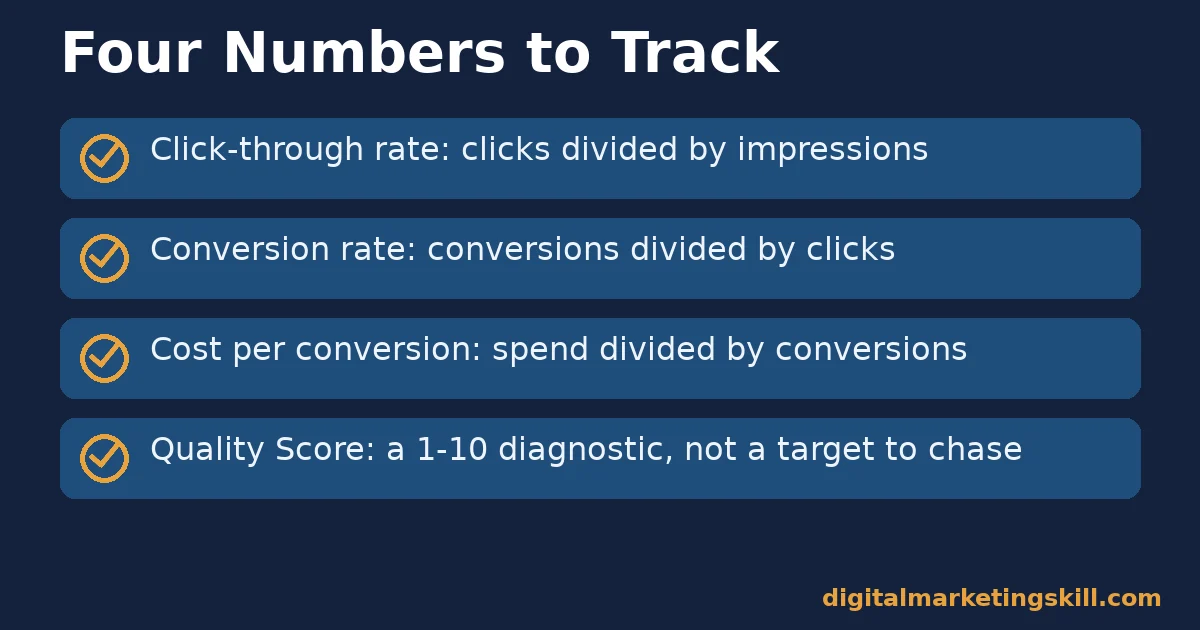
- Click-through rate. This is clicks divided by impressions. LocalIQ’s benchmark puts the cross-industry average around 6.64%, though Search typically runs higher than Display.
- Conversion rate. This is conversions divided by clicks. The same benchmark puts the cross-industry average at 8.18%, but this varies heavily by industry and offer.
- Cost per conversion. This is total spend divided by conversions. LocalIQ’s data puts the average cost per lead at $66.69 across industries, a useful reference point, not a target.
- Quality Score. This is Google’s own 1-10 diagnostic score per keyword. Treat a low score as a signal to improve ad relevance or the landing page, not as a number to chase directly.
Read these together. A high click-through rate with a low conversion rate usually means the ad promises something the landing page does not deliver. A low click-through rate with a low Quality Score usually means the keyword and ad copy are not matched closely enough.
How Often to Check These Numbers
Check these numbers weekly while a campaign is new, then move to a lighter monthly review once performance settles. Checking daily in the first week catches an obvious problem fast. Checking daily forever just adds noise, because small amounts of traffic naturally swing up and down.
The Institute’s guide to reading Google Analytics reports with intent covers how to turn these raw numbers into an actual decision, rather than a wall of charts nobody acts on.
The One Decision Rule: Fund Intent Before You Fund Reminders
If you remember one rule from this guide, make it this one. Put your first real budget into Search ads targeting exact buyer intent. Spend nothing on Display or broad remarketing until that works. Intent-driven clicks convert at a far higher rate, so they teach you more per dollar spent.
Illustrative, invented numbers: imagine a small business splits a $500 monthly budget evenly across Search and Display from day one. The Display spend reaches far more people. It converts at a fraction of the rate, though, so most of the $250 produces no measurable result.
The same $500, spent entirely on three tightly matched Search keywords, would likely produce fewer total clicks. It would also produce several times more conversions, because every dollar meets someone already searching.
Common Mistakes in Google Ads for Small Business
Three mistakes account for most of the wasted spend in a first Google Ads campaign. None of them require a bigger budget to fix.
The first mistake is using broad match keywords without reviewing search terms. Broad match, Google’s own default matching option, can trigger ads for searches only loosely related to your business. That quietly burns budget on clicks that were never going to convert.
The second mistake is sending every click to the homepage. A homepage answers a general question. A searcher clicked because of a specific one, so a mismatched landing page loses them before they convert, no matter how good the ad was.
The third mistake is judging a campaign before it has enough data. A handful of clicks cannot reliably show whether a keyword converts. Give a new campaign enough spend and time to gather a meaningful sample before changing it.
The Quiet Fourth Mistake: Ignoring Negative Keywords
A fourth, quieter mistake is ignoring negative keywords. A negative keyword tells Google which searches to exclude, so a bakery selling wedding cakes can stop paying for clicks from people searching for cake recipes instead of a cake to buy. Without that list, broad match keeps finding new ways to waste the same budget.
Build the negative keyword list from real search term data, not guesswork. Google Ads reports the actual queries that triggered your ad, so a weekly scan of that report usually turns up two or three obvious exclusions worth adding.
The same patience problem shows up broadly across digital marketing, not just in ads. The Institute’s guide to job-ready digital marketing skills covers why reading a result correctly matters more than running a campaign quickly.
A Real Case: Accountability for a Real Ad Budget
According to a published review on the Digital Marketing Skill Institute’s reviews page, a graduate named Chinelo E. described managing a $7,000 monthly ad budget for a U.S. client. The review does not name the ad platform. Still, that underlying skill is the same one covered in this guide: being accountable for how every dollar of a real budget performs.
The lesson is in the accountability, not the platform. Managing a budget that size means tracking cost per conversion closely. Every dollar has to be defensible. That is the same discipline a small Google Ads budget needs from its first week.
Results like this reflect one person’s role and client relationship, not a typical outcome. No outcome is guaranteed; see the Institute’s earnings disclaimer for full context behind any student income figures.
Frequently Asked Questions About Google Ads for Small Business
How much does Google Ads cost for a small business?
Cost varies heavily by industry and keyword competition. LocalIQ’s benchmark puts the average cost per click across industries at $5.42. Legal and home-improvement keywords run well above that, while categories like restaurants run well below it.
Which Google Ads campaign type should a small business start with?
Search ads, in most cases, because they target people already searching for what you sell. Add Shopping ads if you sell a visual product. Treat Display and remarketing as a supporting channel once Search is already converting.
What is a good conversion rate for Google Ads?
There is no single good number, since conversion rate varies by industry and offer. LocalIQ’s cross-industry average sits around 8.18%. Use your own trend over time as the real benchmark, not a universal target.
Is Quality Score something I should try to improve directly?
Improve what drives it instead. Google’s own documentation describes Quality Score as a diagnostic built from expected click-through rate, ad relevance and landing page experience. Fix those three inputs rather than chasing the score itself.
How much should a small business budget for a first Google Ads campaign?
Start with an amount small enough to test safely, but large enough to gather real data. Google’s own guidance on choosing a bid and budget recommends starting conservatively and adjusting once you see real performance. A campaign that stops after a few days rarely collects enough clicks to judge fairly.
Do Google Ads only work for businesses that already rank well in search?
No. Paid placement is separate from organic ranking. That is part of why Google Ads for small business works well for new sites that have not built organic authority yet.
How long before a Google Ads campaign starts converting?
Some clicks convert immediately, but a reliable read usually needs a few weeks of consistent spend. Judging a campaign after only a handful of clicks almost always leads to the wrong conclusion.
Can Google Ads for small business work without a dedicated marketing hire?
Yes, for a single tightly scoped Search campaign. Getting started with Google Ads for small business takes focused setup time rather than a full-time role, though ongoing review of search terms, bids and Quality Score needs someone checking it regularly, even if only for an hour or two a week.
Start With One Tight Campaign, Then Expand
Google Ads for small business works best when you stop spreading a small budget across every available campaign type. Pick Search ads with a narrow, high-intent keyword list. Send clicks to a matching landing page, and give the campaign real time before judging the result. Add Shopping or Display only once that first campaign is reliably converting.
The Digital Marketing Skill Institute’s Master Diploma in Digital & AI Marketing covers this hands-on. It pairs courses like AI-Powered Google Advertising and AI-Powered Google Analytics with unlimited one-on-one coaching and mentoring.
It also includes real project work inside a U.S. partner company, so you practice on a real budget, not a simulation. The diploma is dual US and UK accredited and recognised in more than 100 countries, delivered entirely online, so you can build and run your first campaign from anywhere in your country.
Explore the program at Digital Marketing Skill Institute, browse more guides on the blog hub, or apply directly whenever you are ready, wherever you live. You can set up your first tightly targeted campaign today, and the Digital Marketing Skill Institute team is set up to support that process entirely online.
Every figure in this guide was checked against its original source before publication. Figures marked as illustrative are invented examples, not real results.
![9 Amazing Digital Marketing Skills to Make Money Online [With Proof]](https://digitalmarketingskill.com/wp-content/uploads/2019/07/9-Amazing-Digital-Marketing-Skills-to-Make-Money-Online-With-Proof-17.png)






