
Google Analytics 4 (GA4) is Google’s free analytics platform that tracks how people find and use your website or app, by recording each action they take as an “event”. It shows where visitors come from, what they do and which actions lead to sales or leads. It matters because it is the standard tool most businesses use to measure their marketing, and the older Universal Analytics has stopped processing data.
Key Takeaways
- GA4 uses an event-based model, where every interaction, from a page view to a purchase, is an event.
- It can collect data from both websites and apps in one property.
- Enhanced measurement tracks page views, scrolls, outbound clicks and more without extra code.
- You mark your most important events as key events, which act like conversions.
- Standard properties keep user-level data for 2 or 14 months, so plan your reporting around that limit.
What Is Google Analytics 4?
GA4 is the current version of Google Analytics. Google describes it as a property that collects both website and app data to better understand the customer journey. It also uses event-based data instead of session-based data, and it includes privacy controls such as cookieless measurement and modelling.
The older version, Universal Analytics, has stopped processing new data. So if you work with any website today, GA4 is the version you will use.
For example, an online shop can see that most of its buyers first arrive from Google search on a phone, then come back a few days later through an email and buy on a laptop. That kind of journey is exactly what GA4 is built to show.
How Google Analytics 4 Works
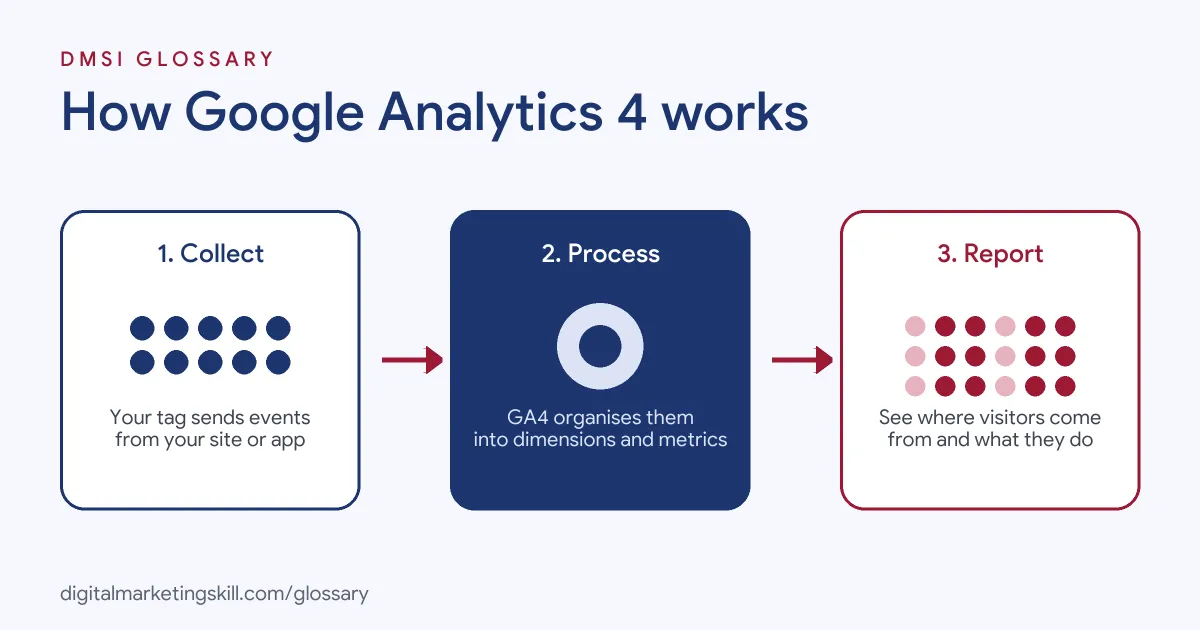
A tag on your site or an SDK in your app sends events to Google Analytics. GA4 then processes those events and turns them into reports, audiences and insights.
Events
Google defines an event as a way to measure a specific interaction or occurrence on your site or app. That could be loading a page, clicking a link or completing a purchase. There are four types:
- Automatically collected events: gathered by default once GA4 is set up.
- Enhanced measurement events: gathered when you switch on enhanced measurement.
- Recommended events: events you add yourself, using names and settings Google has already defined.
- Custom events: events you name and define. Google advises using these only when nothing else fits, because they don’t show up in most standard reports.
Enhanced Measurement
Enhanced measurement lets you track common actions by switching options on in the GA4 settings, with no code changes. For instance, it can record page views, scrolls and outbound clicks. Google says a scroll event fires the first time a user reaches the bottom of a page, when 90% of its depth becomes visible.
Key Events
Not every event matters equally. So GA4 lets you mark your most important ones, such as purchases or form sign-ups, as key events. After that, you can report on them to see which channels lead people to take those actions. Note that Google requires the Marketer role or above in the property to mark key events.
Google Analytics 4 Examples
Here are three made-up examples of GA4 in use:
- Blog (example): A food blog turns on enhanced measurement. Scroll data shows that most readers never reach the recipe card, so the writer moves it higher.
- Online shop (example): A shop adds the recommended purchase event and marks it as a key event. It then compares which traffic sources drive the most revenue.
- Lead generation (example): A training school creates a custom event for brochure downloads. Because custom events don’t appear in most standard reports, it builds an exploration to analyse them.
In each case, the business chooses the events that match its goals, then reads the reports built from them.
A Simple Worked Example
Here is a made-up month for a small online shop. It gets 10,000 visits. Of those, 4,000 come from Google search, 3,000 from Instagram and 1,500 from email. The rest come from other sites.
The shop has marked “purchase” as a key event. Search brings 80 sales, Instagram brings 30, and email brings 45. At first, Instagram looks strong, because it sends lots of visits. But when you look at sales per visit, email does best. It turns 3% of its visits into sales, while Instagram turns just 1%.
So what should the shop do? It might grow its email list, since those readers buy more often. It could also test new Instagram posts that lead to a clear offer. Either way, the numbers point to the next step. That is the real job of GA4: not just to count visits, but to show you where to act.
Google Analytics 4 vs Universal Analytics
Here are the main differences Google highlights:
| Feature | Universal Analytics | GA4 |
|---|---|---|
| Data model | Session-based | Event-based |
| Platforms | Mainly websites | Websites and apps in one property |
| Privacy features | Limited | Includes cookieless measurement and modelling |
| Status | Stopped processing data | The current version |
If you learned the older version, the biggest change is thinking in events rather than sessions and pageviews.
How to Set Up Google Analytics 4
Follow these steps to get started:
- Create a property. In Google Analytics, set up a new property and a web data stream for your site.
- Add the tag. Use your website builder or CMS integration, or add the Google tag to every page. Google lists builders such as WordPress, Wix and Shopify.
- Check enhanced measurement. In the data stream settings, review which options are on.
- Set your data retention. Standard properties let you keep user-level data for 2 or 14 months. Choose 14 if you want longer comparisons in explorations.
- Add key events. Set up events for sales or leads, then mark them as key events.
- Verify the data. Use the Realtime report and DebugView to confirm events arrive.
- Link Google Ads. Connect your Ads account so you can see campaign results and share audiences.
Best Practices
A few habits keep your GA4 data useful:
- Use recommended events first. Their predefined names unlock more reports.
- Keep personal data out. Google says you must make sure no personally identifiable information is collected.
- Name events consistently. Agree a simple naming plan before you add custom events.
- Remember the limits. Google notes that age, gender and interest data always use a two-month retention period.
Common Mistakes to Avoid
First, many site owners leave data retention on the shortest setting and lose detail they later need. Second, they create custom events for things a recommended event already covers. Third, they forget to mark key events, so channel reports show no results. Finally, they install the tag twice, which doubles page views. Each of these makes your reports harder to trust.
Where You’ll Use Google Analytics 4 at Work
GA4 appears in marketing, SEO, product and analytics job listings. For example, current remote roles ask candidates to:
- “Diagnose why a piece isn’t performing, using tools like GA4, Google Search Console, and Ahrefs, and recommend clear, prioritized improvements” (Senior Content Marketer, SEO).
- Show “Familiarity with marketing and acquisition data from platforms such as GA4, Google Ads, Meta or other advertising platforms” (Business Analytics Manager).
- Have “Practical experience building and troubleshooting Google Tag Manager and GA4 tracking setups, including diagnosing why conversions aren’t firing correctly” (Google Ads Specialist, Advanced Tracking and AI Automation).
So as a Web Analytics Specialist, Google Ads Specialist or PPC Specialist, you will use GA4 every week. It works alongside the Google tag, which sends data into it.
Learn It in the Google Specialist Track
You can learn GA4 in the AI-Powered Google Specialist track, which covers Google Analytics alongside Google Ads. There, you launch and measure a Google Ads campaign with conversion tracking. You also get unlimited 1-on-1 mentoring and a U.S. Project Internship from day one.
New to the reports? Start with our guide to Google Analytics for beginners.
Frequently Asked Questions
What is Google Analytics 4 in simple terms?
It is Google’s free tool for tracking what people do on your website or app, and which marketing brings them there.
Is GA4 free?
Yes, the standard version is free. Google also offers a paid version, Google Analytics 360, with longer data retention options.
What is an event in GA4?
It is any interaction or occurrence you measure, such as a page view, a click, a scroll or a purchase.
What is a key event?
It is an event you mark as important, such as a sale or sign-up, so you can report on which channels drive it.
How long does GA4 keep data?
Standard properties keep user-level data for either 2 or 14 months, depending on your setting. Paid 360 properties can keep some event data longer.
Sources: Analytics Help: Introducing the next generation of Google Analytics; Analytics Help: About events; Analytics Help: Enhanced measurement events; Analytics Help: Data retention; Analytics Help: Mark events as key events; remote job listings on Himalayas.