
User experience (UX) is how a person feels and gets on when they use a product, website or service, from first impression to the end of the task. Good UX means people can find what they need, understand it quickly and complete their goal without frustration. It matters because a confusing or slow experience drives people away, however good the product or the marketing behind it.
Key Takeaways
- Nielsen Norman Group says UX “encompasses all aspects of the end-user’s interaction with the company, its services, and its products.”
- Its first requirement is to “meet the exact needs of the customer, without fuss or bother.”
- UX is broader than usability, which is about how easy an interface is to learn and use.
- Google’s page experience guidance covers speed, HTTPS and avoiding intrusive pop-ups.
- Research, testing and data, not opinions, should guide UX decisions.
What Is User Experience?
Think about two coffee shops. In the first, the menu is clear, the queue moves and your order is right. In the second, prices are hidden, the queue is chaotic and they forget your milk. The coffee may be identical, yet you will return to the first one. That difference is the experience.
Online, the same idea applies to websites, apps and emails. Can visitors find the product they want? Do pages load quickly? Is checkout simple? Each answer shapes how people feel about the brand.
Don Norman and Jakob Nielsen of Nielsen Norman Group explain that after meeting the customer’s needs, good UX brings “simplicity and elegance that produce products that are a joy to own, a joy to use.” In other words, it goes beyond working. It should feel easy.
How User Experience Works
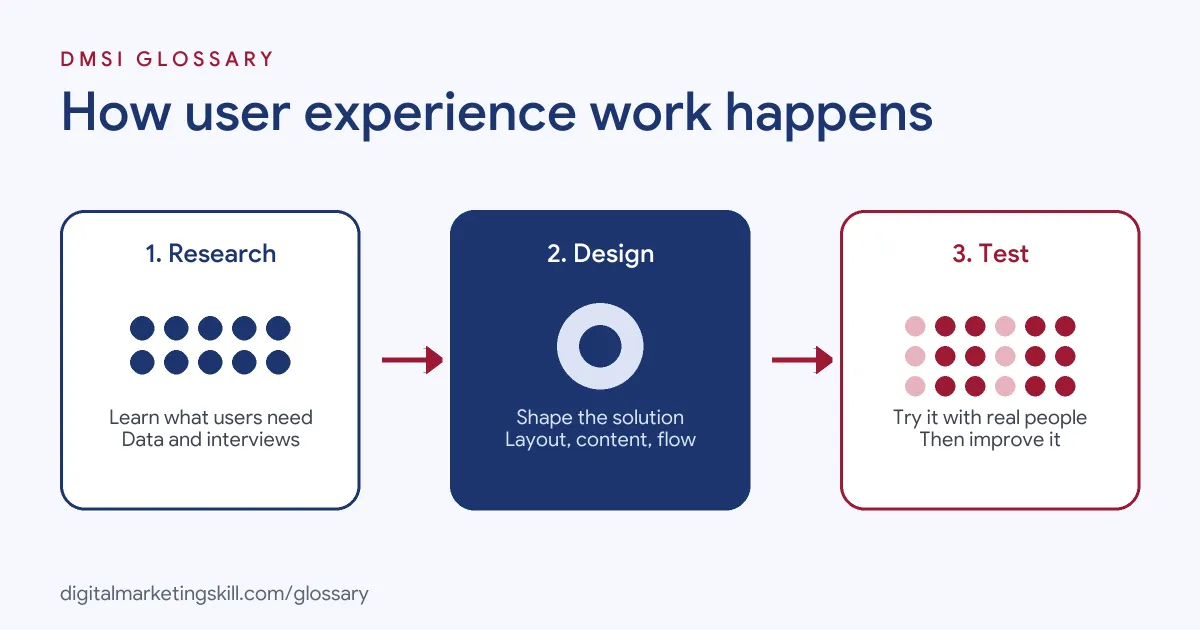
UX work usually follows a cycle. First, you learn about users and their goals. Next, you design and build a solution. Finally, you test it with real people, measure results and improve it. Then the cycle repeats.
Research User Needs
Start by understanding who your users are and what they are trying to do. Methods include interviews, surveys, analytics and watching people use the site. For example, analytics may show that many visitors leave on the pricing page. Interviews might then reveal why.
Design the Experience
Next, turn those insights into structure and screens. This covers navigation, page layout, content and visual design. Knowing how people read helps here. Nielsen Norman Group’s eye-tracking research found that people often scan pages in an F-shaped pattern, reading across the top, then a shorter line below, then down the left side. So put key words where scanners will see them.
Test and Improve
Finally, test the design with real users. Watch them try to complete tasks, and note where they hesitate. Then fix the biggest problems first. For live sites, an A/B test can compare two versions with real traffic.
User Experience Examples
Here are three made-up examples:
- Online shop: A store sees many shoppers abandon checkout. It adds guest checkout and shows delivery costs earlier, and more people finish their orders.
- Service business: A dental practice’s site hides its phone number. Moving it to the top of every page, with tap-to-call on mobile, increases bookings.
- Software app: A budgeting app finds new users get stuck setting up. It replaces a long form with three short steps, and more people complete set-up.
In each case, removing friction made the product easier to use. None of these fixes needed a new design, only a clear look at where people struggled.
User Experience vs UI vs Usability
| Term | What it covers |
|---|---|
| User experience (UX) | The whole experience of a person dealing with a product or brand |
| User interface (UI) | The screens, buttons, colours and layout people interact with |
| Usability | How easy the interface is to learn and use |
Nielsen Norman Group describes usability as “a quality attribute of the UI,” covering whether a system is easy to learn, efficient and pleasant. It adds that “total user experience is an even broader concept.”
How to Improve User Experience on a Website
- Define your users’ main tasks. List the three or four things most visitors come to do.
- Check your data. Use analytics to find pages with high exits or low conversions.
- Watch real users. Ask a few people to complete key tasks while you observe.
- Simplify navigation. Use clear labels and keep the main menu short.
- Speed up pages. Compress images and remove heavy scripts to improve Core Web Vitals.
- Make it work on phones. Use responsive design and test on real devices.
- Write clearly. Use short sentences, plain words and descriptive headings.
- Test, measure and repeat. Make one change at a time and track its effect.
Best Practices for User Experience
- Design for the real need. NN/g warns that true UX “goes far beyond giving customers what they say they want.”
- Remove friction at checkout. Baymard’s research found that 18% of shoppers who abandoned, excluding those just browsing, left because the site wanted them to create an account.
- Avoid intrusive pop-ups. Google’s page experience guidance advises avoiding interstitials that make content less accessible.
- Use HTTPS. Google’s guidance also points site owners to its HTTPS report.
- Be consistent. Buttons, colours and labels should look and behave the same way across the whole site.
Common Mistakes to Avoid
First, teams design for themselves rather than their users. Second, they add features instead of fixing the basics. Third, they test only on fast laptops, so phone users suffer. Finally, they rely on opinions in meetings rather than evidence from real users. Each of these leads to sites that look fine to the team but frustrate the visitors who actually use them.
Quick Wins for Marketers
You do not need a full redesign to improve the experience. Start with a few simple changes that often help:
- Match the ad to the page. If an ad promises a discount, show that discount at the top of the landing page.
- Cut form fields. Ask only for what you truly need, so more people finish.
- Make the main button obvious. Use one clear call to action per page, with a strong colour and plain words.
- Write scannable headings. Readers skim, so headings should say what each section offers.
- Show trust signals. Reviews, guarantees and clear contact details reduce doubt.
Next, check each change in your analytics. If a change helps, keep it. If not, try another idea. Over a few months, these small steps add up to a much smoother journey.
Why It Matters for Marketing
Marketing brings people to a website. UX decides what happens next. If the page is slow, confusing or hard to use on a phone, visitors leave, and the money spent on ads and content is wasted. Good UX also supports search performance, because Google’s guidance encourages pages that offer a good experience. In short, UX turns traffic into results.
Where You’ll Use User Experience at Work
UX skills appear in design, product and marketing roles. For example, remote job listings ask for:
- The ability to “Conduct user research and usability testing to identify pain points and improve user experience.” (UI/UX Intern).
- Someone to “Translate brand messaging into compelling visual design and user experiences” (Website Designer).
- “A track record of improving end-to-end user experiences, not just shipping individual features” (Senior Product Manager).
So if you plan to work as a WordPress Developer, Website Manager or SEO Specialist, you will make UX decisions every week. Even small changes, such as a clearer button, can make a measurable difference.
Learn It in the WordPress and SEO Track
You can learn to build sites that are easy to use in the AI-Powered WordPress and SEO Specialist track. Your portfolio project is a WordPress site or store that you rank with an SEO content plan. The track is about 90% hands-on, with unlimited 1-on-1 mentoring and a U.S. Project Internship from day one.
For layout ideas, read our guide to landing page design.
Frequently Asked Questions
What is user experience in simple terms?
It is how easy and pleasant it is for someone to use a website, app or service, and how they feel about it afterwards.
What is the difference between UX and UI?
UI is the interface itself: screens, buttons and layout. UX is the whole experience, including whether the product meets the person’s needs.
Does user experience affect SEO?
It can. Google’s page experience guidance covers factors such as Core Web Vitals, HTTPS and intrusive pop-ups.
How do you measure UX?
Common measures include task completion, conversion rate, time on task, error rates and feedback from user tests or surveys.
Do I need to be a designer to work on UX?
No. Marketers, writers and developers all shape UX. Clear content, fast pages and simple forms are all UX improvements.
Sources: Nielsen Norman Group: The definition of user experience; Nielsen Norman Group: F-shaped pattern of reading; Google Search Central: Page experience; Baymard Institute: Cart abandonment rate statistics; remote job listings on Himalayas.