
Microsoft Advertising is Microsoft’s pay-per-click ad platform, formerly called Bing Ads, which shows your ads on the Bing search engine and its partner sites. You bid on keywords and audiences, and you pay when someone clicks, in much the same way as Google Ads. It matters because it reaches searchers that Google campaigns miss, and it offers targeting by LinkedIn profile data that Google does not.
Key Takeaways
- Microsoft Advertising was previously known as Bing Ads, and many job listings still use both names.
- Search ads can appear on Microsoft Bing and on partner sites such as Yahoo, AOL, DuckDuckGo and Ecosia.
- Import tools let you bring campaigns across from Google Ads, Meta Ads and Pinterest Ads in a few clicks.
- LinkedIn profile targeting lets you adjust bids by company, industry and job function.
- Most paid search teams run it alongside Google Ads rather than instead of it.
What Is Microsoft Advertising?
When someone types a question into Bing, the results page shows paid ads at the top and bottom. Those ads come from Microsoft Advertising. Businesses choose keywords, write ads and set a budget. Then Microsoft runs an auction each time a search happens and picks which ads to show.
The platform is often called the “other” search engine ad network. However, it is more than a copy of Google Ads. It has its own partner network, its own audience data and some features that Google doesn’t offer, such as LinkedIn profile targeting.
If you are new to search ads, start with our glossary entry on pay-per-click advertising, which explains the auction model.
How Microsoft Advertising Works
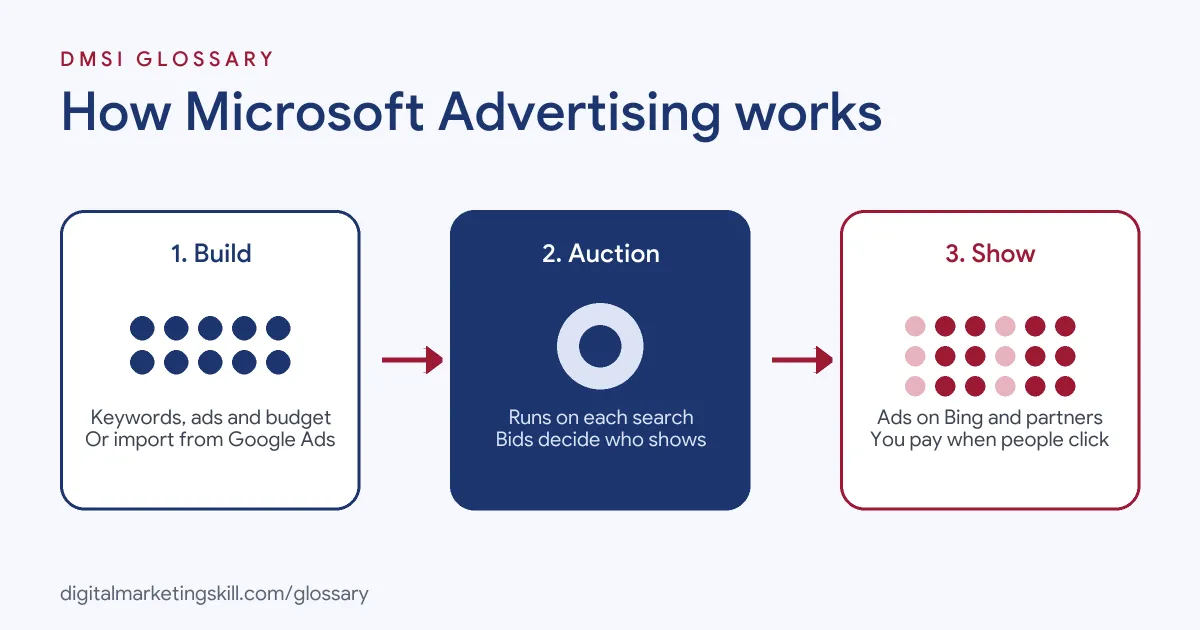
The platform follows the same basic logic as other search ad tools. First, you build campaigns with keywords, ads and budgets. Next, Microsoft runs an auction when someone searches. Finally, it shows the winning ads across Bing and its partners, and you pay when people click.
Where Ads Appear
According to Microsoft, search ads “can appear on Microsoft Bing and search partner sites such as Yahoo, AOL, DuckDuckGo, Ecosia.” It also says it partners with sites “such as CBS, DuckDuckGo, and Forbes.” As a result, one campaign can reach people across several search engines and publishers.
Ad Formats
Microsoft lists several search ad formats. These include responsive search ads, Dynamic Search ads, multimedia ads, vertical ads and ad extensions. Multimedia ads, for example, “find the most effective combinations of headlines, descriptions, and images.” So the format choices will feel familiar if you have used Google Ads.
LinkedIn Profile Targeting
This is the feature that stands out. Microsoft’s help documentation says it “is the only advertising platform (other than LinkedIn) that allows you to target potential customers based on their LinkedIn profile information.” You can target by company, industry and job function.
There is a catch, though. The help page explains that this targeting “will not narrow your ads’ audience.” Instead, it works as “bid only.” In other words, you raise or lower bids for people who match, but others can still see your ads. You also “cannot target more than 1,000 companies in a single ad group or campaign.”
Microsoft Advertising Examples
Here are three made-up examples of how a business might use the platform:
- B2B software: A payroll software firm imports its Google Ads search campaign. Then it adds LinkedIn profile targeting to bid higher for people in finance job functions.
- Online shop: A furniture retailer runs a Microsoft Shopping campaign alongside its search ads. As a result, it shows product listings to Bing shoppers as well as Google ones.
- Local service: A dental clinic copies its best-performing keywords from Google. It then sets a smaller budget to test whether Bing searchers book appointments at a good cost.
In each case, the advertiser builds on work it has already done in Google Ads.
Microsoft Advertising vs Google Ads
Most marketers compare the two platforms. Here is a simple overview:
| Feature | Microsoft Advertising | Google Ads |
|---|---|---|
| Main search engine | Microsoft Bing, plus partners such as Yahoo, AOL, DuckDuckGo and Ecosia | Google Search, plus search partners |
| Professional targeting | LinkedIn profile targeting by company, industry and job function | No LinkedIn data |
| Campaign set-up | Can import campaigns from Google Ads, Meta Ads and Pinterest Ads | Built from scratch or with Google’s own tools |
| Typical role | Extra reach on top of Google campaigns | The main paid search channel for most advertisers |
For a full guide to the larger platform, read our glossary entry on Google Ads.
How to Start With Microsoft Advertising
If you already run Google Ads, the quickest route is to import. Here are the usual steps:
- Create a Microsoft Advertising account and set your billing details.
- Sign in and select Import. Then choose Google Ads, Meta Ads or Pinterest Ads as the source.
- Import everything, or select only the campaigns you want to test.
- Adjust bids and budgets during the import, since costs and volumes differ from Google.
- Set up conversion tracking, so you can judge results on leads or sales.
- Turn on recurring imports if you want changes in Google Ads to carry across.
- After a few weeks, review search terms, add negative keywords and refine bids.
Microsoft notes that “the specific items available for import can vary based on the source platform and campaign type.” So always check the imported campaigns before they go live.
Best Practices
- Don’t just copy and forget. Imported campaigns are a starting point. Review them on their own data.
- Use LinkedIn targeting for B2B. Raise bids for the industries and job functions that buy from you.
- Track conversions separately. Compare cost per lead or sale with Google, not just clicks.
- Check partner traffic. Partner sites add reach, so watch whether that traffic converts.
- Use the right formats. For instance, test multimedia ads next to responsive search ads.
How to Measure Results
To judge the channel fairly, compare it with Google on the same terms. Here are the numbers that matter most:
- Cost per conversion: what you pay for each lead or sale. This is the fairest way to compare two platforms.
- Conversion rate: the share of clicks that turn into a lead or sale.
- Search terms: the real queries that triggered your ads. They show where to add keywords and negatives.
- Impression share: how often your ads showed out of the times they could have. A low number can mean your budget or bids are too low.
For example, imagine Bing brings fewer clicks than Google but a similar cost per lead. In that case, it is adding real value, and you may want to raise its budget.
Common Mistakes to Avoid
Many advertisers ignore the platform entirely, which leaves a source of searchers to competitors. Others import from Google once and never look again, so bids and keywords drift out of date. Some expect LinkedIn targeting to restrict who sees their ads, when it only changes bids. Finally, many skip conversion tracking, so they cannot tell whether the extra spend paid off.
Where You’ll Use Microsoft Advertising at Work
Paid search roles often list it next to Google Ads. For example, recent remote job listings ask for:
- “In-depth knowledge of Google Ads, Microsoft Advertising (formerly Bing Ads), and Google Analytics.” (Google Ads Specialist).
- The ability to “directly manage and optimize campaigns across Google Ads and Microsoft Ads” (Performance Marketing Specialist).
- Someone who will “lead paid search across Google Ads and Microsoft Advertising, with ownership of strategy, investment and commercial results” (Performance Marketing Manager, Paid Search).
So as a Google Ads Specialist or PPC Specialist, you may well manage both platforms and report on them side by side.
Learn It in the Google Specialist Track
The AI-Powered Google Specialist track focuses on Google Ads (Search, Display, Discovery, Gmail and YouTube) and Google Analytics. Your portfolio project is to launch and measure a Google Ads campaign with conversion tracking. Those search skills carry over directly to Microsoft Advertising, since both use keywords, auctions and similar ad formats. You also get unlimited 1-on-1 mentoring and a U.S. Project Internship from day one.
Frequently Asked Questions
Is Microsoft Advertising the same as Bing Ads?
Yes. Microsoft Advertising is the newer name for Bing Ads, and job listings often mention both.
Where do Microsoft ads show?
Search ads can show on Microsoft Bing and partner sites such as Yahoo, AOL, DuckDuckGo and Ecosia.
Can I import my Google Ads campaigns?
Yes. The import tools can bring in campaigns from Google Ads, Meta Ads and Pinterest Ads, and they support recurring imports.
What is LinkedIn profile targeting?
It lets you adjust bids for people based on their company, industry or job function on LinkedIn. However, it does not stop other people from seeing your ads.
Should I use it instead of Google Ads?
Usually not instead, but as well. Most advertisers use it to add reach on top of their Google campaigns.
Sources: Microsoft Advertising: Search ads; Microsoft Advertising: Import tools; Microsoft Advertising Help: LinkedIn profile targeting; remote job listings on Himalayas.