
A newsletter is a regular email that a business or creator sends to everyone who has subscribed, with news, tips, stories or offers. It goes out on a set rhythm, such as weekly or monthly, to the whole list at once. It matters because it gives you a direct line to people who chose to hear from you, without depending on social media feeds or search rankings.
Key Takeaways
- A newsletter goes to your whole list on a regular schedule. An email sequence, by contrast, goes to each person based on their own actions.
- In the UK, you generally need consent, or a valid soft opt-in, to send marketing emails to individuals.
- Gmail asks senders to keep spam rates below 0.3% and requires one-click unsubscribe from bulk senders.
- Telling subscribers what to expect, and how often, helps keep complaints low.
- Good issues have one main topic, a clear subject line and one main call to action.
What Is a Newsletter?
Think of it as a regular letter to your audience. People sign up on your website, often in return for a free guide. Then, every week or month, they get an email from you with something useful.
The content depends on your goals. A shop might share new products and styling tips. A software company might send product updates and how-to guides. Meanwhile, a consultant might write one short lesson per issue. In each case, the aim is to stay useful, so readers keep opening.
The format is not limited to email marketing tools, either. For example, LinkedIn lets members publish newsletters that other members can subscribe to on the platform.
How a Newsletter Works
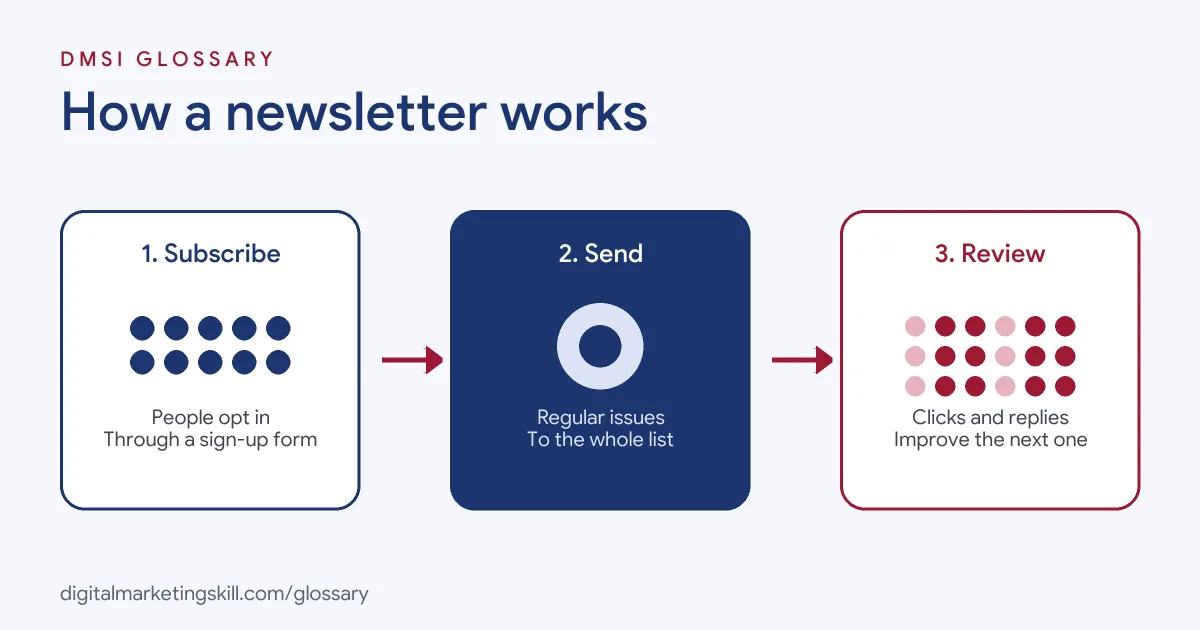
Every newsletter runs on a simple cycle. First, people subscribe. Next, you plan, write and send each issue on schedule. Finally, you review the results and improve the next one.
Building the List
You need permission first. The UK Information Commissioner’s Office (ICO) says you “must not send marketing emails or texts to individuals without specific consent.” There is a limited exception for existing customers, known as the soft opt-in. Even then, you must give a clear chance to opt out when you collect their details and in every message.
A clear opt-in form helps. You can also add a double opt-in, so only real, confirmed addresses join the list.
Sending Each Issue
Next, you write the issue in your email tool, test it and send it to the list. Major inbox providers set rules here. Google says all senders to Gmail should “keep spam rates reported in Postmaster Tools below 0.3%.” It also says senders of more than 5,000 messages a day must support one-click unsubscribe for marketing messages and include “a clearly visible unsubscribe link in the message body.”
Keeping Readers Happy
Expectations matter too. Yahoo advises senders to “set recipient expectations clearly when users subscribe,” including “what mail to expect, how often it will be sent, and what it will look like.” It also asks bulk senders to honour unsubscribes within 2 days. As a result, people who stay on the list are the ones who want to read.
Newsletter Examples
Here are three made-up examples of common styles:
- Online shop (example): A plant shop sends a weekly email with one care tip, three new plants and a small offer for subscribers.
- Agency (example): A marketing agency sends a monthly round-up of five useful links, each with a one-line comment from its team.
- Creator (example): A fitness coach sends one short workout every Monday, with a link to her paid programme at the end.
In each case, the reader gets value first. The offer comes second.
Newsletter vs Email Sequence vs Promotional Email
These three are easy to confuse, so here is how they differ:
| Type | Who gets it | When it sends |
|---|---|---|
| Newsletter | The whole list | On a regular schedule |
| Email sequence | Each person, one by one | After a trigger, such as a sign-up |
| Promotional email | The list or a segment | Around a sale or launch |
In short, the regular issue builds the relationship, a sequence guides new people, and a promotion drives a specific sale.
How to Start a Newsletter
- Pick your reader. Decide who it is for and what problem it helps with.
- Choose a rhythm. Weekly, fortnightly or monthly is fine, as long as you keep to it.
- Set up your tool. Authenticate your sending domain. Google requires SPF or DKIM for all senders, and SPF, DKIM and DMARC for bulk senders.
- Create a sign-up form. Say what readers will get and how often, then add a lead magnet if it helps.
- Write a welcome email. Thank new readers and link to your best past content.
- Plan a simple template. Use the same sections each time, so readers know where to look.
- Send, then review. Check clicks, replies, unsubscribes and complaints after each issue.
A Simple Issue Template
Here is a made-up layout you can copy and adapt:
- Opening line: One or two friendly sentences about what this issue covers.
- Main piece: The tip, story or guide, kept to a few short paragraphs.
- Quick links: Two or three useful reads, each with a one-line note.
- Call to action: One clear next step, such as reading a post or booking a call.
- Sign-off: Your name, plus an invitation to hit reply.
Using the same layout each time saves you work. It also helps readers scan each newsletter quickly and find the part they care about.
Newsletter Best Practices
- Lead with one idea. A single main topic is easier to read than ten small ones.
- Write a clear subject line. Tell readers what’s inside, without clickbait.
- Make it easy to leave. Google notes that letting people opt out “can improve open rates, click-through rates, and sending efficiency.”
- Clean your list. Google suggests you “consider unsubscribing recipients who don’t open or read your messages.”
- Show who you are. The ICO says you must not disguise or conceal your identity in marketing emails.
Common Mistakes to Avoid
A common mistake is adding people who never signed up, such as contacts from business cards. As a result, complaints rise and emails land in spam. Another is sending only sales emails, so readers stop opening. Some senders hide the unsubscribe link, which breaks inbox rules. Others start strong, then go silent for months. Finally, many judge success on opens alone. Instead, track clicks, replies and sales.
How to Measure a Newsletter
Look at a handful of numbers after each send. Clicks show whether the content was useful. Replies show real engagement. Unsubscribes and spam complaints warn you when something is off. Over time, also track how many subscribers go on to buy or book a call. Then compare issues to see which topics and formats work best for your readers.
Where You’ll Use a Newsletter at Work
Newsletters are part of many email, content and marketing roles. For example, real remote job listings ask candidates to:
- “Create and execute email marketing campaigns, newsletters and nurture journeys through HubSpot” (Digital Events and Social Media Executive).
- “Work cross-departmentally to write and edit newsletters that promote Daily Kos’ content” (Part-Time Editor).
- Take charge of “creating and managing our LinkedIn newsletters” (Content Marketing Manager).
So if you want to work as an Email Marketing Specialist or Marketing Automation Specialist, you will need to plan, write, send and report on regular emails. Employers will also want to see examples and results.
Learn It in the Lead Generation Track
You can learn to grow and email a list in the AI-Powered Lead Generation and Email Automation track. It covers AI fundamentals, lead generation, and email marketing and automation. Your portfolio project is a lead magnet and an automated email sequence that converts. You also get unlimited 1-on-1 mentoring and a U.S. Project Internship from day one.
Next, read how to set up email newsletters that people actually open and what inbox providers check in our email deliverability guide.
Frequently Asked Questions
What is a newsletter in marketing?
It is a regular email you send to everyone on your subscriber list. It shares useful content, news or offers, and it keeps your brand in touch with interested people.
How often should I send one?
Choose a rhythm you can keep, such as weekly or monthly. Then tell subscribers when they sign up, so they know what to expect.
Do I need permission to email subscribers?
Yes. In the UK, you generally need specific consent to send marketing emails to individuals. The soft opt-in for existing customers is a limited exception.
What should I put in a newsletter?
Start with one useful idea, such as a tip, a story or a short guide. Then add one clear call to action.
How do I keep my newsletter out of spam?
Email only people who opted in, authenticate your domain, keep complaints low and make it easy to unsubscribe.
Sources: Google: Email sender guidelines; Yahoo Sender Hub: Best practices; ICO: Electronic mail marketing; remote job listings on Himalayas.