
Temperature (AI) is a setting that controls how random or predictable an AI model’s answers are. A low temperature gives focused, consistent replies, while a high temperature gives more varied and creative ones. So it shapes whether your AI copy sounds safe and steady or fresh and surprising. Knowing how to set it helps you get better results from AI tools with less editing.
Key Takeaways
- Temperature controls the amount of randomness in an AI model’s output.
- Low values suit facts, summaries and structured tasks.
- Higher values suit brainstorming, slogans and creative writing.
- Top-p and top-k are related settings that also shape word choice.
- Some newer models ask you to keep temperature at its default, so check the docs.
What Is Temperature in AI?
A large language model writes one piece at a time. At each step, it guesses which token should come next. Usually there are many options, and each has a probability. Temperature decides how boldly the model picks from those options.
Google’s Gemini docs put it simply: “The temperature controls the degree of randomness in token selection.” In other words, it doesn’t change what the model knows. Instead, it changes how it chooses among the words it could use.
Think of ordering at a cafe. At a low temperature, you always order your usual coffee. At a medium one, you sometimes try the special. Then, at a high one, you might pick something you have never heard of. Each choice can be fine. However, the more adventurous you are, the more likely you are to get a surprise, good or bad.
Microsoft’s Azure OpenAI guide gives a clear example. It says “A fictional story could be generated using a higher temperature. Whereas to generate a legal document it’s recommended to use a much lower temperature.” So the right value depends on the job.
Typical Values
Ranges differ between providers. For instance, Microsoft says its temperature “can be set between 0 and 2.” It gives 0.7 as an example of a higher value that “makes the output more random,” and 0.2 as a lower value that “makes the output more focused and concrete.” Other providers use their own ranges and defaults. Therefore, always check the docs for the model you use before you change anything.
Why It Matters for Marketers
Marketers use AI for many tasks, from AI copywriting to reports. A product description needs accurate details, so a lower temperature fits. By contrast, a brainstorm of fifty ad headlines benefits from more variety. As a result, picking the right setting saves time and cuts down on rewrites.
How Temperature Works
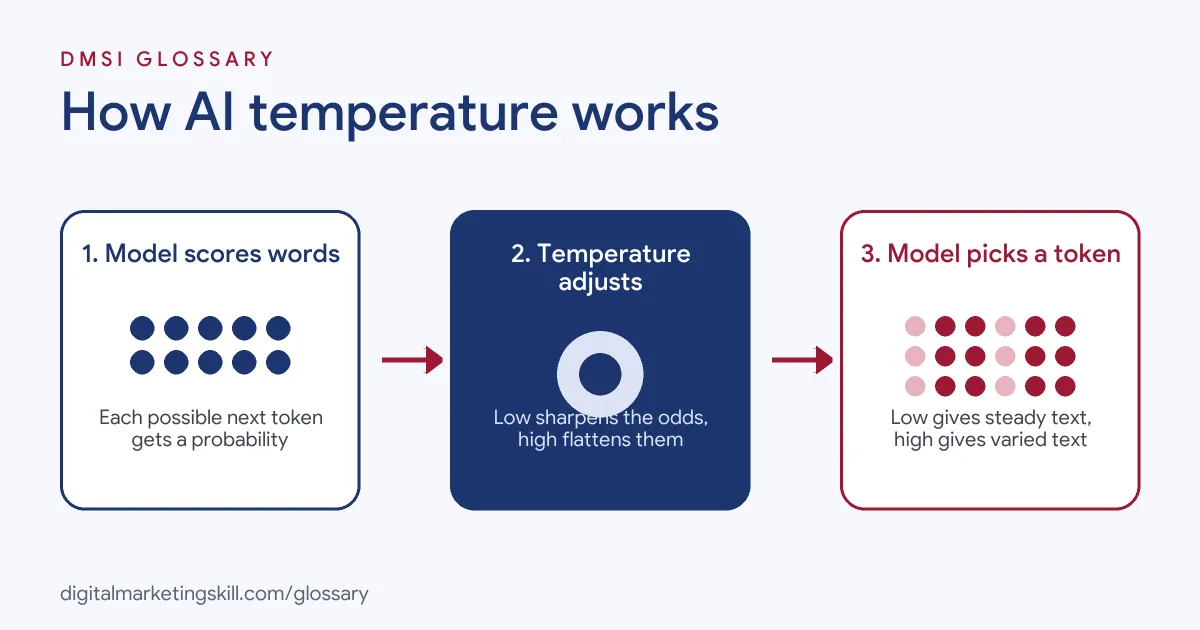
Temperature works during the step where the model picks its next token. The model scores every option, temperature reshapes those scores, and then the model makes its pick.
Step 1: The Model Scores Every Option
First, the model looks at your prompt and the text so far. Then it gives each possible next token a probability. For example, after “Our summer sale starts”, the word “today” might score high, while “Tuesday” scores lower.
Step 2: Temperature Reshapes the Odds
Next, temperature adjusts those odds. A Hugging Face guide explains that lowering it makes the distribution “sharper”, which means “increasing the likelihood of high probability words and decreasing the likelihood of low probability words.” On the other hand, raising it flattens the odds. So less likely words get a better chance of being picked.
Step 3: The Model Picks a Token
Then the model samples a token from the reshaped odds. At very low values, it almost always picks the top choice. In fact, Google says “A temperature of 0 is deterministic, meaning that the highest probability response is always selected.” At higher values, it picks more widely. That is why the same prompt can give different answers each time.
Related Settings: Top-p and Top-k
Two other settings often sit next to temperature. Top-k limits the choice to the k most likely tokens. Meanwhile, top-p keeps the smallest set of tokens whose combined probability reaches a set value. Google notes that “The default topP value is 0.95” for its Gemini API. Microsoft advises that “The general recommendation is to alter one of these two parameters at a time, not both.”
Where You Meet It in Marketing Tools
You may never see the word “temperature” in a chat window. However, it often sits behind the scenes in the tools you use. For example, some AI writing tools offer a “creativity” slider. Likewise, automation platforms that connect to an AI model may show a temperature field in each AI step. So when a tool gives you a choice between “precise” and “creative”, it is often adjusting this kind of setting for you. In short, knowing what the dial does helps you choose the right option, even when it has a friendlier name.
Examples of Temperature in Marketing
- An online shop writing product pages. The team needs sizes, materials and care details to stay correct. So they use a low temperature and give the model a clear template.
- An agency brainstorming taglines. The copywriter wants many fresh ideas for a new brand. Therefore, they raise the temperature and ask for twenty options, then pick the best three by hand.
- A software firm automating support replies. Answers must match the help centre every time. As a result, the developers set a low temperature and add firm rules in the system prompt.
Temperature vs Top-p vs Top-k
| Point | Temperature | Top-p | Top-k |
|---|---|---|---|
| What it does | Reshapes the odds of every token | Keeps tokens until their total probability hits p | Keeps only the k most likely tokens |
| Low value | Focused, repeatable output | Only the safest words stay | Just a handful of words stay |
| High value | More varied, creative output | A wider pool of words stays | Many words stay in play |
| Best use | Main dial for tone and variety | Fine-tuning variety | Capping odd word choices |
How to Set Temperature
- Find the setting. Most chat apps hide it. Instead, you usually find it in an AI API, a developer playground or an automation tool.
- Check the model’s docs. Ranges and defaults differ by provider. For example, Microsoft says its range runs from 0 to 2.
- Match it to the task. Start low for facts and data. Then go higher for ideas and creative copy.
- Change one dial at a time. Adjust temperature or top-p, not both at once.
- Run the same prompt a few times. Compare the outputs, so you can see how much they vary.
- Write down what works. Save your settings with each prompt, so your team can reuse them.
- Review every output. Finally, check facts and tone before anything goes live.
Best Practices for Temperature
- Go low for facts. Summaries, data and product details need steady, repeatable answers.
- Go higher for ideas. Brainstorms and taglines benefit from more variety.
- Pair it with a good prompt. Clear prompt engineering matters more than any single setting.
- Respect model guidance. Google’s docs advise keeping these settings at their defaults for some newer Gemini models.
- Test before you scale. Try settings on a few examples before you automate hundreds of outputs.
- Keep a human check. Even at low values, a model can still make mistakes.
Common Mistakes to Avoid
- Thinking low means accurate. A low value makes output steady, but it can still contain an AI hallucination.
- Setting it too high. Very high values can produce odd, off-topic or rambling text.
- Changing several settings at once. Then you can’t tell which change made the difference.
- Using one value for everything. Ads, reports and emails each need different settings.
- Ignoring provider updates. Some models now ignore custom values, so old settings may do nothing.
- Expecting identical answers. Even at zero, small differences can still appear in practice.
Where You’ll Use Temperature at Work
We found no current remote job listings that name temperature as a skill. Still, it comes up in many AI-related marketing jobs. For example, marketing automation specialists set it when they build AI steps into workflows. Also, content marketers and copywriters use it in AI tools to balance creativity with accuracy. In addition, growth and marketing operations roles tune it when they test AI-powered chatbots, emails or ad variations.
Learn It in the Full Stack Track
You can learn to use AI settings like temperature across real marketing tasks in the Full Stack programme, which covers all four tracks. Every track includes a U.S. Project Internship from day one, with unlimited 1-on-1 mentoring.
Frequently Asked Questions
What is a good temperature setting?
There is no single best value. Use a low setting for facts and structured tasks, and a higher one for creative work.
Does a temperature of 0 always give the same answer?
Google describes 0 as deterministic, so the most likely token is always chosen. Still, in practice you may see small differences between runs.
Can I change temperature in ChatGPT or Claude apps?
Usually not in the standard chat apps. Instead, you set it through the provider’s API or developer tools.
Is temperature the same as creativity?
Not exactly. It controls randomness, which can feel like creativity, but it doesn’t add new knowledge or ideas the model lacks.
Should I change temperature and top-p together?
Microsoft recommends changing one at a time. That way, you can see the effect of each setting clearly.
Sources: Google AI for Developers: Prompt design strategies; Microsoft Learn: Prompt engineering techniques; Hugging Face: How to generate text using different decoding methods.