
Computer vision is the field of artificial intelligence that lets computers see, understand and describe images and videos. It powers tools that spot logos in photos, read text in pictures and sort product images by what they show. For marketers, this means you can learn from visual content at a scale no person could manage. As a result, it now sits behind many social listening, ad review and e-commerce tools.
Key Takeaways
- Computer vision is a branch of AI that helps machines interpret images and video.
- Common tasks include image classification, object detection, tracking and text reading (OCR).
- Most modern systems learn from large sets of labelled images.
- Marketers use it for logo detection, visual search, content tagging and brand safety checks.
- It raises privacy and fairness questions, especially with faces, so use it with care.
What Is Computer Vision?
IBM puts it simply: “Computer vision is a subfield of artificial intelligence (AI).” It adds that the field “equips machines with the ability to process, analyze and interpret visual inputs such as images and videos.” In other words, it turns pixels into useful information.
Think about how you look at a photo. You don’t see millions of coloured dots. Instead, you see a dog, a beach and a red ball. Computer vision tries to do the same thing. First, it looks at the pixels. Then it finds patterns. Finally, it names what is in the picture.
You already use it every day. For example, your phone groups photos by the people in them. Also, a shopping app may let you snap a picture of shoes and find similar ones. Both rely on computer vision.
It is part of the wider world of artificial intelligence and machine learning. Many newer AI tools also combine vision with language. That mix is known as multimodal AI.
Why It Matters for Marketing
Marketing is full of images. There are social posts, product photos, ads, videos and user content. However, most analytics tools only read text and numbers. So a huge share of what people share stays invisible to you. Computer vision changes that. For instance, it can find your logo in photos where nobody tagged your brand. It can also check thousands of product images for errors in minutes. In addition, it helps platforms judge whether an ad image breaks the rules. In short, it turns visual content into data you can act on.
Where Marketers Meet It
So where will you actually come across computer vision? First, in social listening tools that scan images as well as captions. Second, in ad platforms, which check ad images before they go live. Also, many online shops use it for visual search and product tagging. In addition, digital asset tools use it to sort and find images in big libraries. Then there are accessibility features, such as draft image descriptions. Finally, brand safety tools use it to check where your ads appear. In most cases, you won’t see the model itself. Instead, you’ll see a feature that saves you time. That is why a basic grasp of how it works helps you judge these tools. For example, you can ask a vendor how they test accuracy and how they handle faces.
How Computer Vision Works
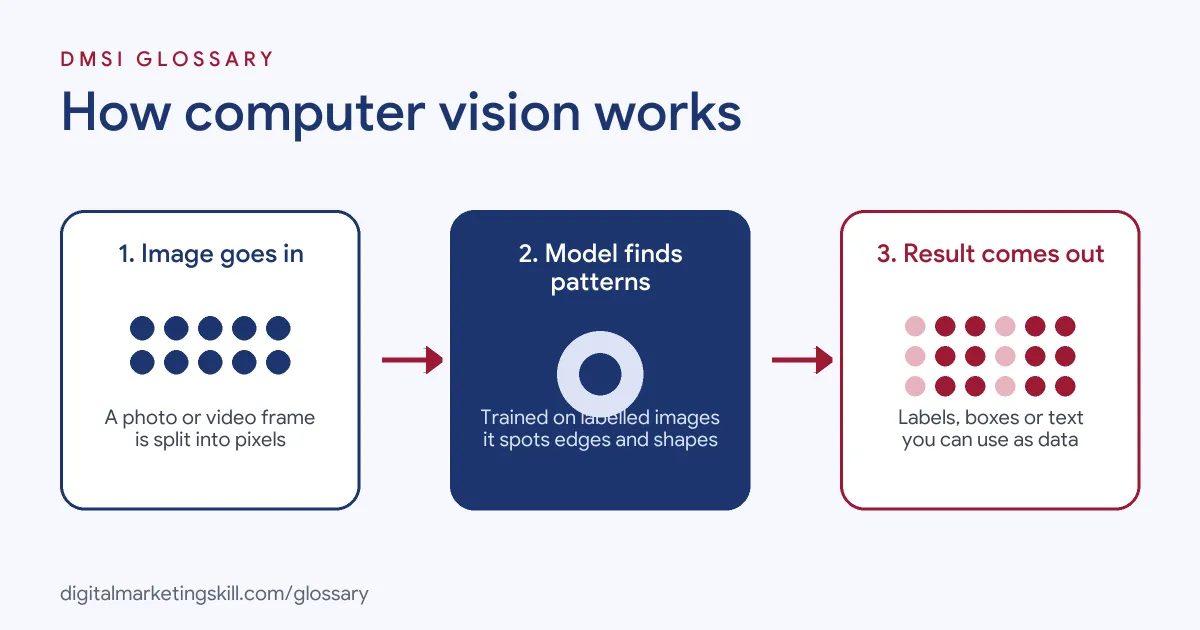
Most computer vision systems follow three steps. First, they take in an image or video frame. Next, a trained model looks for patterns. Finally, the system returns a result, such as a label, a box around an object or some text.
Learning from Labelled Images
A model has to learn before it can see. So developers feed it many images with labels, such as “cat” or “shoe”. The model then guesses, checks its answer and adjusts itself. IBM describes this as training on “training data specific to a computer vision task.” Over time, the guesses get better. As a result, the model can label new images it has never seen.
Neural Networks
Under the hood, most systems use deep learning. According to IBM, “Convolutional neural networks (CNNs) continue to be the primary deep learning model for image processing tasks.” These networks scan an image in small pieces. Early layers find edges and colours. Then later layers combine them into shapes and, finally, whole objects. For example, one layer might spot a curve. Another might join curves into a wheel. A later one might decide the wheels belong to a bike. You don’t need to know the maths to use these tools. However, knowing the idea helps you see why good training images matter so much.
Common Tasks
Computer vision covers several jobs. Image classification “categorizes images into predefined groups or classes,” as IBM explains. Meanwhile, object detection finds where things are in a picture. Object tracking follows them across video frames. Optical character recognition, or OCR, reads text in images. Also, face detection finds faces, which needs extra care for privacy.
Ready-Made Vision Tools
You don’t have to build a model yourself. Instead, cloud services offer ready-made vision tools. For example, Google’s Cloud Vision API includes label, logo and text detection. Its label feature “Provides generalized labels for an image.” Similarly, Microsoft says Azure Vision gives “access to advanced algorithms that process images and return information based on the visual features you’re interested in.” So marketers and developers can add vision features with an API call.
Examples of Computer Vision in Marketing
- A drinks brand tracking mentions. The team uses a social listening tool with logo detection. As a result, it finds photos that show its cans, even when the caption never names the brand.
- An online fashion shop. The shop adds visual search. Shoppers upload a photo of an outfit, and the site suggests similar items from its catalogue.
- A large product catalogue. A retailer uses image labels to tag thousands of product photos by colour and type. Then the team uses those tags to improve filters and suggest draft alt text, which an editor checks.
Computer Vision vs Image Generation vs NLP
| Point | Computer vision | AI image generation | Natural language processing |
|---|---|---|---|
| Main job | Understand images and video | Create new images | Understand and produce text |
| Input | Pictures or video frames | Usually a text prompt | Words and sentences |
| Output | Labels, boxes, text, scores | A new picture | Answers, summaries, labels |
| Marketing use | Logo detection, tagging, visual search | Ad and social visuals | Chatbots, sentiment, copy |
See also AI image generation, which creates pictures rather than reading them.
How to Use Computer Vision in Your Marketing
- Pick one clear problem. For example, “find untagged photos of our product” or “tag our catalogue images”.
- Check your existing tools. Many social listening, digital asset and e-commerce platforms already include vision features.
- Try a ready-made API. If you need more, test a cloud vision service on a small sample of your images.
- Measure accuracy. Compare the results with a person’s judgement on the same images.
- Add human review. Keep a person in the loop for anything public, such as alt text or ad decisions.
- Check privacy rules. Before you process faces or personal photos, review your legal duties with your team.
- Scale up slowly. Once results are reliable, expand to more images and connect them to your reports.
Best Practices for Computer Vision
- Start small. Test on a sample before you run thousands of images.
- Keep humans involved. Models make mistakes, so review anything customers will see.
- Respect privacy. Treat faces and personal images as sensitive data under laws such as GDPR.
- Watch for bias. Check results across different people, places and products.
- Use confidence scores. Many tools return a score, so set a threshold for automatic actions.
- Document your use. Write down what the tool does and why, which supports good AI ethics.
Common Mistakes to Avoid
- Trusting every label. A model can be confident and still wrong.
- Using face tools without care. Face analysis brings legal and ethical risk, so get advice first.
- Skipping the test phase. Results on clean demo images often differ from your real photos.
- Publishing auto alt text unchecked. Machine descriptions can miss the point of an image.
- Buying before defining the goal. Without a clear problem, the tool rarely pays off.
Where You’ll Use Computer Vision at Work
Most computer vision job titles are technical. Still, marketers often work with these teams, or use vision features inside marketing tools. For example, real remote job listings say:
- “Computer vision is the core domain, with scope to work across text, audio, and tabular data.” (Data Scientist – Computer Vision).
- “Deep expertise in computer vision (e.g., object detection, tracking, segmentation) for real-world environments.” (AI / Computer Vision).
- “Solve challenging computer vision problems for large-scale consumer experiences worldwide.” (Computer Vision Researcher / Engineer).
Learn It in the Full Stack Programme
You can learn to use AI tools, including vision features, across all four tracks in the Full Stack programme. Every track includes a U.S. Project Internship from day one, with unlimited 1-on-1 mentoring.
Frequently Asked Questions
Is computer vision the same as AI?
No. Computer vision is one part of AI. It focuses on images and video, while other parts handle text, speech or numbers.
Do marketers need to code to use computer vision?
Usually not. Many marketing tools include vision features already. However, coding helps if you want to use an API directly.
What is OCR?
OCR stands for optical character recognition. It is the computer vision task that reads text in images, such as words on a sign or a receipt.
Can computer vision find my logo on social media?
Yes. Logo detection can spot brand logos in photos. Some social listening tools use it to find untagged mentions.
Is computer vision accurate?
It can be very accurate on clear tasks. Still, it makes mistakes, so check results and keep people involved for important decisions.
Sources: IBM: What is computer vision?; Google Cloud: Cloud Vision API features list; Microsoft Learn: What is Azure Vision?; remote job listings on Himalayas, Himalayas and Himalayas.