
A trigger is the event or condition that starts an automated workflow, such as a new sign-up, a purchase or a date on a contact’s record. When the trigger happens, the automation tool runs the next steps on its own, for example sending an email. Picking the right one matters because it decides who enters your automation and when, which shapes every result that follows.
Key Takeaways
- Every automation needs one. It is the “when this happens” part of “when this happens, do that.”
- Zapier defines a trigger as “an event that starts a Zap.”
- Common types include joining a list, taking an action, meeting a set of conditions or reaching a date.
- Filters narrow the starting event, so only the right people enter the workflow.
- Some events can’t start a workflow. For example, Klaviyo doesn’t let email opens or clicks act as a flow trigger.
What Is a Trigger?
In marketing automation, this is the starting gun. Nothing happens until it fires. Zapier puts it simply: “A trigger is an event that starts a Zap.” It gives the example of a workflow that sends a text message each time you receive an email. In that case, the starting event is “new email in inbox.”
Email tools work the same way. In Klaviyo, a flow is an automated series of messages, and its starting event decides who joins. In HubSpot, the same idea is called an enrolment trigger, because it enrols contacts into a workflow. Other tools may talk about an entry point or a starting event, but they all mean the same thing.
So whatever the tool calls it, the idea answers one question: what has to happen before the automation starts?
How a Trigger Works
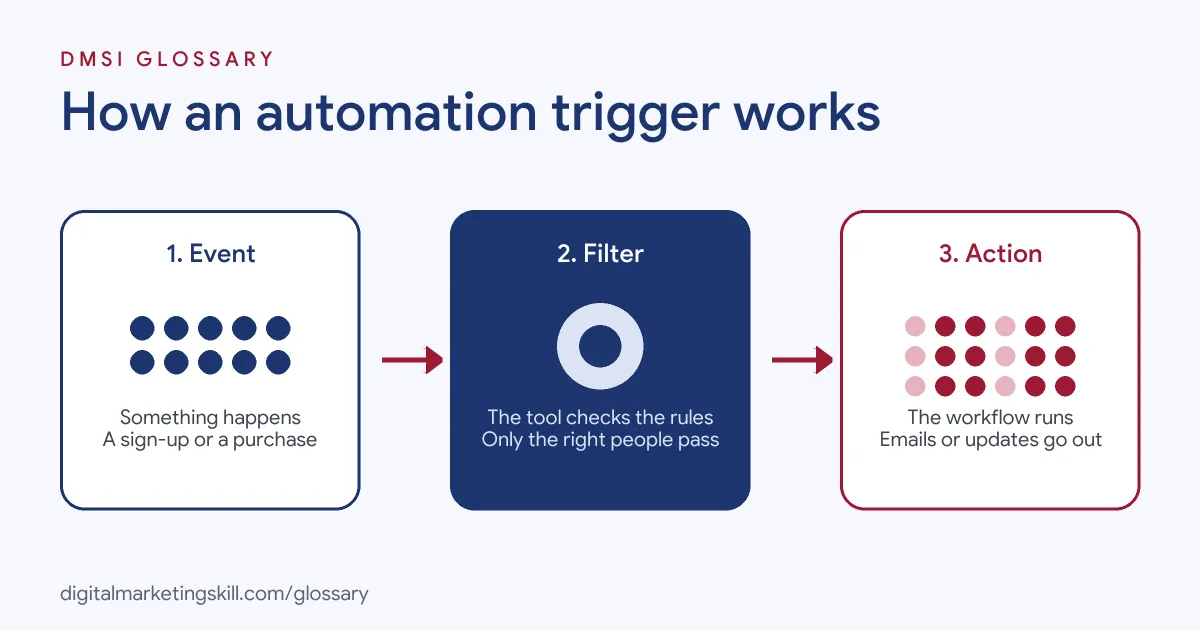
Every automation follows the same pattern. First, the tool watches for a starting event. Next, it checks any filters you set. Finally, it runs the actions in order, such as waiting a day and then sending an email.
Event and Filter Triggers
HubSpot describes two broad kinds. An event-based one fires when something happens, such as a form submission. A filter-based one fires when a condition is true, such as a contact’s city being Dublin. HubSpot can also start a workflow when a webhook arrives from another app, on certain paid plans.
Trigger Filters
Filters narrow who gets in. Klaviyo explains that if a flow triggers when someone places an order, “a trigger filter could be added to limit this to specific product types.” It also uses profile filters, which it checks when people enter the flow and again before each email or SMS.
Instant and Polling Triggers
Timing can vary too. Zapier says triggers labelled Instant start workflows immediately, because the app pushes data to Zapier as soon as the event happens. Other triggers use polling, which means Zapier checks the app for new data at set intervals that depend on your plan.
Trigger Examples
Here are three common examples:
- Welcome series: Klaviyo suggests using the “Added to list” trigger so every new subscriber gets a welcome email straight away, followed by two or three more emails a few days apart.
- Abandoned cart: According to Klaviyo, this flow uses the Started Checkout event as its trigger, plus a filter that removes anyone who went on to place an order.
- Birthday email: A date on the profile, such as a birthday, can start the flow, and it can repeat every year.
Types of Trigger in Email Automation
Klaviyo lists six types of flow trigger:
| Trigger type | Fires when | Typical use |
|---|---|---|
| Added to list | Someone joins a list | Welcome series |
| Added to segment | Someone meets a set of conditions | Win-back or VIP flows |
| Metric | Someone takes an action, such as starting checkout | Abandoned cart or post-purchase |
| Date property | A date on the profile arrives | Birthdays and anniversaries |
| Price drop | A viewed item drops in price | Price alert emails |
| Low inventory | A viewed item runs low in stock | Low stock alerts |
Klaviyo also notes that performance metrics such as Opened Email and Clicked Email can’t start a flow.
How to Set Up a Trigger
The menus differ between tools, but the steps are much the same:
- Define the goal. Decide what the automation should achieve, such as welcoming new subscribers.
- Pick the moment. Choose the event or condition that shows someone is ready for it.
- Select it in your tool. For instance, choose a list, a form, an event or a date.
- Add filters. Next, exclude people who shouldn’t enter, such as existing customers.
- Set re-entry rules. HubSpot enrols records only the first time by default, so decide whether people can enter again.
- Test it. Trigger the workflow with a test contact and check each step.
- Turn it on and monitor. Finally, review entries and results after the first few days.
A Worked Example: Planning a Welcome Flow
Here is a made-up example of how a marketer plans one automation from start to finish. Say a yoga studio offers a free beginner’s guide on its website.
- Goal: turn guide downloads into first class bookings.
- Starting event: the person joins the “Free guide” list after filling in the form.
- Filter: skip anyone who has already booked a class.
- Actions: send the guide straight away, then a tips email two days later, then a first-class offer two days after that.
- Exit rule: stop the emails as soon as the person books.
Writing it out like this before you open the tool saves time. It also makes testing easy, because you know exactly what should happen at each step. If a test contact gets the offer after booking, you know the exit rule is the problem, not the emails.
Best Practices
- Match the trigger to intent. A checkout event shows stronger buying intent than a page view.
- Keep one trigger per job. Simple workflows are easier to test and fix.
- Use filters generously. For example, stop sales emails going to people who just bought.
- Name workflows clearly. Put the trigger in the name, such as “Started checkout, no order.”
- Plan the exit too. Decide what removes someone from the workflow, such as a purchase or a booking, so people stop getting messages that no longer fit them.
- Check data quality. A trigger can only fire if the event or field reaches your tool correctly.
Common Mistakes
The most common mistake is a trigger that is too broad, so the wrong people get the emails. Another is forgetting to exclude buyers from an abandoned cart flow. Some teams also overlap workflows, which means one action sets off two automations and the contact receives duplicate messages. Finally, many people never test with a real contact, so they only find problems after customers do.
Where You’ll Use Triggers at Work
Email and CRM roles ask for this skill by name. For example, real remote job listings include lines like these:
- “Proven build experience on multi-step, multi-channel journeys, with a sound grasp of segmentation, triggers, throttling and frequency capping” (Senior Martech Consultant, Braze).
- “Build audiences, triggers, send rules, and frequency caps; ensure tracking parameters and deep links work” (CRM Marketing Specialist).
- “Configure and execute email campaigns, customer journeys, triggered communications, and audience-targeted initiatives” (CRM Operations Manager).
So if you want to work as an Email Marketing Specialist or a Marketing Automation Specialist, you will set up and test this kind of logic every week. Employers will also want to see a working sequence you have built.
Learn It in the Lead Generation and Email Track
You can build automations from the first trigger to the last email in the AI-Powered Lead Generation and Email Automation track. There, you build a lead magnet and an automated email sequence that converts. You also get unlimited 1-on-1 mentoring and a U.S. Project Internship from day one.
For a hands-on walkthrough, read our guide to building an email automation workflow. You can also see our glossary entry on the drip campaign, which often starts with a sign-up trigger.
Frequently Asked Questions
What is a trigger in email automation?
It is the event or condition that starts an automated workflow, such as a sign-up, a purchase or a birthday. Once it fires, the tool sends the planned messages.
What is the difference between a trigger and an action?
The trigger starts the workflow. An action is a step the workflow then performs, such as sending an email or updating a contact.
Can an email open start a workflow?
It depends on the tool. Klaviyo, for example, does not let Opened Email or Clicked Email act as a flow trigger.
Can one workflow have more than one trigger?
Some tools allow several. However, one clear trigger per workflow is usually easier to manage and test.
Why didn’t my trigger fire?
Common causes are a filter that excludes everyone, missing data in the tool or re-entry rules that block repeat entries.
Sources: Klaviyo: Understanding flow triggers and filters; HubSpot: Set your workflow enrollment triggers; Zapier: Learn key concepts in Zapier; remote job listings on Himalayas.