
Lead enrichment is the process of adding extra, useful details to a lead’s record, such as job title, company size or industry, after you first capture their contact details. A sign-up form often gives you little more than a name and an email. So enrichment fills the gaps, which helps you sort, score and follow up with each lead in the right way. As a result, sales and marketing teams waste less time on guesswork.
Key Takeaways
- Lead enrichment adds missing details to a lead’s record after capture.
- Common details include job title, company name, company size, industry and location.
- Tools usually match on a work email address or a company domain.
- Enriched data powers lead scoring, segmentation, routing and personalisation.
- Under UK GDPR, data you get from other sources still needs a lawful basis and privacy information.
What Is Lead Enrichment?
When someone fills in a form on your website, you capture a lead. However, you rarely know much about them yet. Lead enrichment is how you learn more without asking a long list of questions up front.
Think of a new contact in your phone. At first, you only save a name and a number. Later, you add their workplace, birthday and home town. In the same way, enrichment adds detail to a lead over time, so the record becomes truly useful.
Enrichment can be manual or automatic. For example, a sales rep might look up a lead’s company website and add the industry by hand. On the other hand, a tool can do this for thousands of records at once. Many CRM platforms now include this feature.
HubSpot is one example. Its help pages explain that for contacts, “HubSpot uses first name, last name, and work email address” to find matches. Then, for companies, it says, “HubSpot uses company domain.”
Why It Matters
Short forms convert better, but they give you thin data. So enrichment lets you keep forms short and still know who you are talking to. In addition, it helps you spot your best leads faster. For instance, a lead from a large company in your target industry can go straight to sales. Meanwhile, a student researching a topic can go into a nurture email series instead. Without enrichment, both would look the same.
How Lead Enrichment Works
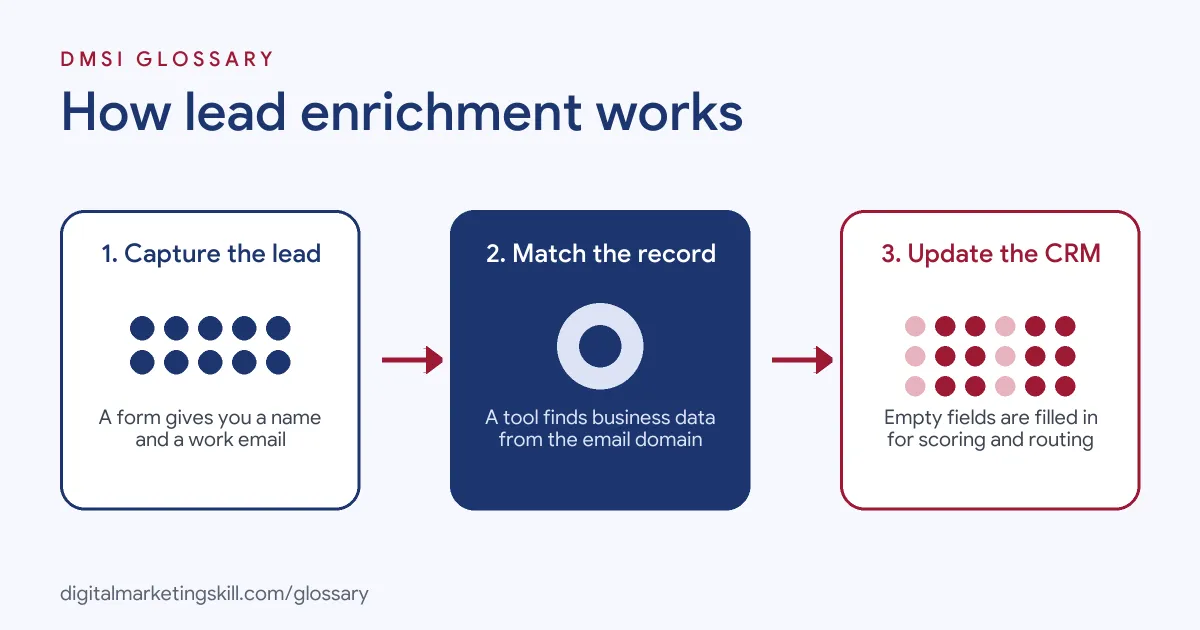
Lead enrichment takes a small piece of data you already have and uses it to find more. Most tools start with an email address or a company website. Then they search their own databases or other sources for a match, and add what they find to your records.
Step 1: Capture the lead
First, a lead arrives through a lead form, a webinar sign-up or a chat. At this point, you may only have a name and an email. Also, a work email is far more useful than a personal one, because its domain points to a company.
Step 2: Match the record
Next, the enrichment tool looks for a match. It compares your data with business data it holds or can find. For example, the domain in an email address can reveal the company name. Then the tool can add details such as industry and headcount.
Step 3: Update the fields
After a match, the tool fills in empty fields in your CRM. HubSpot explains that “If matching information is found across multiple sources, HubSpot updates the corresponding properties in your CRM.” Some tools let you choose whether to overwrite existing values. For instance, HubSpot says, “Automatic enrichment doesn’t overwrite values set by a user or another system.” Still, check your settings before you run enrichment on a full database.
Step 4: Put the data to work
Finally, your automations use the new data. For instance, lead scoring rules can add points for the right job title. Similarly, routing rules can send leads to the right sales rep by region. As a result, the data only adds value once it changes what you do next.
Manual or automatic
Most tools offer both options. In HubSpot, for example, “Automatic enrichment settings are turned off by default for both contacts and companies.” So you either pick records by hand or switch on automatic enrichment for new records. Start small, check the quality, and then scale up.
What good data looks like
Not all enriched data is equal. First, it should be accurate, so the job title matches the person today. Second, it should be relevant, which means it helps you decide what to do with the lead. Third, it should be fresh, because people move jobs and companies grow or shrink. Also, it should come from sources you can explain to the people in your database. If a field fails these tests, it may do more harm than good. So it is better to have five reliable fields than twenty doubtful ones.
Examples of Lead Enrichment
- A software company with a free trial. The sign-up form only asks for a work email. Then enrichment adds company size, so trials from larger firms get a call from sales within a day.
- A marketing agency running webinars. Hundreds of people register with just a name and email. After the event, the team enriches the list with job titles, so follow-up emails speak to each role.
- A B2B supplier cleaning old data. Its CRM has thousands of records with blank industry fields. So the team runs enrichment on the oldest records first, then removes contacts that no longer match.
Lead Enrichment vs Lead Scoring vs Data Cleansing
| Point | Lead Enrichment | Lead Scoring | Data Cleansing |
|---|---|---|---|
| What it does | Adds missing details | Ranks leads by fit and interest | Fixes or removes bad data |
| Main input | Email or company domain | Lead details and behaviour | Existing records |
| Main output | Fuller records | A score for each lead | Accurate, de-duplicated records |
| When it runs | After capture, then on a schedule | Each time data changes | On a regular schedule |
In practice, the three work together. Clean data matches better, and enriched data scores better. So treat them as one data quality habit, not three separate jobs.
How to Set Up Lead Enrichment
- Decide what you need. List the fields that change how you treat a lead, such as industry, company size and role.
- Check your legal basis. Confirm with your data protection lead how you will process enriched data under UK GDPR.
- Choose a tool. Check whether your CRM has enrichment built in, or compare dedicated providers.
- Test on a small batch. Enrich a few hundred records and check the results by hand for accuracy.
- Set overwrite rules. Decide whether new data can replace values your team or your leads entered.
- Connect your workflows. Then update scoring, routing and segmentation rules to use the new fields.
- Review on a schedule. Finally, re-check match rates and data quality every few months.
Best Practices for Lead Enrichment
- Only collect what you use. Each extra field should change a decision, otherwise leave it out.
- Ask for a work email. A company domain gives tools a much better chance of a match.
- Be open with people. Explain in your privacy notice that you add data from other sources.
- Protect first-hand data. Don’t let tools overwrite details a lead gave you directly, which is your most reliable first-party data.
- Spot-check results. Review a sample of enriched records each month to catch wrong matches.
- Keep data fresh. People change jobs, so re-enrich older records before big campaigns.
Common Mistakes to Avoid
- Ignoring data protection. The ICO says that when you get personal data from another source, you must give privacy information “within a reasonable period of obtaining the personal data and no later than one month.”
- Trusting every match. Tools can be wrong, so check key fields before you act on them.
- Enriching everything at once. A full-database run with poor settings can overwrite good data.
- Collecting data you never use. Extra fields add cost and risk, but no value.
- Forgetting to update workflows. New data only helps if your scoring and routing rules use it.
Where You’ll Use Lead Enrichment at Work
Lead enrichment shows up in growth, sales operations and go-to-market roles. It often sits next to CRM, automation and data quality skills. For example, real remote job listings ask for:
- “Strong understanding of lead enrichment, data quality, deduplication, entity resolution, and contact/company matching.” (Data and Automation Engineer – Python).
- “Hands-on experience with GTM-related systems such as CRM integrations, outbound automation, lead enrichment, webhooks, or similar.” (Go-to-Market (GTM) Engineer).
- “Experience with account hierarchies, data enrichment providers such as ZoomInfo” (Salesforce Data Quality Manager).
Learn It in the Lead Generation and Email Track
You can learn lead enrichment, alongside wider lead generation skills, in the AI-Powered Lead Generation and Email Automation track. Every track includes a U.S. Project Internship from day one, with unlimited 1-on-1 mentoring.
Frequently Asked Questions
What data does lead enrichment add?
It usually adds business details such as job title, company name, industry, company size and location. The exact fields depend on the tool.
Is lead enrichment legal in the UK?
It can be, if you follow UK GDPR. You need a lawful basis, and you must tell people when you get their data from other sources.
Do I need a separate tool for enrichment?
Not always. Some CRMs, such as HubSpot, include enrichment features. Otherwise, you can connect a dedicated provider.
How often should I enrich my leads?
Enrich new leads when they arrive. Then re-check older records every few months, because people change jobs.
Can enrichment replace form questions?
Partly, yes. It lets you keep forms short. However, you should still ask leads directly for details that only they can give.
Sources: HubSpot Knowledge Base: Get started with data enrichment; HubSpot Knowledge Base: Enrich your contact and company data; ICO: Right to be informed; remote job listings on Himalayas, Himalayas and Himalayas.