
A transactional email is an automated message sent to one person because of something they did, such as an order confirmation, a password reset or a delivery update. It exists to complete, confirm or update a transaction or account, not to promote anything. It matters because people expect and open these emails, and getting them right builds trust after every purchase or sign-up.
Key Takeaways
- These emails are sent when a person does something, and they go to one person at a time.
- The US Federal Trade Commission says transactional content “facilitates an already agreed-upon transaction or updates a customer about an ongoing transaction.”
- Under US rules, the “primary purpose” of an email decides whether it counts as commercial or transactional.
- Google’s one-click unsubscribe rule for bulk senders applies to marketing and subscribed messages.
- Keep sales messages light in these emails, so their main job stays clear.
What Is a Transactional Email?
Most sales emails go to many people at once. In contrast, a transactional email goes to one person, sent because of one event. You buy something, and an order confirmation arrives. You forget your password, and a reset link appears. Your parcel ships, and a tracking email follows.
The US Federal Trade Commission (FTC) explains the idea in its guide to the CAN-SPAM Act. It describes transactional or relationship content as content that “facilitates an already agreed-upon transaction or updates a customer about an ongoing transaction.” That’s the key test: the email serves a deal or relationship that already exists.
Think of it like the receipt a shop hands you at the till. You didn’t ask for a sales pitch. You just want proof of what you paid for. So the best ones are short, clear and quick to arrive.
Such emails sit next to your email marketing, but they have a different job. Marketing emails try to sell. These emails tell people what happened and help them feel sure.
How Transactional Email Works
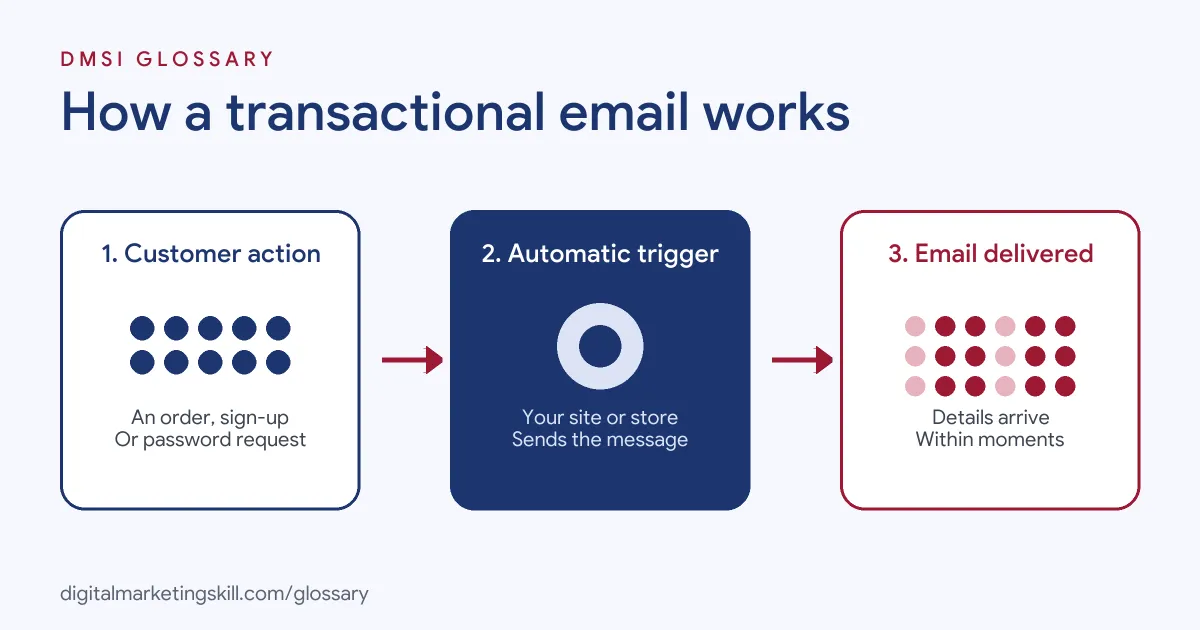
The process has three steps. First, a person takes an action, such as placing an order or requesting a password reset. Next, your website, app or store triggers an automated message through an email system. Finally, the email arrives within moments, with the details the person needs.
What Counts as Transactional
The FTC lists five types of content that count. In plain words, an email fits if it only:
- Confirms or completes a purchase the person has already agreed to.
- Gives safety, recall, warranty or security details about something they bought.
- Tells them about changes to their account, plan or membership, or gives a regular balance.
- Shares details about a job or staff benefits.
- Delivers goods or services they have already agreed to buy.
If an email does any of these jobs and nothing else, it counts. Once it starts to sell, the picture changes.
The Primary Purpose Test
Many emails mix content. For example, an order confirmation might also show product suggestions. The FTC says “the primary purpose of the message is the deciding factor.” An email is treated as commercial if someone reading the subject line would likely think it promotes a product, or if the transactional content doesn’t appear mainly at the beginning. So put the main message first and keep any sales part small.
Sending and Delivery
These emails still need to reach the inbox. Google’s sender rules say everyone who sends to Gmail must set up SPF or DKIM, which prove the email is really from you. However, the one-click unsubscribe rule for bulk senders applies to “marketing messages and subscribed messages.” Many firms send these emails from a separate address, so spam reports on sales emails don’t hurt them. Good inbox placement matters here, because a missing password reset or receipt causes real problems.
Transactional Email Examples
Here are three made-up examples:
- Order confirmation: A shopper buys trainers. Within a minute, she receives an email with the order number, items, price, delivery address and expected delivery date.
- Password reset: A user clicks “Forgot password” on an app. He receives a secure link that expires after a short time.
- Plan change: A software customer moves to a new plan. The firm emails a short list of the new features and the next bill date.
Transactional Email vs Marketing Email
These two types of email differ in purpose, timing and rules:
| Feature | Transactional email | Marketing email |
|---|---|---|
| Purpose | Complete, confirm or update a transaction or account | Promote products, services or content |
| Trigger | One person’s action or account event | A campaign sent to a list or segment |
| Timing | Immediately after the event | Planned by the marketing team |
| Examples | Receipts, password resets, delivery updates | Newsletters, sales, product launches |
Some emails sit in between, such as an abandoned cart email. Because it encourages a purchase that hasn’t happened yet, it usually needs to follow your marketing consent rules. In the UK, for example, the ICO says you “must not send marketing emails or texts to individuals without specific consent,” unless the soft opt-in applies.
How to Set Up Transactional Emails
- List every trigger. Note each event that needs an email, such as sign-up, purchase, shipping, refund and password reset.
- Choose a sending tool. Use your store, your email tool’s built-in option or a service made for this job.
- Prove the email is yours. Set up SPF, DKIM and DMARC, so inbox providers trust you.
- Write clearly. Put the key facts first: what happened, what the person needs to know and what to do next.
- Keep offers second. If you add suggestions, place them below the main details.
- Test every email. Check links, layout on mobile and the data that fills each field.
- Monitor delivery. Finally, track bounces and delays, and fix problems fast.
Tips for Writing Them
Keep it short. Say what happened in the first line. Use plain words. Put the order number where people can see it. Add one clear button, such as “Track my parcel”. Then tell people how to get help if something is wrong. A good receipt does its job in a few seconds, and that is the goal.
What to Measure
Measure delivery first, because an email that doesn’t arrive has failed. Track how quickly emails are sent after each trigger and how many bounce. Then look at clicks on key links, such as “Track your order”. Also, watch support tickets about missing emails. A rise in “I never got my receipt” messages is often the first sign of a delivery problem.
Best Practices for Transactional Email
- Send instantly. People expect confirmations and resets within moments.
- Make the subject line clear. For example, “Your order 1234 is confirmed” beats a clever headline.
- Use your brand. A consistent look reassures people the email is genuine.
- Protect security emails. Keep password resets short, with links that expire.
- Separate your streams. Sending from a different address helps keep these emails out of spam.
Common Mistakes to Avoid
A common mistake is packing receipts with so many offers that the email reads like an advert. Another is sending transactional emails from a “no-reply” address with no way to get help. Some firms also skip SPF and DKIM, so receipts land in spam. Others forget to test emails on mobile. Lastly, many never check whether every trigger still works after a website update.
Where You’ll Use Transactional Email at Work
This work comes up in email, CRM and product roles. For example, remote job listings mention:
- The need to “Build integrations with Salesforce and third-party systems using the Marketing Cloud REST and SOAP APIs, including triggered sends and transactional messaging” (Marketing Cloud Developer).
- The task to “Build and test ways to improve engagement and conversion across email, SMS/RCS, transactional messaging, and in-product experiences” (Product Engagement Manager).
So if you want to work as an Email Marketing Specialist or Marketing Automation Specialist, expect to plan and test these emails, not just campaigns.
Learn It in the Lead Generation and Email Track
You can learn to build automated emails in the AI-Powered Lead Generation and Email Automation track. There, you build a lead magnet and an automated email sequence that converts. You also get unlimited 1-on-1 mentoring and a U.S. Project Internship from day one.
For more, read our guide to post-purchase engagement and our article on email deliverability.
Frequently Asked Questions
What is a transactional email in simple terms?
It is an automatic email sent to one person because of an action they took, such as a receipt, a password reset or a delivery update.
Is a welcome email transactional?
It depends on what it says. An email that confirms a new account is usually transactional, while a welcome email that mainly promotes products is usually marketing.
Can I add promotions to a transactional email?
Some businesses do. Under the FTC’s primary purpose test, keep the main message first and the sales part small.
Do transactional emails need an unsubscribe link?
Google’s one-click unsubscribe rule for bulk senders covers marketing and subscribed messages. Still, check the rules in each country you send to.
Why do transactional emails go to spam?
Common causes include missing SPF or DKIM, a weak sender reputation, or sharing an address with sales emails that get spam reports.
Sources: FTC: CAN-SPAM Act compliance guide for business; Google Workspace Admin Help: Email sender guidelines; ICO: Electronic mail marketing; remote job listings on Himalayas.