
A Google Keyword Planner guide should start with one fact. Most searches are not the big, obvious terms people guess first. Keyword Planner is Google’s free tool for search volume ranges, cost estimates and forecasts. This guide explains how the tool actually works. It also covers what different goals reward, and how to pick keywords by intent instead of raw volume.
Key Takeaways
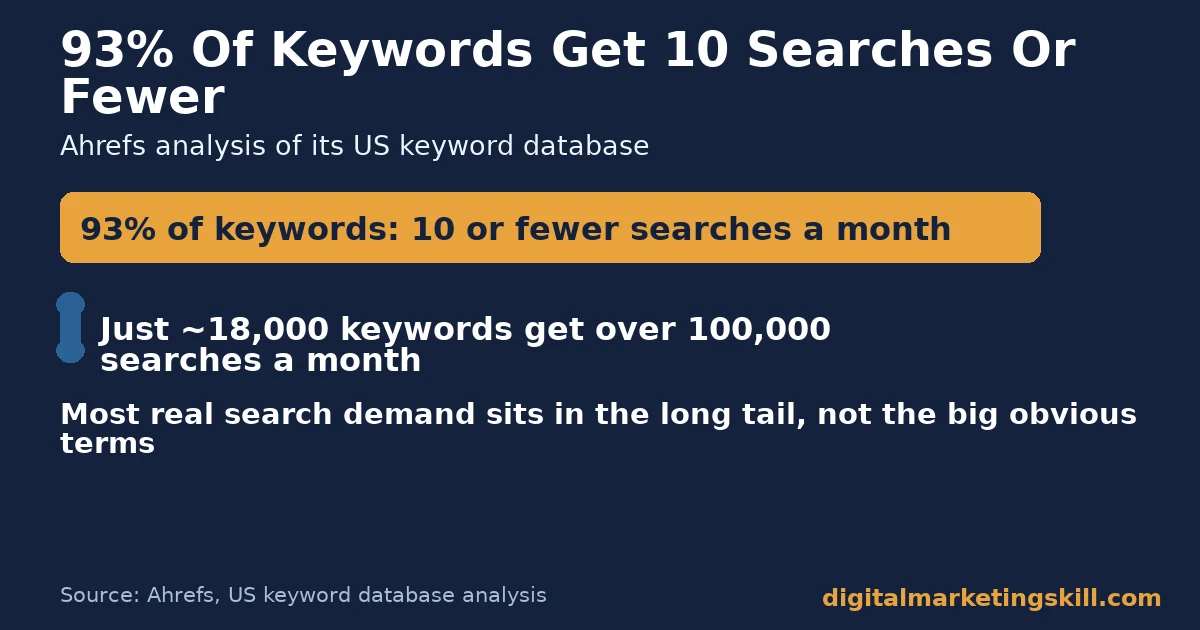
- Most demand is long-tail. Ahrefs found 93% of keywords in its US database get 10 or fewer searches a month. Just 18,000 keywords in that database get over 100,000 searches a month.
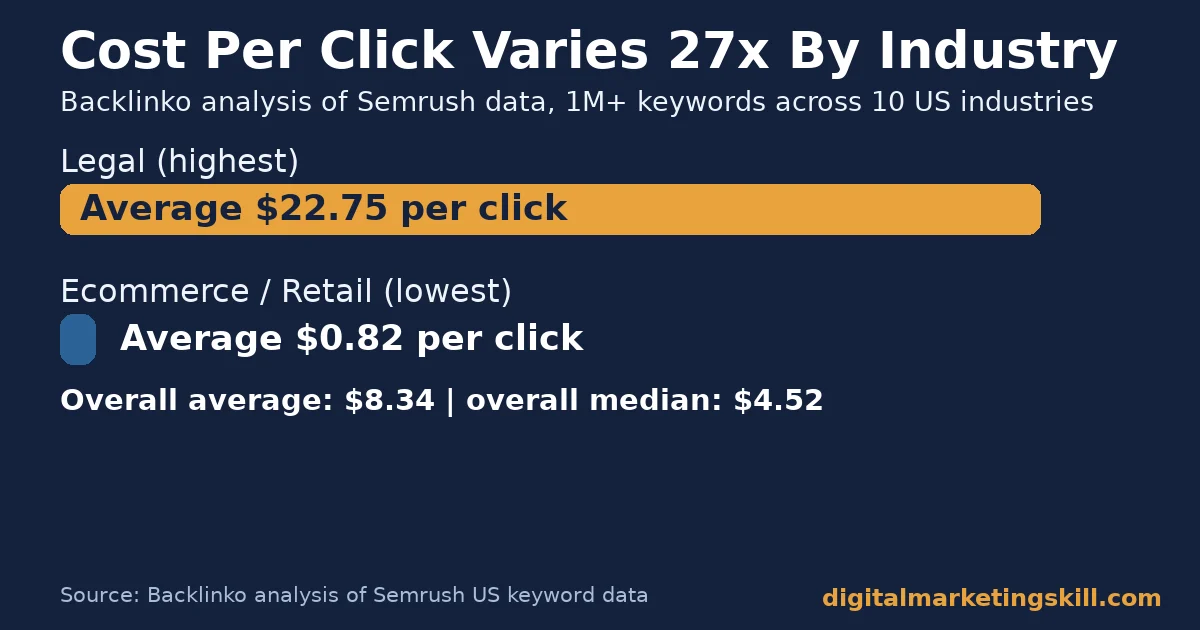
- Cost varies sharply by industry. Backlinko’s analysis of Semrush data across 10 industries found an average cost per click of $8.34. Legal keywords averaged $22.75, while ecommerce keywords averaged just $0.82.
- The median sits well below the average. The median cost per click was $4.52. A small number of expensive keywords pull the average up for everyone else.
- Search is never fully mapped. Google has repeatedly confirmed that around 15% of its daily searches have never been seen before, even now.
- Match type changes everything. Google’s own documentation shows broad match can trigger ads on searches that do not contain your keyword’s literal meaning. Exact match only shows for the same intent.
In this guide
- Why Most Keyword Lists Fail Before They Start
- How Google Keyword Planner Actually Works
- What Each Keyword Research Goal Rewards
- How to Build the Right List for Each Goal
- How to Measure Whether Your Keywords Are Working
- The Intent-Before-Volume Rule
- What the Data Shows: Legal Versus Ecommerce Keywords
- Frequently Asked Questions About Google Keyword Planner
- Build a Keyword List That Matches Real Demand
Why Most Keyword Lists Fail Before They Start
Most beginners open Keyword Planner and search for the biggest, most obvious term in their industry. That term usually has heavy competition and high cost. It rarely matches what most searchers actually type.
So the list gets built around a guess, not around evidence. A handful of broad terms go straight to the top of a spreadsheet. The hundreds of smaller, more specific terms that actually describe what a real customer types never make the cut.
This guide takes the opposite approach. It starts with what the data actually shows. Then it works back to a practical keyword list for your specific goal.
The real shape of search demand is the opposite of what people expect. Ahrefs’ analysis of its US keyword database found that 93% of keywords get 10 or fewer searches a month. Only about 18,000 keywords in that same database get more than 100,000 searches a month. Most of the demand sits in a long tail of specific, low-volume terms, not a handful of giant ones.
Search demand also never stops shifting shape. Google’s own engineers have repeatedly confirmed, most recently reported by Search Engine Journal, that around 15% of its daily searches have never been seen before. A keyword list built once and left untouched is already going stale the day you finish it.
Ground Rules for This Guide
First, cost and volume data mostly comes from US-focused panels. We name the country or dataset behind every figure. Second, Keyword Planner itself shows ranges, not exact numbers, to accounts with low ad spend. Treat every volume figure in this guide as an estimate, not a precise count.
Finally, keyword data shifts with real search behaviour, which keeps changing. Treat every number here as a snapshot, not a permanent ranking. Re-check volume and cost figures inside your own account before committing a budget.
How Google Keyword Planner Actually Works
Keyword Planner has two core jobs. It helps you discover new keyword ideas related to a seed term. It also gives you search volume, cost and forecast data for keywords you already have in mind.
Most people only ever use the first job. They type in one seed term, skim the suggestions, and export a short list. The second job, checking cost and forecast data before committing a budget, is where most of the useful planning actually happens. Skipping it is how a reasonable-looking keyword list quietly turns into an expensive surprise once a campaign goes live.
Google’s own documentation describes the forecasting feature as refreshing daily. It uses data from the previous 7 to 10 days, with seasonal adjustments built in. A forecast made in a slow month will differ from one made in a busy one, even for the same keyword.
What Match Types Actually Control
Match types decide which real searches can trigger your ad for a given keyword. Google’s own explanation sets out three levels. Broad match can show ads on searches related to your keyword, even ones that do not contain its literal meaning. Phrase match requires the search to include your keyword’s core meaning.
Exact match requires the same meaning or intent as the keyword itself. It reaches the fewest searches, but with the most control.
Google states plainly that broader match types capture every query a narrower one would, plus more. That single fact explains why a broad match keyword can rack up clicks on unrelated searches. It needs active management with negative keywords to stay on target.
Many new advertisers skip this step because broad match is the default setting. It requires the least work to set up. That short-term convenience is exactly why it causes the most wasted spend over the following weeks. Because the setting is invisible once a campaign launches, most advertisers only notice the waste after checking their search terms report, if they ever do.
Why the Long Tail Dominates Real Search Demand
The practical lesson from the long-tail data above is simple. A handful of short, generic keywords will never capture most of your potential audience. That stays true no matter how well you rank for them.
A list built mostly from specific, longer phrases usually reaches more total searchers than a list of five or six broad, competitive terms. Each individual term brings fewer visitors. But the combined total is often larger, and the competition for each one is far lower.
Picture two lists of 50 keywords each. One list targets five broad terms and pads out the rest with close variations of the same five ideas. The other list targets 50 genuinely different, specific questions a real customer might type. The second list almost always wins on total reach, because it covers more of the actual territory where searches happen.
This is also why a Google Keyword Planner guide has to cover strategy, not just the tool’s buttons. The tool hands you the data. It does not tell you which hundred low-volume terms are worth the effort and which are not.
That judgment call depends on your goal, not the tool. Picture three people looking at the same keyword list. A content writer, a PPC manager and a local shop owner each need something different from it. They should walk away with three different shortlists from the same raw data.
What Each Keyword Research Goal Rewards
Keyword research serves at least three different goals. Those are organic content, paid search campaigns and local business visibility. Each one succeeds on a different kind of keyword list. One generic list will always underperform for two of the three. Most businesses only ever build one list and reuse it everywhere, which is why results from that single list are usually mediocre across every channel it touches.
Organic Content: Built on Intent Match
Organic content succeeds when a page answers the exact question behind a search. Volume matters less here than matching the searcher’s intent precisely. A page that answers the wrong question will not rank well, even for a high-volume term.
A long-tail, question-shaped keyword often signals clearer intent than a short, generic one. That makes it easier to write a page that fully satisfies the search. It also makes it easier to tell, from the search term alone, exactly what the page needs to cover before you write a single sentence.
PPC Campaigns: Built on Cost Control
Paid search succeeds or fails on cost discipline, because every click has a price attached. Backlinko’s analysis of Semrush data found legal keywords averaging $22.75 a click. Ecommerce and retail keywords averaged just $0.82, a difference of more than 27 times.
A PPC-focused keyword list has to weigh search volume against that cost directly. It cannot just chase the biggest audience available. Our guide to pay-per-click advertising covers how to turn a keyword list into a working campaign structure.
Local Business: Built on Geographic Demand
Local businesses succeed when their keyword list reflects where their customers actually are, not just what they sell. Keyword Planner’s location filters show how demand for the same term differs between a city, a region and the whole country.
A keyword that looks weak at a national level can be strong, cheap and winnable locally. Fewer competitors are bidding on it there. A national agency chasing the generic term will rarely bother to outrank a local business that targets the exact neighbourhood by name.
How to Build the Right List for Each Goal
Each section below mirrors one goal above. It gives you the first change to make, so your keyword list matches what that goal actually rewards.
Organic Content: Lead With Question Keywords
Pull every question-shaped keyword Keyword Planner suggests around your core topic. Group them by the specific question each one asks. Then write one page per group that answers it directly and completely. Resist the urge to combine several questions into one long page; a page that answers one question well usually outranks one that answers five questions shallowly.
PPC Campaigns: Lead With Tight Match Types
Start new PPC keywords on phrase or exact match, not broad match. Keep them tight until you have enough search term data to know which broader queries are worth paying for. Review the actual search terms triggering your ads every week. Add irrelevant ones as negative keywords immediately.
Widening a match type later is safer than starting wide. By then you can see exactly what it would have captured. That beats starting wide and just hoping the waste stays small.
Local Business: Lead With Location Modifiers
Take your core service keywords and pair each one with the specific neighbourhoods, suburbs or cities you serve. Check the search volume for each local variation separately. A term can look dead nationally but be active in your exact market. Our local SEO guide covers the other ranking factors that matter once your keyword list is location-specific.
Make Every Keyword Measurable
For every keyword you add to a list, write down what result would prove it worked. That might be a ranking position, a cost per click ceiling, or a conversion rate. A keyword with no defined success measure cannot really be optimised later. It can only be repeated. This single habit is what turns a static keyword export into a tool you actually use every month.
How to Measure Whether Your Keywords Are Working
Treat your keyword list like a living document, not a one-time export from Keyword Planner. Review these measures on a regular schedule, not just at the start of a campaign.
- Search volume range: the estimated monthly searches Keyword Planner shows for a term. Treat it as a planning range, not an exact count, since Google typically shows ranges to most smaller accounts.
- Cost per click: what you actually pay per click in a live campaign, checked against the industry averages you planned around.
- Click-through rate: clicks divided by impressions for a given keyword. This is the first sign a keyword’s ad or page matches what searchers expected.
- Conversion rate: conversions divided by clicks for that keyword. This is the clearest signal of whether the traffic it brings is the traffic you actually want.
- Ranking position: for organic content, where your page sits for its target keyword, tracked over weeks, not days.
- Impression share: for paid search, the percentage of eligible auctions your ad actually appeared in. A low share often means budget or bid limits, not a weak keyword.
Review each measure against the goal the keyword was meant to serve. A local keyword with modest volume but strong conversions can outperform a bigger, more expensive one. Treat this review as a recurring habit, not a one-time report you file away after the first month.
The Intent-Before-Volume Rule
If you take one idea from this Google Keyword Planner guide, take this one. It is the most useful rule for building a keyword list, because it stops the most common mistake: chasing the biggest number on the page.
Decision rule: do not choose a keyword for its volume alone. Choose it because its intent matches what you can actually deliver. If a high-volume keyword does not match your offer precisely, a lower-volume keyword that does will usually convert better.
A Worked Example: Two Keywords, Two Outcomes
Here is a simple worked example with illustrative, invented numbers. A business targets a broad, high-volume keyword with 10,000 estimated monthly searches. It ranks on page one and gets 200 visits a month. It gets only 2 sales, because most searchers wanted something slightly different.
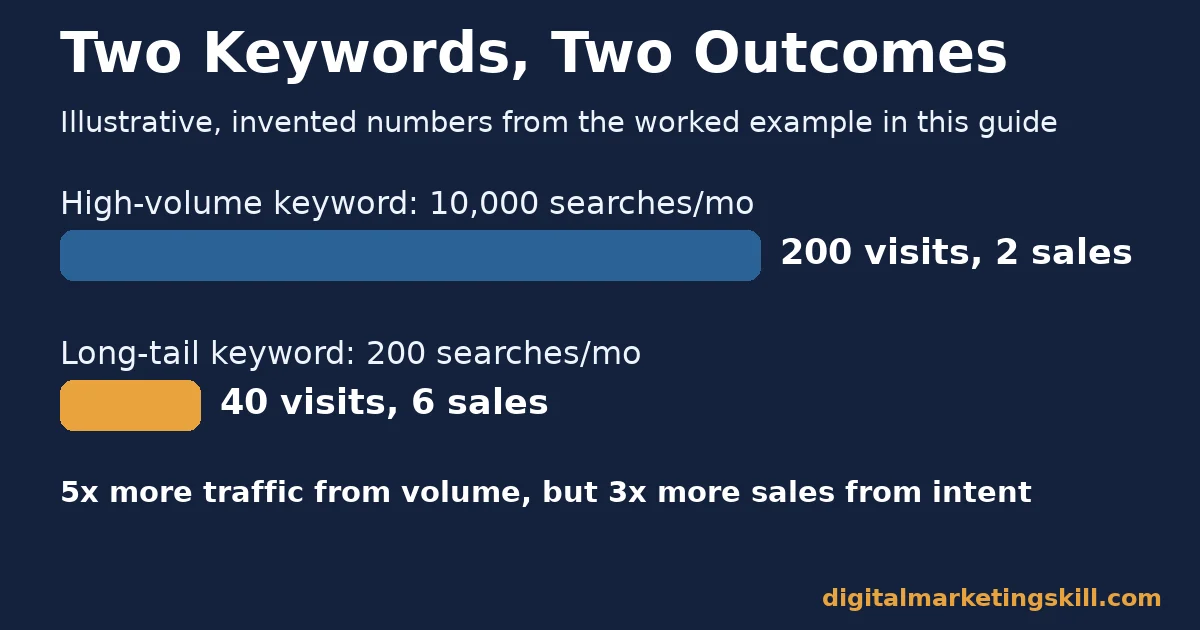
The same business then targets a specific, long-tail keyword with only 200 estimated monthly searches. It ranks first easily and gets 40 visits a month. It gets 6 sales, because every visitor wanted exactly what the page offered.
The high-volume keyword brought 5 times more traffic. The long-tail keyword brought 3 times more sales. Volume alone told the wrong story. A spreadsheet sorted by search volume would have ranked the losing keyword first and the winning one somewhere near the bottom.
What the Data Shows: Legal Versus Ecommerce Keywords
Backlinko’s analysis of more than a million keywords across 10 industries, drawn from Semrush’s US database, found legal keywords averaging $22.75 a click. Ecommerce and retail keywords averaged just $0.82, over 27 times less for the same single click.
The gap exists because of what a click is worth to each industry. A single new legal client can be worth thousands of dollars. A legal advertiser can afford to pay far more per click than a retailer selling a low-cost product.
The same logic applies inside a single business, not just between industries. A keyword tied to a high-value service can justify a higher cost per click than a keyword tied to a low-margin add-on, even on the exact same website. So the right benchmark for any keyword is what it is actually worth to you, not what a competitor happens to be paying.
This case has clear limits. It reports industry averages across a large keyword sample, not the cost any single business will pay. Your own cost per click depends on your specific keywords, your quality score and your local competition, not just your industry’s average. Treat the figures above as a planning benchmark. Compare your own account against them. Do not treat them as a guaranteed price.
Frequently Asked Questions About Google Keyword Planner
Is Google Keyword Planner free to use?
Yes. You need a Google Ads account to access it, but you do not need an active ad campaign or spend to use the keyword research features.
Why does Keyword Planner show a range instead of an exact search volume?
Google shows precise historical search volume mainly to accounts with meaningful ad spend. Accounts with little or no spend typically see a broader range instead of a single number.
What is the difference between broad, phrase and exact match?
Broad match reaches the widest set of related searches. Phrase match requires your keyword’s core meaning. Exact match requires the same meaning or intent as the keyword itself, reaching the fewest but most relevant searches.
Should I target high-volume or long-tail keywords?
Usually both, for different jobs. Long-tail keywords tend to convert better because intent is clearer, while a smaller number of higher-volume terms can still be worth the extra competition for broad visibility.
Why do some industries pay so much more per click than others?
Because the value of a single customer differs enormously by industry. Industries with high-value sales, like legal services, can profitably pay far more per click than industries with low-cost products, like general ecommerce.
How often should I update my keyword list?
Review it at least quarterly, and sooner if your conversion rates shift. Search behaviour changes constantly, so a list that worked well a while back may already be missing newer ways people phrase the same need. Google has confirmed that around 15% of its daily searches have never been seen before.
Can I use Keyword Planner for organic SEO, not just ads?
Yes. The search volume and related keyword data work just as well for planning content as for planning a paid campaign, even if you never spend a cent on Google Ads.
Build a Keyword List That Matches Real Demand
A working keyword list starts with intent, not volume. Pull your core topics into Keyword Planner. Group the results by what each searcher actually wants. Build content or campaigns around the match, not the biggest number on the screen. Revisit the list on a schedule, since the shape of real search demand never stays still for long.
If you want structured, hands-on practice building keyword strategy like this alongside SEO, PPC and analytics, the Digital Marketing Skill Institute can help. The Master Diploma in Digital & AI Marketing covers Google Ads and analytics, WordPress and SEO, with AI-powered tools built into every track.
Every track includes project-based work experience with a U.S. partner company, so you practise keyword research on real campaigns, not just theory. You learn to read Keyword Planner data the way this guide describes, as a planning tool, not a popularity contest. You also get unlimited 1-on-1 coaching and mentoring throughout the programme.
The diploma is dual US and UK accredited and recognised in more than 100 countries. The programme is fully online, so you can study wherever you live in your country.
Browse more guides on the Digital Marketing Skill Institute blog, or read our guide to search engine optimisation. When you are ready, apply for the Master Diploma or start from the Digital Marketing Skill Institute homepage.
Every figure in this guide was checked against its original source before publication. Figures marked as illustrative are invented examples, not real results.
![9 Amazing Digital Marketing Skills to Make Money Online [With Proof]](https://digitalmarketingskill.com/wp-content/uploads/2019/07/9-Amazing-Digital-Marketing-Skills-to-Make-Money-Online-With-Proof-17.png)






