Keyword placement means putting your main search phrase where search engines and readers look first. Those spots are the title, the main heading, the opening lines, the URL, and your link and image text. Get those few spots right and you can stop counting how often the phrase appears.
Key Takeaways
- Google says it uses the HTML title element for its search result titles around 87% of the time, so the title is still the most reliable place to put your main phrase.
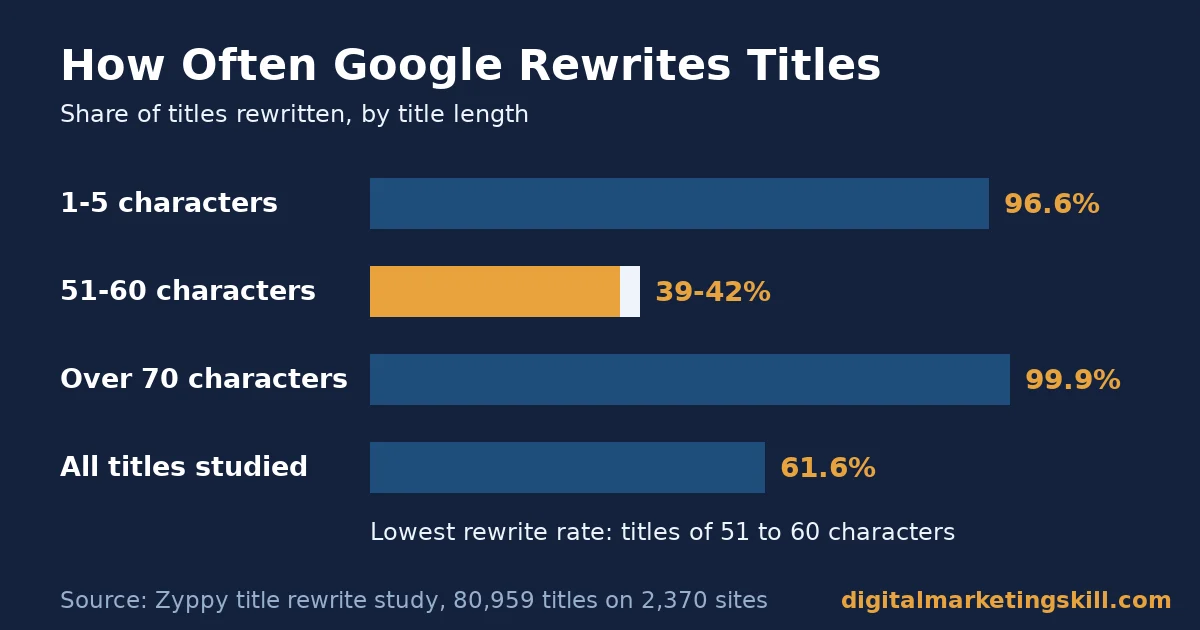
- Google rewrote 61.6% of 80,959 titles in a Zyppy study of 2,370 sites. Titles of 51 to 60 characters were rewritten least, at 39% to 42%.
- An Ahrefs study of 20,000 keywords found that Google replaced the meta description 62.78% of the time, because snippets come mainly from the page itself.
- The average page ranking first also ranks in the top ten for nearly 1,000 other keywords, according to Ahrefs. So you write for a topic, not a single string.
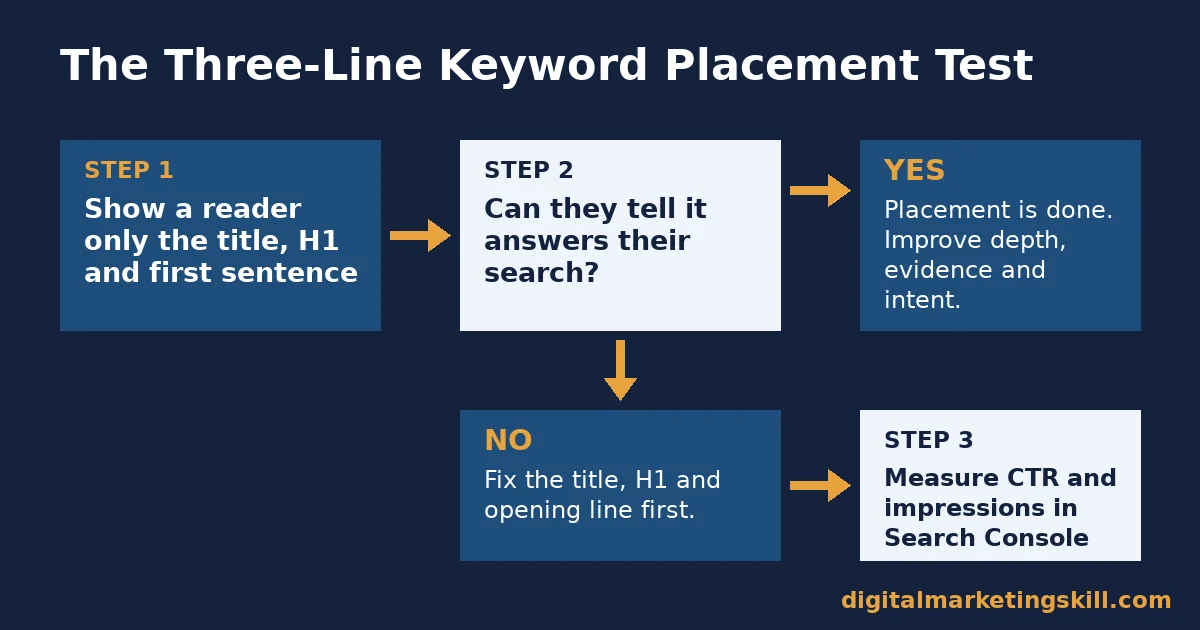
- The best decision rule is simple. If a reader who sees only the title, main heading and first sentence can tell the page answers their search, your keyword placement is done.
In this guide
- Why Most Keyword Placement Advice Misses the Point
- How Google Reads the Words on Your Page
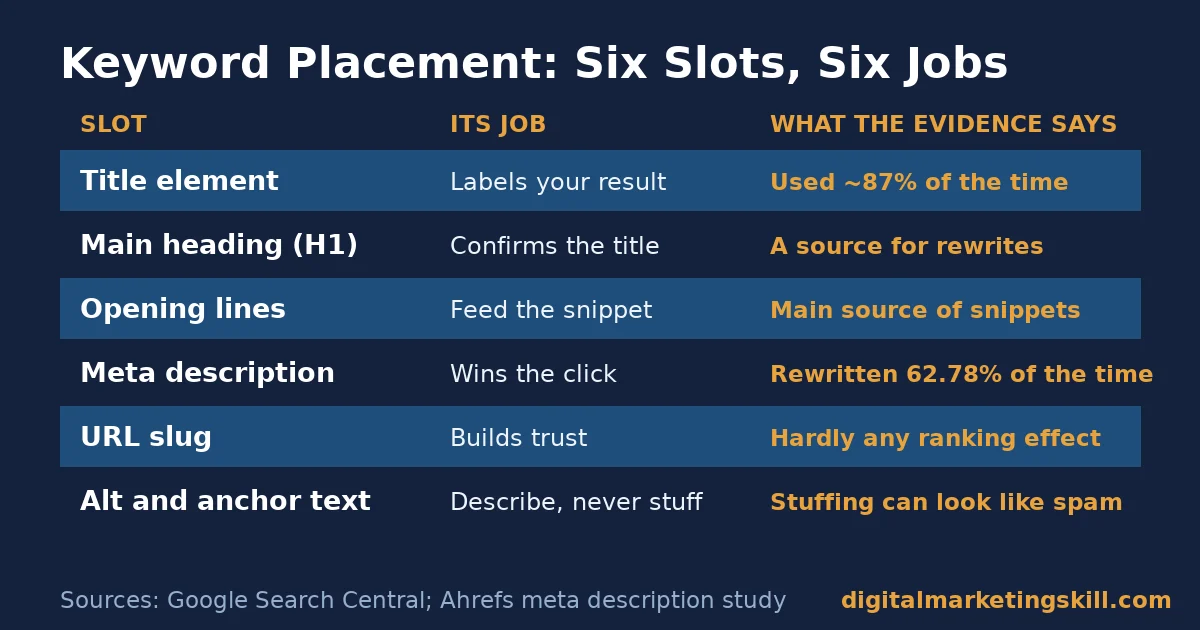
- Where Keyword Placement Matters: Six Slots, Six Different Jobs
- Title Element: Built to Label the Page in Search Results
- Main Heading: Built to Confirm What the Title Promised
- Opening Paragraph and Body: Built for Relevance and Snippets
- Meta Description: Built to Win the Click, Not to Rank
- URL Slug: Built for Readers, Not for Rankings
- Alt Text and Anchor Text: Built to Describe, Not to Stuff
- How to Fix Keyword Placement Slot by Slot
- Title Element: Lead With the Phrase and Stay Near 55 Characters
- Main Heading: Lead With the Same Promise as the Title
- Opening Paragraph and Body: Lead With the Answer
- Meta Description: Lead With the Benefit and Include the Phrase Once
- URL Slug: Lead With the Phrase and Nothing Else
- Alt Text and Anchor Text: Lead With a Plain Description
- How to Measure Whether Keyword Placement Worked
- The One Keyword Placement Rule Worth Remembering
- What Doing This Right Looks Like
- Frequently Asked Questions About Keyword Placement
- Your Next Step: Apply the Three-Line Test
Why Most Keyword Placement Advice Misses the Point
Most guides to keyword placement hand you a checklist. Put the phrase in the title, the URL, the first 100 words and the alt text. Then repeat it until a plugin turns green. That list is not wrong, but it treats every spot as equal, and they are not. Even a good anatomy of an optimised page only helps once you know why each part matters.
What is missing is the job each spot does. Some slots feed ranking directly. Some mainly decide whether people click. One of them Google ignores completely, and another it rewrites more often than not. So this guide takes each part of the page in turn and says what it does, what goes wrong there, and what to do instead.
The Ground Rules for This Guide
First, we separate three kinds of evidence. Google’s own documentation tells you what Google says it reads. Third-party studies, such as the Zyppy and Ahrefs rewrite studies, show what Google did on a large sample. Treat them as a snapshot, not a permanent ranking. Where we join the two, we say so, because that is an informed inference, not a settled fact.
Second, nobody outside Google can see the ranking formula. Keyword placement is only one of many signals, and our guide to how search engine optimisation works covers the rest. Good placement helps the right page get found and clicked, but it cannot rescue a page that fails to answer the question.
How Google Reads the Words on Your Page
Google works in three stages, according to its guide to how Search works. It crawls a page, indexes the words and other signals it finds, and then serves the page when it matches a search. Keyword placement matters at the indexing stage, because that is where Google works out what your page is about.
Google’s SEO Starter Guide is blunt about several old habits. It says Google Search does not use the keywords meta tag. It also says keywords in a domain name or URL path have hardly any effect on ranking beyond appearing in breadcrumbs. Even content length alone does not matter, since there is no magic word count.
The same guide warns that repeating the same words over and over is tiring for readers. Worse, keyword stuffing breaks Google’s spam policies. So the aim is not to use the phrase as often as possible. Instead, you place it where it tells a reader and a search engine the most with the fewest words.
Google Matches Topics, Not Exact Strings
Ahrefs studied 3 million search queries and found that the average page in first place also ranks in the top ten for nearly 1,000 other keywords. The median was lower, at around 400, but the point stands. A single page earns traffic from hundreds of phrasings it never repeats word for word.
This changes how you think about keyword placement. You put the main phrase in a few key spots, then write naturally about the whole topic. The related terms, questions and examples do the rest of the work, which is why stuffing one phrase adds so little. If you have not chosen your phrase yet, start with what keyword research is and how to do it.
Where Keyword Placement Matters: Six Slots, Six Different Jobs
Each slot below does a different job for the page. Read them as a set, because a weak title cannot be fixed by a strong URL, and a stuffed body can undo a perfect heading.
Title Element: Built to Label the Page in Search Results
The title element is the text inside the <title> tag in your page code. Google says it now uses that text for its result titles around 87% of the time, up from around 80%. That figure comes from a Google Search Central blog post on how titles are generated. The rest of the time it builds a title from headings, prominent text or links.
Google’s title link documentation lists the reasons it swaps a title. These include half-empty titles, the same title on every page, and titles stuffed with repeated words. Its own bad example strings together several versions of the same product name.
Main Heading: Built to Confirm What the Title Promised
The main heading, or H1, is the large title a reader sees on the page itself. Google lists heading elements among the sources it uses when it writes its own title. So when your title and main heading agree, you give Google one clear story instead of two competing ones.
The Zyppy study found a striking detail here. When a number appeared in both the title and the H1, Google kept that number 97.3% of the time. My reading is that matching headings act as a second vote for the title you wrote.
Opening Paragraph and Body: Built for Relevance and Snippets
The opening lines tell a reader, within seconds, whether they are in the right place. They also give Google its best material for the snippet, the short text under each result. Google’s snippet documentation says snippets are mainly created from the page content itself.
The body is where the whole topic lives. Here the phrase should appear a handful of times, spread out, alongside the words a real expert would use. If you catch yourself forcing it into a sentence, that sentence is already telling you to stop. Our step-by-step SEO writing guide shows how to draft around a topic instead.
Meta Description: Built to Win the Click, Not to Rank
The meta description is a summary you write in the page code. It does not help ranking, but it can shape the snippet when Google thinks it describes the page better than your content does. An Ahrefs meta description study of 20,000 keywords found that Google rewrote the description 62.78% of the time.
The rewrite rate was 65.62% for long-tail keywords, the specific, low-volume searches, and 59.65% for popular ones. That makes sense, because one fixed summary cannot match every phrasing. Google also warns that descriptions made of long strings of keywords are less likely to be shown.
URL Slug: Built for Readers, Not for Rankings
The slug is the part of the web address after the domain, such as /keyword-placement/. Google’s starter guide says keywords in the URL path alone have hardly any ranking effect beyond appearing in breadcrumbs. Even so, a short, readable slug helps people trust a link before they click it.
The risk sits in the other direction. Long slugs full of dates, places or repeated words age badly and look spammy when shared. Changing a slug later also means setting up a redirect, so it pays to get it right once.
Alt Text and Anchor Text: Built to Describe, Not to Stuff
Alt text is the written description of an image for people using screen readers. Anchor text is the clickable wording of a link. Google’s image SEO guidance says filling alt attributes with keywords creates a poor experience and may cause a site to be seen as spam.
Anchor text works the same way. Google’s link guidance asks for anchor text that is descriptive, reasonably concise and relevant, and it warns against cramming in every related keyword. So in both slots, the phrase belongs only when it truly describes the image or the page behind the link.
How to Fix Keyword Placement Slot by Slot
Now for the practical side. Each heading below mirrors a slot from the section above, so you can move straight from the problem to the fix.
Title Element: Lead With the Phrase and Stay Near 55 Characters
Put your main phrase at or near the start of the title, then add the benefit or angle. In the Zyppy title rewrite study, titles of 51 to 60 characters had the lowest rewrite rate, at 39% to 42%. Titles over 70 characters were rewritten 99.9% of the time. Titles of five characters or fewer fared almost as badly, at 96.6%.
Also watch the separators. Pipe characters were removed or replaced 41% of the time, while dashes were removed 19.7% of the time. So a clean title such as “Keyword Placement: Where to Put Keywords on a Page” is safer than a string of pipes and brand names.
Main Heading: Lead With the Same Promise as the Title
Write one H1 per page and keep it close to the title. It does not need to match word for word, but it should use the same main phrase and make the same promise. Then use the phrase, or a close variant, in a few subheadings where it reads naturally.
Heading order is less fragile than many people think. Google’s starter guide says it does not matter to Google Search if headings are used out of order. Still, a logical order helps readers and screen reader users scan the page, so keep it tidy.
Opening Paragraph and Body: Lead With the Answer
Put the phrase in the first sentence or two, inside a direct answer to the search. For example, a page on keyword placement should define it and say what to do before any background. That opening often becomes the snippet, which makes it your free advert in the results.
In the body, use the phrase where it fits and use variants everywhere else. A useful test is to read a paragraph aloud. If it sounds like the app store credit example in Google’s spam policies, where one phrase repeats in every sentence, cut it back.
Meta Description: Lead With the Benefit and Include the Phrase Once
Write a unique description of about 120 to 155 characters that says what the reader will get. Include the main phrase once, because it confirms to the searcher that the page matches their query. Then stop, since keyword lists make Google less likely to show your text at all.
Do not spend hours on every page, though. Given a rewrite rate above 60%, a description is a suggestion, not a guarantee. Put your effort into the top pages, where a better click rate pays back quickly.
URL Slug: Lead With the Phrase and Nothing Else
Make the slug the main phrase, joined with hyphens, with no dates, city names or filler words. For example, /keyword-placement/ is better than /the-ultimate-guide-how-best-to-use-seo-keywords-on-your-blog-page/. The short version stays accurate even after you update the article.
If an old page already ranks, change its slug only when the old one is clearly wrong. Then add a 301 redirect from the old address, so links and bookmarks still reach the page.
Alt Text and Anchor Text: Lead With a Plain Description
Describe each image as you would to someone who cannot see it. Google’s own example rates “Dalmatian puppy playing fetch” as best, a bare “puppy” as better, and a long list of dog words as bad. Use your phrase in alt text only when the image is genuinely about it.
For links, name the destination. “Our guide to keyword research” beats “click here” and also beats the same exact phrase repeated across twenty links. Varied, natural anchors tell Google more about the target page than a single forced one.
How to Measure Whether Keyword Placement Worked
You measure keyword placement in Google Search Console, the free tool that shows how your pages appear in Google. Its performance report definitions explain the four core numbers. Compare the four weeks before a change with the four weeks after it, and read them together.
- Impressions: how many times a link to your page appeared in search results. A rise shows Google now matches the page to more searches.
- Clicks: how many times people clicked through to your page. This is the number that turns placement into traffic.
- Click-through rate (CTR): clicks divided by impressions. A higher CTR after a title change usually means the new title matches intent better.
- Average position: the average ranking of your page for the searches that showed it. Read it next to impressions, because new low-ranking queries can pull it down even when things improve.
- Queries per page: how many different searches the page appears for. Growth here means the page now covers the topic, not just one string.
- Title shown vs title written: search for your page and compare Google’s title with yours. A rewrite is a sign the title is too long, too vague or stuffed.
Keep your other metrics alongside these. Traffic that grows without leads or sales means the page ranks for the wrong intent, so fix the content before you touch placement again.
The One Keyword Placement Rule Worth Remembering
If you remember one thing from this guide, make it this. Show someone only your title, your main heading and your first sentence. If they can tell the page answers their search, your keyword placement is done, so spend the rest of your time on the content.
This rule works because it covers the slots Google leans on most, and it stops you from over-tuning the rest. It also points to the right fix when a page struggles. If the three-line test fails, fix placement first. If it passes, the problem is almost always depth, evidence or intent.
A Worked Example
Here is an illustrative case with invented numbers. A guide gets 4,000 impressions a month at an average position of 7, but only 60 clicks, a CTR of 1.5%. Its title reads “Blog | Tips | Keywords | Our Company | Learn More”, and Google is rewriting it.
So the three-line test fails. The title never says what the page answers.
The owner rewrites it as “Keyword Placement: Where to Put Keywords on a Page”, matches the H1, and opens with a direct answer. If CTR then rose to 3% on the same impressions, clicks would double to 120 a month, without a single new link. Those numbers are invented, but the arithmetic shows why placement fixes are the cheapest wins in search.
What Doing This Right Looks Like
Public reviews of Digital Marketing Skill Institute students show keyword placement as a first practical skill. On the Institute’s reviews page, Esther Elueme writes that within a month of starting they had built a website, scheduled social ads, added their business to Google and “optimized my page for keywords search on google”.
Another student, Abimbola Fafiolu, says they used the skill to build a functioning website that ranks in Google. They name the SEO module as the best lecture of the course. Both reviews show that page-level keyword work is something a beginner can learn and apply quickly.
These cases have clear limits. They are self-reported Google reviews, they give no traffic or ranking numbers, and results depend on the niche and the effort involved. Read them as proof that the skill is learnable, not as a promise of rankings, and see our earnings disclaimer for how we present student results.
Frequently Asked Questions About Keyword Placement
Where should I put my main keyword on a page?
Put it in the title element, the main heading, the first sentence or two, the URL slug and, where it genuinely fits, one or two subheadings. After that, write naturally and use related terms instead of repeating the exact phrase.
How many times should a keyword appear in an article?
Google gives no number and says there is no magic word count, while repeating words unnaturally counts as keyword stuffing under its spam policies. Some SEO plugins flag a density range as a sense check, but readability should always decide.
Does keyword placement in the URL still matter?
Only a little for ranking. Google’s SEO Starter Guide says keywords in the URL path have hardly any effect beyond breadcrumbs. Still, a short, clear slug helps people trust and share the link.
Does Google still use the meta keywords tag?
No. Google’s SEO Starter Guide states plainly that Google Search does not use the keywords meta tag, so you can leave it out or ignore it.
Why does Google change my title in search results?
Google rewrites titles that are too long, too short, vague, repeated across pages or stuffed with keywords. Keeping titles near 51 to 60 characters and matching them to your main heading cut rewrites in the Zyppy study.
Should I put the keyword in image alt text?
Only when the image is genuinely about that topic. Google’s image guidance says alt text should describe the image in context, and stuffing alt attributes with keywords may cause a site to be seen as spam.
Is keyword placement enough to rank a page?
No. Placement helps Google understand and label a page. But ranking also depends on how well the content answers the search, and on its quality and links.
Your Next Step: Apply the Three-Line Test
Pick one page that gets impressions but few clicks, and apply the three-line test. Fix the title, heading and opening, then measure the change in Search Console. That single loop teaches you more about keyword placement than any checklist, and it is the kind of proof that working SEO experts use to show their skills. For more guides like this, browse the Digital Marketing Skill Institute blog.
Want to learn search and the wider craft with support? The Master Diploma in Digital & AI Marketing at Digital Marketing Skill Institute covers nine practical courses, including AI-powered SEO, Google Ads and analytics. You get unlimited 1-on-1 coaching and mentoring, plus real project work inside a U.S. company. The diploma is dual US and UK accredited and recognised in more than 100 countries.
The programme runs 100% online, so you can study wherever you live, from anywhere in your country. When you are ready, apply to the Master Diploma or return to the Digital Marketing Skill Institute homepage to see how the programme works.
Every figure in this guide was checked against its original source before publication. Figures marked as illustrative are invented examples, not real results.
![9 Amazing Digital Marketing Skills to Make Money Online [With Proof]](https://digitalmarketingskill.com/wp-content/uploads/2019/07/9-Amazing-Digital-Marketing-Skills-to-Make-Money-Online-With-Proof-17.png)