
The right e-commerce store features turn browsers into buyers. Most stores lose that fight before checkout even starts. Globally, about 70% of shopping carts are abandoned, across every industry and price point. Most of that loss is preventable with a handful of specific, well-built features, not a bigger advertising budget.
Key Takeaways
- The global cart abandonment rate sits at 70.22%, based on an aggregate of 50 studies (Baymard Institute). Most of that loss happens at checkout, not the product page.
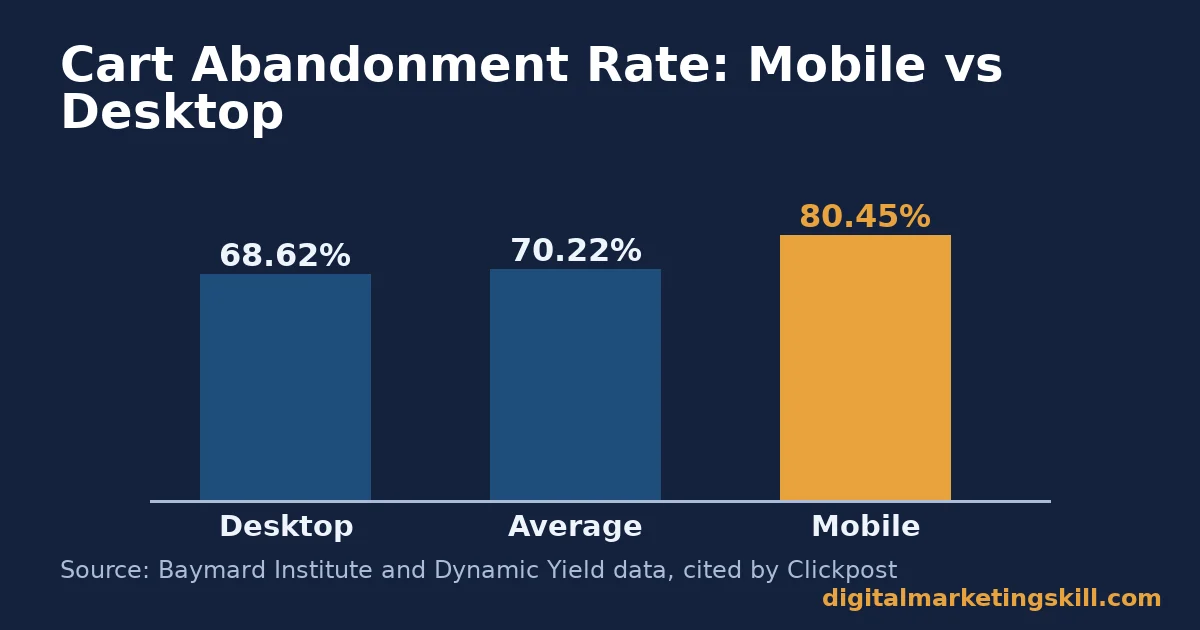
- Mobile shoppers abandon carts at 80.45%, versus 68.62% on desktop, a 12-point gap (Dynamic Yield data, cited by Clickpost). A store that is not mobile-friendly loses sales disproportionately.
- Unexpected costs at checkout, shipping, tax, or fees, are the single biggest abandonment trigger. 39% of shoppers cite it (Baymard Institute, cited by Clickpost). Showing the full price early fixes a large share of this.
- A 0.1-second improvement in mobile load speed lifted retail conversions by 8.4% in a joint Google and Deloitte study (cited by Mirasvit). It also lifted average order value by 9.2%.
- A site that loads in 1 second converts roughly 2.5 times better than one taking 5 seconds (Portent data, cited by Mirasvit). Speed is a feature, not a technical afterthought.
In this guide
- Why Most E-Commerce Store Features Get Built in the Wrong Order
- The Core E-Commerce Store Features, and the Job Each One Does
- Ten E-Commerce Store Features Worth Checking Today
- What Differs By Store Size
- How to Strengthen E-Commerce Store Features, By Store Size
- How to Measure Your E-Commerce Store Features
- How to Check These Features Without Guessing
- The One Rule for Deciding Which Feature to Fix First
- A Real Case: Traffic Into a Tightly Built Funnel
- Common E-Commerce Store Mistakes to Avoid
- Frequently Asked Questions About E-Commerce Store Features
- Build an E-Commerce Store and the Skills to Grow It
Why Most E-Commerce Store Features Get Built in the Wrong Order
Most store owners add features in whatever order they think of them. A logo first, then a few products, then a checkout button bolted on at the end. That order ignores where shoppers actually drop off. It builds the parts a founder enjoys first, and the part that actually closes the sale last.
This is an informed framework, not a guarantee. The figures here come from publicly reported industry research, not a promise for your store. Your own numbers depend on your product, price point, and audience. Treat every benchmark as a comparison point, and check it against your own analytics.
With that ground rule in place, this guide covers which e-commerce store features actually move the needle. It also covers what changes by store size, how to measure what is working, and the one rule for deciding what to fix first.
The Core E-Commerce Store Features, and the Job Each One Does
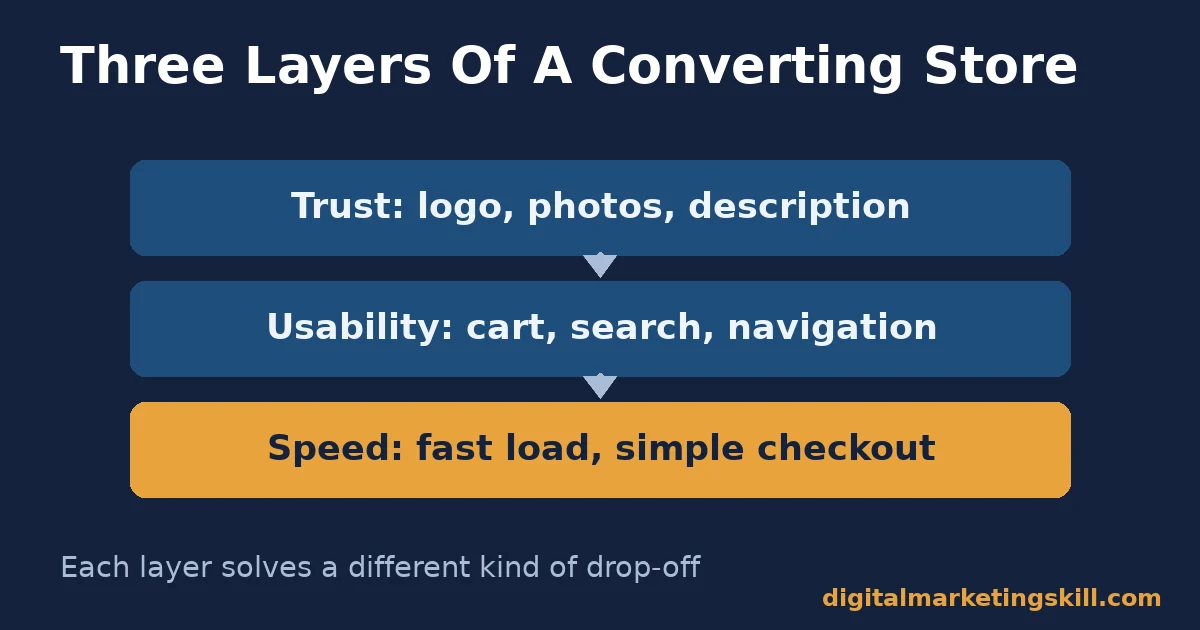
Every converting store rests on three layers: trust, usability, and speed. Each layer has its own features. Each one solves a different kind of drop-off, so missing one layer entirely cannot be fixed by over-investing in another.
Trust Features
A clear logo, high-quality product images, and a detailed product description all build trust before a shopper ever reaches checkout. Shoppers cannot touch or try your product. These features do that job for you instead.
Weak trust features do not usually cause an obvious complaint. They just quietly reduce the number of people willing to add anything to their cart in the first place.
Usability Features
A visible shopping cart, a search box, clean navigation, and a clear call to action remove friction from the path to purchase. Each one answers a question a confused shopper would otherwise have to ask you directly.
A shopper who cannot quickly find what they want rarely emails to ask. They simply leave, and you never find out why.
Speed and Checkout Features
A responsive, fast-loading design and a simple checkout process are what actually convert interest into a sale. This layer matters most. A shopper who is ready to buy will still leave if the last step is slow or confusing.
This is also the layer with the clearest, most measurable payoff. Small speed and checkout fixes tend to show up in your numbers within days, not months.
Ten E-Commerce Store Features Worth Checking Today
Use this as a quick audit. Each feature below maps to one of the three layers above, so a weak score in one group points you straight back to the right fix.
Trust: Logo, Photos, and Description
A simple, memorable logo. Genuine, high-quality photos from multiple angles. A product description that covers real benefits and features, not just a generic blurb copied from a supplier.
None of these three need to be expensive. A clean, well-lit photo taken on a modern phone usually beats an expensive but generic stock image.
Usability: Cart, Search, and Navigation
Keep the shopping cart icon visible at all times. Add a working search box if you sell more than a handful of products. Navigation should be simple enough that a first-time visitor finds what they want within seconds.
Test this yourself, honestly. Hand your store to someone unfamiliar with it, and watch how long it takes them to find one specific product.
Clarity: Call to Action and Contact Information
One clear call to action per page, such as “Shop Now” or “Add to Cart,” not three competing buttons. Visible contact information, so a hesitant shopper can ask a question before they buy.
A visible phone number, email, or live chat option often reassures a nervous first-time buyer, even if they never actually use it.
Conversion: Speed, Responsiveness, and Checkout
Your design should be mobile-responsive, working as well on a phone as a desktop. Your checkout process should have as few steps as your payment provider allows, with no surprise costs added at the final step.
If you only have time to fix one thing from this whole list, fix this one. It sits closest to the sale.
What Differs By Store Size
These three layers apply to every store. What you prioritise first should change depending on whether you are launching a new store or scaling an existing one.
New Stores: Built to Earn First Trust
A brand-new store has no reviews and no history. Every visitor is deciding whether to trust a stranger with their payment details. Trust features carry more weight here than anywhere else in the store, especially once you know your customer avatar well enough to anticipate their doubts.
At this stage, a handful of genuinely excellent product photos will usually do more for sales than a long list of half-finished features.
Scaling Stores: Built to Remove Friction at Volume
A store already getting traffic has passed the trust test for enough people to matter. Here, usability and checkout friction cost more in absolute terms, because small leaks affect a much larger number of shoppers. Ongoing conversion optimization matters far more at this stage than it did on day one.
A single extra checkout field might cost a new store almost nothing. At scale, that same field can quietly cost thousands in lost orders every month.
How to Strengthen E-Commerce Store Features, By Store Size
These fixes mirror the two groups above. Start with the one that matches where your store is today.
New Stores: Lead With Real Product Photos and a Clear Logo
Invest first in genuine, high-quality photos of your actual product, from multiple angles. A clear, simple logo signals that a real business is behind the store, not a one-page scam site.
Avoid stock photography wherever possible. Shoppers can usually tell, and it quietly undermines the trust you are trying to build.
Scaling Stores: Lead With Checkout and Speed Audits
Run a checkout audit every quarter. Count the steps, check for surprise costs, and time how long the page takes to load on a phone. At volume, a single removed step can be worth more than a new marketing campaign.
Schedule this audit like any other recurring task. Waiting for a complaint means you have already lost the sales the audit would have caught.
How to Measure Your E-Commerce Store Features
Checkout is simply the final stage of your sales funnel, so measure it the same way. You cannot tell which feature is working without measuring the right numbers. These are the core metrics, each defined in one sentence.
- Conversion rate: the percentage of visitors who complete a purchase. It is the clearest sign that your store’s features are doing their job.
- Cart abandonment rate: the percentage of shoppers who add a product to cart but never complete checkout. A high rate usually points to cost surprises or a slow, confusing checkout.
- Average order value (AOV): the average amount spent per completed order. It tells you whether features like product recommendations are actually increasing basket size.
- Bounce rate: the percentage of visitors who leave after viewing only one page, as Google Analytics defines it. A high bounce rate on product pages often points to slow load times or unclear information.
- Page load time: how long a page takes to become usable, especially on mobile. It is one of the few features that affects every single visitor, whether they notice it or not.
Read these together. A high conversion rate with a low average order value points toward upsell and cross-sell features. A high bounce rate with normal conversion among the shoppers who stay points toward a speed problem, not a trust problem. Reading any one of these numbers alone tends to send you chasing the wrong fix.
How to Check These Features Without Guessing
You do not need expensive software to audit most of this. A handful of free or near-free checks cover almost everything above.
Checking Speed
Run your store’s product and checkout pages through a free page-speed testing tool on both mobile and desktop. Note the load time, and repeat the test after any major change to confirm it actually helped.
Checking Mobile Usability
Open your own store on your phone, on an ordinary mobile connection, not fast office wifi. Try to find a specific product, add it to cart, and complete a test checkout from start to finish.
Checking Checkout Friction
Count every field, click, and page between “add to cart” and “order confirmed.” Ask whether each one is truly necessary, or whether it exists only because no one has removed it yet.
The One Rule for Deciding Which Feature to Fix First
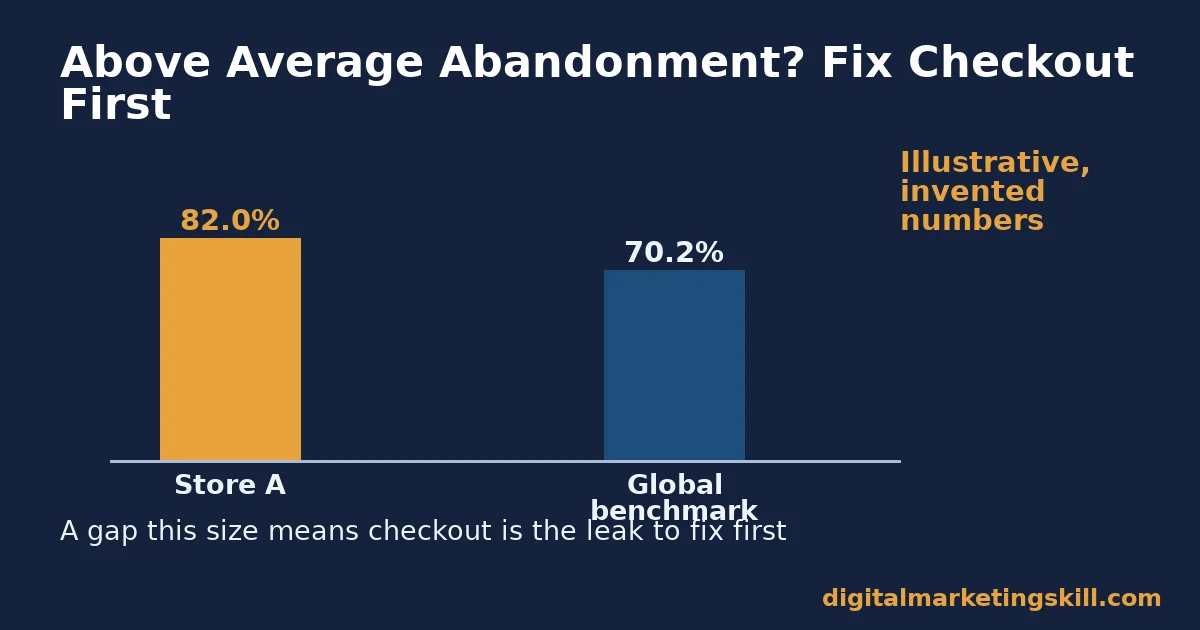
Fix checkout friction before you fix anything upstream of it, if your cart abandonment rate is above the roughly 70% global average (Baymard Institute). A better product page sends more shoppers into a checkout that is already losing most of them.
Illustrative, invented numbers: imagine a store with 1,000 monthly visitors, a 2% conversion rate, and an 82% cart abandonment rate. The temptation is to spend on more traffic.
But an 82% abandonment rate is well above the 70.22% global average. That gap means checkout itself, not traffic volume, is the leak worth fixing first.
Now imagine a second store with the same traffic, a 1% conversion rate, but a 65% cart abandonment rate, slightly better than average. Here, checkout is already reasonably healthy. The real problem sits earlier, most likely in trust or product-page features that stop shoppers from adding anything to the cart at all.
A Real Case: Traffic Into a Tightly Built Funnel
Ayooluwa Osemi, a Digital Marketing Skill Institute graduate, spent $14 on Facebook and Instagram ads and generated $878 in returns within a short timeframe, as published on the Institute’s reviews page. Good e-commerce store features do not replace a clearly identified target audience or traffic. They decide how much of that traffic actually converts once it arrives.
This is one published, named result, not a typical outcome; see the earnings disclaimer for the Institute’s full position on income claims. The lesson is structural: a small, well-targeted audience lands harder on a store with clear trust and checkout features than the same traffic would on a confusing one.
Neither this case, nor any single feature on its own, guarantees a result like it. The mechanism is what transfers, not the dollar figure.
Common E-Commerce Store Mistakes to Avoid
Most lost sales trace back to one of these five habits, not to a lack of traffic. None of them require a redesign to fix; each is a specific, correctable choice.
Using Stock Photos Instead of Real Product Shots
Because shoppers cannot touch your product, a generic stock image quietly tells them your listing is not fully real. Replace it with a genuine photo as soon as you can, even an imperfect one.
Hiding Shipping Costs Until Checkout
Since surprise costs are the single biggest abandonment trigger, showing shipping late in the process is one of the most expensive habits a store can keep. Show it on the product page instead.
Treating Mobile as an Afterthought
Therefore, given how much higher mobile abandonment runs, a store that was only ever tested on desktop is leaking sales it never notices. Test every major change on a phone before it goes live.
Running Too Many Competing Calls to Action
When a page offers three equally loud buttons, a shopper often picks none of them. Instead, pick one primary action per page and make it visually obvious.
Ignoring Page Speed Until It Becomes Obvious
Speed problems rarely announce themselves with an error message. Instead, they just show up as a slowly declining conversion rate that gets blamed on everything except the real cause.
Frequently Asked Questions About E-Commerce Store Features
What are the most important e-commerce store features?
Trust features (clear logo, real product photos, detailed descriptions), usability features (search, navigation, visible cart), and speed features (fast load times, a simple checkout) matter most, in that order of visibility to a new shopper.
How many steps should an e-commerce checkout have?
As few as your payment provider allows. Every extra field or page is another point where a shopper can lose confidence or patience and leave without buying.
Does mobile responsiveness really affect sales?
Yes. Mobile shoppers abandon carts at a noticeably higher rate than desktop shoppers. A store that is hard to use on a phone loses a large share of visitors before they ever reach checkout.
Why do shoppers abandon their cart at the last step?
Unexpected costs, shown for the first time at checkout, are the single biggest trigger. Showing shipping and any fees earlier in the shopping process removes this surprise.
How fast should an e-commerce store load?
Faster is consistently better, with measurable revenue impact down to fractions of a second. Treat page speed as a core feature of the store, not a technical detail to fix later.
Do I need customer reviews on my store?
Reviews are not covered in depth here, but they work alongside the trust features above. A new store without reviews should lean more heavily on photos, descriptions, and a clear logo to earn trust instead.
Should a new store focus on traffic or on fixing the store first?
Fix the store’s checkout and trust features before scaling traffic spend. Sending more visitors through a leaking checkout just wastes the extra traffic.
What is a good conversion rate for an e-commerce store?
It varies widely by product and price point, so compare your store against its own history first. A sudden drop usually points to a specific broken feature, which is more useful to find than chasing an industry-wide average.
Can I fix e-commerce store features myself, without a developer?
Many of the features here, product photos, descriptions, a clear call to action, visible contact details, need no coding at all. Speed and checkout changes sometimes need technical help, but auditing them first does not.
How often should I review my e-commerce store features?
Review trust and usability features whenever you add new products. Review checkout and speed on a fixed schedule, at least every quarter, since these are the features most likely to quietly degrade over time.
Build an E-Commerce Store and the Skills to Grow It
Knowing which e-commerce store features matter is one thing. Building, testing, and improving a real store is another. A structured program with real feedback will catch the mistakes above far faster than trial and error alone.
The Master Diploma in Digital & AI Marketing at Digital Marketing Skill Institute is built around four AI-powered tracks, including AI-Powered WordPress and SEO Specialist and AI-Powered Lead Generation and Email Automation, drawn from ten execution-first courses in total, with a Full Stack option covering all four.
Every track includes unlimited one-on-one coaching and mentoring, a U.S. Project Internship with a verified U.S. Work Reference Letter, and a dual US and UK accredited diploma recognised in more than 100 countries. The program runs 100% online, so you can build and test a real store for a real project anywhere in your country.
If you are ready to put these e-commerce store features to work, wherever you live, you can apply here, browse more guides on the blog, read more student results, or start from the Digital Marketing Skill Institute homepage.
Every figure in this guide was checked against its original source before publication. Figures marked as illustrative are invented examples, not real results.
![9 Amazing Digital Marketing Skills to Make Money Online [With Proof]](https://digitalmarketingskill.com/wp-content/uploads/2019/07/9-Amazing-Digital-Marketing-Skills-to-Make-Money-Online-With-Proof-17.png)





