
The Facebook page creation limit is Meta’s automated system for restricting how many new Pages an account can create in a short window. It exists to stop spam, not to block real businesses. This guide explains how the system actually works, what legitimately fixes a restriction, and why shortcuts like VPNs or extra accounts usually make the underlying problem worse instead of better.
Key Takeaways
- A single profile can create up to 200 Pages, and a verified Business Manager account can hold up to 500 Pages, according to reporting compiled by marketing consultant Lilach Bullock.
- Meta has never published an official daily limit. In practice, around 4-6 new Pages a day is a safe pace on an average account, rising to about 10 on a well-established, verified Business Manager account.
- A documented case on a 3-year-old account hit an identity-verification request at Page 6, then a roughly 48-hour creation hold at Page 9.
- The same reporting explicitly warns against workarounds. It says plainly: do not try to get around the restriction with a second account or a VPN.
- Pages created inside a verified Meta Business Suite tend to clear review faster than ones created one by one from a personal profile.
In this guide
- The Real Gap In Most Facebook Page Creation Limit Advice
- How The Facebook Page Creation Limit Actually Works
- Why Meta Treats Rapid Page Creation As A Spam Signal
- Facebook Page Creation Limit: What Differs By Account Type
- How This Compares To Similar Limits On Other Platforms
- How To Legitimately Fix A Facebook Page Creation Limit Restriction
- Common Mistakes That Make The Restriction Worse
- A Pre-Creation Checklist
- The Signals That Predict A Facebook Page Creation Limit Restriction
- The One Decision Rule For Creating New Pages Safely
- A Realistic Timeline For Recovering From The Restriction
- A Real Facebook Page Creation Limit Case, And Its Limits
- What To Do Once Your Pages Are Approved
- A Short Glossary For This Topic
- Facebook Page Creation Limits For Agencies And Freelancers
- Frequently Asked Questions About The Facebook Page Creation Limit
- Build Reliable Facebook Marketing Skills With Digital Marketing Skill Institute
The Real Gap In Most Facebook Page Creation Limit Advice
Search for this error, and you will find guides suggesting a VPN, a second account, or reinstalling the app to “reset” the limit. These are not real fixes. They are attempts to fool a fraud-detection system, and that system exists for a reason.
Meta’s own policy on account integrity explains that enforcement is designed to match the severity and history of an account’s behavior. In plain terms, a sudden burst of new Pages looks like spam to that system, whether or not the intent behind it is genuine.
Two ground rules before we go further. First, Meta does not publish its exact thresholds, so every number below is a reported pattern, not a guaranteed rule. Second, nothing here helps you bypass a legitimate restriction faster. It helps you avoid triggering one, and recover cleanly when you do.
How The Facebook Page Creation Limit Actually Works
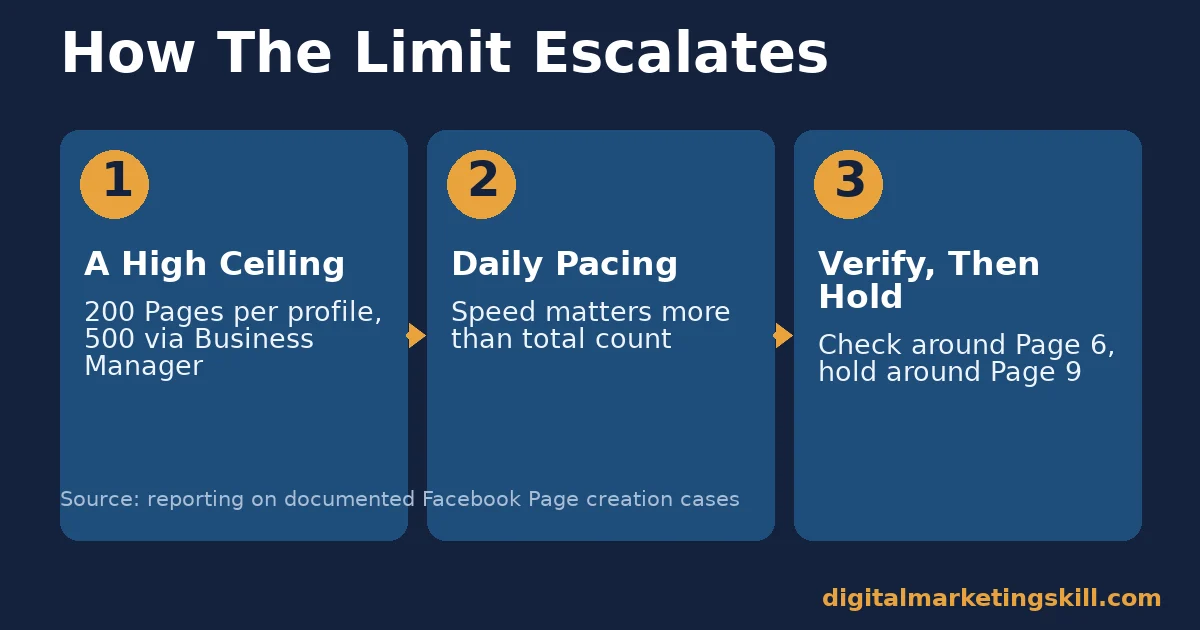
The restriction is not simply one fixed number. It is a behavioral system that reacts to patterns, then applies escalating checks.
Step 1: A Hard Ceiling Exists, But It Is High
A personal profile can create up to 200 Pages in total. A verified Business Manager account can hold up to 500. Most people never get near either number before running into the daily pacing issue instead.
Step 2: Daily Pacing Triggers The Real Restriction
The practical limit is about speed, not total count. Creating many Pages within hours, rather than days, is what usually triggers a review or a temporary hold.
Step 3: Verification And Holds Escalate Together
Accounts often see an identity-verification request first, around the fifth or sixth Page created in a short window. If creation continues at the same pace, a temporary hold on new Pages can follow. It typically lifts within 24 to 72 hours.
Why Meta Treats Rapid Page Creation As A Spam Signal
This is not an arbitrary inconvenience. Meta’s own policy on inauthentic behavior covers coordinated and automated activity designed to mislead people about who is behind an account or a Page. Rapid, repeated Page creation matches the same pattern that spam operations use at scale.
A single real business rarely needs to launch dozens of Pages within hours. So when that pattern shows up, Meta’s systems apply the same checks they would use against a spam network, even though most people triggering it are legitimate. Understanding this helps explain why patience, not persistence, is the fastest real fix.
Facebook Page Creation Limit: What Differs By Account Type
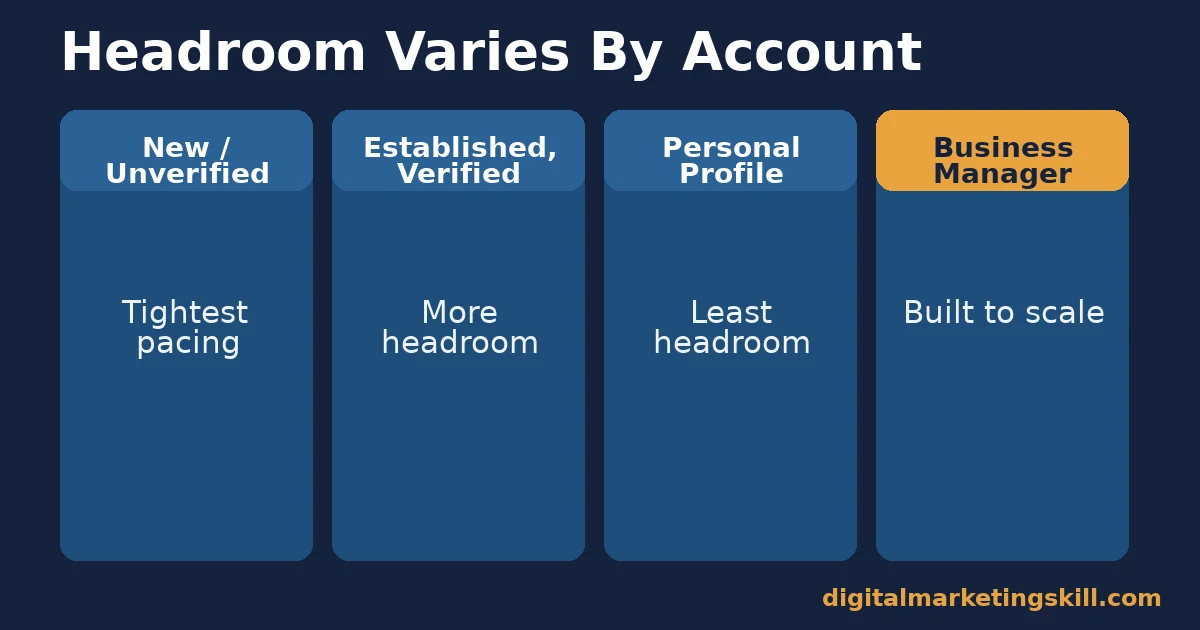
The same action can trigger very different outcomes, depending on the account behind it.
New Or Unverified Account: Built For Caution
A brand-new or completely unverified account has no history for Meta’s systems to trust. So it faces the tightest pacing before a hold appears, even for a genuinely small number of new Pages.
Established, Verified Account: Built For More Headroom
An older account with two-factor authentication and accurate profile details earns more trust from Meta’s systems over time. It can typically create more Pages per day before triggering review.
Personal Profile: Built For Occasional Pages
Creating Pages one at a time from a personal profile works fine for occasional use. But it offers the least headroom of any method when you need to launch several new Pages close together.
Business Manager: Built For Scaling Pages
A verified Meta Business Suite account is built for creating and managing multiple Pages. It generally clears review much faster than the same action taken from a personal profile.
How This Compares To Similar Limits On Other Platforms
The Facebook page creation limit is not unique to Meta. Most major platforms apply similar pacing systems, for similar reasons.
Instagram, also owned by Meta, applies comparable trust-based pacing to actions like following accounts or posting in bulk. LinkedIn restricts rapid connection requests on new accounts in much the same way. In every case, the underlying logic is identical: a sudden burst of activity reads as automation or abuse, regardless of the platform, so the system slows it down until trust is established.
If you manage marketing across several platforms, it helps to apply the same patience to all of them. A verified, established account with a steady activity pattern tends to earn more headroom everywhere, not just on Facebook, since every major platform relies on some version of the same trust-building logic.
How To Legitimately Fix A Facebook Page Creation Limit Restriction
If you are already restricted, here are the approaches that actually work, instead of the ones that just hide the problem temporarily.
New Or Unverified Account: Lead With Verification
Confirm your phone number and email. Add accurate personal details, and turn on two-factor authentication. A verified identity is one of the clearest trust signals the system checks before approving anything new.
Established Account: Lead With Patience
If a hold appears, stop creating new Pages right away. Keep using the account normally, and check again after the hold’s typical 24-to-72-hour window. Continuing to attempt creation during the hold tends to extend it further.
Personal Profile: Lead With A Slower Pace
Space new Pages out over days, rather than hours. A pace of roughly one or two Pages a day is generally safe for an everyday, non-business account.
Business Manager: Lead With Consolidation
Move Page creation into a verified Meta Business Suite account, instead of a personal profile. This single change often resolves recurring restrictions for agencies and multi-brand businesses.
Common Mistakes That Make The Restriction Worse
Most people who stay restricted for weeks, instead of days, make one of these mistakes.
- Trying a VPN or a second account. Reporting on this issue explicitly warns against both. They do not fix the underlying trust signal, and can add new ones.
- Retrying immediately and repeatedly. Continuing to attempt Page creation during an active hold tends to extend it, rather than clear it.
- Uninstalling and reinstalling the app. This does not reset server-side restrictions, since the hold lives on Meta’s systems, not on your device.
- Skipping verification. An unverified account faces the tightest limits of all, so skipping this step guarantees you hit the ceiling fastest.
- Creating Pages from a personal profile at scale. Business Manager exists for exactly this use case, and using it from the start avoids the issue entirely.
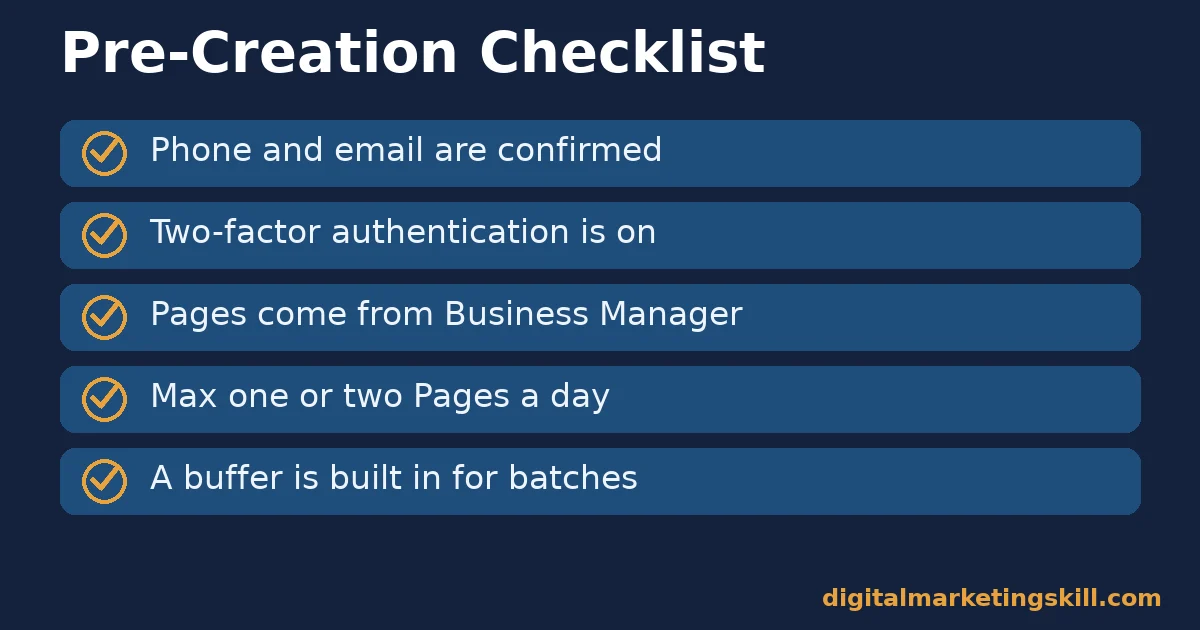
A Pre-Creation Checklist
Run through this list before launching a batch of new Pages.
- Confirm your phone number and email on the account.
- Turn on two-factor authentication before you start.
- Create Pages from a verified Business Manager, not a personal profile.
- Plan no more than one or two Pages a day on a personal profile.
- Build in a buffer of a few days for any larger batch.
The Signals That Predict A Facebook Page Creation Limit Restriction
Four signals matter more than any single number. None of them means much read alone.
Account Age: how long the profile has existed. Older accounts generally earn more headroom than accounts created recently.
Verification Status: whether you have confirmed your phone, email, and two-factor authentication. Verified accounts face fewer early checks.
Creation Pace: how many Pages you created in the last 24 hours, not the total you have ever created. Pace is what triggers most holds.
Account Type: whether you create Pages from a personal profile or a verified Business Manager. Business Manager generally gives you more headroom.
Check these four signals before you create your next Page, especially if you were restricted before. Fixing the weakest signal usually prevents a repeat restriction.
The One Decision Rule For Creating New Pages Safely
Decision rule: only create a new Page once you have verified your account, and never create more than two Pages in any 24-hour window on a personal profile. Every other recommendation in this guide supports that one rule.
Illustrative, invented numbers: suppose you need to launch six new Pages for six different product lines. Instead of creating all six in one afternoon, spread them across three days. Create two Pages per day, from a verified Business Manager account.
That pace sits well inside the headroom a verified, established account typically has. It also avoids the review that a same-day burst tends to trigger, so the whole batch finishes without a single hold.
A Realistic Timeline For Recovering From The Restriction
Knowing roughly what to expect makes the waiting easier. Here is a realistic timeline based on documented cases of the Facebook page creation limit in action.
Hour 1: The Restriction Appears
You see the “you have created too many Pages” message, usually right after submitting a new Page, sometimes with a request to verify your identity first.
Day 1: Stop And Verify
Stop attempting new Pages immediately. Complete any verification steps Meta requests, and confirm your two-factor authentication is active if it was not already.
Days 2-3: The Hold Typically Lifts
Most documented holds clear within 24 to 72 hours, without any further action from you. Continuing to attempt creation during this window is the single most common reason a short hold turns into a longer one, so the best action during this stretch is often no action at all.
After The Hold: Resume At A Slower Pace
Once the restriction clears, resume Page creation at a reduced pace, ideally one or two Pages a day rather than the burst that triggered the hold in the first place.
A Real Facebook Page Creation Limit Case, And Its Limits
A documented case, reported by Lilach Bullock, tracked a 3-year-old, established account creating Pages one after another in a single session. By the sixth Page, Meta asked for identity verification. By the ninth, the account received a temporary hold on new Page creation, lasting roughly 48 hours before it cleared on its own.
This case has real, important limits worth naming here. It describes one single account’s experience, not a guaranteed threshold. Meta’s exact triggers are not published, and they can change without notice, since the underlying detection system is not static. So treat this as a realistic pattern to plan around, not a fixed rule to rely on for every account.
What To Do Once Your Pages Are Approved
Clearing the restriction is only the first step. A few habits keep your account’s trust standing healthy going forward.
Engage Normally Between Launches
Use the account for ordinary activity, such as posting, replying, and managing existing Pages, between batches of new Page creation. A pattern of nothing but creation activity looks different to Meta’s systems than a normal, active account.
Archive Pages You No Longer Use
Remove yourself as admin from, or archive, Pages that are no longer active. This keeps your account’s footprint clean, and it makes genuine activity easier for the platform’s systems to recognize going forward.
Review Your Pace Before Each New Batch
Before launching another round of Pages, revisit the pre-creation checklist above. The signals that triggered the Facebook page creation limit once can trigger it again if the same pattern repeats, so treat the checklist as a standing habit, not a one-time fix.
A Short Glossary For This Topic
These terms come up constantly when troubleshooting Page creation issues.
- Business Manager (Meta Business Suite). A centralized tool for managing multiple Pages, ad accounts, and team members separately from a personal profile.
- Account Verification. Confirming your phone number, email, and sometimes identity documents, to prove an account is genuine.
- Two-Factor Authentication (2FA). A login step that requires a code from your phone, in addition to your password.
- Creation Hold. A temporary restriction on creating new Pages, usually lasting 24 to 72 hours.
- Trust Signal. Any account detail, such as age or verification status, that a platform’s systems use to judge whether behavior is genuine.
You do not need to memorize every term. Refer back here whenever one comes up in a support thread or a help article.
Facebook Page Creation Limits For Agencies And Freelancers
Agencies and freelancers managing several client Pages face this issue more often than anyone else, simply because of volume. A few practical adjustments help.
Keep Each Client In Its Own Business Portfolio
Group each client’s Pages inside their own Meta Business Suite portfolio, rather than one shared personal account managing everyone. This spreads creation activity across trust histories, instead of stacking it all onto one profile.
Stagger New Client Onboarding
When onboarding several new clients at once, stagger Page creation across the week rather than launching every client’s Page on day one. A rushed batch at the start of a contract is one of the most common triggers agencies report.
Set Expectations With Clients Early
Tell new clients upfront that Page setup may take a few days if several assets need creating. Explaining the legitimate reason for this pacing avoids pressure to use the shortcuts that make restrictions worse, and it builds the kind of client trust that a rushed, unexplained delay never does.
Frequently Asked Questions About The Facebook Page Creation Limit
How many Pages can I create on Facebook?
A single profile can create up to 200 Pages in total, and a verified Business Manager account can hold up to 500. Most accounts run into the daily pacing restriction long before reaching either ceiling.
Why does Facebook say I created too many Pages?
This message usually appears when you create several Pages in a short window, not because you crossed a lifetime total. Meta’s systems treat rapid creation as a spam signal, regardless of your actual total.
How long does a Facebook Page creation hold last?
Typically 24 to 72 hours, based on documented cases, though Meta does not publish an exact duration. Continuing to attempt Page creation during the hold can extend it.
Does a VPN fix the Facebook Page creation limit?
No, and using one is explicitly discouraged by sources tracking this issue. A VPN does not address the account-trust signals that triggered the restriction, and it can introduce new red flags of its own.
Does verifying my account really help?
Yes. Confirmed phone and email details, plus two-factor authentication, are among the clearest trust signals Meta’s systems check. Verified accounts generally see fewer early restrictions.
Is Business Manager better than a personal profile for creating Pages?
Generally yes, for anyone creating more than a couple of Pages. A verified Meta Business Suite account tends to clear review faster than the same volume of Pages created from a personal profile.
Will my existing Pages be affected by a creation hold?
No. A Page creation hold restricts new Pages only. Your existing Pages, their content, and their settings continue to function normally during the hold.
Should a complete beginner worry about this limit at all?
Only if you plan to create several Pages quickly. Someone launching a single Page for one business will rarely encounter this restriction, as long as the account is reasonably established and verified beforehand.
Can I avoid the Facebook page creation limit entirely?
Not entirely, since the system applies to every account in some form. But you can avoid triggering a visible restriction of the Facebook page creation limit almost completely by verifying your account first, using Business Manager for any real volume, and pacing new Pages at one or two a day instead of several at once.
Does deleting old Pages help raise my Facebook page creation limit?
Not directly, since the restriction tracks recent creation activity and account trust signals, not how many Pages you already manage. Removing unused Pages is good account hygiene, but it will not speed up an active hold once one has already started.
Build Reliable Facebook Marketing Skills With Digital Marketing Skill Institute
Understanding platform systems like this one is part of running Facebook marketing professionally, not just reacting to errors as they appear and guessing at a fix.
The Master Diploma in Digital & AI Marketing at Digital Marketing Skill Institute is built around four AI-powered tracks covering ten courses in total. The AI-Powered Social Media Management and Advertising track covers Page and account management in depth, including Business Manager setup and account health. A Full Stack option lets you complete all four tracks for a broader marketing skill set.
Every path includes unlimited 1-on-1 coaching and mentoring, a U.S. Project Internship with a verified U.S. Work Reference Letter, and dual US and UK accreditation recognised in more than 100 countries. The program runs 100% online, so you can study from anywhere in your country while applying each lesson directly to real client or business Pages.
Explore the digital marketing blog for more practical guides, browse real student reviews, or go straight to the application page to get started today. Wherever you live, Digital Marketing Skill Institute trains students worldwide, and you can learn more at digitalmarketingskill.com.
Every figure in this guide was checked against its original source before publication. Figures marked as illustrative are invented examples, not real results.
![9 Amazing Digital Marketing Skills to Make Money Online [With Proof]](https://digitalmarketingskill.com/wp-content/uploads/2019/07/9-Amazing-Digital-Marketing-Skills-to-Make-Money-Online-With-Proof-17.png)






