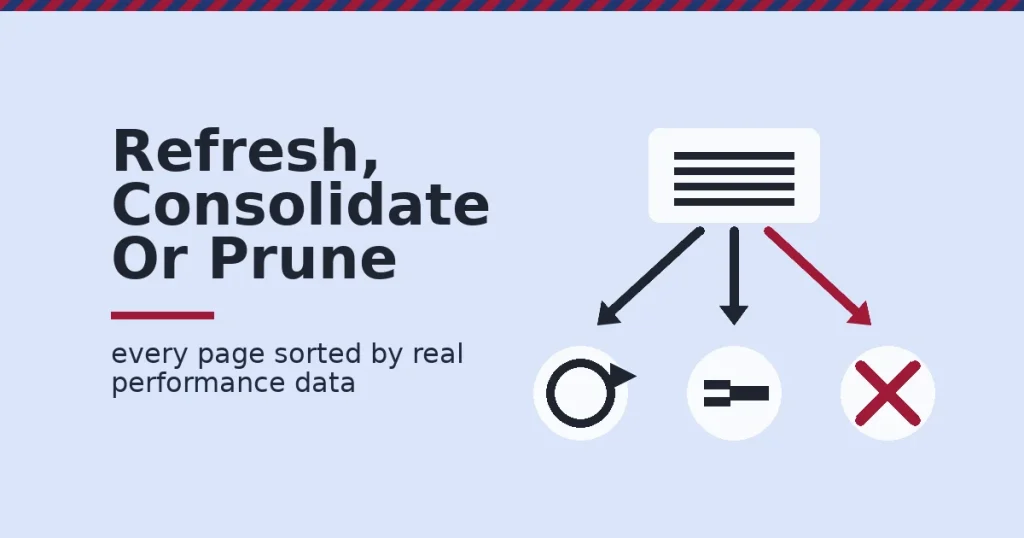
A content audit is a full review of everything you have published, scored against real performance data. Most teams run one once, find the mess, and never repeat it. It only pays off as a habit: a repeatable way to decide what to refresh, merge or remove before decay quietly drains your traffic.
Key Takeaways
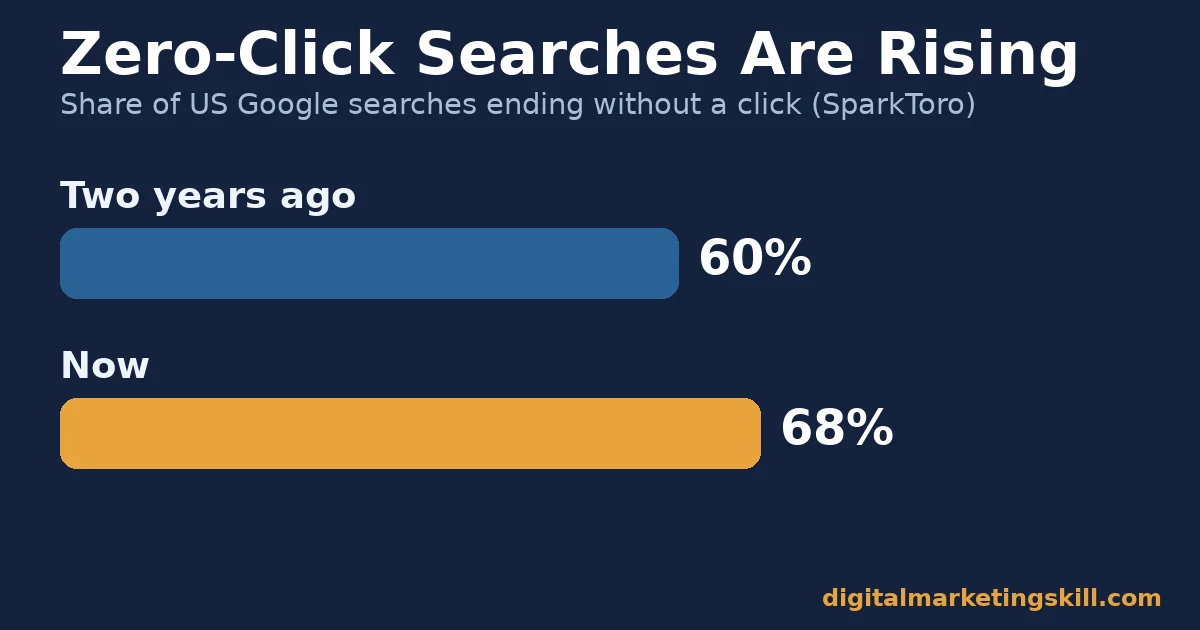
- 68% of US Google searches now end without a click, up from 60% two years earlier (SparkToro, based on Similarweb clickstream data).
- URLs cited by AI assistants are 25.7% “fresher” on average than pages ranking in organic search results (Ahrefs).
- Branded searches make up roughly 44% of Google searches. Brand-focused sites win clicks at about twice the rate of competitors (SparkToro, citing analysis by Cyrus Shepard).
- 84% of websites that still win clicks in a zero-click era let visitors complete a task on the page itself, not just read it (SparkToro).
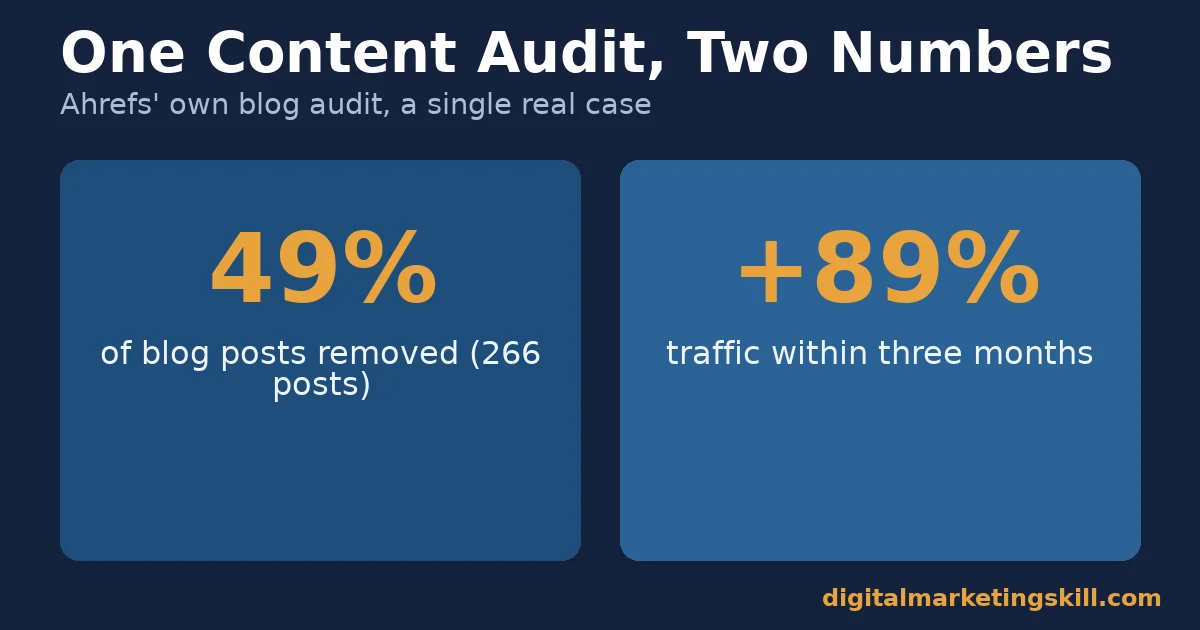
- In Ahrefs’ own, frequently cited content audit, deleting 266 low-traffic posts, 49% of its blog, led to an 89% traffic increase within three months.
In this guide
- The Content Audit Gap Most Teams Miss
- How a Content Audit Actually Works
- What Differs by the Type of Page You’re Auditing
- How To Act On Each Type, Not Just Label It
- A Step-By-Step Content Audit Workflow
- Measuring Whether a Content Audit Is Working
- The One Decision Rule
- A Real Case: Ahrefs’ Own Content Audit
- Frequently Asked Questions About Content Audit
- Turn a Content Audit Into a Repeatable System
The Content Audit Gap Most Teams Miss
Most content advice focuses on publishing more. A content audit does the opposite. It asks what you have already published, and whether it still earns its place.
This is a snapshot, not a permanent ranking of tactics. Search behaviour keeps shifting, and a figure that holds today could move next year. Treat every number below as a directional signal for your own audit, not a guarantee.
The real gap: teams audit content for grammar and formatting, but skip the harder question. Is this page still worth the crawl budget, the backlink equity and the reader’s time it asks for? A content audit built around that question changes what gets kept.
Most content teams already know, roughly, which pages feel old. What a formal content audit adds is a repeatable scoring method, so the decision to refresh, merge or remove a page rests on traffic and backlink data instead of a gut feeling about what looks dated.
That shift matters most when a team changes. A new hire or a new agency cannot read a gut feeling, but they can read a scoring sheet. Documenting the audit turns institutional knowledge into something the next person can pick up without starting over.
How a Content Audit Actually Works
A content audit runs on three mechanisms. Each one tells you what to pull, what to measure and what to decide.
Inventory First
Every content audit starts with a full list of published URLs. Pull it from your CMS export or a crawl tool like Screaming Frog. Without a complete inventory, decay hides in pages nobody remembers publishing.
Pair that list with performance data from Google Search Console and Google Analytics 4. Pull organic sessions, clicks, average position and conversions for every URL over the last 12 months. For a fuller list of what to track, see the metrics that actually matter in content marketing.
Then Decay Detection
Content decay is the slow traffic loss a page suffers as competitors publish fresher pages and your own facts go stale. Ahrefs describes it as something that affects nearly every piece of content you publish, not a rare edge case.
Decay rarely shows up as a sudden drop. It looks like a slow, steady decline across a few months, which is exactly why it is easy to miss without a scheduled audit. A page can lose half its traffic over a year without ever triggering an alert, because no single week looks alarming on its own.
Freshness matters beyond classic search too. Pages cited by AI assistants are 25.7% “fresher,” on average, than organic results for the same query, per Ahrefs’ own data. A page untouched in years is less likely to be the one an AI system quotes.
The practical takeaway is to treat freshness as a metric you track, not an impression you form by skimming a page. A quick date check on every external statistic, every tool screenshot and every “current” claim catches most of what makes a page feel outdated to both readers and search engines.
Then a Decision Rule
Every audited page gets sorted into one of three buckets: refresh, consolidate or prune. The decision rule later in this guide shows exactly where that line sits, using your own traffic and backlink data, not guesswork.
What Differs by the Type of Page You’re Auditing
Not every page fails for the same reason, so not every page gets the same fix. Sorting pages into types before you act saves hours of guessing.
Evergreen Guides: Built For Refresh
These pages still match a real, searched topic. They already rank somewhere on page one or two. The content itself is simply out of date: old statistics, an outdated screenshot, a missing section competitors now cover. Refreshing, not rewriting from scratch, usually wins here.
A refresh keeps the backlinks, the ranking history and the publish date a page has already earned, while updating only what actually needs it. Rewriting the same page from scratch throws that equity away for no real benefit, since the URL and topic were never the problem.
Competing Pages: Built For Consolidation
These are two or more pages chasing the same keyword and the same reader intent. They split your own traffic and backlinks instead of combining them. The fix is a merge: fold the weaker page’s unique value into the stronger one, then 301 redirect the old URL.
This pattern builds up quietly over years, usually because different writers or agencies covered the same topic without checking what already existed. A content audit is often the first time anyone notices the overlap at all.
Dead Weight: Built For Pruning
Thin, outdated or zero-traffic pages with no real backlink value sit in this bucket. They add crawl weight without adding authority. Ahrefs’ own case removed 266 such posts, 49% of its total at the time, and traffic rose rather than fell.
A large share of dead weight tends to come from early-stage content: short posts published before a site had a clear content strategy, or pages built around a keyword that never had real search volume. Neither category is worth the ongoing maintenance.
How To Act On Each Type, Not Just Label It
Sorting pages into buckets is only useful if the next step is specific. Here is what to actually do with each one.
Refresh: Lead With the Newest Verifiable Facts
Open every external source cited on the page. Check it still says what the page claims. Replace outdated statistics with current ones, named and dated by source, not guessed.
Add one section competitors now cover that your page does not. Keep the original publish date if your CMS allows it, and update a “last reviewed” signal instead. If the page’s on-page SEO basics have drifted too, this guide to optimizing a blog post for search covers the fundamentals worth rechecking.
Consolidate: Lead With the Stronger URL
Pick the page with more backlinks and more historical traffic as the survivor. Fold in any unique facts, examples or sections from the weaker page. Then 301 redirect its URL to the survivor.
Update internal links that pointed to the old URL. Readers and crawlers should both land on the merged page directly, without an extra redirect hop.
Consolidation is usually the fastest win of the three actions, because the traffic and backlinks already exist somewhere on the site. The work is combining them onto one URL rather than earning anything new, which is why it is worth doing before a slower refresh pass on the pages that remain.
Prune: Lead With Backlink Value First
Before deleting anything, check whether the page holds backlinks worth keeping. If it does, 301 redirect it to the closest relevant page instead of a plain deletion. If it holds no real backlink value and no traffic, removing it entirely is safe.
Pruning feels riskier than refreshing or consolidating, since it looks like giving something up. Treated as a decision based on real data rather than instinct, it is the lowest-risk of the three actions: a page earning nothing has nothing left to lose.
A Step-By-Step Content Audit Workflow
The three mechanisms and three page types above explain the thinking. This is the order to actually run them in, start to finish.
- Export the full inventory. Pull every published URL from your CMS or a crawl, including pages with zero recent traffic. Nothing gets excluded at this stage.
- Attach 12 months of performance data. Add organic sessions, clicks, average position and conversions per URL from Search Console and Analytics.
- Attach backlink data. Pull referring domains per URL from a backlink tool, so pruning decisions never happen blind to link equity.
- Score each page against the decision rule. Traffic or backlinks in the last 12 months means refresh or consolidate; neither means prune.
- Group competing pages before you act. List every pair or cluster chasing the same keyword, and pick one survivor per cluster.
- Execute in batches, then recheck. Refresh or redirect a batch of pages, wait four to six weeks, then confirm the organic sessions trend before moving to the next batch.
Running the steps in this order matters. Scoring pages before grouping competing ones means you decide what to keep based on real data, not on which page happens to be older or longer.
Most teams try to shortcut this by skipping straight to step four. Scoring without a complete inventory and without backlink data just moves the guesswork later instead of removing it. The first three steps are slower, but they are what makes the decision rule reliable.
Measuring Whether a Content Audit Is Working
A content audit should move numbers, not just tidy a spreadsheet. Track these four over the quarter after you act.
Organic sessions trend is the month-over-month change in organic visits to the audited page, pulled from Analytics. A refreshed page should trend up within four to six weeks.
Click-through rate is the share of people who see your result in search and actually click it, shown in Search Console. A low CTR despite a decent position usually points to the title or meta description, not the content.
Freshness signal is how long it has been since a page’s facts, examples or sources were last verified. Pages older than 24 months without a check are the ones most likely already decaying.
Backlink value retained is the share of a pruned or merged page’s referring domains that now point at a live, relevant URL instead of a dead one. Check every redirect rather than assuming it works.
Pull all four numbers into one tracking sheet, one row per affected page, and revisit it on the same four-to-six-week cycle you used for the refresh itself. A page that fails to improve on any of the four after that window is worth a second look rather than a longer wait.
The One Decision Rule
If a page has earned organic traffic or holds real backlinks in the last 12 months, refresh or consolidate it. If it has neither, prune it. Either signal alone justifies keeping a page. Only the absence of both is a safe signal to remove one.
Illustrative, invented numbers: imagine a 40-page audit where 18 pages still earn traffic, 14 pages overlap with a stronger page, and 8 pages have zero traffic and zero backlinks. The rule sorts that instantly: 18 refreshes, 14 consolidated into 7 merged pages, and 8 pruned. That cuts the site from 40 pages to 25 without losing a single visitor.
A Real Case: Ahrefs’ Own Content Audit
In a widely cited case study, Ahrefs audited its own blog. It found that 266 posts, 49% of everything it had ever published, were earning zero monthly visitors. Most were short, thin posts, averaging well under 700 words each, written early in the company’s history before its content strategy matured.
It deleted them and created redirects for any post that held backlinks, pointing those redirects at a related post or the homepage. Traffic rose 89% within three months.
Its limits matter. This is one company’s own blog, not a controlled study across many sites. Your traffic gain from pruning will not match that figure exactly, and a site with a different content history could see a smaller effect or none at all.
It still shows the core mechanism working. Removing dead weight can free up authority for the pages that remain, rather than diluting the site further. The redirects mattered as much as the deletions; a prune without redirects for the pages that held backlinks would have thrown away link equity instead of reallocating it.
Redirect Maps Are Worth the Extra Step
Before any pruning or consolidation batch goes live, build a simple redirect map: old URL, new destination, reason. It takes minutes per page and prevents the single most common content audit mistake, a 404 where a working redirect should have been.
A redirect map also becomes the record you check against later. Traffic data then confirms whether each redirect is pulling its weight, or needs a different destination entirely.
Frequently Asked Questions About Content Audit
How often should I run a content audit?
Once a year for the full audit catches most decay before it compounds. A lighter quarterly check of your top 20 pages by traffic, just confirming facts and links still hold, catches the rest. Sites that publish daily or weekly may need the full audit twice a year instead, simply because the inventory grows faster.
Should I delete a page or redirect it?
Redirect any page that holds a real backlink or still gets occasional traffic. Only delete outright, without a redirect, when a page has neither. A redirect from a page with no value adds nothing. A long chain of pointless redirects can even slow crawling on a large site.
Will pruning content always increase my traffic?
Not automatically. Ahrefs’ case showed a clear gain, but the mechanism depends on the pruned pages genuinely adding no value. Pruning pages that still hold niche traffic or backlinks can lose ground instead. Checking both signals before deleting anything is what makes the difference between a pruning session that helps and one that quietly erases working pages.
What tools do I need to run a content audit?
A crawler such as Screaming Frog for the inventory. Google Search Console and Google Analytics 4 for performance data. A backlink tool such as Ahrefs or Semrush for referring domains.
A spreadsheet or the free SEO content audit template ties the data together. None of these tools are optional at scale; past a few dozen pages, tracking the inventory by memory stops being reliable.
How do I handle a page that ranks well but converts poorly?
That page is a refresh candidate, not a prune candidate. Ranking well means it already matches search intent. The gap is usually a missing call to action or a weak internal link.
Common technical issues are worth ruling out too; see these common SEO mistakes that quietly cap rankings. A page can also convert poorly simply because it answers the question too completely, leaving the reader with no reason to click further.
Does a content audit help with AI visibility, not just Google rankings?
Yes. Pages cited by AI assistants skew noticeably fresher than typical organic results. The same refresh work that helps your Google ranking also raises the odds an AI system cites your page instead of a competitor’s. A page that still ranks on page one but has not been checked in two years is a realistic candidate for losing that AI citation even while its Google position holds steady.
How many pages should a first content audit cover?
All of them, even if the review is shallow on the first pass. A partial audit hides exactly the thin, forgotten pages that most need pruning. Grouping related pages under content pillars first makes a full-site audit easier to work through.
What is the biggest mistake teams make in a content audit?
Auditing content quality in isolation from performance data. A page can read beautifully and still deserve pruning if nobody finds it and it holds no backlinks. One that reads roughly can still deserve a refresh if it already earns real traffic.
Turn a Content Audit Into a Repeatable System
A content audit is not a one-time cleanup. It is a skill that compounds inside a real curriculum.
The Master Diploma in Digital & AI Marketing at Digital Marketing Skill Institute is built around four AI-powered tracks, totalling ten execution-first courses. They are AI-Powered Social Media Management and Advertising, AI-Powered Lead Generation and Email Automation, AI-Powered Google Specialist, and AI-Powered WordPress and SEO Specialist, with a Full Stack option for completing all four.
The AI-Powered WordPress and SEO Specialist track covers exactly this work, with unlimited 1-on-1 coaching and mentoring guiding every decision. Every track also includes a U.S. Project Internship with a verified U.S. Work Reference Letter, so the audits you run become proof, not just practice.
The diploma is dual US and UK accredited and recognised in more than 100 countries. The whole program runs 100% online, so you can build this skill from anywhere in your country.
See the full curriculum on the Master Diploma program page, read outcomes on the reviews page, or go straight to the application page to apply for the 65% partial scholarship.
Wherever you live, a disciplined content audit habit is one of the fastest ways to make an existing site perform like a new one. That is exactly the kind of skill a structured program at digitalmarketingskill.com is built to teach.
Every figure in this guide was checked against its original source before publication. Figures marked as illustrative are invented examples, not real results.