
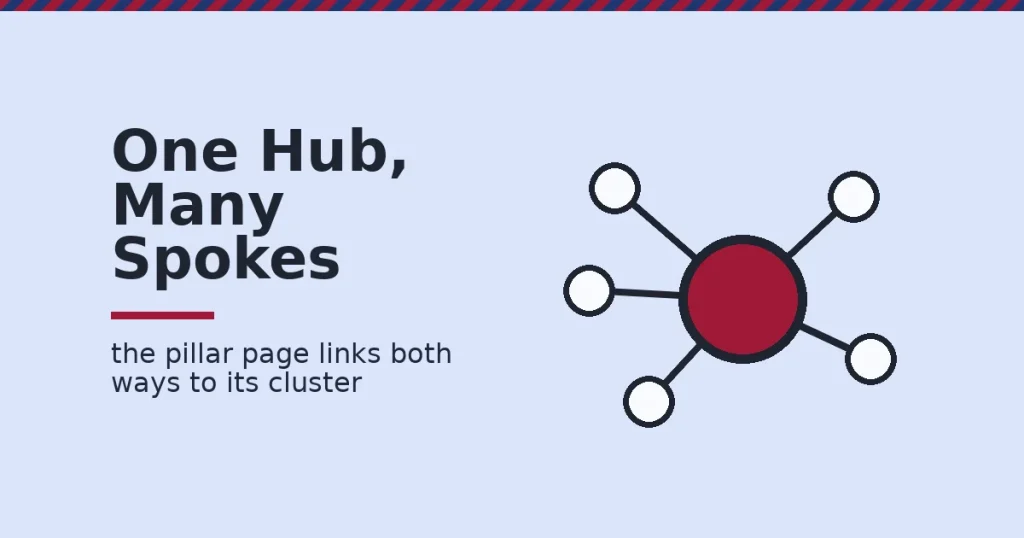
Content pillars are broad, in-depth hub pages that organize a cluster of related articles around one core topic. Most sites that try content pillars pick a topic, write one big page, and stop there. This guide covers the three pillar types, how to pick one, how to measure results, and a real example you can check yourself.
Key Takeaways
- Pages with 40-44 internal links pointing to them get roughly four times the Google clicks of pages with 0-4 internal links. This is based on a Zyppy study of 23 million internal links across 1,800 sites. The study is correlational, not proof of direct cause.
- One e-commerce client documented in a HubSpot case study grew organic blog traffic from 500 to nearly 190,000 monthly visitors after switching to a topic-cluster structure. That is a single case, not a typical result.
- Most SEO guidance recommends three to five content pillars per site. That range is broad enough to support many subtopics, but narrow enough to stay focused.
- A content pillar and a topic cluster are not the same thing. The pillar is the hub page itself. The cluster is the full set of hub-plus-linked-articles around it.
- Pages above roughly 45-50 internal links tend to see traffic decline again, per the same Zyppy data. More links is not always better.
In this guide
- The Real Problem With Content Pillars
- How Content Pillars Actually Work
- How The Three Pillar Types Differ
- How To Lead With Each Pillar Type
- How To Measure Whether A Pillar Is Working
- The One Decision Rule: Match Pillar Type To Search Intent
- A Real Case: A Pillar Structure You Can Check Yourself
- Common Mistakes That Undermine Content Pillars
- Frequently Asked Questions About Content Pillars
- Building Content Pillars That Actually Rank
The Real Problem With Content Pillars
Search “content pillars” and you will find dozens of near-identical checklists. Pick a theme. Write a hub page. Link out to subtopics. The checklist is not wrong. But it skips one decision that determines whether the pillar actually works.
That decision is picking the pillar type that fits the search intent behind your topic. A guide-style pillar, a definition-style pillar, and a how-to pillar solve different reader problems. Using the wrong type for your topic is why some pillar pages sit at zero traffic for months, even with solid writing and the right keyword in the title.
There is also a sequencing issue. Many sites write the pillar page first. They scramble to backfill supporting articles later, sometimes years later. A pillar with no linked cluster around it is just a long blog post. It will not get the internal-linking lift that makes pillars work in the first place.
Two ground rules before the detail. First, the traffic figures in this guide come from named, dated studies with real limits, not a universal formula. Your results depend on your niche, competition, and how well you execute. Second, a content pillar is not a shortcut around good writing. It organizes good content. It cannot replace it.
How Content Pillars Actually Work
A content pillar works through two mechanisms at once: topical depth and internal links. The hub page shows search engines that you cover a topic comprehensively. The cluster of linked articles around it sends internal link signals back to the hub. The hub sends relevance signals out to the cluster.
This is why a pillar page rarely performs well alone. The Zyppy study of 23 million internal links found that pages with 40-44 internal links pointing to them earned roughly four times the Google clicks of pages with only 0-4 internal links. A pillar without a cluster of supporting articles never reaches that kind of internal link density.
The second mechanism is coverage. A single article on “email marketing” competes with the whole internet for that term. A pillar page on email marketing that links out to a dozen specific subtopics demonstrates breadth a standalone post cannot match. Each linked subtopic covers one angle in depth.
Neither mechanism works without the other. Depth without links is an orphaned long article. Links without depth is a thin hub page padded with filler. Content pillars work when both are built together, deliberately, from the start.
In practice, this means planning the cluster outline before writing the pillar’s first sentence. Listing every planned subtopic up front, for instance, makes it easier to spot gaps in coverage and to write internal links that point to a specific, already-planned article rather than a vague promise of “more on this soon.”
How The Three Pillar Types Differ
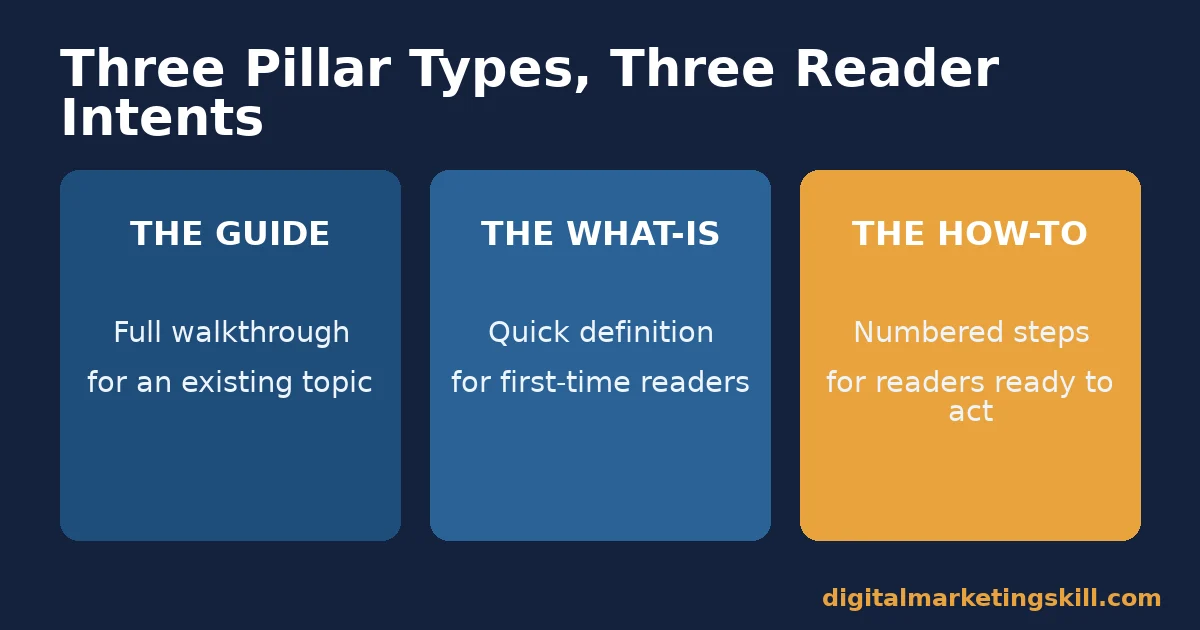
Not every topic needs the same kind of pillar page. The three common types each match a different stage of what a reader is trying to do.
Mixing up the three types is an easy mistake to make, because all three can cover the exact same core topic. A site could reasonably publish a what-is pillar, a guide pillar, and a how-to pillar all about “email marketing,” each targeting a different search intent, as long as each one is distinct enough not to compete with the others for the same exact search terms.
The Guide: Built For Readers Who Want The Full Picture
A guide-style pillar works best when readers already know the topic exists and want a complete walkthrough. “The Complete Guide to Email Marketing” is a guide pillar. It assumes some context. It takes the reader from basics through advanced tactics in one structured path.
The What-Is: Built For Readers Who Need A Definition First
A what-is pillar works best when the topic itself needs defining before anything else makes sense. “What Is Content Marketing?” is a what-is pillar. These pages rank for early-stage, lower-intent searches. They often become a site’s highest-traffic single page, since search volume for “what is X” questions tends to be large.
The How-To: Built For Readers Who Want To Act Now
A how-to pillar works best when the reader already understands the topic and wants steps to execute it. “How to Create a Digital Marketing Plan” is a how-to pillar. These pages convert well, because a reader following step-by-step instructions is close to ready to act, whether that action is trying a tactic or hiring help.
A single topic can support all three pillar types at once, provided each one is clearly scoped. A what-is pillar on digital marketing, a complete guide pillar on digital marketing strategy, and a how-to pillar on building a digital marketing plan can all live on the same site without competing, because each answers a different question at a different stage of the reader’s search.
How To Lead With Each Pillar Type
Picking the right type is step one. Structuring it correctly is step two.
The Guide: Lead With A Clear Reading Path
A guide pillar needs a visible path through its sections. A linked table of contents near the top works well. Readers skim guides rather than read them start to finish. The structure has to make each subtopic easy to jump to. Group related subtopics together instead of listing them in a flat, unordered list.
The What-Is: Lead With The Answer In The First Sentence
A what-is pillar should answer its own question in the opening sentence. Do not bury the definition three paragraphs down. Readers searching “what is X” want the definition immediately. Everything after that first sentence adds depth for readers who stay.
The How-To: Lead With Numbered Steps, Not Prose
A how-to pillar performs best as a numbered sequence, not a wall of paragraphs. Each step should be short enough to scan and specific enough to act on immediately. Save the “why this matters” explanation for a sentence after the step, not before it.
How To Measure Whether A Pillar Is Working
Three numbers tell you whether a content pillar is doing its job.
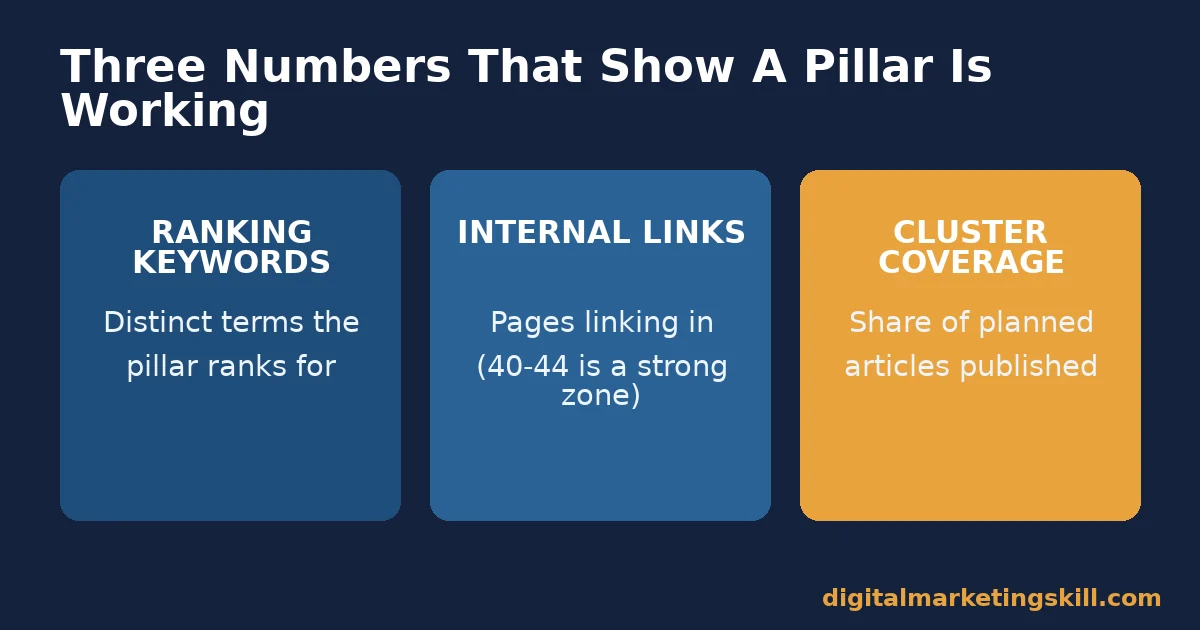
Ranking keyword count. This is how many distinct search terms the pillar page ranks for in a tool such as Google Search Console or Analytics. A healthy pillar should rank for dozens of related terms, not just its exact-match title.
Internal links received. This is how many other pages on your site link to the pillar. Based on the Zyppy data above, pages in the 40-44 link range saw meaningfully more traffic than pages with only a handful of internal links. Traffic started to decline again past roughly 45-50 links.
Cluster coverage. This is the share of your planned subtopics that actually have a published, linked article. A pillar missing half its planned cluster articles is still a work in progress. It is not a finished asset, no matter how long the hub page itself is.
Check these three numbers quarterly, not weekly. Pillar pages compound slowly. Short-term swings in ranking keyword count are normal as Google re-evaluates a growing cluster.
For example, a new cluster article can temporarily split ranking signals between itself and the pillar before Google settles on which page best answers a given query. That settling period often takes several weeks, so a single bad week of rankings is rarely a reason to rewrite a pillar that is otherwise sound.
A fourth signal worth watching: which cluster articles send the pillar the most referral clicks internally, not just search traffic. Tools such as Ahrefs or Moz can show this breakdown.
A cluster article sending little internal traffic to its pillar may need a clearer, more visible link back up. Moving the link higher in the article, or rewriting the anchor text to match what readers are actually searching for, is usually enough to fix it.
The One Decision Rule: Match Pillar Type To Search Intent
If you take one rule from this guide, make it this one. Do not choose a pillar type because you prefer writing guides, or because a what-is page looks easier. Look at what already ranks on the first page of search results for your target topic, and match that format.
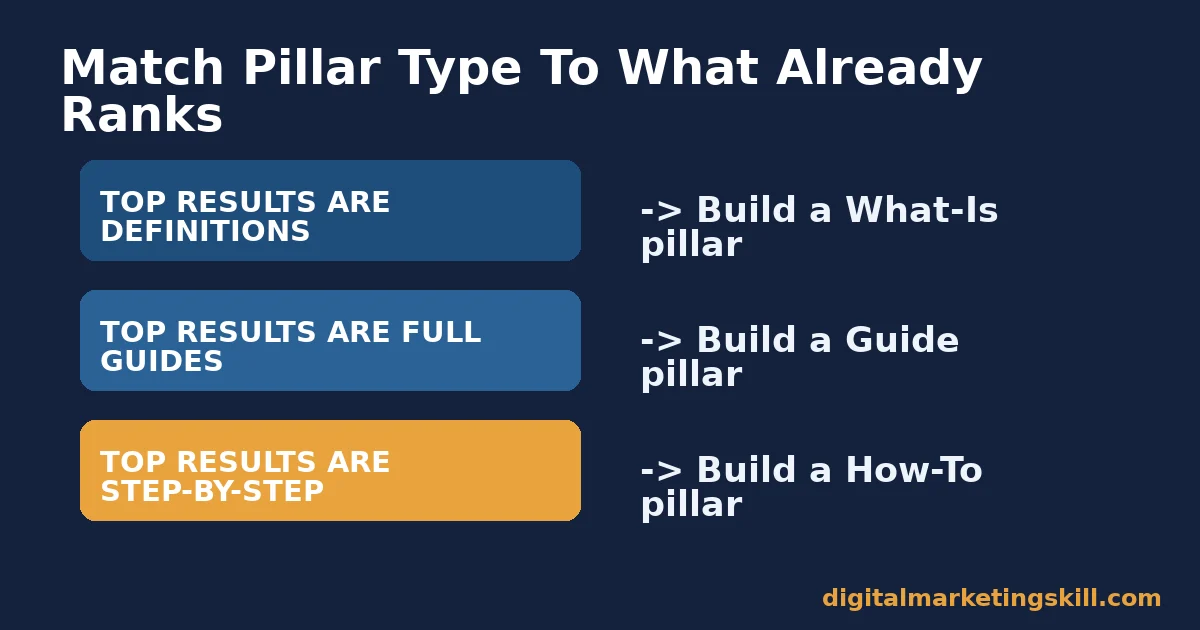
Here is an illustrative example with invented numbers, to show the logic. Picture a site planning a pillar on “social media scheduling.” If the top-ranking pages are mostly “what is social media scheduling” definition pages, a 4,000-word advanced guide would likely underperform.
That long guide would answer a question nobody at that stage is asking yet. Matching the what-is format first, then building a separate how-to pillar for the more advanced searcher, respects how the two audiences actually search.
The same rule applies in reverse. If every top-ranking result is already a comprehensive guide, a short definition page will struggle to compete. It under-serves readers who are clearly looking for depth.
Running a quick keyword research pass on your planned pillar title usually reveals this pattern within a few minutes, before you write a single paragraph.
A Real Case: A Pillar Structure You Can Check Yourself
The Digital Marketing Skill Institute’s own blog hub is a checkable example of pillar-and-cluster structure in practice. Its core pillars sit around digital marketing, search engine optimization, content marketing, and social media. Dozens of narrower articles link back up to each pillar topic.
What makes this example useful is that it is observable, not a reported statistic. You can visit the blog hub, see the pillar pages, and follow the internal links out to the supporting cluster articles yourself, rather than taking a claimed result on faith.
The lesson from this structure is not the specific topics chosen. It is the pattern: a small number of broad pillars, each with enough supporting articles linked both ways, kept current over time rather than published once and left alone.
This pattern generalizes beyond any one site or industry. A software company could build the same structure around its product category instead of digital marketing. A local service business could build it around the specific problem it solves for customers.
The topic changes; the pillar-and-cluster mechanics stay the same. What stays constant across every industry is the discipline of planning the cluster before writing the hub page, then revisiting both on a schedule rather than leaving them untouched once published.
Common Mistakes That Undermine Content Pillars
A handful of repeated mistakes stop content pillars from working, even when the hub page itself is well written.
- Publishing the pillar before the cluster. A pillar with no linked subtopic articles cannot show the topical depth that makes pillars outperform standalone posts.
- Picking a topic too broad to cover. “Marketing” is too broad for one pillar. “Email marketing automation for small teams” is narrow enough to cover completely.
- Linking only one direction. Cluster articles need to link back up to the pillar, and the pillar needs to link back down to each cluster article. One-directional linking leaves value on the table.
- Letting the cluster go stale. A pillar built once and never revisited drifts out of date as the topic evolves. This is also why content pillars should stay free of dates and year references that make them look outdated immediately.
- Treating the pillar as a sales page. A pillar that pitches a product in every section loses the comprehensive, neutral tone that earns it links and shares from other sites.
- Skipping the audience research step. A pillar built around what a team assumes readers want, instead of what they actually search for, often misses the format and depth readers expect entirely.
Most of these mistakes share one root cause: treating the pillar as a single publishing event instead of an ongoing structure that needs upkeep, new cluster articles, and periodic review as a topic shifts.
As a result, teams that schedule a recurring review of each pillar, for instance once a quarter, tend to catch these problems early. Teams that publish a pillar once and move on to the next topic tend to discover the problems only after traffic has already declined.
Frequently Asked Questions About Content Pillars
How many content pillars should a website have?
Most SEO guidance recommends three to five content pillars per site. Fewer than that often means the site is too narrow to need the structure. More than that usually means the pillars are not broad enough and should be consolidated.
What is the difference between a content pillar and a topic cluster?
A content pillar is the single hub page covering a broad topic. A topic cluster is the full structure: the pillar page plus every supporting article linked to and from it. People often use the two terms interchangeably, but the pillar is one page inside the cluster, not the whole thing.
How long should a content pillar page be?
There is no fixed word count. Length should match what is needed to cover the topic comprehensively, not a target number. A pillar that tries to cover everything in 800 words usually reads as shallow. One padded past what the topic needs reads as filler.
Can a content pillar hurt SEO if done badly?
Yes. A pillar page that duplicates content already covered by its own cluster articles can create internal competition. Two pages on your own site end up competing for the same search term instead of reinforcing each other. Each page in a cluster should own a distinct angle.
Do content pillars still work with AI search and AI Overviews?
Clustered, well-linked content tends to perform well in AI-generated search summaries. Those systems favor pages that demonstrate clear topical authority and are easy to cross-reference against related pages on the same site. A single isolated article has less of that supporting context for an AI system to draw on.
Should every blog post link back to a content pillar?
Not every post needs to belong to a pillar. Any post written as part of a planned cluster should link back to its pillar page, and the pillar should link down to it. Posts outside any planned cluster can stand alone without weakening the pillar structure.
What tools help plan a content pillar strategy?
A keyword research tool, Google Search Console, and a simple spreadsheet mapping each planned cluster article to its pillar are usually enough to start. Dedicated SEO platforms such as Ahrefs, Moz, or Semrush add keyword-gap and internal-link reporting once a site has several pillars running.
Should a content pillar be updated after it is published?
Yes. A pillar page should be treated as a living document, not a one-time project. Revisiting it every few months to add newly published cluster articles, refresh any statistics that have since been updated at their source, and fix broken links keeps the pillar accurate and keeps its ranking position from drifting down as competing pages get refreshed more often.
Building Content Pillars That Actually Rank
Content pillars work when the pillar type matches what your reader is searching for, and when the supporting cluster gets built alongside the hub page, not years after it.
If you want structured support building a content and SEO strategy like this, the Digital Marketing Skill Institute’s Master Diploma in Digital & AI Marketing is built around four AI-powered tracks and ten courses: AI-Powered Social Media Management and Advertising, AI-Powered Lead Generation and Email Automation, AI-Powered Google Specialist, and AI-Powered WordPress and SEO Specialist, with a Full Stack option for completing all four.
The program includes unlimited 1-on-1 coaching and mentoring, plus a U.S. Project Internship with a verified U.S. Work Reference Letter. It is dual US and UK accredited and recognised in more than 100 countries, 100% online, so you can build this skill set anywhere in your country or wherever you live.
Explore the full program on the Master Diploma page, browse more guides on the digital marketing blog, read more student reviews, or go straight to apply when you are ready. Learn more at digitalmarketingskill.com, and start wherever you are at digitalmarketingskill.com.
Every figure in this guide was checked against its original source before publication. Figures marked as illustrative are invented examples, not real results.
![9 Amazing Digital Marketing Skills to Make Money Online [With Proof]](https://digitalmarketingskill.com/wp-content/uploads/2019/07/9-Amazing-Digital-Marketing-Skills-to-Make-Money-Online-With-Proof-17.png)






