
Google Ads is Google’s online advertising platform, which lets businesses show ads on Google Search, YouTube, Maps and partner websites and apps. You choose a goal, a budget and who to reach, and Google runs an auction each time there is a chance to show your ad. It matters because it lets you appear in front of people at the exact moment they are searching for what you sell.
Key Takeaways
- The platform runs an auction for every search. Your bid is only one part of who wins.
- Ad Rank decides whether your ad shows and where. It is based on six factors, including your bid and the quality of your ad.
- With cost-per-click bidding, you pay when someone clicks, and often less than your maximum bid.
- There are six main campaign types: Search, Performance Max, Display, Video, App and Shopping.
- Conversion tracking is essential. Without it, neither you nor Google’s AI can tell what is working.
What Is Google Ads?
Google calls Google Ads “Google’s online advertising program.” It helps you reach people when “they’re searching for businesses like yours on Google Search, YouTube, Maps and more.”
The big difference from many other channels is intent. On social media, you interrupt people while they scroll. On Google Search, by contrast, people are already looking for an answer. For example, someone types “emergency plumber near me”. A plumber’s ad that appears at that moment has a strong chance of getting a call.
That said, the platform covers much more than search. You can also run image ads across websites, video ads on YouTube, product ads for online shops and ads that promote apps.
How Google Ads Works
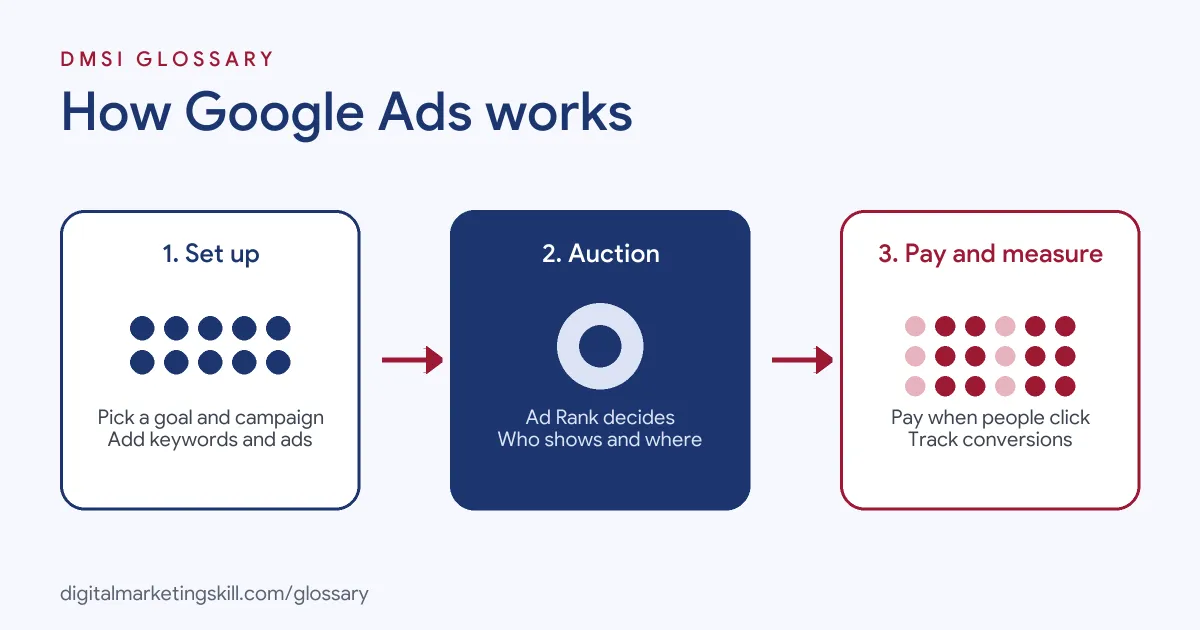
Every time someone searches or loads a page with ad space, Google holds a quick auction. It checks which ads are relevant, scores them and decides which ones to show and in what order. Then, if someone clicks, the advertiser pays.
The Auction and Ad Rank
According to Google, “Ad Rank is a set of values that are used to determine whether your ads are eligible to show.” It also sets your position on the page. The score is based on six factors: your bid, the quality of your ad and landing page, minimum thresholds, how competitive the auction is, the context of the search, and the expected effect of your ad assets.
So a bigger budget doesn’t guarantee the top spot. Google states that “the advertiser with the highest Ad Rank gets to show in the top position.” In other words, a relevant ad with a strong landing page can beat a bigger bid.
Keywords and Match Types
On Search campaigns, keywords tell Google which searches your ad is relevant to. Match types control how close the search must be. Broad match is the default and reaches the most searches, including related ones. Phrase match, written in quotation marks, shows your ad on searches that “include the meaning of your keyword.” Exact match, written in square brackets, targets searches with “the same meaning or same intent as the keyword.” As a rule, the tighter the match, the more control you have, but the fewer searches you reach.
How You Pay
With cost-per-click (CPC) bidding, “you pay for each click on your ads.” You set a maximum CPC, which Google says “is the most you’ll typically be charged for a click, but you’ll often be charged less.” The amount you are actually charged is called your actual CPC. Google also notes that “higher quality ads can often lead to lower CPCs.”
Smart Bidding
You can also let Google set bids for you. Smart Bidding uses “Google AI to optimize for conversions or conversion value in every auction.” It looks at signals such as device, location, time of day and the search terms. The main strategies are Target CPA, Target ROAS, Maximise conversions and Maximise conversion value.
Google Ads Examples
Here are three common ways businesses use the platform:
- Local service: A dental clinic runs a Search campaign for terms like “teeth whitening” in its town. It tracks phone calls and booking form sign-ups as conversions.
- Online shop: A homeware store links its product feed through Merchant Center. Its products then appear as listings in search results and on the Shopping tab.
- Brand awareness: A new drinks brand runs short YouTube video ads to reach young adults in its launch city.
In each case, the campaign type matches the business goal.
Google Ads Campaign Types Compared
Google’s help centre lists these main campaign types:
| Campaign type | Where ads show | Best for |
|---|---|---|
| Search | Text ads on Google search results | Reaching people searching for what you offer |
| Performance Max | All Google ad inventory from one campaign | Sales, leads or store visits, using AI |
| Display | Image ads across websites, apps and Google sites such as YouTube | Awareness and remarketing |
| Video | YouTube and other video partners | Reach, views and conversions |
| App | Search, Play, YouTube, Discover and other apps and sites | App installs and in-app actions |
| Shopping | Product listings on search results and the Shopping tab | Retailers with a Merchant Center account |
In short, pick the type that matches your goal, not the one that looks most advanced.
How to Set Up a Google Ads Campaign
The steps below follow Google’s standard flow for a Search campaign:
- In your account, open Campaigns and select the plus button to create a new campaign.
- Choose a goal, such as sales, leads or website traffic. Then select Search as the campaign type.
- Name your campaign and choose your bidding, locations, languages and ad assets.
- Create ad groups with closely related keywords.
- Write your ads, including the final URL, headlines and descriptions.
- Set a daily budget, review any flagged issues and publish.
Before you launch, set up conversion tracking. Otherwise, you won’t know which clicks turned into customers.
Best Practices
- Track conversions first. Smart Bidding needs conversion data to learn who is likely to act.
- Keep ad groups tight. Group similar keywords, so each ad matches the search closely.
- Send people to a relevant page. Landing page quality is one of the factors in Ad Rank.
- Use negative keywords. Block searches that will never buy, such as “free” or “jobs”, if they don’t fit.
- Review search terms weekly. Check what people actually typed, then add new keywords or negatives.
Common Mistakes to Avoid
New advertisers often make the same few errors. First, they launch without conversion tracking. Second, they leave every keyword on broad match without checking search terms. Third, they send all traffic to the home page. They also keep the “Display Network” box ticked on a Search campaign without meaning to. Finally, they change bids every day, which gives automated bidding no time to learn.
Where You’ll Use Google Ads at Work
This platform is a core skill in paid search and performance roles. For example, recent remote job listings ask for:
- “Proven experience managing Google Ads campaigns with a strong understanding of paid search strategy and optimisation” (Digital Marketing Manager).
- Someone who can “plan, launch, manage, and optimize Google Ads campaigns across Search, Display, Shopping, YouTube, and Performance Max” (Senior Google Ads Specialist).
- The ability to “manage Google Ads and Microsoft Ads (Bing) campaigns” (Senior Paid Search Strategist).
So if you want to work as a Google Ads Specialist, PPC Specialist or Web Analytics Specialist, expect to build campaigns, track conversions and explain results. Employers will also want proof, such as a live campaign you set up and measured.
Learn It in the Google Specialist Track
You can learn this platform in the AI-Powered Google Specialist track. It covers AI fundamentals, Google Ads across Search, Display, Discovery, Gmail and YouTube, and Google Analytics. For your portfolio, you launch and measure a Google Ads campaign with conversion tracking. You also join a U.S. Project Internship from day one, with unlimited 1-on-1 mentoring.
To go further, read our guide to keyword match types and our list of common PPC mistakes.
Frequently Asked Questions
What is Google Ads in simple terms?
It is Google’s paid advertising platform. You pay to show ads on Google Search, YouTube, Maps and partner sites to people likely to be interested.
Do you pay for every view of a Google ad?
Not with cost-per-click bidding. In that case, you pay only when someone clicks. Some video and display options use other pricing models.
Does the highest bid always win in Google Ads?
No. Ad Rank also looks at ad quality, landing page quality and the context of the search. So a more relevant ad can beat a higher bid.
What is the difference between Google Ads and SEO?
Paid ads are placements that appear as soon as your campaign goes live. SEO earns free listings in the organic results, but it takes longer to work.
Is Google Ads the same as AdWords?
Yes. AdWords was the platform’s old name, and Google later gave it the name it uses today.
Sources: Google Help Centre: About Ad Rank; Google Help Centre: Cost-per-click bidding; Google Help Centre: Choose the right campaign type; Google Help Centre: About Smart Bidding; Google Help Centre: About keyword matching options; remote job listings on Himalayas.