
Google Ads mistakes usually start at the account level, not in the ad copy. A broken account structure, a shared login, or a vague audience wastes budget before a single ad gets tested. This guide covers the Google Ads mistakes that cost the most, with a source for every claim and a fix for each one.
Key Takeaways
- Quality Score is a 1-10 diagnostic built from expected click-through rate, ad relevance and landing page experience. Google calls it a diagnostic tool, not a direct auction input (Google Ads Help).
- Google Ads aims to spend your daily budget times roughly 30.4 over a month, not your exact daily number every day. Budgeting mistakes often come from daily panic, not monthly thinking (Google Ads Help).
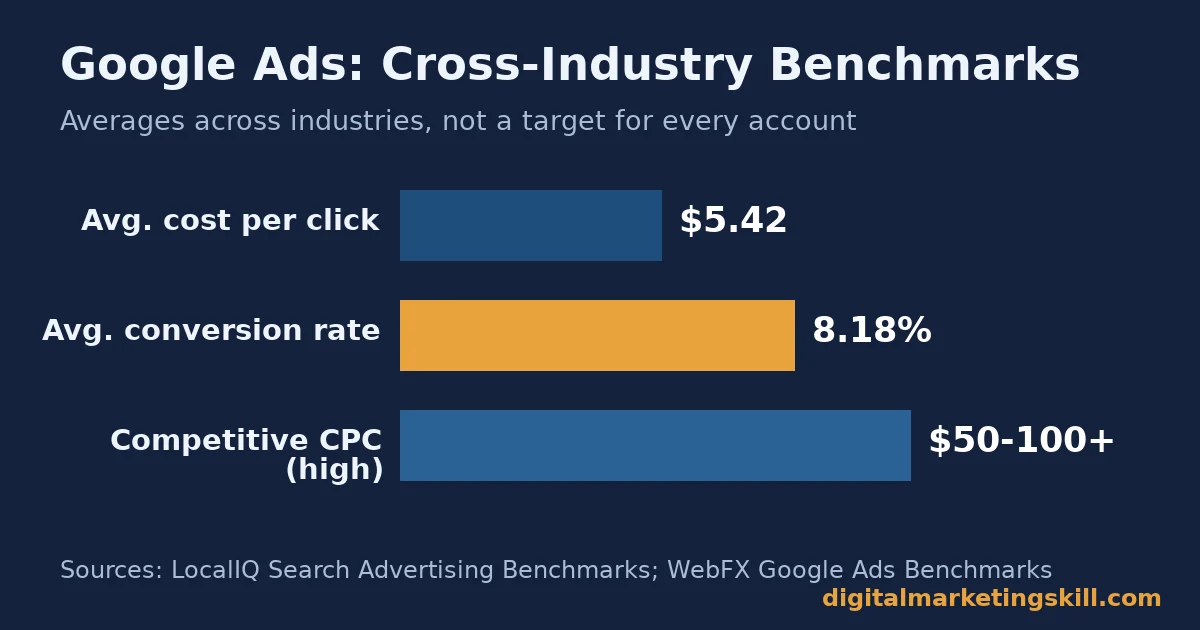
- Average cost per click sits around $5.42 across industries, and average cost per lead around $66.69. Competitive verticals can run $50 to $100 or more per click (LocalIQ Search Advertising Benchmarks; WebFX Google Ads Benchmarks).
- A manager account lets one login control every client account, each with its own access level, instead of one shared password across accounts. This single setup choice prevents some of the costliest Google Ads mistakes (Google Ads Help).
- Google Ads needs roughly 50 conversion events or three conversion cycles to finish learning after a big change. Judging results early is one of the most common Google Ads mistakes (Google Ads Help).
In this guide
- Why the Same Google Ads Mistakes Keep Costing Money
- How Google Ads Mistakes Compound
- The Google Ads Mistakes That Waste the Most Budget
- Account Ownership: The Mistake That Locks You Out
- Audience Targeting: The Mistake That Burns Spend Fast
- Generic Ad Copy: The Mistake That Looks Fine Until You Compare It
- Quality Score Confusion: The Mistake That Wastes Effort, Not Money
- Reading Results Too Early: The Mistake That Kills Good Campaigns
- Conversion Tracking Gaps: The Mistake You Cannot See
- Landing Page Mismatch: The Mistake That Undoes a Good Ad
- Bid Strategy Mismatch: The Mistake That Fights Your Own Goal
- How to Fix Each Mistake
- Account Ownership: Put the Client in Control
- Audience Targeting: Segment by Intent, Not by Visit
- Ad Copy: Write for One Specific Buyer
- Quality Score: Fix the Three Inputs, Not the Number
- Results Timing: Wait Out the Learning Period
- Conversion Tracking: Audit the Tags Before You Trust the Data
- Landing Page: Match the Page to the Promise
- Bid Strategy: Match It to Your Actual Goal
- How to Measure Google Ads Performance
- The One Decision Rule
- What Doing This Right Looks Like
- Frequently Asked Questions About Google Ads Mistakes
- Start With Your Account Structure
Why the Same Google Ads Mistakes Keep Costing Money
Most Google Ads advice focuses on copywriting and bidding. Those matter less than the account-level Google Ads mistakes that waste budget before a campaign even launches. This guide ranks the mistakes by cost, not by how interesting they are to write about.
The ground rules are simple. Every benchmark below names its source and sample. Cross-account benchmarks vary by industry. Treat them as a directional snapshot, not your own target. Nothing here is permanent. Google changes auction mechanics often, so check your own account before acting on any of it.
How Google Ads Mistakes Compound
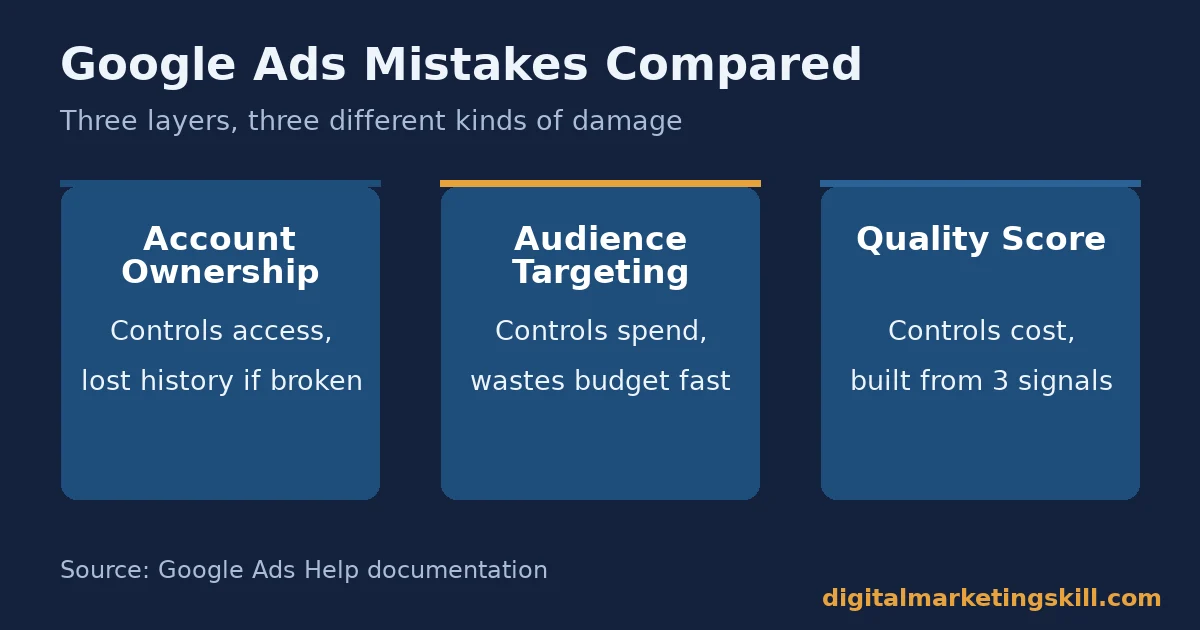
A Google Ads account has three layers. Structure covers accounts, campaigns and ad groups. Inputs cover keywords, audiences, ads and bids. Signals cover Quality Score and conversion tracking. A mistake at the structure layer breaks everything built on top of it. An account with no manager-account setup cannot easily share conversion data or compare campaigns.
Mistakes at the input layer waste spend directly. A remarketing audience that is too broad shows ads to people who were never close to buying. Mistakes at the signal layer are the hardest to catch. They look like normal performance until you dig into Quality Score or conversion data and find the signal was broken the whole time.
Fixing structure first is not optional. A broken structure keeps producing the same Google Ads mistakes at the input and signal layers, no matter how good the ad copy gets.
The Google Ads Mistakes That Waste the Most Budget
Here is what each mistake actually costs, and why it differs from the others.
Account Ownership: The Mistake That Locks You Out
Agencies sometimes open a new Google Ads account using the agency’s own email address. If the client and agency part ways, the client can lose access to the account and its entire performance history. This is one of the most damaging Google Ads mistakes, because it is invisible until the relationship ends.
Google’s manager account system exists to prevent exactly this. A manager account “lets you view and manage multiple Google Ads accounts… from a single location.” Each client account stays under its own owner. The manager gets a differentiated access level instead of the client’s actual login (Google Ads Help, manager accounts).
Audience Targeting: The Mistake That Burns Spend Fast
An overly broad remarketing audience shows ads to anyone who ever visited the site. That includes people who bounced in two seconds. This audience converts at a far lower rate than one built around real buying intent. A visitor who viewed a pricing page or added an item to cart shows real intent; a visitor who left instantly does not. Treating every past visitor the same is one of the easiest Google Ads mistakes to fix, and one of the most common.
Generic Ad Copy: The Mistake That Looks Fine Until You Compare It
A generic ad that could run for any competitor in the category rarely wins the click. It also tends to drag down expected click-through rate, one of the three inputs behind Quality Score (Google Ads Help, Quality Score). The fix is specificity, not more creativity. Name the exact product, price point or benefit the ad group is built around.
Quality Score Confusion: The Mistake That Wastes Effort, Not Money
Some advertisers treat Quality Score as something to optimize directly. They chase the number itself, as if it were a lever on its own. But Google is explicit that Quality Score is a diagnostic tool, not a direct auction input. It comes from three things: expected click-through rate, ad relevance and landing page experience (Google Ads Help, Quality Score). Chasing the score wastes time. Fixing the three inputs behind it is what actually moves performance, and skipping this step is one of the quieter Google Ads mistakes.
Reading Results Too Early: The Mistake That Kills Good Campaigns
A new campaign, or a campaign with a major change, enters a learning period. Google Ads needs roughly 50 conversion events or three conversion cycles before it finishes learning. A new strategy, a setting change or a composition change can all trigger it (Google Ads Help, learning period). Pausing or rewriting a campaign inside that window throws away progress the algorithm was already making.
Conversion Tracking Gaps: The Mistake You Cannot See
Duplicate conversion tags, a tag that fires on every page load, or a missing tag on the thank-you page all distort the numbers an account is optimized against. None of these Google Ads mistakes show up as an error message. They show up as a campaign that looks worse, or better, than it actually is, which leads to the wrong decision every time.
Landing Page Mismatch: The Mistake That Undoes a Good Ad
An ad that promises a specific product or offer, landing on a generic homepage, loses the visitor it just paid to earn. This mismatch also damages landing page experience, one of the three Quality Score inputs. Among the Google Ads mistakes on this list, this is the one most likely to be caused by a different team entirely, since marketing buys the click and a separate team owns the page.
Bid Strategy Mismatch: The Mistake That Fights Your Own Goal
Choosing a bid strategy built for clicks when the actual goal is leads, or one built for conversions when the account has too little conversion data to learn from, works against the campaign from day one. Because the bid strategy decides what the auction algorithm optimizes for, a mismatch here is one of the quietest Google Ads mistakes, undercutting every other fix on this list without ever throwing an error.
How to Fix Each Mistake
Each fix below matches the mistake above, in the same order.
Account Ownership: Put the Client in Control
Use the client’s own Google Ads account, or have them create one. Then connect your agency through a manager-account link request. The client owner must approve that request before you gain access. This keeps ownership and history with the client no matter what happens to the agency relationship.
Audience Targeting: Segment by Intent, Not by Visit
Build separate remarketing lists for different intent levels. One list covers everyone who visited. A second covers people who viewed a key page. A third covers people who started checkout. Exclude people who already converted. Bid and message each segment differently, since a cart abandoner needs a different nudge than a first-time visitor.
Ad Copy: Write for One Specific Buyer
Structure ad groups by tight theme, not broad category. Write ad copy that names the exact product, price or outcome that theme covers. Test several headline and description combinations against each other. Let performance pick the winner instead of guessing.
Quality Score: Fix the Three Inputs, Not the Number
Improve expected click-through rate with tighter ad groups and more specific copy. Match ad text to the exact keyword theme to improve ad relevance. Then fix landing page experience with a page that matches the ad’s promise and loads fast. Once all three inputs improve, the score moves on its own.
Results Timing: Wait Out the Learning Period
Before judging a new campaign or a major change, count conversion events against the roughly 50-event, three-cycle threshold Google names for finishing learning. Avoid stacking multiple changes inside that window. Each new change can reset the clock on learning.
Conversion Tracking: Audit the Tags Before You Trust the Data
Check every conversion action for duplicate firing, incorrect placement, and whether it only fires on a genuine conversion event. Run this audit before changing budgets or bids based on a sudden performance shift. A tracking fix often explains a swing that looked like a real performance change.
Landing Page: Match the Page to the Promise
Send each ad to a page that matches its specific promise, not a general homepage. Keep the headline, the offer and the image consistent between the ad and the page. A visitor who lands on exactly what the ad promised converts at a far higher rate than one who has to search for it.
Bid Strategy: Match It to Your Actual Goal
Pick the bid strategy that matches what you actually want the account to do. Do not pick the one with the most impressive name. A lead-generation account needs a strategy built around conversions or conversion value. A brand-awareness campaign can run well on a clicks or impressions-based strategy instead. Note that a strategy built for conversions still needs enough conversion data to learn from, so pair this fix with the learning-period fix above. Switching strategies every week only resets the clock again.
How to Measure Google Ads Performance
Four numbers tell you whether a Google Ads account is healthy. Compare each one against your own account’s history first. Only then compare it against cross-industry benchmarks.
- Cost per click (CPC): what you pay per click, on average. The cross-industry average sits around $5.42, but competitive verticals such as legal or insurance can run $50 to $100 or more (LocalIQ Search Advertising Benchmarks; WebFX Google Ads Benchmarks). Compare your own trend over time rather than chasing the cross-industry number.
- Conversion rate: the share of clicks that complete your defined conversion action. The cross-industry average is around 8.18% (LocalIQ), though this varies heavily by industry and offer.
- Cost per lead (CPL): total spend divided by leads generated. The cross-industry average is around $66.69 (LocalIQ). Read it alongside your actual close rate, since a cheap lead that never closes is not cheap at all.
- Quality Score: the 1-10 diagnostic covered above. Track it per keyword to spot which ad groups need tighter copy or a better landing page, not as a single account-wide number.
Read these alongside your actual revenue or signed-customer data. A campaign can hit every benchmark above and still lose money if the product margin does not support the cost per lead.
The One Decision Rule
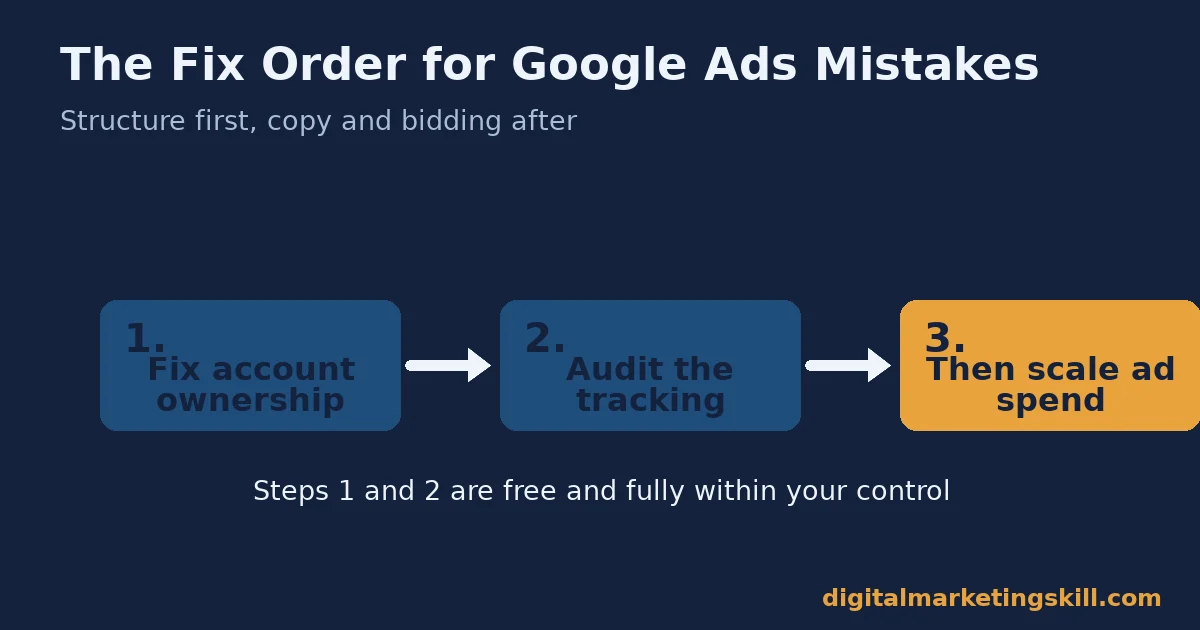
If you can fix only one thing this week, fix account ownership and structure before you touch ad copy. A manager-account link request is free. It takes minutes. It protects everything you build afterward. A clever headline on top of a broken account structure still loses the client’s history the day the agency relationship ends.
Here is an illustrative, invented example. An agency manages a client’s account through a shared login for two years. Then the relationship ends, and the agency keeps the login. So the client starts over with zero history and zero Quality Score data. A manager-account link, set up on day one, would have let the client revoke access in minutes and kept everything intact. Of all the Google Ads mistakes in this guide, this is the one with no partial fix after the fact.
What Doing This Right Looks Like
Spending data from the CMO Survey shows digital marketing spend growing faster than overall marketing budgets. That means more businesses are entering paid search with less first-hand experience managing it. It also means the account-structure Google Ads mistakes above are becoming more common, not less, as newer advertisers skip straight to ad copy and bidding without fixing ownership, tracking or audience segmentation first. Our guide to marketing channel mix covers how to decide how much budget paid search should get in the first place, before these mistakes start compounding.
The limit worth stating plainly: the benchmark figures above are cross-industry averages from vendor data (LocalIQ, WebFX), not controlled studies, and neither discloses its exact account count. Treat them as a sense check, not a target. Weigh your own account’s trend more heavily. For the wider pattern of why different channels fail in different ways, see our guide to online marketing mistakes, and for how paid traffic fits alongside other sources, see our guide to website traffic.
Frequently Asked Questions About Google Ads Mistakes
What is the most common Google Ads mistake?
Account ownership and structure mistakes cause the most lasting damage, because they affect everything built on top of them. A shared login or a missing manager-account link can cost a client their entire performance history.
Should I worry about my Quality Score directly?
No. Google treats Quality Score as a diagnostic, not something to chase directly. Fix the three inputs behind it instead: expected click-through rate, ad relevance and landing page experience.
How long should I wait before judging a new Google Ads campaign?
Wait until the campaign clears its learning period, roughly 50 conversion events or three conversion cycles. Judging results earlier often mistakes normal learning-phase volatility for a failing campaign.
Why did my remarketing audience perform so poorly?
A remarketing list built from every site visitor includes people who bounced immediately and never showed buying intent. Segment lists by actual intent, such as pricing-page visitors or cart abandoners, for a far stronger return.
What counts as a good cost per click for Google Ads?
There is no single good number; it depends on your industry and margin. The cross-industry average sits around $5.42, but compare your own account’s trend over time rather than chasing that figure directly.
Should an agency use its own login to manage a client’s Google Ads account?
No. Connect through a manager-account link request to the client’s own account instead. That keeps ownership and performance history with the client regardless of what happens to the agency relationship.
Does a higher budget fix a Google Ads account with low conversions?
No. More budget spent on a broken structure, generic ad copy or a mismatched landing page just wastes more money faster. Fix the account-level mistakes first, then scale budget once conversions are efficient.
How often should I review my account for these Google Ads mistakes?
Check account access and structure quarterly. Check Quality Score inputs, conversion tracking and audience segmentation whenever conversion rate or cost per lead shifts noticeably. These mistakes tend to creep back in as accounts grow.
Can a mismatched bid strategy undo good ad copy?
Yes. A bid strategy built for the wrong goal tells the auction algorithm to optimize for the wrong outcome, so even strong, specific ad copy ends up competing in auctions aimed at the wrong result.
Who is responsible for fixing landing page mismatch?
Usually two teams share it: whoever writes the ad and whoever owns the page it sends traffic to. Because the Quality Score penalty hits the Google Ads account, the ads team has the clearest incentive to flag the mismatch first.
Start With Your Account Structure
Before you rewrite a single ad, check your account ownership, your conversion tracking and your audience segmentation. Those fixes typically save more budget than a better headline ever will. Then move to ad copy and bidding once the foundation is solid.
Want structured, hands-on practice managing real Google Ads accounts? The Digital Marketing Skill Institute’s Master Diploma in Digital & AI Marketing includes an AI-Powered Google Specialist track. It is one of four AI-powered tracks, with a Full Stack option covering all four. It is built around unlimited 1-on-1 coaching and mentoring, a U.S. Project Internship with a verified U.S. Work Reference Letter, and dual US and UK accreditation recognized in more than 100 countries. The program is fully online, so you can study and manage real campaigns from anywhere in your country.
See the Master Diploma program page for the full track breakdown. Browse the Digital Marketing Skill Institute blog for more practical guides, or read student reviews. Go to digitalmarketingskill.com to explore the full program. Wherever you live, you can apply here to get started, and you can always come back to digitalmarketingskill.com for more guides like this one.
Every figure in this guide was checked against its original source before publication. Figures marked as illustrative are invented examples, not real results.
![9 Amazing Digital Marketing Skills to Make Money Online [With Proof]](https://digitalmarketingskill.com/wp-content/uploads/2019/07/9-Amazing-Digital-Marketing-Skills-to-Make-Money-Online-With-Proof-17.png)






