
Cost per click (CPC) is the amount an advertiser pays each time someone clicks one of their ads. In auction-based platforms such as Google Ads, you set the most you are willing to pay, and the auction decides what you are actually charged. It matters because CPC shapes how much traffic your budget can buy, and therefore whether a campaign can make a profit.
Key Takeaways
- CPC is the price of one click. It is the core cost in pay-per-click advertising.
- There are three versions: maximum CPC (your limit), actual CPC (what one click cost) and average CPC (the mean across all clicks).
- On Google Ads, you usually pay less than your maximum, because you pay only enough to beat the ad below you.
- Ad quality and relevance can lower your CPC, so price is not set by bids alone.
- A low CPC is not the goal by itself. What matters is the cost of each sale or lead.
What Is Cost per Click?
Imagine you run an ad for a cycling shop. Every time someone clicks the ad and lands on your site, you pay a small fee. That fee is the cost per click. If people see the ad but do not click, you usually pay nothing.
Google describes the model simply: “Cost-per-click (CPC) bidding means that you pay for each click on your ads.” It also notes that CPC pricing “is sometimes known as pay-per-click (PPC).” So the two terms are closely linked. PPC is the advertising model, and CPC is the price you pay within it.
CPC varies widely. It depends on how many advertisers want the same searches, how good your ads are, and where your ad appears on the page.
How Cost per Click Works
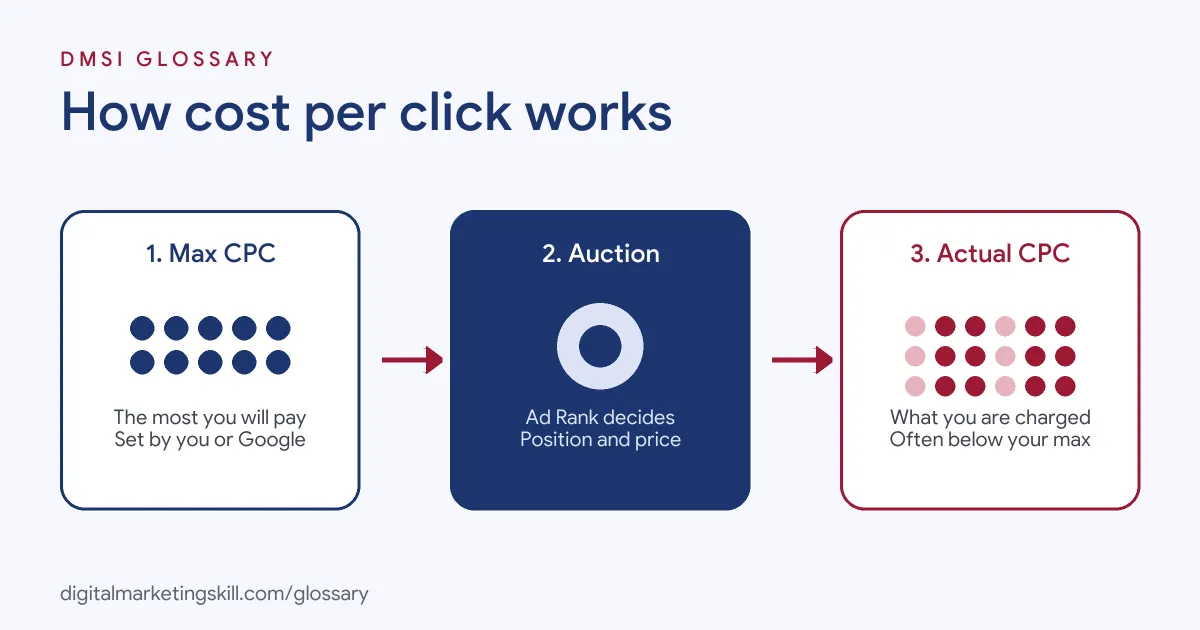
Every click price comes out of an auction. First, you set a maximum. Next, the auction ranks the ads. Finally, the platform charges you the actual price, which is often lower than your maximum.
Maximum CPC
Your maximum CPC is “the highest amount that you’re willing to pay for a click on your ad.” You can set it yourself with manual bidding. Alternatively, you can use automated bidding and let Google set bids for you. Google notes that a click “won’t cost you more than the maximum CPC bid amount that you set”, though bid adjustments and some automated strategies are exceptions.
The Auction and Ad Rank
For each search, Google calculates Ad Rank for every eligible ad. It considers your bid, the quality of your ad and landing page, Ad Rank thresholds, competition, the context of the search and the expected impact of your assets. As a result, a highly relevant ad can win a higher position for a lower price.
Actual CPC
Your actual CPC is “the final amount you’re charged for a click.” Google says you “only pay what’s minimally required” to clear the Ad Rank thresholds and beat the advertiser just below you. If there is no competitor below you, you pay a reserve price. In addition, Google notes that thresholds are usually higher for ads above the search results, so those positions often cost more per click.
Cost per Click Examples
Here are three ways CPC shows up in real campaigns:
- Working out average CPC: Google’s own example uses two clicks. One costs $0.20 and the other $0.40, for $0.60 in total. Divide $0.60 by 2 clicks, and the average CPC is $0.30.
- Improving quality: A florist rewrites its ads to match each search more closely and speeds up its landing page. Because Ad Rank rewards relevance, it can keep its position while paying less per click.
- Choosing keywords: A software firm finds that “project management software” is expensive. So it also bids on narrower phrases, such as “project tool for small agencies”, which attract fewer rivals.
In each case, CPC is a lever you can influence, not just a fixed price.
Maximum, Actual and Average CPC Compared
These terms appear side by side in Google Ads, so it helps to know the difference:
| Term | What it means | Where you see it |
|---|---|---|
| Maximum CPC | The most you are willing to pay for one click | Bid settings for a keyword or ad group |
| Actual CPC | The final amount charged for one click | Built into your cost reports |
| Average CPC | Total cost of clicks divided by the number of clicks | The “Avg. CPC” column in your campaigns |
| Top of page bid | Keyword Planner’s low range is about the 20th percentile of past bids; the high range is about the 80th percentile | Keyword Planner, based on the last 30 days |
So when you plan a budget, start with Keyword Planner’s bid ranges. Then, once the campaign runs, watch your average CPC.
Next, link CPC to results. Cost per conversion equals your CPC divided by your conversion rate. For example, if your average CPC is $0.30 and one in twenty clicks converts, each conversion costs $6. That figure, not the click price, tells you whether the campaign pays.
How to Lower Cost per Click the Right Way
Use these steps to bring your CPC down without losing good traffic:
- Check your Quality Score. Google rates expected click-through rate, ad relevance and landing page experience. Find keywords marked “below average”.
- Tighten your ad groups. Group closely related keywords, so each ad can match the search exactly.
- Rewrite weak ads. Use the searcher’s words and a clear reason to click.
- Improve the landing page. Make it fast, relevant and easy to act on.
- Add negative keywords. Stop paying for searches that never convert.
- Test longer keywords. More specific phrases often have fewer competitors.
- Review bids against results. Lower bids on keywords that cost a lot but rarely convert.
Best Practices for Cost per Click
- Judge CPC against value. A higher CPC can be fine if those clicks turn into sales.
- Track conversions. Without conversion data, you cannot tell a cheap click from a useful one.
- Use Quality Score as a guide. Google calls it “a diagnostic tool”, not an input in the auction, so treat it as a hint about where to improve.
- Compare like with like. CPC differs by keyword, device and location, so analyse them separately.
- Watch the trend. A sudden rise can mean a new competitor or a drop in ad quality.
Common Mistakes to Avoid
Beginners often make the same errors with CPC. First, they chase the lowest CPC and end up with cheap clicks that never buy. Second, they set one bid for every keyword. Third, they raise bids to fix poor results instead of improving the ad or page. Finally, they confuse maximum CPC with what they actually pay, and so misread their budget.
Where You’ll Use Cost per Click at Work
Job listings rarely spell out “CPC”. However, they describe the bidding and quality work that controls it. For example, recent remote listings ask candidates to:
- “Optimize bids, quality score, and other important account metrics” (Senior PPC Specialist).
- “Ensure campaign structure, targeting, bidding, budgets, and messaging align with best practices” (Senior Paid Search Strategist).
- “Get the most out of value-based bidding by feeding it the right signals” (Paid Ads Specialist, Google and Meta).
So if you want to work as a Google Ads Specialist, PPC Specialist or Web Analytics Specialist, you will report on CPC every week and explain why it moved.
Learn It in the Google Specialist Track
You can learn to manage cost per click in the AI-Powered Google Specialist track. It covers Google Ads across Search, Display, Discovery, Gmail and YouTube, plus Google Analytics. For your portfolio, you launch and measure a Google Ads campaign with conversion tracking. You also join a U.S. Project Internship from day one, with unlimited 1-on-1 mentoring.
For more on the levers that change your costs, read our guide to Google Ads optimisation.
Frequently Asked Questions
How is cost per click calculated?
Average CPC is your total cost of clicks divided by the number of clicks. For example, $0.60 spent on 2 clicks gives an average CPC of $0.30.
What is the difference between CPC and PPC?
PPC is the advertising model where you pay for clicks. CPC is the price of each click within that model.
Can I pay more than my maximum CPC?
Usually not. However, Google notes that bid adjustments and some automated bidding tools can push the actual CPC above your set maximum.
Why are some clicks more expensive than others?
Prices depend on competition, ad quality and position. For instance, ads above the search results usually face higher thresholds, so they often cost more.
Is a low CPC always good?
No. A low CPC only helps if the clicks turn into leads or sales. Always compare CPC with your cost per conversion.
Sources: Google Ads Help: Cost-per-click bidding; Google Ads Help: Actual cost-per-click; Google Ads Help: Average cost-per-click; Google Ads Help: Ad Rank; Google Ads Help: Keyword Planner metrics; Google Ads Help: About Quality Score; remote job listings on Himalayas.